Vovsoft Open Multiple Files: Open Your Whole Work Setup in One Click
Open Multiple Files is a $19 Windows program from Vovsoft that opens a saved list of files, folders, programs and web addresses all at once, in the order you set, with one button or automatically when Windows starts. The $19 is a one-time lifetime license, and there's a free trial.
It's for anyone who starts every day, or every project, by opening the same spreadsheet, two folders, a chat app and five browser tabs, one by one.
Quick facts
- Version: 3.3, released March 6, 2026
- Developer: Vovsoft
- Platform: Windows 11, 10, 8/8.1, 7 and Vista, 32-bit and 64-bit. No Mac version
- Opens: files, folders, executables and URLs, with default programs or one program you choose
- Automation: remember list, auto open list, run at Windows startup, auto close, wait between items
- Lists: save and load list files, export as a batch file (licensed)
- Editions: installer (3.43 MB) and portable (2.07 MB), one license for both
- Price: $19, one-time payment, lifetime license with free updates
- Trial: opens lists, but no batch file export or auto close, with a nag screen and for non-commercial use only
- What we checked: installer file version 3.3.0.0 (3,598,040 bytes) with a valid code signature, downloaded from the vendor on November 11, 2026, and $19.00 on the order page with no auto-renewal on November 11, 2026. We didn't set up a startup list ourselves
Download Free TrialBuy Now
Overview
Open Multiple Files is one small window: a list of files, folders and URLs, arrow buttons to reorder it, Add and Remove, buttons to load and save the list, a Wait box in milliseconds, a choice between Open with System Defaults and Open with a program you pick, and the big Open Multiple Files button. Click it and everything opens, top to bottom.
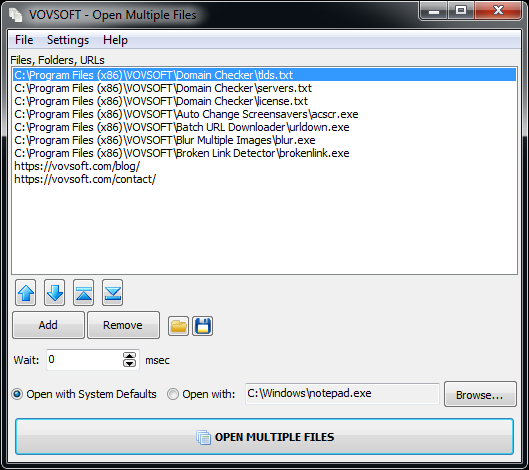
A list mixing text files, three programs and two web addresses, with the Wait setting and the open-with choice below (an older version's window; current versions add a checkbox to each item).
Features
Files, folders, programs and URLs in one list
Open Multiple Files takes anything Windows can open: documents, folders (they open in Explorer), executables and web links (they open in your browser). Add items with the buttons or menu, or drag them from Explorer. Checkboxes, added in version 3.0, let you skip an item without deleting it, and Check All and Uncheck All sit on the right-click menu.
Open everything at Windows startup
Open Multiple Files can run your list as soon as you log in: in the Settings menu, turn on Remember List, Auto Open List and Auto Run at Startup. Add Auto Close Application (licensed) and the program closes itself once the list has opened. The Wait setting puts a pause between items, so a slow program can finish loading before the next one starts.
Several lists for several setups
Open Multiple Files saves lists as files (OMFL lists keep each item's checked state and can include settings), so you can keep one for work, one for a project and one for the weekend, and load whichever you need. A licensed copy also exports a list as a batch file (.bat or .cmd) that runs without the program.
Open a selection from Explorer
Open Multiple Files' installer can add a shortcut to Windows' Send To menu, so you can select files and folders in Explorer, right-click and send them all to the program to open them in one go. The Open with option opens every item in one chosen program, such as all the selected text files in Notepad.
Benefits
It saves the first five minutes of every work session and the small mental load of remembering what to open. A one-click setup also helps people who switch between machines or projects: one user keeps a separate list for each of two computers. And because it's a plain list, it's easier to change than a batch script or the Windows Startup folder.
Real-World Uses
- Opening a daily set of web dashboards and two office programs at login.
- Starting a writing session: the manuscript, the notes file, the research folder and a dictionary site.
- Opening every file of a project for review in one go, in a set order.
- A support technician launching a fixed set of tools on each PC they visit, from the portable edition.
- Opening a batch of selected text files all in Notepad from the Send To menu.
Who It's For, and Who Should Skip It
Open Multiple Files suits Windows users who open the same files, programs and sites every day and want that done for them, without writing scripts.
Skip it if you only want a few programs at startup: Windows' own Startup folder and startup apps settings do that free. If you're happy writing a batch file, you can build the same thing yourself. Browsers can also reopen your last tabs on their own, so for web pages alone it adds little.
Usage Guide
- Download the installer or the portable edition and start Open Multiple Files.
- Click Add or drag files, folders and program shortcuts into the list. Add web addresses to the list as well.
- Put them in order with the arrow buttons, and untick anything you want to skip.
- Set a Wait in milliseconds if programs need time to start.
- Click Open Multiple Files.
- Save the list, or turn on Remember List, Auto Open List and Auto Run at Startup in the Settings menu.
Before you buy
The trial opens lists but can't export batch files or close itself automatically, shows a nag screen and is for personal use; work use needs the license. One license covers one person on any number of their own computers. Vovsoft's general policy is no refunds, since the trial comes first (it may refund an accidental order at its discretion, and PayPro Global has the final say on its orders).
Where it falls short
- It opens things; it doesn't arrange windows on screen or restore them to set positions.
- "Open with" applies one program to the whole list, not a different one per item.
- Development is slow: since July 2023 the only release has been a high-DPI fix in March 2026.
- The vendor's screenshots show older versions, and the interface is English only.
What Users Say
On Vovsoft's site
Open Multiple Files' product page shows 4.4 out of 5 from 8 ratings, with these comments:
"Absolutely useful! Simple, intuitive and useful. In my personal case, every day I have pages and programs that I have to open on two different machines, being able to save configurations for each machine leaves me with the notebook ready for my work day." Mario Aguilar
"I have Open Multiple Files set up to open about 6 urls and a couple of office programs, works great! One click to open the UI and another to open the files. I like how each one is highlighted as it goes down the list, then auto closes the UI in 10 seconds." Anonymous User
"Awesome, that's exactly what I want." vax_rap
"I like it! Very useful tool..." Jmj
"Very nice software" Mark
The comments are short but consistent: people use it for the daily set of sites and programs, and like that one click does it. Nobody reports a problem; with eight ratings, it's a small but positive sample.
Comparisons
Open Multiple Files vs the Windows Startup folder
The Startup folder is free and runs shortcuts at login, but in no set order, with no pause between them, and only at login. Open Multiple Files runs in order, with waits, from several saved lists, whenever you click.
Open Multiple Files vs a batch file
A batch file costs nothing if you can write one. Open Multiple Files is the same idea with a list you can drag items into and reorder, and a licensed copy writes the batch file for you.
Editions and Pricing
| Option | Price | License | What you get |
|---|
| Trial | Free | Personal, non-commercial use | Opens lists, no batch export or auto close, nag screen |
| Open Multiple Files license | $19 one time | Lifetime, commercial use allowed | Batch file export, auto close, no nag screen, all future updates |
| Vovsoft Universal License | $99 one time | Lifetime | All 115+ Vovsoft programs |
The license key arrives by email right after payment. Prices include tax.
FAQs
Can Open Multiple Files open several websites at once?
Yes. Open Multiple Files opens every URL in the list in your default browser, alongside any files, folders and programs.
Can I keep different lists for work and home?
Yes. Open Multiple Files saves and loads list files, so you can keep as many setups as you like and open the one you need.
Does Open Multiple Files need to stay running?
No. Open Multiple Files only launches the items. With a license, Auto Close Application closes it once the list has opened.
Can it open programs with command-line arguments?
Open Multiple Files opens each item as Windows would on a double-click. For a program with arguments, point the list at a shortcut that includes them.
Is the $19 a subscription?
No. Open Multiple Files' $19 is a one-time payment for a lifetime license with future updates. Nothing renews.
Can I use one license on my desktop and laptop?
Yes. Vovsoft's license lets one person use Open Multiple Files on any number of their own computers, installed or portable.
System Requirements
- Windows 11, 10, 8/8.1, 7 or Vista, 32-bit or 64-bit
- About 3.4 MB for the installer, or 2.1 MB for the portable edition
- English interface
Conclusion
Open Multiple Files is worth $19 if you open the same mix of files, programs and sites every day, or juggle several setups, and want it to happen in one click or at login. The reason to buy it is a simple, ordered, saveable list that beats the Startup folder. The reason not to: it does one small job, Windows and a batch file can cover the basics free, and it gets few updates. Build your daily list in the trial and see whether you'd miss it.
Download Free TrialBuy Now