Vovsoft CSV Splitter: Break a Huge CSV or Excel File into Smaller Files, Offline
CSV Splitter is a $19 Windows program from Vovsoft that splits a large CSV file, or an XLS or XLSX spreadsheet, into several smaller files with the number of rows you choose, copying the header row into each one. It handles files of millions of rows and over 1 GB, works entirely offline, and the $19 is a one-time lifetime license. There's a free trial for personal use.
It solves a familiar wall: Excel stops at 1,048,576 rows, upload forms and import tools choke on big files, and online splitters want you to upload your data first.
Quick facts
- Version: 2.0, released June 11, 2024
- Developer: Vovsoft
- Platform: Windows 11, 10, 8/8.1, 7, Vista and XP, 32-bit and 64-bit. No Mac version
- Input: CSV, plus XLS and XLSX since version 2.0
- Splits by: number of rows per file, with an optional header row in each
- Encoding: auto-detect, ANSI, UTF-8 or UTF-16 (Unicode)
- Editions: installer (3.36 MB) and portable (2.06 MB), one license for both
- Price: $19, one-time payment, lifetime license with free updates
- Trial: free and fully working for personal use, with a nag screen. Commercial use needs a license
- What we checked: installer file version 2.0.0.0 (3,527,192 bytes) with a valid code signature, downloaded from the vendor on November 11, 2026, and $19.00 on the order page with no auto-renewal on November 11, 2026
Download Free TrialBuy Now
Overview
CSV Splitter is one small window. Pick the CSV file, pick an output folder, set the number of rows per package, and click Split CSV Into Multiple Files. Before you split, it counts the input rows and tells you how many files you'll get, so you can adjust the row count until it fits the limit you're working to.
Nothing leaves your PC. That matters when the file is a customer list, an export of orders or anything else you wouldn't paste into a web form.
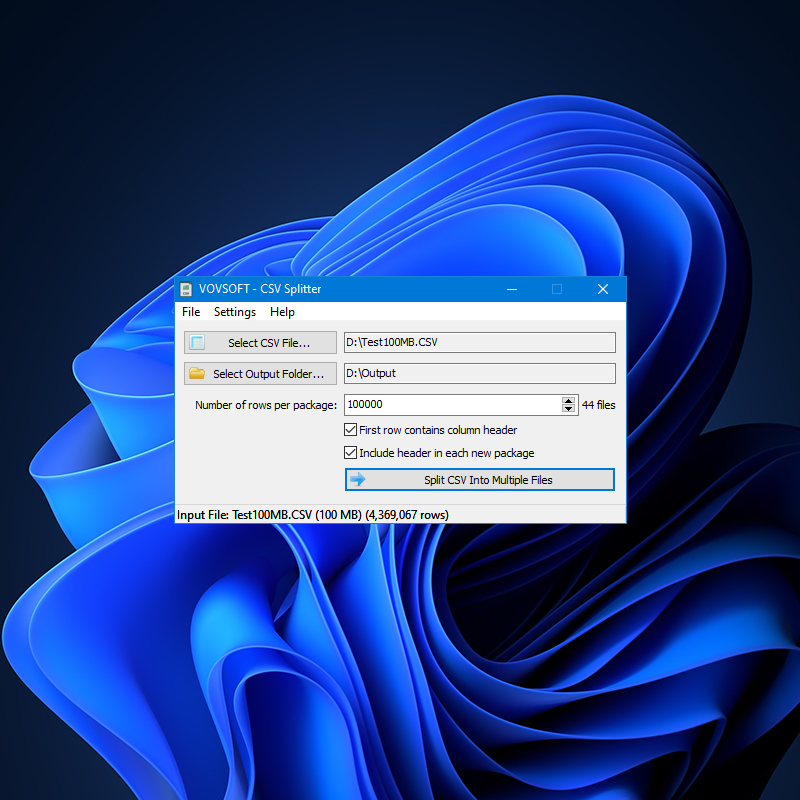
A 100 MB CSV with 4,369,067 rows, split into packages of 100,000 rows: the counter shows 44 files, with the header copied into each.
Features
Splits by row count, header included
CSV Splitter cuts a file into pieces of the number of rows you set. Tick First row contains column header and Include header in each new package, and every piece starts with the same column names, so each one imports cleanly on its own.
Built for very large files
CSV Splitter handles files of millions of rows and over 1 GB, and version 1.5 added support for creating huge output files with lower memory use. On files over 100 MB it turns off the row count automatically, to avoid loading the whole file.
Excel files too
CSV Splitter 2.0 accepts XLS and XLSX files as input, so an oversized workbook can be broken into smaller files without opening it in Excel first. An Output File Extension setting chooses what the pieces are saved as.
Encoding and naming control
CSV Splitter auto-detects the input encoding or lets you choose ANSI, UTF-8 or UTF-16, and sets the output encoding separately. Keep Original Filename names the pieces after the source file, and existing files are never overwritten.
Command line and Send To
CSV Splitter can split a file from the command line, for scripts and scheduled jobs, and the installer adds a Send To shortcut so you can right-click a CSV in Explorer and split it.
Real-World Uses
- Splitting a 22-million-row export into files of under a million rows each so Excel can open every one.
- Breaking a 40,000-record customer list into 5,000-line files that a CRM or web server accepts.
- Feeding a database import that times out on one huge file, a piece at a time.
- Sharing part of a large data set by email without sending the whole thing.
- A nightly script that splits a fresh export with the command line options.
Who It's For, and Who Should Skip It
CSV Splitter suits anyone who handles exported data: analysts, marketers with big mailing lists, developers and admins moving data between systems, and anyone whose files are too big for Excel.
Skip it if you need to split by the value in a column (one file per country, say) or by file size: it splits by row count only. If you already use Python, PowerShell or the command-line split tool, you can do the same for free. And on a Mac you'll need something else.
Usage Guide
- Download the installer or the portable edition and start CSV Splitter.
- Click Select CSV File, or drag the file onto the window. XLS and XLSX work too.
- Click Select Output Folder. CSV Splitter creates it if it doesn't exist.
- Set the number of rows per package and watch the file count next to it.
- Tick the header options if your file has column names, then click Split CSV Into Multiple Files.
Before you buy
The trial does the full job for personal, non-commercial use, with a reminder screen, so you can test it on your own file before paying. Use at work needs a license. One license covers one person on any number of their own computers. Vovsoft's general policy is no refunds once the key is delivered, since a free trial comes first (accidental orders are generally refunded, at its discretion, and PayPro Global has the final say on its orders).
Where it falls short
- Splits by row count only, not by column value or file size.
- The window can freeze while a big file is being split, an open user request.
- A single line over 1 GB still causes an out-of-memory error, another open request.
- No merging. Joining files back together is a separate job (Vovsoft sells Spreadsheet Combiner for that).
What Users Say
On Vovsoft's site and Trustpilot
CSV Splitter's page on Vovsoft's site shows 4.7 out of 5 from 12 ratings, one of the higher counts among Vovsoft's tools. Two of its comments are also posted on Trustpilot.
"Bought and used this csv splitter. Needed something that would split a 22+ million row file into separate smaller files that excel would accept (approx. 1 million row limit in excel). This thing did it quickly and accurately, 23 separate files automatically. I love things that actually work and work well !!!!!" David, Trustpilot, 5 stars, April 2023
"Excellent. Great software at a great price. Appreciate the people who creates these utilities to help productivity." steven, Trustpilot, 5 stars, December 2023
"Many thanks for this program that works properly! I tried to upload a CSV file with more than 40000 records but the server froze. I solved the problem by splitting it into pieces of 5000 lines." Anonymous User, Vovsoft's site
The criticism
The complaints show up in the feature request list rather than in reviews: users have asked for the window not to freeze during a split, and for a fix to the out-of-memory error when a single line is over 1 GB. Earlier requests, like the out-of-memory error on output files over 400 MB and Excel input, have been fixed.
Vovsoft as a company has a TrustScore of 4.6 out of 5 from 411 reviews on Trustpilot, read through a summarizer, with users mostly describing its tools as simple and dependable.
Comparisons
CSV Splitter vs online CSV splitters
Online splitters are free but cap the upload size and need your data on someone else's server. CSV Splitter handles files over 1 GB and never sends the file anywhere.
CSV Splitter vs a script
A few lines of Python or PowerShell split a CSV for free, if you're comfortable writing them and handling headers and encodings. CSV Splitter is for people who'd rather click a button, and adds Excel input.
CSV Splitter vs Vovsoft Spreadsheet Combiner
They're opposites: Spreadsheet Combiner merges many CSV or Excel files into one, CSV Splitter breaks one into many.
Editions and Pricing
| Edition | Price | License | What you get |
|---|
| Trial | Free | Personal, non-commercial use | Full splitting, with a nag screen |
| Licensed | $19 one-time | Lifetime | Commercial use, no nag screen or ads, lifetime free updates |
The installer and portable editions use the same key, sent by email right after payment. Vovsoft's $99 Universal License covers all of its desktop programs.
FAQs
How big a file can CSV Splitter handle?
CSV Splitter is built for files of millions of rows and over 1 GB. The known limit is a single line over 1 GB, which causes an out-of-memory error.
Will CSV Splitter keep my column headers in each file?
Yes. CSV Splitter can copy the first row into every new file when you tick both header options.
Can CSV Splitter split an Excel XLSX file?
Yes, CSV Splitter 2.0 accepts XLS and XLSX files as input.
Can CSV Splitter split by column value or file size?
No. CSV Splitter splits by number of rows only. Use the row counter to aim for a size.
Does CSV Splitter work with non-English text?
Yes. CSV Splitter reads and writes ANSI, UTF-8 and UTF-16, and can detect the input encoding.
Can I use the CSV Splitter trial at work?
No. The free trial is for personal, non-commercial use, and work use needs the $19 license.
Is the CSV Splitter license a subscription?
No. The $19 license is a one-time payment that never expires and includes future updates.
System Requirements
- Windows 11, 10, 8/8.1, 7, Vista or XP, 32-bit or 64-bit
- About 4 MB for the program, plus disk space for the output files
Conclusion
CSV Splitter is worth $19 if you regularly run into files too big for Excel, an importer or an upload form and don't want to write a script. It's one window, it handles huge files, and nothing goes online. The reason not to buy: it only splits by row count, and the window can lock up during a big split, so if you need smarter rules a script or a data tool will serve you better.
Download Free TrialBuy Now