Vovsoft Merge Audio Files: Join MP3, FLAC, WAV and Other Tracks into One File
Merge Audio Files is a $19 Windows program from Vovsoft that joins several audio files into one continuous track, even when they're in different formats: MP3, WAV, M4A, WMA, FLAC, OGG, OPUS, AAC, AIFF, AC3, EAC3, MP2 and WV. You line the files up in the order you want, pick an output format and click Save As. The $19 is a one-time lifetime license, and there's a free trial.
It's for anyone holding an audiobook in 40 chapter files, a lecture recorded in parts, or a set of voice memos that should be one recording, who doesn't want to learn an audio editor to glue them together.
Quick facts
- Version: 1.4, released October 27, 2026 (first released June 24, 2026)
- Developer: Vovsoft
- Platform: Windows 11, 10, 8/8.1, 7 and Vista, 32-bit and 64-bit. No Mac version
- Input formats: MP3, WAV, M4A, WMA, FLAC, OGG, OPUS, AAC, AIFF, AC3, EAC3, MP2, WV
- Options: Re-encode and Re-sample for mixed formats, output format of your choice
- Editions: installer (16.69 MB) and portable (19.73 MB), one license for both
- Price: $19, one-time payment, lifetime license with free updates
- Trial: merges files, with a nag screen and for non-commercial use only
- What we checked: installer file version 1.4.0.0 (17,502,768 bytes) with a valid code signature, downloaded from the vendor on November 11, 2026, and $19.00 on the order page with no auto-renewal on November 11, 2026. We didn't run a merge ourselves
Download Free TrialBuy Now
Overview
Merge Audio Files is a single window. The toolbar has Add Files and Add Folder; the list shows each file with its size and duration; arrow buttons under the list move the selected file up, down, to the top or to the bottom; and on the right sit the Output Format menu, the Re-encode and Re-sample boxes and a big Save As button. That's the whole program, and it's enough for the job.
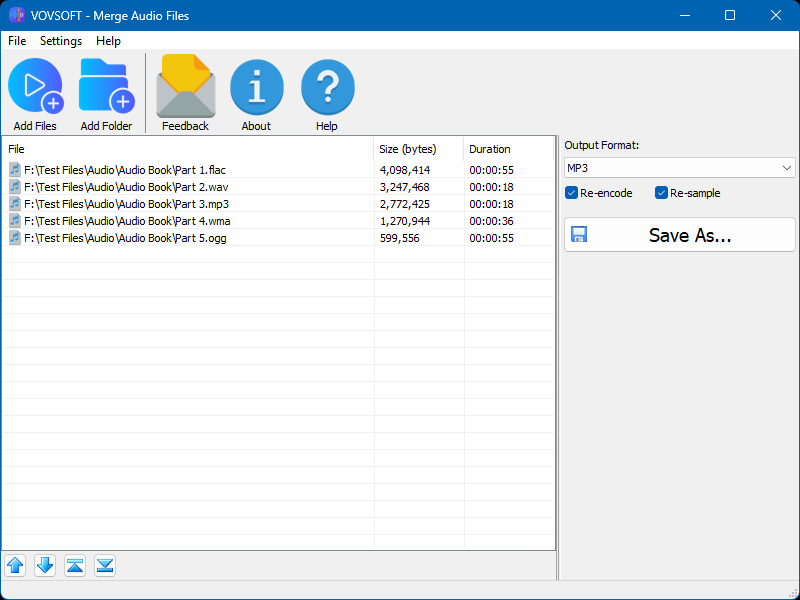
Five audiobook parts, each in a different format (FLAC, WAV, MP3, WMA, OGG), with durations listed, MP3 chosen as the output and Re-encode and Re-sample ticked.
Features
Mix formats in one merge
Merge Audio Files joins files of different formats into one, such as a FLAC, a WAV and an MP3, as long as you tick Re-encode, which converts everything to the output format. When all the files share the same format and settings, you can leave it off and the merge is quick. Re-sample, added in version 1.4, evens out files recorded at different sample rates.
Put the tracks in the right order
Merge Audio Files lets you drag files from Windows Explorer into the list, add a whole folder at once, and then fix the order by dragging rows or with the up, down, top and bottom buttons. The Duration column shows how long each part is, and a double-click opens the selected file so you can check which one it is. The same file can be added more than once, for a jingle between segments or a looped track.
Convert while you merge
Merge Audio Files writes the result in the output format you pick, so a merge can double as a conversion: WMA voice notes come out as one MP3 a phone will play, for example.
Benefits
One file is easier to live with than forty. A single audiobook track keeps its place in a car stereo or a basic player, a full lecture uploads in one go, and a set of recordings becomes something you can share without a zip file. Merge Audio Files gets you there in about a minute, without the timeline, tracks and export dialogs of a full audio editor.
Real-World Uses
- Joining an audiobook's chapter MP3s into one file for a player that doesn't remember your place across files.
- Combining a lecture or meeting recorded in several parts into a single recording.
- Stitching podcast segments recorded separately, with a repeated intro clip between them.
- Turning a folder of WMA or WAV voice notes into one MP3.
- Making one continuous music file for an event or a workout.
Who It's For, and Who Should Skip It
Merge Audio Files suits Windows users who need to join files now and then and want it done in a few clicks, especially with mixed formats.
Skip it if you need to edit the audio: cut out mistakes, add fades or crossfades, insert silence or even out loudness. Merge Audio Files joins tracks end to end and nothing more, so a free editor such as Audacity is the better tool there. If you're comfortable with the command line, the free FFmpeg can also concatenate files. Mac users need something else.
Usage Guide
- Download the installer or the portable edition and start Merge Audio Files.
- Click Add Files or Add Folder, or drag files into the list.
- Arrange the order by dragging rows or with the arrow buttons.
- Choose the output format. Tick Re-encode if the files are in different formats, and Re-sample if their sample rates differ.
- Click Save As, name the file and save.
Before you buy
The trial merges files with a nag screen and is for personal use; work use needs the license. One license covers one person on any number of their own computers. Vovsoft's general policy is no refunds, since the trial comes first (it may refund an accidental order at its discretion, and PayPro Global has the final say on its orders), so merge a real set of your files in the trial first.
Where it falls short
- No trimming, fades, gaps or volume leveling: tracks are joined as they are.
- The result is one plain audio file, with no chapter markers.
- It's a young program, first released in June 2026, so it has had little outside testing. Version 1.4 fixed a freeze during saving.
- English interface only, and Windows only.
What Users Say
On Vovsoft's site
Merge Audio Files' product page shows 4.5 out of 5 from 2 ratings, with no written comments yet. Download sites such as MajorGeeks list it, but we found no hands-on reviews.
With a program this new, there's no track record to report, good or bad. Vovsoft has shipped five versions in its first four months, which at least shows active work on it, and the trial costs nothing.
Comparisons
Merge Audio Files vs Audacity
Audacity is free and can do everything here and far more, but joining files means importing them, lining them up on a timeline and exporting, one project at a time. Merge Audio Files is faster for a plain join and handles mixed formats without any setup.
Merge Audio Files vs Vovsoft Batch Audio Converter
Vovsoft's Batch Audio Converter converts many files into many files. Merge Audio Files turns many files into one. If you only need format changes, the converter is the one to get.
Editions and Pricing
| Option | Price | License | What you get |
|---|
| Trial | Free | Personal, non-commercial use | Merging, with a nag screen |
| Merge Audio Files license | $19 one time | Lifetime, commercial use allowed | No nag screen, all future updates |
| Vovsoft Universal License | $99 one time | Lifetime | All 115+ Vovsoft programs |
The license key arrives by email right after payment. Prices include tax.
FAQs
Does Merge Audio Files lose quality when joining MP3s?
Merge Audio Files can join files of the same format and settings without re-encoding, which avoids another round of compression. With Re-encode ticked, everything is converted to the output format, and with a lossy format like MP3 that means a new encode.
Can Merge Audio Files join audio from video files?
Merge Audio Files is listed for audio formats only. To pull the sound out of videos first, Vovsoft sells a separate program, Convert Video to Audio.
How many files can Merge Audio Files join at once?
Merge Audio Files doesn't state a limit, and it takes whole folders, so a long audiobook in dozens of parts is a normal job for it.
Is the $19 a subscription?
No. Merge Audio Files' $19 is a one-time payment for a lifetime license with future updates. Nothing renews.
Does Merge Audio Files work offline?
Yes. Merge Audio Files does the merge on your PC, so your recordings aren't uploaded anywhere. Internet access is only needed to activate the license, and offline activation is available.
Can I use one license on two PCs?
Yes. Vovsoft's license lets one person use Merge Audio Files on any number of their own computers, installed or portable.
System Requirements
- Windows 11, 10, 8/8.1, 7 or Vista, 32-bit or 64-bit
- About 17 MB for the installer, or 20 MB for the portable edition
- English interface
Conclusion
Merge Audio Files is worth $19 if you join audio files often enough that opening an editor each time is a chore, and it's especially handy when the parts come in different formats. The reason to buy it is that it turns a stack of files into one in a minute, with nothing to learn. The reason not to: it does nothing but join, and free tools like Audacity or FFmpeg can do the same if you don't mind the extra steps. Try a real audiobook or recording in the trial first.
Download Free TrialBuy Now