Short answer: for regular audio editing on a Windows PC, buy Soundop: $99 once gets you waveform and spectral editing, a real multitrack mixer, noise reduction and a batch processor in a 20 MB program, with a 7-day full trial. If you only trim the odd file, start free with Audacity or Nero WaveEditor. If you edit video too, AVS4YOU Unlimited Subscription ($79 once) adds AVS Audio Editor to four video and audio programs. For one job done in bulk, Vovsoft's Merge Audio Files joins tracks and Batch Audio Converter converts whole folders, at $19 each.
At a glance
| Program |
Price (November 23, 2026) |
Cut and clean up |
Multitrack mixing |
Free trial or free use |
| Soundop | $99 perpetual, or $35.90 a year | ✓ waveform and spectral, noise reduction, click repair | ✓ unlimited tracks, buses, sends, automation | 7 days, fully working |
| AVS4YOU Unlimited (AVS Audio Editor) | $79 once, or $49 a year | ✓ cut, trim, split, noise removal, equalizer | ✓ mix several tracks | Trial adds a voice logo to saved audio |
| Nero WaveEditor | Free | ✓ declicker, declipper, dehum, noise reduction | ✗ one file at a time | Free download |
| Audacity 4.0.2 | Free, open source | ✓ cut, trim, noise reduction, spectrogram | Tracks yes, but the Mixer is missing in 4.0 | Free |
| Nero Platinum Suite 2027 | $59.95 a year (auto-renews) | ✓ includes WaveEditor | ✓ through SoundTrax | Trial, 30-day money-back guarantee |
| Merge Audio Files | $19 once | ✗ joins files only | ✗ | Works, with a nag screen, non-commercial |
| Batch Audio Converter | $19 once | ✗ converts and normalizes only | ✗ | Works, with a nag screen and ads, non-commercial |
How we picked
- We looked for Windows programs that do the four jobs people search for: cut (trim, split, delete), clean up (noise, clicks, hum), mix (several tracks into one) and convert (change format, even out volume).
- We read each vendor's feature pages, version history, trial terms and refund policy, and looked at their screenshots.
- We read the price on each program's order page, and checked each installer's size and, where we downloaded it, its file version and signature.
- We gathered user reviews from KVR Audio, Trustpilot and the vendors' own sites, keeping the complaints as well as the praise.
- What we checked: on November 23, 2026 we read the order-page prices of Soundop ($99.00 perpetual), AVS4YOU Unlimited ($79.00), Nero Platinum Suite 2027 ($59.95 a year), Merge Audio Files ($19.00) and Batch Audio Converter ($19.00); downloaded the AVS4YOU installer (file version 26.0.3.6, 312 MB) and the Merge Audio Files installer (file version 1.5.0.0), both with valid signatures; and checked the sizes of the Soundop (20 MB), Nero WaveEditor (349 MB) and Audacity 4.0.2 (47.5 MB) installers.
We compared features, prices, trials and reviews. We didn't run timed edits or listening tests, and this article doesn't cover music production with MIDI and virtual instruments, which needs a DAW instead. For capturing audio rather than editing it, see our guide to the best audio recording software for Windows.
The free way first: Audacity
Audacity is the free, open-source audio editor most people try first, and for cutting, trimming and basic cleanup it's enough. It runs on Windows, macOS and Linux, records from a microphone or interface, cuts and splits clips, and has free noise reduction, compression, reverb, pitch and speed effects, a spectrogram view and local AI transcription. The current version, 4.0.2, came out on November 2, 2026, and the Windows installer is 47.5 MB.
Audacity 4.0, released on September 3, 2026, rebuilt the whole interface. That brought a cleaner look, workspaces and better clip editing, but the release notes list Audacity 3 features that aren't in 4.0 yet:
- The Mixer and Time Tracks
- Note/MIDI tracks
- The Macro Manager and scripting pipe, which is how Audacity 3 batch-processed folders of files
- VAMP and LADSPA plug-ins and play-at-speed, plus "some missing exporting and rendering features, analyzers, and effects"
Two more gaps have nothing to do with version 4: Audacity doesn't burn audio CDs (you export WAV files and burn them with another program), and the main download button installs MuseHub, Muse Group's plug-in store, alongside it. A separate "Download without MuseHub" link skips that. If you need macros today, the older Audacity 3 versions are still offered for download.
So the honest summary: Audacity is free and good for a quick edit, but on Windows it's now in a transition year. If you edit audio every week, batch-process files or mix several tracks, the paid editors below do those jobs today.
1. Soundop: best audio editor for most Windows users
Soundop from Ivosight Software is a Windows audio editor and multitrack mixer in one 20 MB program. Price: $99 once for a perpetual license with lifetime updates (shown against a $199 list price as a special offer with no end date), $35.90 for a one-year license or a yearly subscription, or $14.99 a month. Platforms: Windows 8, 10 and 11, 32-bit and 64-bit. Version: 2.4.1.0, released October 30, 2026. Best for: podcasters, voice-over artists and home-studio musicians who edit every week.

Soundop's Audio File Editor: an FX chain (compressor, parametric EQ, reverb, echo) on the left, a stereo waveform with a spline gain envelope, and the spectral view below it.
Soundop covers all four jobs in one window. The Audio File Editor works down to the sample, in waveform or spectral view, and you can limit an edit to one channel and a frequency range, so a cough or a siren can be painted out of the spectrogram without touching the voice around it. Cleanup tools include noise-profile and adaptive noise reduction, click repair and silence detection, and the meters show peak, true peak and loudness.
The Multitrack Editor is what sets it apart from other stereo editors: unlimited audio and bus tracks, sends, side-chain inputs, clip lanes for alternate takes, and read, write, latch and touch automation. You can host VST, VST3 and ARA plug-ins. For repeat work, Soundop records a chain of steps as a Processor (for example auto trim, fades, a limiter and EBU R128 loudness matching) and the Batch Processor runs it on a whole folder while converting the format. It exports MP2, MP3, AAC, WAV, AIFF, OGG, FLAC, APE and WMA, records system audio through WASAPI loopback, and burns audio CDs.

The Multitrack Editor: three audio tracks and two buses, a volume automation lane on Bus 1, and the track and clip settings on the left.
Where it falls short: it's Windows only, it has no MIDI or instrument tracks, and Ivosight treats purchases as generally non-refundable, reviewing requests case by case. The community is small, so there are fewer tutorials than for the big names, and version 2.4 (September 2026) moved parts of the interface, so older videos won't match exactly.
What we like
- Spectral editing, multitrack mixing and batch processing in one program
- $99 once, lifetime updates included
- Small (20 MB) and quick on an older PC
- Fully working 7-day trial
- Updated often: five releases between September 7 and October 30, 2026
Watch out for
- Purchases are generally non-refundable
- Windows only, no MIDI
- Small user base and few tutorials
- The trial needs an internet connection
- Built-in effects are adequate; experienced users add their own plug-ins
What users say about Soundop
All seven member reviews on KVR Audio give Soundop five stars, though several are from 2020 to 2022.
"Whenever someone asks me what's the best audio editing program, I don't say Audacity. I tell them Soundop. Because it is. ... This unheralded program is light on system resources and handles VST plugins like a dream." cfisanick, KVR Audio, June 11, 2021
"Speech and dialog are my focused recording and editing areas, and Soundop absolutely excels here." bobmic, KVR Audio, December 8, 2020
"Excellent alternative to Audition :). Although not a finished product in my mind, Soundop is getting there. With each update it is more polished and reasonably easy to use." Stevan Rokbox, KVR Audio, September 17, 2025
Download Soundop Free TrialBuy Soundop
2. AVS4YOU Unlimited: best if you edit video too
AVS4YOU Unlimited Subscription from Ascensio System is one license for five Windows programs: AVS Audio Editor, AVS Audio Converter, AVS Video Editor, AVS Video Converter and AVS Video ReMaker. Price: $79 once on the order page on November 23, 2026, with free upgrades, or $49 for one year. Platforms: Windows 11 back to XP. Version: 26.0.3.6, released November 3, 2026. Best for: home users who want simple audio and video editing from one purchase.

AVS Audio Editor: the ribbon with Cut, Delete and Trim to Selection, the effects tree on the left, and the save dialog with MP3, WAV, WMA, AAC, M4A, MP2, AMR, OGG and FLAC tabs.
AVS Audio Editor is the easiest editor in this list to pick up. A ribbon puts Cut, Delete, Trim to Selection, Noise, Normalize, Amplify, Fade In/Out, Noise Removal and Equalizer one click away. It edits MP3, FLAC, WAV, M4A, WMA, AAC, MP2, AMR and OGG, cuts, joins, trims and splits files, mixes several tracks together, and has 20 built-in effects (delay, flanger, chorus, reverb, echo, pitch shift, tempo change and others) plus DirectX and VST filters. It records from a microphone, a turntable or any sound-card input, pulls the soundtrack out of a video, turns text into speech and makes phone ringtones. There are waveform, spectral and envelope views.
The reason to buy the suite rather than a standalone editor is the rest of the bundle: AVS Video Editor, Video ReMaker and the two converters share the same look, so moving a soundtrack between a video and the audio editor feels natural. At $79 once, the Unlimited license costs less than two years of the $49 annual plan.
To see AVS Audio Editor at work before you download it, watch the short official tutorial Audio Editor: How to Edit Your Audio Files With AVS Audio Editor on our video page.
Where it falls short: the license covers one computer and can't be transferred, which several Trustpilot reviewers only found out after a new PC or a drive failure. AVS4YOU's 30-day refund covers errors support can't fix, unsupported hardware and double purchases, and may refuse a refund asked for right after buying or because you changed your mind. The trial puts a spoken voice logo into every saved file. For detailed podcast mixing, Soundop's buses, sends and automation make it the stronger tool.
What we like
- Five audio and video programs for $79 once
- Simple ribbon layout, quick to learn
- Records vinyl and tapes, extracts audio from video
- Text-to-speech and ringtone maker built in
Watch out for
- "Unlimited" means no time limit, not unlimited PCs: one computer, no transfer
- Refunds only in set cases
- Trial output carries a voice logo
- AVS4YOU lists no phone or chat support, only a support form
What users say about AVS4YOU
AVS4YOU had a TrustScore of 3.6 from 1,023 reviews on Trustpilot on October 24, 2026. People who use the programs mostly like them; the anger is about licenses and support.
"The software loads quickly, operates seamlessly, and in all my years of experience with it, it has never crashed once." Richard Evans, United Kingdom, Trustpilot, 5 stars, September 10, 2026
"The software is pretty good and easy to use, with (mostly) good results." Ray Tooley, United Kingdom, Trustpilot, 4 stars, April 16, 2026
"Maybe I should have read the small print, that unlimited doesn't actually mean unlimited." Alan Burke, United Kingdom, Trustpilot, 2 stars, April 22, 2026
Download AVS4YOU Free TrialBuy AVS4YOU Unlimited
3. Nero WaveEditor: best free editor for cleaning up recordings
Nero WaveEditor is Nero AG's audio editor, offered free in the Free Products section of Nero's download center. Price: free. Platforms: Windows 11, 10, 8.1 and 7. Formats: MP3, AIF, WAV, FLAC, WMA and OGG. Best for: restoring old recordings and cutting MP3s at no cost.

Nero WaveEditor's Enhancement menu open over a 23-minute MP3: Band Extrapolation, Camera Denoiser, DC Offset Correction, Declicker, Declipper, Dehum, Filter Toolbox, Noise Reduction and Noise Analysis.
Nero WaveEditor has the best set of free restoration tools in this list. Its Enhancement menu holds a declicker, declipper, dehum filter, noise reduction with noise analysis, DC offset correction and band extrapolation, which is exactly what a digitized cassette or a hissy voice memo needs. The Edit menu covers cut, copy, paste, delete, crop and reverse, plus pause detection, track splits and "Save Tracks as Files" for splitting a recorded LP side into songs. The Volume menu has fades and normalize, and the Effects menu includes a stereo processor, noise gate, equalizer and pitch change. It also has a Plug-ins menu for VST effects.
Where it falls short: WaveEditor edits one file at a time, with no multitrack mixing and no batch processing. The installer is large for a free editor, 349 MB on November 23, 2026, and the interface is plainer and older-looking than Soundop's or AVS's.
Nero also sells Nero Platinum Suite 2027 for $59.95 a year on the order page (it renews automatically), which bundles WaveEditor with Nero SoundTrax for digitizing tapes and records and building audio projects, Burning ROM for audio CDs, Recode for converting music and video, Nero Video and more. Don't buy it only for audio editing, since WaveEditor itself is free. It makes sense if you also burn discs, back up or edit video.
What we like
- Free
- Declicker, declipper, dehum and noise reduction
- Splits a long recording into separate track files
Watch out for
- One file at a time, no multitrack
- 349 MB installer
- Dated interface
Download Nero WaveEditor (free)Buy Nero Platinum Suite 2027
4. Merge Audio Files: best for joining tracks into one
Merge Audio Files from Vovsoft joins several audio files into one, in the order you choose. Price: $19 once on the order page, lifetime license with free updates. Platforms: Windows 11, 10, 8/8.1, 7 and Vista. Version: 1.5, released November 12, 2026. Best for: audiobook chapters, lecture parts and podcast segments that should be one file.
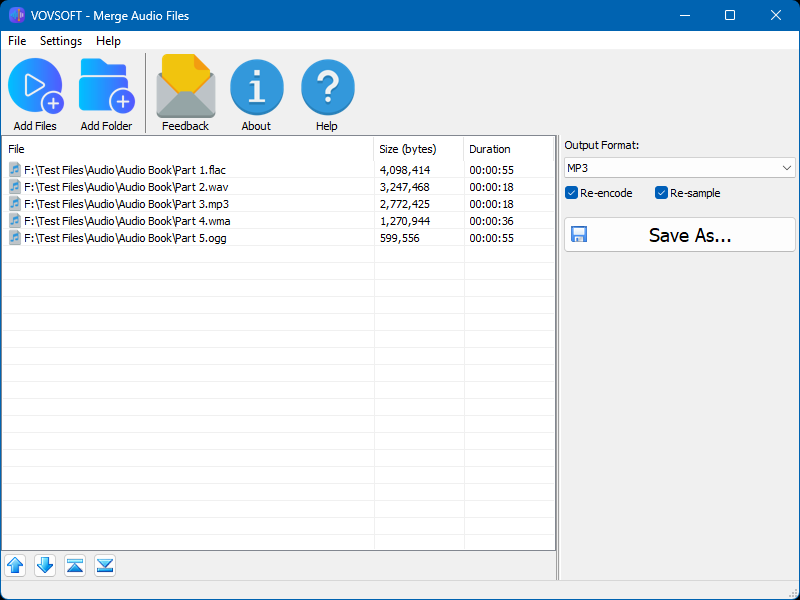
Merge Audio Files with five audiobook parts in five formats, their sizes and durations, MP3 chosen as the output, and Re-encode and Re-sample ticked.
Merge Audio Files does one job that full editors make fiddly: lining up many files and saving them as one. It reads MP3, WAV, M4A, WMA, FLAC, OGG, OPUS, AAC, AIFF, AC3, EAC3, MP2 and WV, takes files or whole folders by drag and drop, and lets you reorder them with drag and drop or up, down, top and bottom buttons. Tick Re-encode to mix formats, and Re-sample to even out sample rates; version 1.5 fixed a problem with files of different bitrates.
Where it falls short: it isn't an editor. There's no trimming, no fades, no gaps and no volume leveling, and the result has no chapter markers. The trial works but shows a nag screen and is for non-commercial use only. It's a young program, first released in June 2026, and Vovsoft's page shows 4.5 out of 5 from just 2 ratings.
Download Merge Audio FilesBuy Merge Audio Files
5. Batch Audio Converter: best for converting whole folders
Batch Audio Converter from Vovsoft converts many files at once between 14 formats and can even out their loudness. Price: $19 once on the order page. Platforms: Windows 11, 10, 8/8.1 and 7. Version: 2.1, released June 29, 2026. Best for: turning a FLAC library into MP3s for a phone, or a folder of WAVs into one format at one volume.
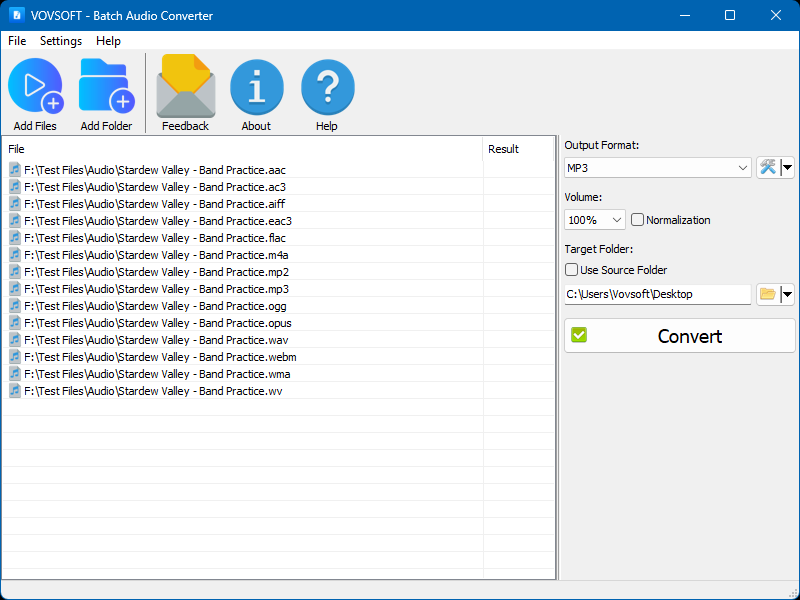
Batch Audio Converter with one track loaded in 14 formats, MP3 as the output, volume at 100%, a Normalization checkbox and the target folder.
Batch Audio Converter is the conversion half of audio work, done in bulk. It reads and writes MP3, WMA, WAV, M4A, AIFF, AAC, OGG, OPUS, AC3, EAC3, MP2, WavPack, WEBM audio and FLAC, normalizes loudness with the EBU R128 method, sets bitrate, sample rate and channels, and keeps ID3 tags and cover art where the format allows. Vovsoft's page shows 4.7 out of 5 from 6 reviews.
Where it falls short: it doesn't edit, so there's no trimming or cleanup. The trial converts but shows a nag screen and ads, can't be used from the command line, and is for non-commercial use only. Soundop's Batch Processor does the same conversions plus your saved edits, so you don't need both.
Download Batch Audio ConverterBuy Batch Audio Converter
Prices and download sizes compared
Price to own it, one PC (USD)
Soundop (perpetual)$99.00
AVS4YOU Unlimited (five programs)$79.00
Nero Platinum Suite 2027 (first year)$59.95
Batch Audio Converter$19.00
Nero WaveEditor and Audacity$0
Order-page prices checked on November 23, 2026. Nero Platinum Suite renews every year; the others are one-time payments.
Installer size (MB)
AVS4YOU (all five programs)312
Batch Audio Converter16.6
Sizes of the vendors' current Windows installers, checked on November 23, 2026. Soundop is the smallest full editor by far.
Which should you choose?
Soundop is our pick for most people who edit audio on Windows, because it's the only program here that cuts, cleans, mixes and batch-converts at a serious level for a one-time $99. Choose by your situation:
| Your situation |
Pick |
Why |
| Podcast or voice-over every week | Soundop | Spectral cleanup, multitrack with buses, saved processors for loudness and fades |
| Trim an MP3 or make a ringtone now and then | Audacity or Nero WaveEditor | Free, and a simple cut doesn't need more |
| Digitizing tapes and records | Nero WaveEditor (free), or Soundop | Declicker, dehum and track splitting; Soundop adds spectral repair |
| You also edit home videos | AVS4YOU Unlimited | Audio Editor plus video editor and converters for $79 once |
| You also burn CDs and back up | Nero Platinum Suite 2027 | WaveEditor and SoundTrax come with Burning ROM and BackItUp |
| Join audiobook chapters into one file | Merge Audio Files | Order, re-encode and save in a few clicks for $19 |
| Convert a whole music library | Batch Audio Converter | 14 formats, loudness normalization, tags kept, $19 |
Who should skip each one
- Skip Soundop if you're on a Mac, need MIDI and virtual instruments (get a DAW), or only cut a file a month.
- Skip AVS4YOU Unlimited if you change PCs often, since the license can't move, or if you never touch video.
- Skip Nero Platinum Suite if audio editing is all you want: WaveEditor is free on its own, and the suite renews every year.
- Skip Merge Audio Files and Batch Audio Converter if you're buying Soundop, which joins and batch-converts too.
- Skip Audacity 4.0 for now if you rely on macros or the Mixer; use Audacity 3 or a paid editor until they return.
What commonly goes wrong
- Buying before testing. Soundop purchases are generally non-refundable, and AVS4YOU refunds only in set cases. Use Soundop's 7-day trial and the AVS trial with your own files and your audio interface first.
- Reading "Unlimited" or "lifetime" as "any PC". AVS4YOU Unlimited is tied to one computer. Soundop's perpetual license allows two computers at a time and eight in total, so deactivate before you replace a PC.
- Forgetting a renewal. Nero Platinum Suite's $59.95 plan renews every 12 months on the same card. Soundop's yearly and monthly plans are subscriptions too; only the perpetual license is a single payment.
- Editing the only copy. Cleanup tools such as noise reduction change the audio. Work on a copy of the original recording, especially with tape and vinyl transfers you can't make again.
- Judging the trial by its watermark. AVS Audio Editor's trial puts a voice logo into saved files by design; registering the program removes it.
- Updating Audacity mid-project. Audacity 4 saves projects in the new .aup4 format, and a converted project can't be saved back to Audacity 3's .aup3, so finish open projects before you upgrade.
FAQs
What is the best free audio editing software for Windows?
Audacity is the best-known free audio editor for Windows and handles cutting, trimming and basic noise reduction. Nero WaveEditor is the better free choice for restoring old recordings, with a declicker, declipper, dehum and noise reduction. Neither does serious multitrack mixing on Windows today: Audacity 4.0 is missing its Mixer, and WaveEditor edits one file at a time.
Is Soundop better than Audacity?
Soundop does more than Audacity for regular editing work: a full mixer with bus tracks, sends and automation (Audacity 4.0 is missing its Mixer), saved processors and a batch processor (Audacity 4.0 is missing its Macro Manager), and CD burning, which Audacity has never had. Audacity wins on price (free), on Mac and Linux support, and on the size of its community and tutorials.
Is there a one-time-payment audio editor, not a subscription?
Yes. Soundop's perpetual license is $99 once with lifetime updates, AVS4YOU Unlimited is $79 once with free upgrades, and Vovsoft's Merge Audio Files and Batch Audio Converter are $19 once each. Nero Platinum Suite 2027's $59.95 price is a yearly plan that renews.
Can I remove background noise from a recording for free?
Nero WaveEditor and Audacity both remove background noise for free. Nero WaveEditor's Enhancement menu has Noise Reduction with a Noise Analysis step, plus a declicker and dehum filter for record and tape noise. For noise that overlaps the voice, Soundop's spectral editing lets you remove it in one frequency range only.
Which audio editor can also burn an audio CD?
Soundop burns audio CDs in Disc-at-Once mode with custom gaps between tracks and verifies the disc afterwards. Nero Platinum Suite includes Burning ROM for audio CDs. Audacity can't burn CDs, so you export WAV files and burn them with another program.
Does AVS4YOU Unlimited include the audio editor?
Yes. AVS4YOU Unlimited Subscription includes AVS Audio Editor and AVS Audio Converter alongside AVS Video Editor, AVS Video Converter and AVS Video ReMaker, all for one $79 payment on one computer.
Does Nero Platinum Suite include an audio editor?
Yes. Nero Platinum Suite 2027 includes Nero WaveEditor for recording and editing audio files and Nero SoundTrax for digitizing tapes and records and building audio projects. WaveEditor is also a free download on its own, so buy the suite only if you want its other programs.
What's the easiest way to join several MP3s into one file?
Merge Audio Files is the easiest: add the files, drag them into order, pick MP3 as the output and click Save As. Tick Re-encode if the files are in different formats. Soundop and AVS Audio Editor can join files too, but take more steps.
Can these programs edit audio on a Mac?
Only Audacity runs on a Mac. Soundop, AVS4YOU, Nero WaveEditor, Nero Platinum Suite and the two Vovsoft tools are Windows only.
Conclusion
If you cut, clean up, mix and convert audio on a Windows PC more than now and then, Soundop is the one to buy. For $99 once it gives you spectral repair, a multitrack mixer with buses and automation, and a batch processor that repeats your edits across a folder, in a program a fraction of the size of the others. The main reason to hesitate is the no-refund policy, so run your own files through the 7-day trial first. If a quick trim is all you need, stay free with Audacity or Nero WaveEditor, and if you edit video as well, AVS4YOU Unlimited is the better-value bundle.
Download Soundop Free TrialBuy Soundop