Nero Platinum Suite 2027: Nero's Whole Windows Media Toolbox in One Install
Nero Platinum Suite 2027 is a Windows 10 and 11 bundle of about 20 Nero programs for video editing, photo organizing, music, disc burning, file conversion and backup, plus local AI photo tools. It costs $59.95 a year on the order page (renewing automatically every 12 months), or $159.95 once for a permanent license of the 2026 version.
If you've ever installed a burner from one company, a video editor from another and a backup tool from a third, and then had to learn three interfaces, this suite is Nero's answer: one installer, one launcher, and a tool for almost every media job on a Windows PC.
Quick facts
- Developer: Nero AG
- Version: 29.5.30000 (installer dated October 23, 2026)
- Platform: Windows 11 and Windows 10 only, 1 PC per license
- Price: $59.95 per year (auto-renews), or $159.95 one-time for the 2026 permanent license
- What's inside: Nero Video, Burning ROM, Express, BackItUp, Recode, MediaHome, AI Image Upscaler, AI Photo Tagger, DuplicateManager, USBxCopy, WaveEditor, SoundTrax, CoverDesigner, Motion Tracker, PhotoSnap, Rescue Agent and more
- Extra in the yearly plan: Nero TuneItUp PRO (PC tune-up)
- Guarantee: 30-day money-back guarantee
- Internet: needed to verify the license
- What we checked: the free trial installer from nero.com, NeroCore-29.5.30000-Setup.exe (205 MB, file version 29.5.30000.0), and the order page prices of $59.95 for the yearly plan (renewal every 12 months) and $159.95 for the 2026 permanent license, all on November 13, 2026. We didn't install the suite or test each program.
Buy 2027 Yearly PlanBuy 2026 Permanent LicenseDownload Free Trial
Overview
Nero has sold burning software since the CD-R days, and the Platinum Suite is everything it makes for Windows, bundled. Nero counts 13 standalone applications covering 56 formats, and its included-software list names about 20 programs once you add the smaller tools like Nero Score, Face Beautifier and Disc to Device.
Everything starts from Nero Start, a launcher that installs, updates and activates each program. You don't have to install all of them: pick the ones you need and add others later. The AI tools (image upscaling, face recognition, scene tagging) run locally on your PC, so your photos don't go to a cloud service.
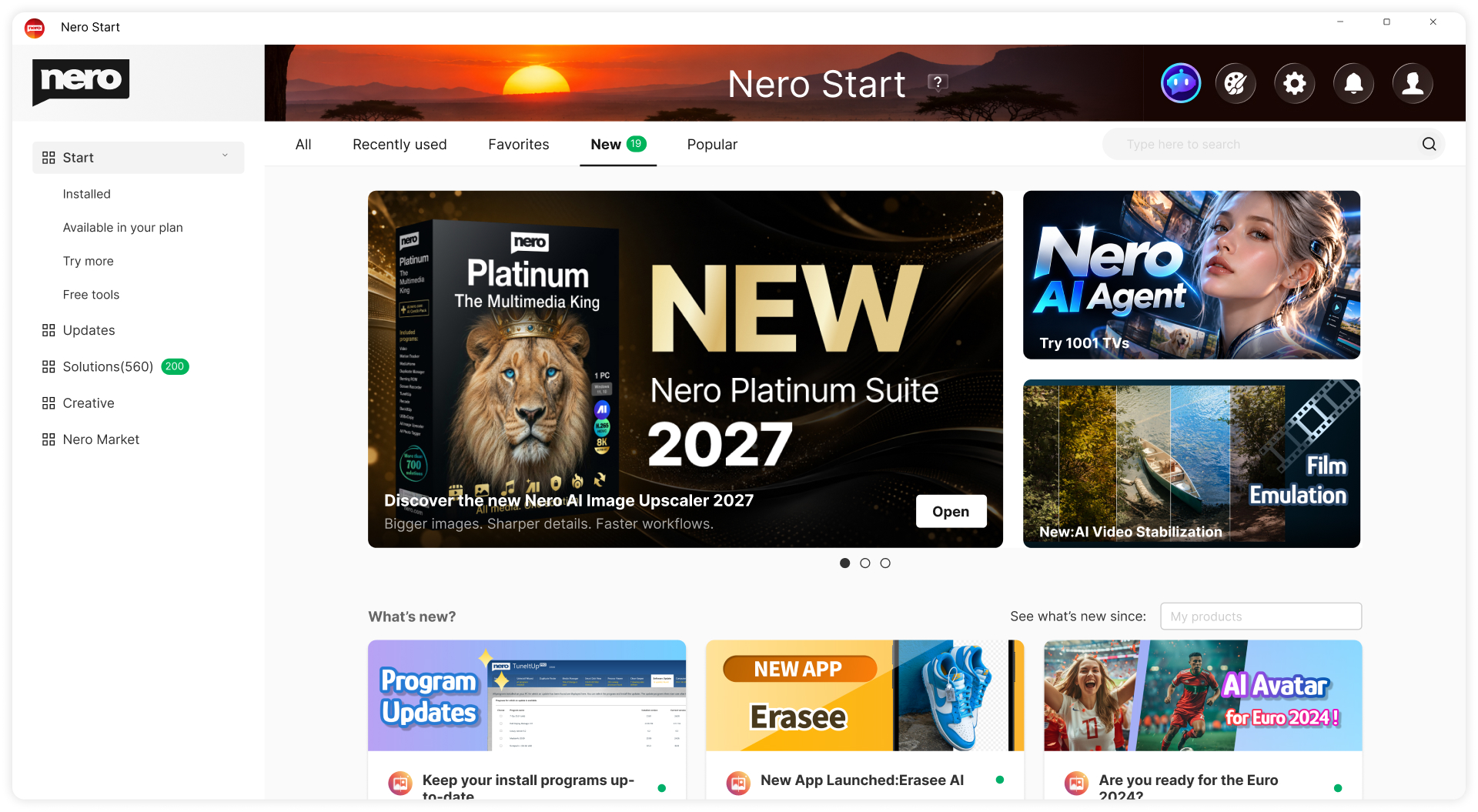
Nero Start, the suite's launcher: installed programs, updates and the solutions list on the left, with news about the Platinum Suite 2027 release on the right.
What's new in the 2027 release, from Nero's own update notes: automatic subtitles in Nero Video (import, edit, export and speech recognition), batch ripping of several audio CDs in Burning ROM, DVD subtitle export to SUB/IDX in Recode, and your own folder structure in the media library.
Features
Video editing and slideshows with Nero Video
Nero Video in the Platinum Suite gives you a timeline editor with hundreds of theme templates for holidays and events, picture-in-picture, alpha channel, tilt-shift, slow-motion and time-lapse effects. The 2027 version adds automatic subtitles with speech recognition. You can export the finished movie, stream it to a TV, or burn it to a DVD or Blu-ray.
Disc burning, ripping and copying with Burning ROM and Express
Nero Platinum Suite includes the full Nero Burning ROM, the same product Nero sells alone for $55.95. It burns CDs, DVDs and Blu-ray discs up to BDXL, copies discs, writes ISO and Nero NRG images, and protects data discs with SecurDisc 4.0 (256-bit encryption, password and digital signature). It rips audio CDs to MP3, AAC, FLAC and APE with Gracenote album details. Nero Express is the simpler wizard for quick burns, and Nero CoverDesigner prints covers and labels.
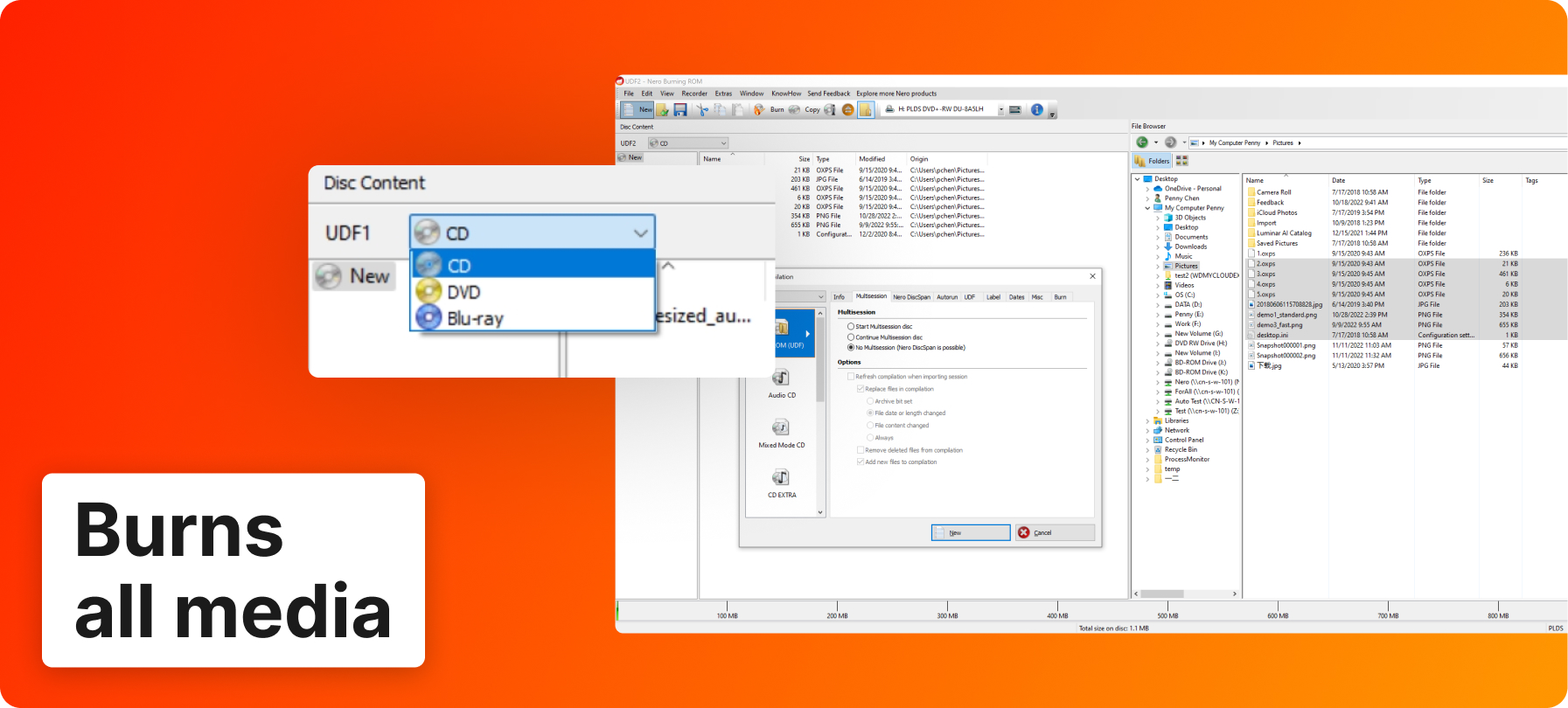
Nero's annotated screenshot of Burning ROM: a UDF data compilation with the disc type menu (CD, DVD, Blu-ray) and the file browser.
Backups to drives, discs and six cloud services with BackItUp
Nero BackItUp in the suite backs up folders on a schedule (daily, weekly, monthly or continuously) to an internal or external drive, a NAS, optical discs, or the cloud: Google Drive, OneDrive, MagentaCLOUD, HiDrive, pCloud and QLOUD. It keeps older versions of changed files, compresses backups and encrypts them with AES 256-bit.
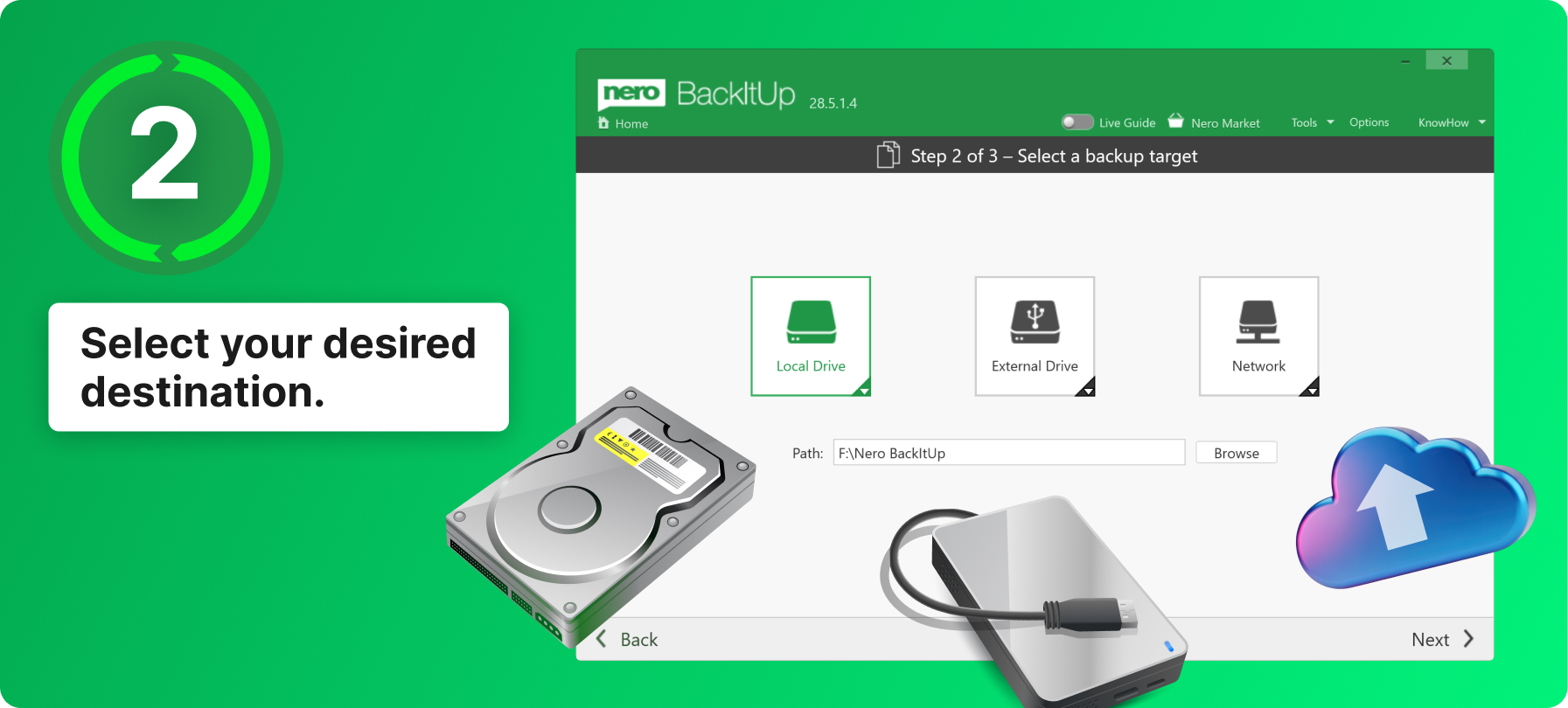
Nero's annotated screenshot of BackItUp (title bar shows build 28.5.1.4): step 2 of 3, picking a local drive, external drive or network target.
Local AI for photos: upscaling, tagging and duplicate cleanup
Nero Platinum Suite includes Nero AI Image Upscaler, which enlarges and sharpens photos on your PC, and Nero AI Photo Tagger, which recognizes scenes and faces so you can name people and search your archive. DuplicateManager finds exact and similar photos, MediaHome sorts by place (world map) and date (timeline), and PhotoSnap and Face Beautifier handle quick touch-ups. Note that the separate Nero AI Video Upscaler is not on the suite's included-software list.
Music, audio and conversion
Nero Platinum Suite covers audio with WaveEditor (record and edit sound with effects and fades), SoundTrax (digitize tapes and records and build audio projects) and MediaHome for your music library and CD imports with metadata and album art. Nero Recode converts and rips videos and music to formats for phones and tablets, and now exports DVD subtitles to SUB/IDX.
PC tools: tune-up, USB copying and file rescue
Nero Platinum Suite also bundles USBxCopy (copy data to several USB sticks at once), Rescue Agent (recover files from damaged discs and drives), Nero Score (a PC speed test), Motion Tracker (automatically pixelate moving faces or plates in video) and a basic Screen Recorder. The yearly plan adds TuneItUp PRO, which cleans the PC, manages startup items, updates drivers and tweaks internet settings.
Benefits
- One purchase instead of five. Burning ROM alone is $55.95 and BackItUp alone is $59.95; the yearly suite costs about the same as either and adds a video editor, a converter and the AI photo tools.
- Your photos stay on your PC. Face recognition, tagging and upscaling run locally, which matters if you don't want family pictures on someone's server.
- Old media still has a home. Few current suites still burn Blu-ray, rip CD collections in batches and digitize tapes. Nero still does all three.
- One launcher. Nero Start installs only what you pick and keeps it updated.
Real-World Uses
- Digitize a CD shelf: feed a stack of audio CDs to Burning ROM's batch ripper, get FLAC or MP3 files with album art, then organize them in MediaHome.
- Turn a holiday into a movie: drop clips into a Nero Video theme template, let it add subtitles, and burn a DVD for grandparents without a streaming account.
- Clean up a 20-year photo archive: run DuplicateManager to delete near-duplicates, then let AI Photo Tagger name faces so you can search for "Mum at the beach".
- Protect the family PC: set BackItUp to back up Documents and Pictures weekly to an external drive and to OneDrive, encrypted.
- Hand out files on USB: copy a presentation to ten sticks at once with USBxCopy.
Who It's For, and Who Should Skip It
Good fit: Windows home users who still burn or rip discs, edit family videos, and want backup and photo organizing from one vendor. It also suits anyone who has used Nero before and wants the current versions together.
Skip it if:
- You use a Mac or Linux: the suite is Windows 10/11 only.
- You only need one tool, such as burning: Burning ROM alone is a one-time purchase and avoids a yearly renewal.
- You edit video professionally: Nero Video is a consumer editor, so a dedicated editor like DaVinci Resolve or Premiere Pro fits better.
- You dislike subscriptions and can't keep track of renewals: buy the permanent license instead, or skip it.
Usage Guide
- Download the trial installer (about 205 MB) and run it. It installs Nero Start, the launcher.
- Sign in or create a Nero account in Nero Start; after buying, activate your serial number there. The suite needs an internet connection to verify the license.
- In Nero Start, choose the programs you want and install them. You can add the rest later.
- Open a program from Nero Start, for example Burning ROM for a disc or BackItUp for a backup plan.
- Use Nero Start's Updates section to keep each program current.
Before you buy
- The $59.95 plan renews automatically every 12 months on the card you paid with. Note the date if you only want one year.
- The $159.95 permanent license is the 2026 version, not 2027, and doesn't include TuneItUp PRO, which comes only with the 1 PC / 1 year plan.
- One PC per license.
- Several Nero AI features run on credits or tokens; a reviewer found PhotoSnap gives 200 operations before you pay for more.
- You get 30 days to ask for your money back.
Buy 2027 Yearly PlanDownload Free Trial
Where it falls short
- Renewals and cancelling. The most common Trustpilot complaint is being charged for a renewal the buyer didn't expect, and finding it hard to cancel.
- Support response times. Several reviewers report waiting days or weeks for email replies about activation, refunds or shipping of bundled extras.
- Activation through Nero Start. Everything runs through a Nero account and license check, which some long-time users find a hurdle after years of offline serial numbers.
- Not every module is fully included. Screen Recorder is the basic version, AI features use credits, and some reviewers found modules that wanted a separate license.
- Interface translations. One reviewer reports inexact translations in Nero Start.
What Users Say
Nero Platinum Suite gets two kinds of review: people who use the software are mostly happy with it, while the angry ones are mostly about billing, renewals and support. Nero's Trustpilot page (which covers all Nero products) shows 3.0 out of 5 from about 350 reviews, with 28% five-star and 49% one-star.
Trustpilot: praise for the software
- Marty Hovey (5 stars, "I Love Nero Platinum Suite", November 2026): "I usually try Nero first for a solution to a project." He uses it for burning, ripping and converting, and for background removal and upscaling.
- Pat (5 stars, November 2026): "They update the software for the music/video customer needs."
- OliverX (5 stars, December 2025): "Nero celebrates it 30th anniversary just now and I am a daily user of it"
- Torsten (4 stars, "Initial issues were resolved by Nero Support", March 2026), on Platinum Suite 2026: "I encountered significant issues during installation because the passwords I received at the time of purchase were not accepted." Support fixed it in the end.
- Bill Levinson (4 stars, November 2024): "None of this review reflects on the actual quality of Nero's software, which I believe is good."
Trustpilot: complaints about billing and support
- Mike Blackburn (1 star, "Rip-Off?", July 2024): "The software is good, but they have switched to a subscription service and did not make that clear."
- Ronald Turnbull (1 star, November 2025): "I paid my annual subscription on the 19th September. I am locked out of my programs."
- Paul (1 star, "Very hard to get a refund", August 2025): "asked for a refund under the 30 days money back guarantee still waiting for a refund 3 weeks later"
- Kevin Blunt (1 star, "Nero customer service and Nero Know How", October 2025): "Customer service is shocking and if I do get a response it could take up to two weeks or more"
- RickInPA (1 star, November 2025): "now I have to dig up my password for "Nero Start" before ANY? OF MY NERO stuff"
- Kun Tibor (4 stars, "In Nero Start/Platinum", August 2026): "In Nero Start/Platinum, the translations are wrong, are not exacts."
- Robert Plucker (3 stars, "Software works great, however falsely advertised", June 2026): "The software works great, but an advertised USB drive that was part of the bundle was not shipped."
Independent reviews
- Steve Litchfield, a veteran tech writer, reviewed Nero Platinum Suite 2026 on his blog in May 2026: "It's hard not to recommend Nero Platinum Suite". On the launcher: "Nero Start gets a thumbs up overall." On the classic modules: "all work as well as they ever did, hence my enthusiasm for the suite as a whole." His caveats: "PhotoSnap is tokenised, with 200 operations available before you have to start paying extra for more tokens," and "Occasionally, modules are, it seems, needing a separate license."
- TechRadar's review of Nero Burning ROM, the suite's burning module (Binay Gupta, September 2020), called it "a top-notch app with a range of outstanding features" with a "sleek and user-friendly interface".
The pattern: people praise how much the suite does and how well the long-standing tools (burning, ripping, video) still work. The complaints are about the business around it: renewals that surprised buyers, slow email support, the Nero Start sign-in, and credits for some AI features. If you buy the yearly plan, decide at purchase whether you want it to renew.
Comparisons
Nero Platinum Suite vs buying single Nero programs
Nero Platinum Suite at $59.95 a year costs about the same as one Nero program bought alone: Burning ROM 2027 is $55.95 and BackItUp 2027 is $59.95, both one-time. If you only burn discs, Burning ROM alone is the cheaper choice over a few years because it never renews. If you'd use two or more of the programs, the suite is better value.
Nero Platinum Suite vs free tools
Nero Platinum Suite replaces a set of free programs (a free burner, a free ripper, a free converter, Windows' own backup) with one consistent package and support. Free tools cost nothing and don't renew, but you assemble and update them yourself, and few of them do SecurDisc encryption, Blu-ray authoring or local AI tagging.
Editions and Pricing
| Edition |
Price on the order page |
License term |
What you get |
Buy |
| Nero Platinum Suite 2027 (yearly) |
$59.95 per year |
1 PC, renews automatically every 12 months |
The 2027 suite, updates while subscribed, TuneItUp PRO included |
Buy 2027 Yearly |
| Nero Platinum Suite 2026 (permanent license) |
$159.95 once |
1 PC, lifetime license, no renewal |
The 2026 version of the suite to keep; TuneItUp PRO not included |
Buy 2026 Permanent License |
Each button orders that edition. The permanent license costs as much as about 2.7 years of the yearly plan, so it pays off only if you'll keep using the suite well beyond that and don't need the 2027 additions.
FAQs
Does Nero Platinum Suite 2027 work on a Mac?
No. Nero Platinum Suite 2027 runs only on Windows 11 and Windows 10. Ultra HD (4K) editing and the AI tools need the 64-bit versions.
What happens when the Nero Platinum Suite yearly plan ends?
Nero Platinum Suite's yearly plan renews automatically for another 12 months on the card you paid with. If you only want one year, cancel the renewal before the renewal date and keep the order confirmation.
Is the permanent license of Nero Platinum Suite the 2027 version?
No. The one-time Nero Platinum Suite license sold on the order page is the 2026 version (permanent license). The 2027 release is sold as the yearly plan.
Does Nero Platinum Suite need an internet connection?
Nero Platinum Suite needs the internet to verify the license and to download programs through Nero Start. The AI photo tools themselves work locally on your PC, and Nero says they're also available offline.
Can I install Nero Platinum Suite on two computers?
Nero Platinum Suite licenses on the order page are for 1 PC. A second computer needs a second license.
Is Nero AI Video Upscaler part of Nero Platinum Suite?
No. Nero Platinum Suite includes the AI Image Upscaler, but Nero AI Video Upscaler isn't on its included-software list and is sold separately.
Do I still need a disc drive to use Nero Platinum Suite?
Only for burning, ripping and playing discs. Nero Platinum Suite's video editing, conversion, backup to drives or cloud, and photo tools work on a PC without an optical drive.
Can I get a refund on Nero Platinum Suite?
Nero Platinum Suite comes with a 30-day money-back guarantee. Some buyers report slow refunds, so ask within the 30 days and keep the order number.
System Requirements
- Windows 11 or Windows 10 (32 or 64 bit; 64-bit required for 4K editing, Motion Tracker, PhotoSnap, Screen Recorder and AI Photo Tagger)
- 2 GHz AMD or Intel processor, 1 GB RAM (8 GB recommended for the AI and 8K features)
- 5 GB of disk space for a typical install of all components; up to 50 GB more for video projects
- DirectX-compatible graphics card; Nvidia GTX 960 or newer recommended for AI image upscaling
- CD, DVD or Blu-ray recorder for burning
- Internet connection to verify the license
Conclusion
Nero Platinum Suite 2027 is worth $59.95 a year if you'll use at least two of its programs: that's the price of Burning ROM or BackItUp alone, and you also get Nero Video, Recode, MediaHome, the AI photo tools and TuneItUp PRO. The one reason to buy it is breadth: nothing else bundles Blu-ray burning, CD batch ripping, video editing, encrypted backup and local AI photo tagging for Windows at this price. The main reason not to is the business side: the plan renews automatically, support can be slow, and everything runs through a Nero account. If you only need to burn discs, buy Burning ROM alone; if you hate renewals, take the 2026 permanent license.
Buy 2027 Yearly PlanBuy 2026 Permanent LicenseDownload Free Trial