Soundop: A Fast Windows Audio Editor With a Multitrack Mixer Built In
Soundop is a Windows audio editor for recording, editing, restoring, mixing and mastering audio, with waveform and spectral editing, an unlimited-track multitrack editor and a batch processor in one 20 MB program. A perpetual license with lifetime updates costs $99 on the order page right now (list price $199), or you can pay $35.90 a year, and there's a 7-day fully functional trial.
It's aimed at people who edit audio every day: podcasters and voice-over artists cleaning up dialog, musicians editing and mastering tracks, and anyone who has outgrown Audacity but doesn't want the cost or weight of a full DAW.
Quick facts
- Version: 2.4.1.0, released October 30, 2026 (four releases between September 7 and October 30, 2026)
- Developer: Ivosight Software Inc.
- Platform: Windows 8, 10 and 11, in 32-bit and 64-bit builds
- Audio: ASIO, WASAPI (with loopback), MME and DirectSound; recording up to 24-bit / 192 kHz
- Plug-ins: VST, VST3 and ARA
- Price: $99 perpetual with lifetime updates (list $199), $35.90 for a one-year license or a yearly subscription, $14.99 a month
- Activations: two computers at the same time on every license
- Trial: 7 days, fully functional, needs an internet connection
- Refunds: purchases are generally non-refundable; requests are reviewed case by case
- What we checked: the 64-bit installer for version 2.4.1.0 (20 MB) on the vendor's site, and the prices on the order page ($99.00 for the Perpetual License after a $100.00 discount, $35.90 for the Annual Plan and the One Year License, $14.99 for the Monthly Plan, in USD) on November 20, 2026. We didn't run Soundop with third-party plug-ins.
Download Free TrialBuy Now
Overview
Most audio editors make you choose: a stereo editor for detailed work on one file (Sound Forge, WaveLab) or a DAW for mixing many tracks. Soundop does both. The Audio File Editor works on one file at sample level, in waveform or spectral view. The Multitrack Editor lays out unlimited audio and bus tracks with sends, side-chains and automation. A CD Track Editor and a Batch Processor sit alongside them in the same window.
It stays small and quick. The installer is about 20 MB, and KVR reviewers keep calling it "light on system resources". It's also under active development: version 2.4 in September 2026 rebuilt the track layout, moved the time ruler, added a transport bar and changed how automation lanes work, and three updates followed within eight weeks.
Features
Waveform and spectral editing
Soundop edits audio with sample-level precision and lets you limit an edit to one channel and a selected frequency range, so you can paint out a cough or a siren in the spectrogram without touching the rest. Selections snap to zero crossings, crossfades remove clicks at edit boundaries, and you can sync views across several files to compare them.

The Audio File Editor: an FX chain (compressor, EQ, reverb, echo) on the left, the stereo waveform with a spline gain envelope, and the spectral view below.
A full multitrack mixer
Soundop's Multitrack Editor supports unlimited audio and bus tracks, routing one track to several destinations, side-chain inputs, clip lanes for alternate takes, and read, write, latch and touch automation for track and clip effects. You can freeze heavy effects to save CPU, edit clip sources non-destructively through ARA plug-ins, and export a full mixdown, a time range, single tracks or single clips. Automatic latency compensation keeps plug-ins in time.

The Multitrack Editor: three audio tracks and two buses, a volume automation lane on Bus 1, and track and clip settings on the left.
Processors and the Batch Processor
Soundop lets you record a sequence of edits and effects as a Processor (auto trim, fades, limiting to -0.1 dB, matching EBU R128 loudness) and run it on a selection with one shortcut. The Batch Processor then applies a processor to a whole folder, converts the format, and can run several batch jobs at once. For a podcast feed or a sample library this is where most of the time savings come from.
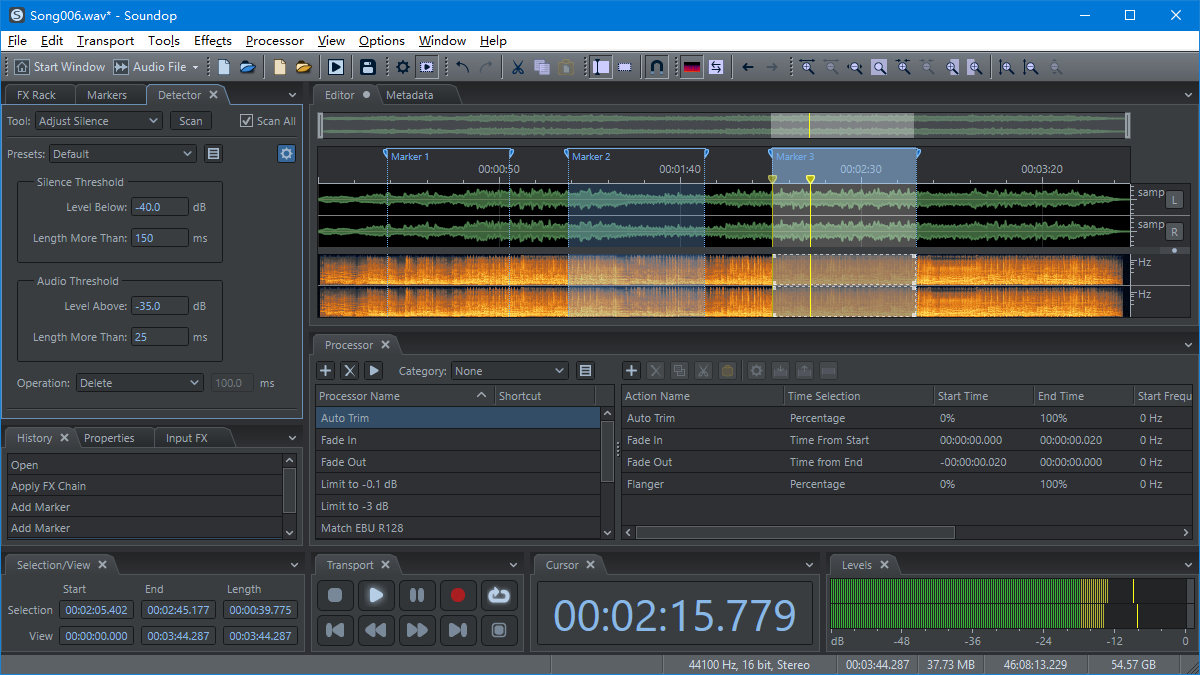
The Processor panel listing saved processors and the actions inside Auto Trim, with the silence Detector settings on the left.

The Batch Processor converting a folder of WAV songs to Ogg Vorbis, with per-file progress.
Recording, restoration and analysis
Soundop records in insert or overwrite mode with pre-roll, on a timer, or only when the level crosses a threshold, and it captures system audio through WASAPI loopback. For cleanup it has noise-profile and adaptive noise reduction, click repair and silence detection. Meters show peak, true peak and loudness to ITU BS.1770-2, plus channel correlation, frequency and phase analysis.
Formats, video, CDs and metadata
Soundop exports MP2, MP3, AAC, WAV, AIFF, OGG, FLAC, APE and WMA, imports audio from video files, and can attach a video to the timeline to edit sound to picture and export MP4, WMV or MOV. It burns audio CDs in Disc-at-Once mode with custom track gaps and verifies them afterwards. Metadata editing covers ID3 tags, Vorbis comments, RIFF and AIFF chunks, cover art for MP3 and FLAC, and ACID loop data.
Benefits
- One program from recording to master. You don't bounce files between a stereo editor and a DAW.
- Repeatable results. Processors turn your usual chain into one click, and the Batch Processor runs it on hundreds of files.
- Light on an older PC. A 20 MB install that starts fast leaves the CPU for your plug-ins.
- A developer that listens. Several reviewers report bugs fixed and feature requests added within days.
Real-World Uses
- Podcast episodes. Record two guests on separate inputs, clean each with noise reduction and spectral editing, mix in the multitrack, and match loudness to EBU R128.
- Voice-over delivery. Build a processor that trims silence, normalizes and fades, then batch it across a day's takes.
- Mastering a single. Run a mastering chain of VST3 plug-ins, check true peak and loudness, and burn a reference CD.
- Field recordings and samples. One KVR reviewer used it to capture sounds at factories and construction sites, then clean and cut them into loops with ACID metadata.
- Sound for video. Pull the audio from a clip, fix it against the picture, and export the video again.
Who It's For, and Who Should Skip It
Soundop suits Windows users who edit audio often and want something faster and tidier than Audacity: podcasters, audiobook narrators, voice actors, mastering engineers and home-studio musicians.
Skip it if you're on a Mac or Linux, since it's Windows only. Skip it too if you compose with MIDI and virtual instruments: Soundop has no MIDI sequencing, so a DAW such as FL Studio or Reaper fits that job better. And if you only trim the odd MP3, a free editor will do.
Usage Guide
- Download the 64-bit installer (or the 32-bit one for an older system) and install it. Stay online during the 7-day trial.
- Choose your audio device and driver in the settings. Use ASIO if your interface has it, for the lowest latency.
- Open a file in the Audio File Editor, or start a Mixspace in the Multitrack Editor for several tracks.
- Add effects from the FX Rack. To apply the same chain to all open files, use the "apply to all" option added in version 2.4.0.5.
- Save repeated steps as a Processor, then run it on a folder from the Batch Processor.
- After buying, enter the license key that FastSpring emails you. Deactivate it on the old PC before moving to a new one.
Before you buy
- Use the whole trial. Ivosight treats purchases as generally non-refundable, so test your interface and your key plug-ins in those 7 days.
- The $99 perpetual price is a special offer against a $199 list price, with no end date given. It includes lifetime updates, which makes it the best value if you'll use Soundop for more than three years.
- The perpetual license has a lifetime cap of 8 different computers (two at a time). The one-year license allows 6, and the subscription has no total limit.
Where it falls short
- A small company and a small user base. There are few independent reviews and fewer tutorials than for Audition or Sound Forge, so you'll rely on the user guide and the vendor's forum.
- Some bugs along the way. One KVR reviewer found "a bit more bugs than when using more expensive software", though fixed quickly once reported, and another called it "not a finished product in my mind".
- The built-in effects are only adequate. Two experienced reviewers said they use third-party plug-ins instead.
- The interface keeps changing. Version 2.4 moved the ruler and scroll bar and reworked automation, so older tutorials won't match exactly.
What Users Say
Soundop's reviews come mainly from KVR Audio, the plug-in community, where all seven member reviews give it five stars (the vendor's download page shows 5.0 / 5 from KVR). The reviewers are mostly experienced users who moved from other editors.
KVR Audio: what reviewers like
"As a mastering engineer, after a long search for an audio editor for daily use, I found the ultimate solution with Soundop. No other software is innovative, fast, clear and stable in this way. In addition, presets can be easily created for every type of automated process combined with VST plugins or internal functions and also with shortcuts. The time saved is enormous." Fuzzy24v, December 4, 2020 (version 1.7.8.18)
"This beautiful editor allowed me to drop a long time subscription that I had to another popular editor. Speech and dialog are my focused recording and editing areas, and Soundop absolutely excels here." bobmic, December 8, 2020
"It is remarkably stable on Win10 and delivers top-shelf performance on any audio editing task I have used it to complete. The UI is clean and uncomplicated, and it supports enough customization to meet my needs. ... I have experience with WaveLab and older versions of SoundForge, and I found the learning curve for working in Soundop to be small." rictheobscene, July 6, 2020
"Whenever someone asks me what's the best audio editing program, I don't say Audacity. I tell them Soundop. Because it is. ... This unheralded program is light on system resources and handles VST plugins like a dream. And there's next to no learning curve." cfisanick, June 11, 2021
"Soundop audio editor has a rare feature in other audio editors, a multitrack section, that's right, an option exclusive to DAWs that has been built into this editor, offering the best of both worlds, with enormous ease of production." waltervianacom, April 29, 2024 (version 1.9.5.3)
KVR Audio: the reservations
"A competent audio editor for a modest amount of €. Although I have encountered perhaps a bit more bugs than when using more expensive software. But I have to say the responsiveness of the developers is something I have never seen before. Many bugs have been repaired as soon as I have reported them at forum..." anykyri, October 31, 2022 (version 1.8.15.2)
"Excellent alternative to Audition :). Although not a finished product in my mind, Soundop is getting there. With each update it is more polished and reasonably easy to use." Stevan Rokbox, September 17, 2025 (version 2.1.6.13)
"The included processing tools are respectable, but I tend to use 3rd party plugins for these sorts of things." rictheobscene, July 6, 2020
The themes repeat across reviewers: it's light and quick, it handles VST plug-ins well, the multitrack section sets it apart from other stereo editors, and the developer fixes problems fast. The complaints are about rough edges in a product still moving quickly, and built-in effects that serious users replace with their own plug-ins. Note that several reviews are from 2020 to 2022, several versions ago.
Comparisons
Soundop vs Audacity
Audacity is free and fine for simple cuts. Soundop adds non-destructive multitrack mixing with buses, sends and automation, ARA plug-in support, saved processors, a multi-job batch processor, loudness metering and CD burning, in a more polished interface.
Soundop vs Adobe Audition and Sound Forge
Soundop covers the same core of spectral editing, multitrack mixing and batch work. Audition is sold only as a subscription, while Soundop's $99 perpetual license includes lifetime updates. In return you get a much smaller community and fewer tutorials.
Editions and Pricing
There's one edition of Soundop with every feature; the plans differ only in how long you can use it and how many computers you can activate over time.
| Plan |
Price |
How long |
Updates |
Computers |
| Perpetual License | $99 one time (list $199) | Never expires | All future versions | 2 at a time, 8 in total |
| Annual Subscription | $35.90 a year | While subscribed | Latest while active | 2 at a time, no total limit |
| One-Year License | $35.90 one time | One year from purchase | Released during the year | 2 at a time, 6 in total |
| Monthly Subscription | $14.99 a month | While subscribed | Latest while active | 2 at a time, no total limit |
The Buy Now button opens Ivosight's purchase page, where each plan has its own button. Orders are processed by FastSpring, which emails the license key right away.
FAQs
Is there a Mac version of Soundop?
No. Soundop runs only on Windows 8, 10 and 11, in 32-bit and 64-bit versions.
Does Soundop support VST3 and ARA plug-ins?
Soundop hosts VST, VST3 and ARA plug-ins. ARA lets a plug-in such as a pitch editor work on a clip's source audio non-destructively inside the Multitrack Editor. One KVR reviewer with dozens of plug-ins reported that only one gave trouble.
Can Soundop record what's playing on my PC?
Yes. Soundop captures system audio through WASAPI loopback, so you can record a stream or a call without a virtual cable.
Can I use Soundop without an internet connection?
Soundop needs the internet during the trial. A purchased license can be activated offline by uploading an activation request file on Ivosight's Offline Activation page.
What's the difference between the annual subscription and the one-year license?
Both cost $35.90. The Soundop annual subscription renews until you cancel and has no limit on the total number of computers. The one-year license is a single payment that ends a year after purchase and can be activated on up to 6 computers in that time.
Can I get a refund on Soundop?
Soundop purchases are generally non-refundable, except where the law requires it. Ivosight reviews requests sent to sales@ivosight.com case by case, which is why the 7-day trial matters.
Does Soundop do MIDI?
No. Soundop is an audio editor and audio multitrack mixer. Its multitrack has audio and bus tracks, not MIDI or instrument tracks.
System Requirements
- Windows 8, Windows 10 or Windows 11 (32-bit or 64-bit)
- A Windows-compatible audio device; an ASIO-compatible device is recommended
- About 20 MB for the installer
- An internet connection during the trial
Conclusion
At $99 for a perpetual license with lifetime updates, Soundop is one of the best-value serious audio editors on Windows, and it's worth it for anyone who edits voice or music every week. The reason to buy is the combination: precise spectral editing, a real multitrack mixer and a batch processor in one light, fast program. The reasons to hesitate are the no-refund policy and a smaller community than the big names, so spend the 7-day trial running your own interface and plug-ins through it before you pay.
Download Free TrialBuy Now