Vovsoft Batch Audio Converter: Convert Whole Music Folders Between 14 Formats
Batch Audio Converter is a $19 Windows program from Vovsoft that converts many audio files at once between 14 formats, including MP3, FLAC, WAV, M4A, OGG and OPUS, and can even out their loudness on the way. The $19 is a one-time lifetime license.
A phone that won't play FLAC, an editor that only takes WAV, or a podcast archive where every episode is a different volume: converting those files one by one takes all evening.
Quick facts
- Version: 2.1, released June 29, 2026
- Developer: Vovsoft, the software company of Fatih Ramazan Çıkan in Turkey
- Platform: Windows 11, 10, 8/8.1 and 7, 32-bit and 64-bit. No Mac or Linux version
- Formats, in and out: MP3, WMA, WAV, M4A, AIFF, AAC, OGG, OPUS, AC3, EAC3, MP2, WV, WEBM, FLAC
- Volume: percentage adjustment and EBU R128 loudness normalization
- Editions: installer (16.61 MB) and portable (19.71 MB), one license for both
- Price: $19, one-time payment, lifetime license with free updates
- Trial: free to try and it converts, but command line use needs a license, it shows a nag screen and ads, and commercial use isn't allowed
- Refunds: no money-back guarantee; refunds are at the vendor's discretion, mainly for accidental orders
- What we checked: installer file version 2.1.0.0 (17,421,088 bytes) with a valid digital signature, downloaded from the vendor and read without running it; checkout price $19.00 with no auto-renewal on the order page on November 9, 2026. We didn't convert test files or measure audio quality
Download Free TrialBuy Now
Overview
Batch Audio Converter is one window: the file list fills the left side, with a Result column, and the right side holds the output format, the volume control with a Normalization checkbox, the target folder and a large Convert button. You can drag files in from Windows Explorer or use Add Files and Add Folder, and the installer adds a Send To shortcut.
It is built on FFmpeg, and it is actively worked on. Vovsoft shipped 1.0 in November 2024 and has released updates through 2025 and 2026, adding normalization, sortable columns, a Use Source Folder option and, in June 2026, an output volume setting.
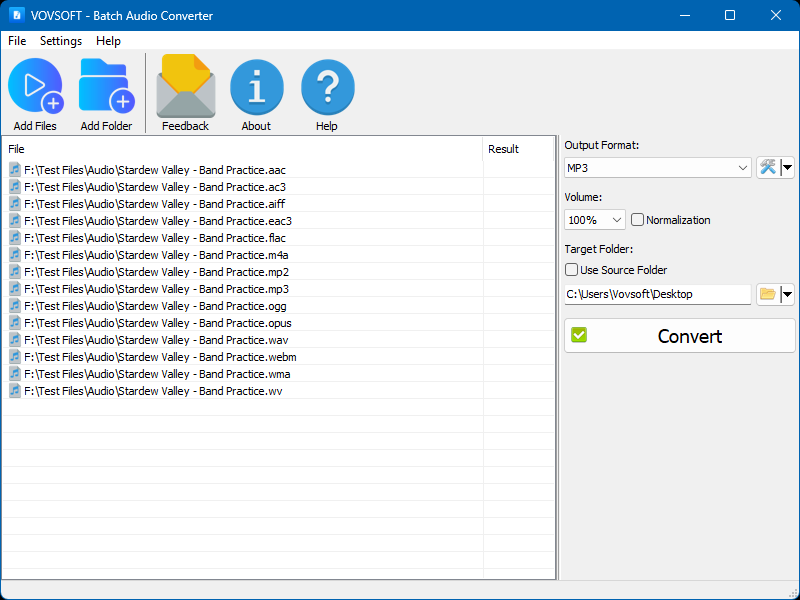
The main window with the same track loaded in 14 formats, MP3 as the output, volume at 100% and the target folder set to the desktop.
Features
Fourteen formats in both directions
Batch Audio Converter reads and writes MP3, WMA, WAV, M4A, AIFF, AAC, OGG, OPUS, AC3, EAC3, MP2, WavPack, WEBM audio and FLAC, so a mixed folder can come out as one format in a single run.
Loudness normalization to EBU R128
Batch Audio Converter can normalize loudness using the EBU R128 method defined by the European Broadcasting Union, so tracks from different sources play at a similar level. A simple percentage control is there too if you just want a quiet file louder.
Control over bitrate, sample rate and channels
Batch Audio Converter lets you set the bitrate, sampling rate and channel layout, with mono, stereo, 5.1 and 7.1 available, through the wrench icon beside the output format.
Tags and cover art carried over
Batch Audio Converter keeps ID3 tags and cover art when the target format supports them, and a Discard Video Stream setting drops embedded art when you don't want it.
Command line for scripts
Batch Audio Converter's licensed version accepts -input and -output arguments, so a script can convert files without opening the window. This is one of the features the trial doesn't include.
Benefits
- Less fiddling. Set the format once and it is remembered, along with the normalization choice.
- Tidy output. Send files to one folder, or use Use Source Folder to keep them beside their originals.
- A flat price. $19 once, with free updates.
Real-World Uses
- Music libraries. Turn a FLAC collection into MP3 or AAC for a phone or car stereo.
- Podcasts and lectures. Normalize a season of episodes so they play at the same level.
- Video and audio editing. Convert odd source files to WAV or AIFF for an editor.
- Automation. Add conversions to a batch file with the command line.
Who It's For, and Who Should Skip It
Batch Audio Converter suits Windows users who convert folders of audio now and then and want a simple window with loudness normalization included.
Skip it if you are happy with free tools such as fre:ac or a command line, since FFmpeg alone does the same conversions at no cost. Skip it too if you need to rip CDs, edit audio or tag files in depth: it only converts. There is no Mac version.
Usage Guide
- Install Batch Audio Converter or unzip the portable edition.
- Drag your files in, or use Add Files or Add Folder.
- Pick the Output Format, and use the wrench button for bitrate, sample rate and channels.
- Set the volume, or tick Normalization.
- Choose a target folder, or tick Use Source Folder.
- Click Convert and read the Result column for any failures.
Before you buy
- Converting lossy to lossless doesn't restore quality. Turning an MP3 into FLAC gives a bigger file, not better sound. Keep your originals.
- The trial is for personal use, shows a nag screen and ads, and has no command line.
- No refund if you change your mind. Vovsoft's policy is no refunds in general because a trial is available, with exceptions at its discretion, and PayPro Global has the final say on orders placed there.
- One license, one person. It can go on several of your own PCs. A business with multiple users needs more licenses.
Where it falls short
- Free alternatives exist. The conversion engine is FFmpeg, so you're paying for the convenience of the window.
- An older FFmpeg source. The source Vovsoft publishes for its bundled FFmpeg is version 4.2.1, so don't assume the newest codec improvements are included.
- Converter only. It has no trimming, tag editing or CD ripping.
What Users Say
Vovsoft's page for Batch Audio Converter showed 4.7 out of 5 from 6 reviews. Across all its products, Vovsoft's Trustpilot profile showed 4.6 out of 5 from 410 reviews on November 9, 2026.
Customer reviews on the vendor's page
Savva Emanon: "It works perfectly... Great product, great price, we are very appreciative of this fabulous software :)"
JOHNNY R HASTINGS: "SOFTWARE THAT WORKS WELL"
Independent coverage
Trisha, TrishTech.com, December 2024: "this tool delivers on all fronts."
The small number of reviews are positive and mostly about it simply working at a low price. We found no independent measurements of its audio quality.
Comparisons
Batch Audio Converter vs fre:ac
fre:ac is a free, open-source audio converter that also rips CDs. If you want zero cost and more features, start there. Batch Audio Converter is the simpler single-window choice, with EBU R128 normalization as a checkbox.
Batch Audio Converter vs FFmpeg on the command line
FFmpeg does all of this free, and it is what this program runs on. Batch Audio Converter is worth $19 only if you'd rather use a window than write commands.
Batch Audio Converter vs Vovsoft Convert Video to Audio
Vovsoft's Convert Video to Audio takes the soundtrack out of video files. Use Batch Audio Converter when your sources are already audio.
Editions and Pricing
| Edition | Price | License | Size |
|---|
| Installer | $19 at checkout | Lifetime, free updates | 16.61 MB |
| Portable | Same license | Lifetime, free updates | 19.71 MB |
FAQs
Does Batch Audio Converter keep ID3 tags and album art?
Batch Audio Converter preserves ID3 tags and cover art when the target format supports them, and it has a setting to discard embedded art.
Can Batch Audio Converter convert FLAC to MP3?
Batch Audio Converter converts FLAC to MP3 and any of its other 12 output formats, in batches.
Can Batch Audio Converter run from the command line?
Batch Audio Converter takes -input and -output arguments in the licensed version. The trial doesn't include command line use.
Can I use Batch Audio Converter commercially?
Batch Audio Converter's license allows commercial use, while the trial does not.
Is Batch Audio Converter a subscription?
Batch Audio Converter is a one-time $19 purchase. The license doesn't expire and includes future updates.
Does Batch Audio Converter run on 32-bit Windows?
Batch Audio Converter supports both 32-bit and 64-bit Windows, from Windows 7 through 11.
System Requirements
- Windows 11, 10, 8/8.1 or 7, 32-bit or 64-bit
- 16.61 MB for the installer or 19.71 MB for the portable edition
Conclusion
Batch Audio Converter is worth $19 if you want a plain, single-window batch converter with one-click loudness normalization and don't want to learn FFmpeg. The one reason to buy it is the simplicity of folder conversion with EBU R128 built in. The main reason not to is that free tools can do the same conversions. Convert a sample of your own files in the trial before you buy.
Download Free TrialBuy Now