Coolmuster iCloud Backup Recovery for Mac: Download Your iCloud Albums, Contacts and Notes to Folders on Your Mac
Coolmuster iCloud Backup Recovery for Mac is a $19.95-a-year macOS app that signs in with your Apple ID and saves iCloud contacts, photo albums, notes, note attachments, calendars and reminders as files on your Mac, with no iPhone connected. It copies what iCloud holds today; it doesn't undelete, and it doesn't read messages, WhatsApp or app data.
A Mac already syncs much of this through Photos, Contacts and Notes, so the question is why you'd pay. The answer is when the data belongs to an Apple ID you don't want signed in on this Mac, or when you want plain files (an archive, a handover, a switch to another platform) rather than another synced copy.
Quick facts
- Version: 2.0.12 for Mac, released March 3, 2026
- Developer: Coolmuster
- Runs on: macOS 10.10 or later. Intel build, so Apple silicon Macs use Rosetta 2
- Reads from iCloud: contacts, photo albums, notes, note attachments, calendars, reminders
- Price: $19.95 for one year on one Mac, $29.95 lifetime
- Trial: free download that signs in, scans and previews. Saving needs a license
- What we checked: Mac version 2.0.12 in the vendor release notes and inside the downloaded app's Info.plist, the 20.9 MB disk image from the vendor (file dated March 3, 2026) with Intel-only program files, checkout price $19.95 on November 11, 2026. We didn't sign in to an iCloud account with it; the workflow below comes from the vendor's Mac manual and screenshots.
Before you buy
- Every data type sits under "Existing Data Only (Unable to recover deleted data)". Pictures still in iCloud's Recently Deleted album do show up, but anything purged from iCloud is gone for this app too.
- No messages, WhatsApp, Health, app data or device settings.
- Recovery products like this one fall under Coolmuster's statement that refund requests for recovery products will not be approved. Use the free preview to decide.
- The one-year plan renews automatically unless you cancel it.
Download Free Trial Buy Now
Overview
The Mac app is a two-item sidebar, Recover from iCloud and Toolkit, wrapped around one workflow: sign in, choose data types, preview, save. It's the same iCloud engine that sits inside Coolmuster iPhone Data Recovery for Mac, sold on its own. The March 2026 update fixed an iCloud account login failure; the Windows edition had a further sign-in fix in September 2026 that the Mac build hasn't received yet.
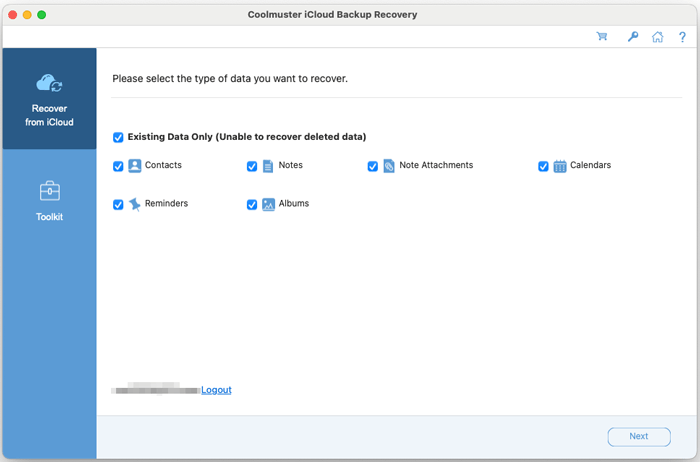
The Mac data-type screen after sign-in: six types, all marked existing data only, with a Logout link for the account.
Features
Coolmuster iCloud Backup Recovery for Mac keeps the account out of macOS
Coolmuster iCloud Backup Recovery for Mac signs in inside its own window, with the two-factor code sent to your trusted Apple devices, and logs out with one click. The Apple ID never has to be added to System Settings, which is the point when you're pulling a parent's, a former employee's or an old account's data onto your Mac.
Shows photos album by album, including Recently Deleted
Coolmuster iCloud Backup Recovery for Mac lists iCloud photos by album with counts (Screenshots, Live, Videos and your own albums, plus Recently Deleted in the vendor's example), so you can save one album instead of the whole library.
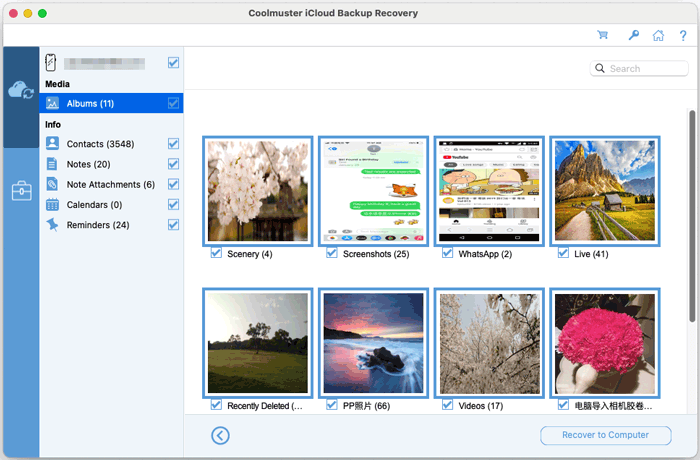
Albums as thumbnails, with counts for contacts, notes, note attachments, calendars and reminders on the left.
Lists notes and reminders with their dates
Coolmuster iCloud Backup Recovery for Mac shows notes as a table with title, content, note ID and time, going back years, and keeps note attachments as a separate category so pictures and files inside notes aren't lost.
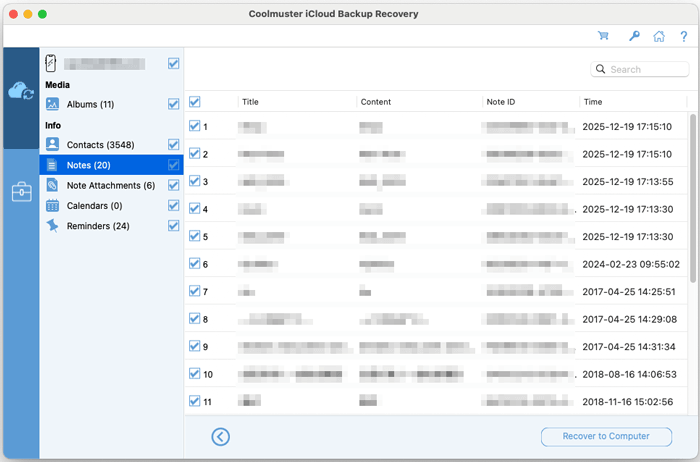
iCloud notes from 2017 to 2025 in one list, ready to tick and save.
Benefits
- A clean file copy of an iCloud account without merging it into your own Mac's apps.
- No phone needed, so it works after a lost, sold or broken iPhone.
- Selective saving keeps a one-album or one-contacts-list job small.
Real-World Uses
- Archiving a late relative's iCloud photos and notes on the family Mac without signing the Mac in to their Apple ID.
- Taking contacts and calendars out of a work Apple ID before it's closed.
- Saving photos that are still in Recently Deleted before the 30 days run out.
Who It's For, and Who Should Skip It
It's for Mac owners who need iCloud data as files, from an account they'd rather not sync to the Mac, and who find the iCloud website too slow for the job.
Skip it if the account is already yours and signed in on the Mac: Photos, Contacts and Notes already hold the data and can export it for free. Skip it for deleted texts or WhatsApp too; Coolmuster iPhone Data Recovery for Mac and iPhone WhatsApp Recovery for Mac cover those.
Usage Guide
- Open the .dmg, drag the app into Applications and launch it. macOS may ask for permissions or to install Rosetta 2 on first run.
- Enter the Apple ID and password and click the arrow, then type the verification code and click Verify.
- Tick the data types and click Next to scan.
- Preview each category, tick what you want, and click Recover to Computer (licensed copies only).
- Click Logout when you're done so the account isn't left signed in.
Where it falls short
- Six data types and no undelete, which customers on the vendor's page point out.
- Intel-only code on a platform that is now Apple silicon.
- Large accounts load slowly, according to a buyer on the vendor's review page.
- It depends on Apple's sign-in process, which needed fixes in March and September 2026.
What Users Say
We found no independent review of the Mac edition. Coolmuster's review page covers the Windows and Mac editions together, and Coolmuster rewards reviews with free licenses, so read it as a friendly sample.
What buyers liked (Coolmuster's review page, 58 reviews)
"It helped me find old iPhone data from iCloud backup without complicated settings."
Emily Parker, July 31, 2026
"Saved me from digging through endless iCloud backups."
Jessica Miller, September 4, 2026
"This software helped me a lot. I can log in to my iCloud directly on it, and preview my backup contacts. As such, I got back my contacts from my iCloud backup."
Mary, Coolmuster product page (excerpt)
"Works as advertised for iCloud backups."
Eric Nelson, February 2, 2026
What they questioned
"But the data type is incomplete, only contacts, photos, note attachments, reminders, and calendars are supported. App data, device settings, etc. can not be found."
Zdeněk Dvořák, Coolmuster product page (excerpt)
"iCloud sync sometimes unstable?"
James Wright, April 3, 2026
"Scan speed is okay, but large backups take time to load."
Matthew Lewis, May 29, 2026
Coolmuster as a company holds 4.6 out of 5 from 223 Trustpilot reviews (read through a page summarizer), mostly for quick support replies. In short: easy, and good for contacts and photos; limited in what it can see.
Comparisons
iCloud Backup Recovery for Mac vs iPhone Data Recovery for Mac
iPhone Data Recovery for Mac ($49.95 a year) includes this iCloud mode plus device scans and local backups. Pay the extra $30 only if the data might be on the phone or in a Finder backup.
iCloud Backup Recovery for Mac vs signing the Mac in to iCloud
Signing in is free and syncs everything, but it merges that account into the Mac's apps. This app keeps it separate and gives you files.
Editions and Pricing
| Macs | 1 Year (renews) | Lifetime |
|---|
| 1 | $19.95 | $29.95 |
| 5 | $29.95 | $49.95 |
| 10 | $39.95 | $89.95 |
The lifetime license includes lifetime updates, which matters for a tool that depends on Apple's sign-in changes.
FAQs
Does Coolmuster iCloud Backup Recovery for Mac restore a full iCloud device backup?
No. Coolmuster iCloud Backup Recovery for Mac reads six categories of iCloud data and saves them to the Mac. A full device restore still happens on the iPhone during setup.
Can Coolmuster iCloud Backup Recovery for Mac read Advanced Data Protection accounts?
Coolmuster doesn't say. With Advanced Data Protection, most iCloud data is end-to-end encrypted, so check with the free scan before paying.
Is my Apple ID password stored by Coolmuster iCloud Backup Recovery for Mac?
Coolmuster says it never stores or discloses account information and that the app only reads data. Log out in the app when you finish.
Does a Mac license of Coolmuster iCloud Backup Recovery work on Windows?
No. The Windows edition is a separate product with its own license, at the same prices.
Does Coolmuster iCloud Backup Recovery for Mac run on macOS Sequoia or Tahoe?
Coolmuster lists macOS 10.10 or later without an upper limit. The app is an Intel build, so it depends on Rosetta 2 on Apple silicon Macs.
System Requirements
- macOS 10.10 or later, Intel Mac or Apple silicon with Rosetta 2
- Intel Core 1 GHz or faster, 1 GB RAM, 1 GB free disk space
- Internet connection, Apple ID and access to its two-factor codes
Conclusion
Worth $19.95 if you need someone's iCloud photos, contacts or notes saved as files on your Mac without signing the Mac in to that account. It does that one job simply, and the preview tells you before you pay whether the data is there.
The reason not to buy is if the account is already on your Mac, where Apple's own apps export the same data free, or if you need deleted messages, which this app can't see.
Download Free Trial Buy Now