Vovsoft Copy Files Into Multiple Folders: One Copy Job, Many Destinations
Copy Files Into Multiple Folders is a $19 Windows utility from Vovsoft that copies (or moves, or mirrors) a list of files and folders into a whole list of target folders in one run, including network drives and cloud-synced folders. The $19 is a one-time lifetime license, and there's a free trial.
Windows Explorer pastes into one folder at a time. If you push the same files to ten project folders, three backup drives or every PC on the home network, this does it in one click.
Quick facts
- Version: 7.6, released July 15, 2026
- Developer: Vovsoft
- Platform: Windows 11, 10, 8/8.1, 7 and Vista, 32-bit and 64-bit. No Mac version
- Sources: files, folders (with subfolders) and URLs, which it downloads first
- Modes: Copy, Move (deletes the source after a successful copy) and Mirror (empties each target first)
- Languages: English and 31 others
- Editions: installer (5.05 MB) and portable (5.12 MB), one license for both
- Price: $19, one-time payment, lifetime license with free updates
- Trial: free to try, for personal, non-commercial use, with a nag screen
- What we checked: installer file version 7.6.0.0 (5,304,792 bytes) with a valid code signature, downloaded from the vendor on November 11, 2026, and $19.00 on the order page with no auto-renewal on November 11, 2026. We didn't run a copy job to network drives
Download Free TrialBuy Now
Overview
The window is two lists. The top one, Source, holds the files, folders or URLs to copy. The bottom one, Target Folders, holds every destination. Tick whether existing or read-only files should be overwritten, press Copy Into Target Folders, and a log window shows each file as it's copied or skipped.

Two source files, the Copy, Move and Mirror mode buttons, and ten project folders as targets.
Features
Copy, move or mirror
Copy Files Into Multiple Folders copies by default. Move mode deletes the source files once the copy succeeds, and Mirror mode clears each target folder's contents before copying, so every destination ends up holding exactly the source set. Mirror deletes files, so check the target list before you use it.
Network, cloud and files in use
Copy Files Into Multiple Folders works with mapped network drives and with Dropbox, Google Drive and OneDrive folders when their desktop apps are installed. It can copy files that are open in another program, and it understands Windows environment variables such as %USERPROFILE% in paths.
Right-click Send To and saved lists
Copy Files Into Multiple Folders' installer adds it to the Send To menu, so you can right-click files in Explorer and send them straight in, and since version 7.3 it remembers the target folders when you do. Source and target lists can be saved and loaded as operation files.
A simple countdown scheduler
Copy Files Into Multiple Folders can count down a set time and then start the copy on its own, handy for a copy at the end of the working day.
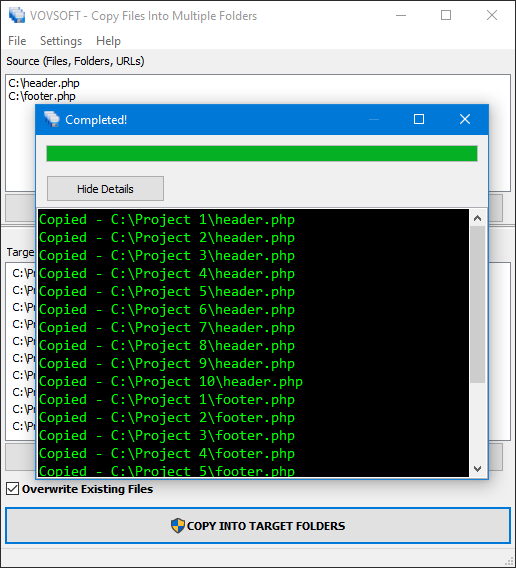
The log after a run: each file listed as copied into each of the ten project folders.
Benefits
It turns a repetitive drag-and-drop chore into a saved job you can run again. You set the targets once, keep them as a list, and next time just drop in the new files. The option to keep original creation dates (added in version 7.0) also means copies don't all look brand new.
Real-World Uses
- A web developer updates a shared header and footer file in ten site folders at once.
- A music collector pushes newly tagged albums to a NAS, a backup drive and a second PC in one go.
- An office manager places the same updated forms into every department's shared folder.
- Someone who backs up to two external USB drives copies each category of files to the right folder on both drives in a single run.
Who It's For, and Who Should Skip It
It suits anyone who regularly copies the same set of files to several places and wants a point-and-click tool rather than a script.
Skip it if you need true sync or backup: it doesn't watch folders for changes, doesn't keep versions and doesn't verify copies with checksums. A sync tool such as FreeFileSync or a backup program fits those jobs better. People comfortable with batch files or Robocopy can script the same thing for free.
Usage Guide
- Download the installer or the portable edition and start the program.
- Add files, folders or URLs to the Source list with the plus button or by drag and drop.
- Add each destination to the Target Folders list.
- Choose Copy, Move or Mirror, and tick the overwrite options you want.
- Press Copy Into Target Folders and read the log. Save both lists if you'll repeat the job.
Before you buy
Test Mirror mode on a scratch folder first, since it empties targets. One license covers one person on any number of their own computers. Vovsoft's general policy is no refunds once the key is delivered, since a free trial comes first (accidental orders are generally refunded, at its discretion, and PayPro Global has the final say on its orders).
Where it falls short
- No checksum verification after copying, an open request.
- No automatic copying when files change, and saved operation files don't yet run one after another.
- No FTP targets.
- It can't recreate part of a source folder path at the destination, another open request.
What Users Say
On Vovsoft's site
Copy Files Into Multiple Folders' page shows 4.6 out of 5 from 17 ratings, with these comments among others.
"After downloading and installing I'm furious! .... Furious I hadn't come across this software before, what a neat idea, simple to use. I have a need to copy the same data to several other devices and this is a big time saver" Robert
"Brilliant, time-saving piece of kit, especially as it can be set up to copy to networked drives/folders on other machines, given the correct location address. ... I must admit to doing a dummy run, initially, as I wondered if it could be trusted but no problems. It flags up any minor errors, such as syntax, in red, as it goes, to be corrected." Dave P
"Extremely Responsive! While evaluating 'Copy Into Multiple Folders', I sent an email with 2 or 3 suggestions for improvements that would make the product perfect for my use case. They immediately responded and added everything I asked for within 72 hours!" TKruzze
"I sometimes need to move some new files into a bunch of different folders. This means dragging and dropping into each folder, which can be tedious. Copy Files Into Folders made this job easier and done much faster, plus the price was reasonable." Anonymous User
Overall
Vovsoft as a company has a TrustScore of about 4.6 out of 5 from 411 reviews on Trustpilot, read through a summarizer, where people mostly praise fast fixes and fair prices.
Across the comments, users of this program like that it's simple and that the developer adds requested options quickly. The wishes that keep coming up in its feature requests are verification, automation and FTP.
Comparisons
Copy Files Into Multiple Folders vs Robocopy
Robocopy is free and built into Windows, with mirroring, retries and logging, but each destination needs its own command line. This program puts many targets in one list with a log window, and no commands to remember.
Copy Files Into Multiple Folders vs a sync tool
A sync program compares folders and copies only what changed, in both directions if you like. This program is a one-way push of a chosen set of files to many places at once.
Editions and Pricing
| Edition | Price | License | What you get |
|---|
| Trial | Free | Personal, non-commercial use | The full program, with a nag screen |
| Licensed | $19 one-time | Lifetime | Commercial use, no nag screen or ads, lifetime free updates |
The installer and portable editions use the same key, sent by email right after payment. Vovsoft's $99 Universal License covers all of its desktop programs.
FAQs
Can Copy Files Into Multiple Folders copy to a NAS or another PC?
Yes. Copy Files Into Multiple Folders copies to mapped network drives and network paths on your local network, as long as Windows can reach them.
Does Copy Files Into Multiple Folders keep the original file dates?
Yes, with the Keep Original Creation Date setting added in version 7.0.
Can I schedule Copy Files Into Multiple Folders to run every day?
Only with a countdown. The built-in scheduler waits a set time and then starts the copy once. For a daily job you'd keep it running or use Windows Task Scheduler.
Will Copy Files Into Multiple Folders copy files that are open?
Yes. Vovsoft says it can copy files that are already in use or open.
Does it work with OneDrive or Google Drive?
Yes, through their desktop apps. Copy Files Into Multiple Folders copies into the local Dropbox, Google Drive or OneDrive folder and the app uploads from there.
Is the license a subscription?
No. The $19 license is a one-time payment that never expires and includes future updates.
System Requirements
- Windows 11, 10, 8/8.1, 7 or Vista, 32-bit or 64-bit
- About 6 MB of disk space
Conclusion
Copy Files Into Multiple Folders is worth $19 if you copy the same files to several places every week. The reason to buy it is how much drag-and-drop it saves, with copy, move and mirror modes and network and cloud folders covered. The reason not to: it's not a sync or backup tool, with no change detection or verification, and script-minded users can do the same with Robocopy for free.
Download Free TrialBuy Now