Coolmuster PDF to JPG Converter: Turn PDF Pages into Images
Coolmuster PDF to JPG Converter is a $15.95-a-year Windows program that turns PDF pages into JPG, PNG, TIF, BMP or GIF images, for a batch of files or selected pages.
You need page 12 of a report as a picture for a slide, or a whole brochure as images for a website. Screenshots are blurry and slow. Converting the pages gets you real image files.
Quick facts
- Version: 2.5.3 (February 2, 2026)
- Developer: Coolmuster
- Platforms: Windows 11, 10, 8, 7 only
- Input: PDF
- Output: JPG, JPEG, PNG, TIF, BMP, GIF
- Trial: free download, limits not published
- Price: $15.95 for one PC for one year at checkout, renewing automatically unless you cancel
- Refund: 30 days on one-year and lifetime licenses, 7 days on monthly ones
- What we checked: the trial installer from coolmuster.com (18.10 MB, server date February 2, 2026) and the $15.95 price on the order page on November 10, 2026. We read Coolmuster's specifications and user guide, but we didn't install the program or run it on our own files.
Before you buy
This turns whole pages into pictures. To pull out just the photos embedded in a PDF, use PDF Image Extractor instead. The output is an image, so the text in it can no longer be edited or searched, and Softpedia's editor found few advanced image settings for fine-tuning output.
Download Free TrialBuy Now
Overview
PDF to JPG Converter is a focused tool. You add PDFs, choose which pages to convert, pick a format for each file from a drop-down in the Mode column, and press Start.
Each output image is one page. A preview on the right lets you browse a PDF so you can find the page numbers you need, and the file list shows total pages and selected pages for each document.
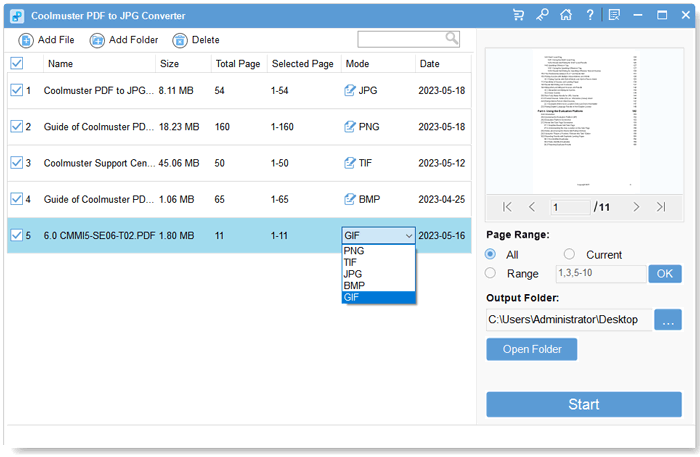
Five PDFs listed with different output formats, and the drop-down open on the last one.
Features
Six output formats, set per file
Coolmuster PDF to JPG Converter outputs JPG, JPEG, PNG, TIF, BMP or GIF, and you can select the format separately for each PDF in the list.
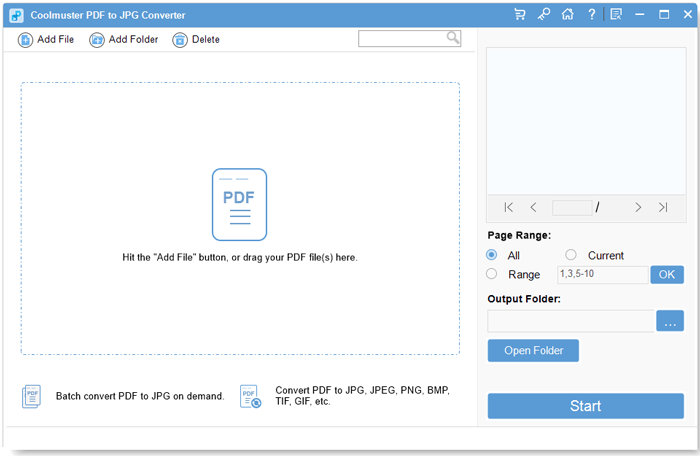
The start window with the preview pane and Page Range settings on the right.
Page ranges
PDF to JPG Converter converts All pages, the Current page you're previewing, or a Range you enter such as 1,3,4,5-10.
Batch conversion
PDF to JPG Converter processes several PDFs in one run, so a folder of files can be converted without opening each one.
Built-in preview
PDF to JPG Converter previews any loaded PDF page by page on the right of its window, which helps you pick the right page numbers.
Benefits
- You get real image files of your pages rather than screenshots.
- Different PDFs in one run can go to different formats.
- Page ranges avoid making hundreds of images you don't want.
Real-World Uses
- Dropping a PDF chart into a PowerPoint slide as a picture.
- Publishing brochure pages as images on a website.
- Sharing a PDF page on social media.
- Converting pages to TIF for a print or archive workflow.
Who It's For, and Who Should Skip It
It's for people who regularly need PDF pages as images and want a choice of formats.
Skip it for an occasional page, where a screenshot or a free online converter may be enough. If you also want Word or Excel, PDF Converter Pro at $29.95 includes image output. If you need precise DPI or scaling controls, look elsewhere, since none are listed.
Usage Guide
- Install PDF to JPG Converter from the Download Free Trial button and launch it.
- Click Add File or Add Folder, or drag PDFs into the window.
- Set All, Current or Range for each PDF, pressing OK after typing a range.
- Choose an output format in the Mode column, and an output folder.
- Click Start and open the folder when it finishes.
Where It Falls Short
- No listed DPI or image size controls.
- Softpedia's editor noted limited pagination settings and few advanced image format options.
- Windows only.
- Image output means text can't be selected or edited.
What Users Say
Coolmuster's site shows customer reviews, but it also runs a "Win Free Coolmuster License Code" offer for writing one, and many entries are short and unspecific. Treat them as a sign of what buyers care about, not as independent testing.
Reviews on Coolmuster's own site
- 'Ideal' tool "At least 3x improvement in quality compared to the blurry images I got from screenshots." traveller*, August 13, 2026
- I can choose the page I need to convert "Fast speed, even for large files. Professional!" DavidLin_uW, February 26, 2026
- It's a powerhouse "Allow me to convert 9 PDFs to JPG format at once without slowing down my computer's performance" Cold TO, December 9, 2025
- It is not confined to handling one format. "You can see the entire PDF to be converted through the preview window." Yinh To, June 1, 2026
- A tool that can be used directly "I don't need to spend time working on another version - just add my files and click convert." Laen Na, April 26, 2026
Independent coverage
Softpedia's editor review calls it a basic converter with reliable performance, and criticizes its limited pagination settings and few advanced image format options.
Buyers mostly like the speed and the preview. The outside review agrees on reliability and marks it down for a shortage of settings.
Comparisons
PDF to JPG Converter vs PDF Image Extractor
PDF to JPG Converter makes one image per page. PDF Image Extractor pulls out only the pictures embedded in the PDF. They cost the same $15.95.
PDF to JPG Converter vs PDF Converter Pro
Coolmuster's comparison shows PDF Converter Pro including image output and also Word, ePub, text, HTML, Excel and PowerPoint for $29.95 a year.
Editions and Pricing
| Seats | 1 month | 1 year | Lifetime |
|---|
| 1 PC | $9.95 | $15.95 | Not on the order page |
| 5 PCs (business) | $19.95 | $25.95 | $35.95 |
| 10 PCs (business) | $29.95 | $35.95 | $45.95 |
Prices exclude VAT. Monthly and yearly licenses renew automatically until you cancel, and the yearly plan includes free upgrades for that year.
FAQs
Which image formats can Coolmuster PDF to JPG Converter create?
Coolmuster PDF to JPG Converter creates JPG, JPEG, PNG, TIF, BMP and GIF images.
Can PDF to JPG Converter convert only some pages?
Yes. PDF to JPG Converter accepts All pages, the Current page or a typed Range, for example 1,3,4,5-10.
Does the one-year PDF to JPG Converter license renew automatically?
Yes. The one-year PDF to JPG Converter license at $15.95 renews automatically after 12 months, and Coolmuster's order page says you get a notification email before the renewal date and can cancel at any time. It includes free upgrades during that year.
What is the refund period for PDF to JPG Converter?
PDF to JPG Converter has a 30-day money-back guarantee on one-year and lifetime licenses and 7 days on monthly licenses. Orders can't be canceled once payment has gone through, because the license is issued right away, and a refund goes through support@coolmuster.com with your order ID or receipt.
Is PDF to JPG Converter available for Mac?
No. Coolmuster lists PDF to JPG Converter for Windows 11, 10, 8 and 7 only.
Can PDF to JPG Converter set the image DPI?
DPI control isn't on the PDF to JPG Converter feature list. If exact resolution matters, check the output in the trial.
System Requirements
- Windows 11, 10, 8 or 7
- 1 GHz processor or faster (32 or 64 bit)
- 256 MB RAM, 1 GB recommended
- 200 MB of free disk space
Conclusion
Coolmuster PDF to JPG Converter is worth $15.95 if you regularly need PDF pages as images in a choice of formats and don't care about fine-tuning them.
The one reason to buy it is simple batch conversion with page ranges. The main reason not to is the lack of resolution settings.
Download Free TrialBuy Now