Coolmuster Android Backup Manager: One-Click Android Backups to Your PC, No Root Needed
Coolmuster Android Backup Manager is a $19.95-a-year Windows program that copies an Android phone's contacts, messages, call logs, photos, videos, music, documents and apps to your PC, and restores them to that phone or another one. It's for people who'd rather keep a full copy on their own computer than pay for cloud storage.
It does just two things, Backup and Restore, and it doesn't need root.
Quick facts
- Version: 4.0.11 for Windows, released October 21, 2026
- Developer: Coolmuster
- Works with: Android 6 and later, up to Android 17
- Connection: USB cable or Wi-Fi
- Price: $19.95 for one year on one PC, $29.95 lifetime
- Trial: free download
- What we checked: Windows version 4.0.11 in the vendor release notes, 24 MB installer from the vendor (file dated October 21, 2026), checkout price $19.95 on November 10, 2026. We worked from the vendor manual and its screenshots and did not run a backup and restore on a phone.
Before you buy
- The program installs Coolmuster's companion Android app on your phone in order to connect, and you'll need to allow its permissions.
- Apps are backed up as installable app packages. One Trustpilot customer found that some wouldn't restore, so don't assume your app logins and data come across.
- The one-year plan renews automatically until you cancel it, and a renewal charge is non-refundable.
Download Free Trial Buy Now
Overview
After connecting, the program shows two buttons. Backup lists eight data types with their counts and sizes and lets you choose a folder on the PC, including an external drive. Restore finds your earlier backups, lets you pick one and tick which types to bring back, and has an optional "Clear data before restoring" box.
It's less capable than Coolmuster Android Assistant, which also edits and manages phone data. If your only need is a backup you control, this cheaper tool is enough.
Features
Coolmuster Android Backup Manager backs up eight data types in one pass
Contacts, messages, call logs, photos, music, videos, documents and apps are listed with their counts and sizes. You tick what you want and pick the destination, which can be any folder or an external drive, and the program works without root.
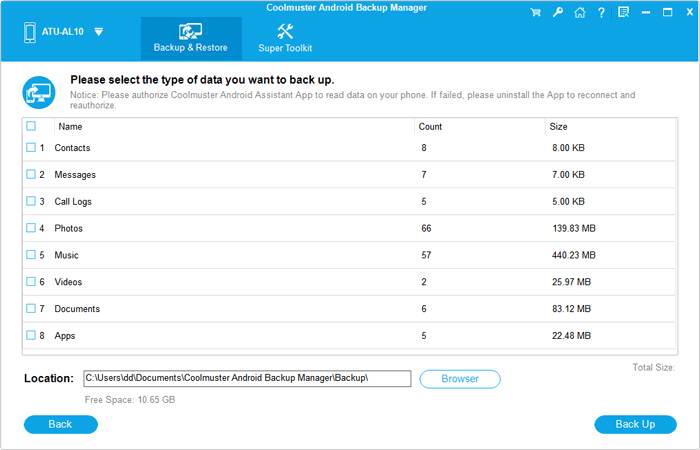
The backup screen lists each data type with its count and size (from the vendor manual).
Restore to the same phone or a different one
Coolmuster Android Backup Manager finds past backups automatically and lets you restore specific types from one backup, including individual apps. An Add Backup Folder button brings in a backup stored elsewhere. Current data stays in place unless you tick Clear data before restoring.
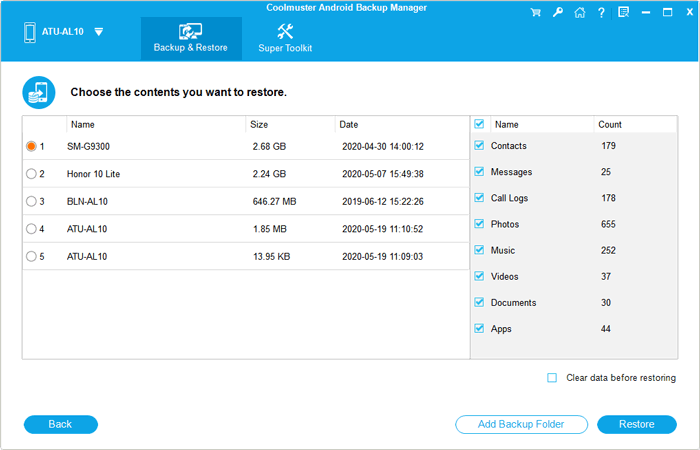
The restore screen, with past backups on the left and data types on the right.

Apps can be selected individually before restoring.
Choose USB or Wi-Fi
Coolmuster Android Backup Manager connects by USB with debugging enabled, which the vendor recommends for large files, or over Wi-Fi by scanning a QR code with the companion app while the phone and PC are on the same network.
Handles several phones
Coolmuster Android Backup Manager can connect to more than one Android phone or tablet at once and switch between them from a drop-down, which helps when a household shares one computer.
Benefits
- Your backups stay on your own disk and aren't limited by a cloud storage plan.
- The backup screen shows counts and sizes before you start, so you know what you're copying.
- Restoring by data type means you don't have to overwrite the whole phone.
- At $19.95 it's one of Coolmuster's cheapest tools.
Real-World Uses
- You're moving from an old Samsung to a new Pixel and want contacts, photos and texts across.
- You keep a monthly backup of your phone on an external drive.
- You're about to do a factory reset and want a full copy first.
- Two family phones share one PC for safekeeping.
Who It's For, and Who Should Skip It
It suits Android owners who want simple, local backups and want to avoid cloud subscriptions.
Skip it if you want to edit contacts, send texts or manage apps from the PC, which is what Coolmuster Android Assistant does. It can't help with data you've already deleted, either: that's a job for a recovery tool. It's also not an iPhone tool, and Mac users need the separate Mac edition.
Usage Guide
- Install and launch the program, then connect the phone by USB or click the Wi-Fi icon.
- Enable USB debugging and allow the connection when prompted. The program installs its companion app on the phone.
- Click Backup, tick the data types, choose a folder and click Back Up.
- To restore, click Restore, pick a backup, tick the types and click Restore.
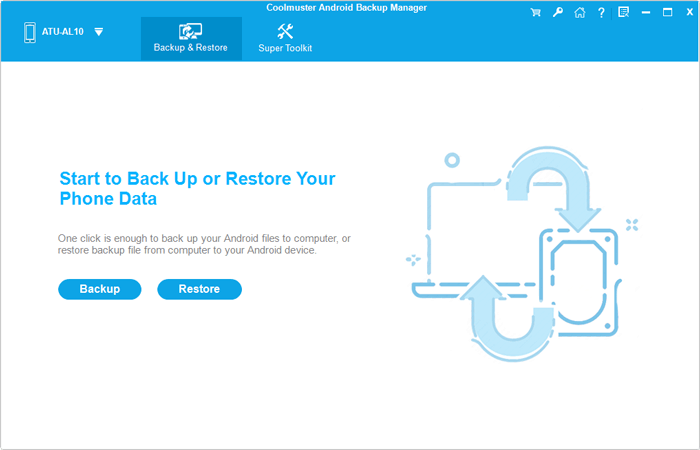
The main screen after connecting: just Backup and Restore.
Where it falls short
- Trustpilot customer Nigel Hunt found some apps would not restore, though he also got a full refund from Coolmuster.
- It relies on a companion app and USB debugging, so a phone that won't connect means no backup at all.
- It's a full-or-by-type backup, with no scheduling or automatic backups mentioned by the vendor.
What Users Say
We found no independent test of this product, so the product-specific quotes come from Coolmuster's own site and Trustpilot. Coolmuster runs a write-a-review-to-win-a-free-license promotion, so read the praise on its own site, and on small blogs, with that in mind.
On Coolmuster's product and review pages (151 reviews shown)
These appear on the vendor's own site.
"Product is easy to use and allowed me to create a backup of my phone and tablet prior to updating me devices. I am very pleased with the application."
Joseph Hargis, vendor product page
"Excellent software. Very easy to use. Got 2 phones backed up with it. Came in very handy when I transferred to a new phone."
John, vendor product page
"Backing up my Android data to a computer is straightforward. I like having a separate copy of important files that I can restore when needed."
Grace Mitchell, October 29, 2026, vendor review page
Trustpilot reviews that mention this product
Coolmuster scores 4.6 out of 5 from 223 Trustpilot reviews, read through a page summarizer. These two relate to backups.
"After purchase of Backup Manager I found that some app apks wouldn't restore."
Nigel Hunt, January 31, 2026, 4 stars, Trustpilot (excerpt)
"Customer service was very good. Simplified instructions and prompt response."
Bert, July 29, 2026, Trustpilot (excerpt, about Android backup)
Customers usually mention how little there is to learn. The one specific problem that came up was apps not restoring.
Comparisons
Android Backup Manager vs Coolmuster Android Assistant
Android Assistant ($29.95 a year) adds editing contacts, sending texts and installing apps from the PC, and includes a backup function. Backup Manager is $10 cheaper and simpler if backup is all you want.
Android Backup Manager vs cloud backup
Google's backup is free up to your storage limit and runs automatically, but it doesn't give you a complete copy on your own disk. This tool does, but you have to run it yourself.
Editions and Pricing
| Plan | Price | Term | Covers |
|---|
| 1 Year, 1 PC | $19.95 | 1 year, renews automatically | 1 PC |
| Lifetime, 1 PC | $29.95 | One payment, lifetime updates | 1 PC |
| 1 Year, 5 PCs | $29.95 | 1 year, renews automatically | 5 PCs |
| Lifetime, 5 PCs | $49.95 | One payment, lifetime updates | 5 PCs |
| 1 Year, 10 PCs | $39.95 | 1 year, renews automatically | 10 PCs |
| Lifetime, 10 PCs | $89.95 | One payment, lifetime updates | 10 PCs |
Backups are something you do repeatedly, so the lifetime license, only $10 more than one year, makes more sense here than it does for a one-time recovery tool.
FAQs
Does Coolmuster Android Backup Manager need root?
No. Coolmuster Android Backup Manager backs up internal phone storage without root access, according to the vendor.
Can Coolmuster Android Backup Manager back up WhatsApp?
Coolmuster doesn't list WhatsApp as a data type for Android Backup Manager. The eight types are contacts, messages, call logs, photos, music, videos, documents and apps.
Does Coolmuster Android Backup Manager restore app data and logins?
Coolmuster describes apps as user apps in APK form and doesn't promise app data, and one customer found some apps wouldn't restore. Expect to sign in again.
Can I restore a Coolmuster Android Backup Manager backup to a different brand of phone?
Yes. Coolmuster says Android Backup Manager restores to any connected Android device, so a move between brands is supported.
What's the refund policy for Coolmuster Android Backup Manager?
Android Backup Manager is covered by the standard 30-day guarantee, but Coolmuster refuses refunds without a reasonable reason, so check that your phone connects in the trial.
Which Android versions work with Coolmuster Android Backup Manager?
Coolmuster Android Backup Manager supports Android 6.0 and later, including Android 17.
System Requirements
- Windows 11, 10, 8 or 7 (a separate Mac edition exists)
- Android 6.0 or later, up to Android 17
- 1 GHz CPU or faster, 256 MB RAM, 1 GB recommended
- 200 MB free disk space, plus room for your backup
Conclusion
Worth it if you want a straightforward local backup of an Android phone at a low price. Its strength is that there's almost nothing to figure out.
The main reason not to buy is if you need your apps back with their data and logins, or you want backups to run on their own. Google's automatic backup and a fuller manager handle those better.
Download Free Trial Buy Now