Vovsoft XLS to CSV Converter: Batch Excel to CSV, With Encoding Control
XLS to CSV Converter is a $19 Windows program from Vovsoft that batch converts XLS and XLSX files, including their worksheets, to CSV. The $19 is a one-time lifetime license, and the free trial limits how many files you can convert.
Excel's own Save As works for one sheet at a time. This earns its price when you have dozens of files or need a specific encoding.
Quick facts
- Version: 2.3, released June 6, 2024
- Developer: Vovsoft
- Platform: Windows 11, 10, 8/8.1, 7, Vista and XP, 32-bit and 64-bit. No Mac or Linux version
- Input: XLS and XLSX, by file or folder, with subfolders
- Encodings: ANSI, UTF-8, UTF-8-BOM, UTF-16 BE BOM, UTF-16 LE BOM
- Separator: Your choice, such as comma or semicolon
- Editions: installer (3.35 MB) and portable (2.05 MB), one license for both
- Price: $19, one-time payment, lifetime license with free updates
- Trial: free to try. Converts a limited number of files, with a nag screen. It isn't allowed for commercial use
- Refunds: Vovsoft's general policy is no refunds, since a free trial comes first. An order placed by accident is generally refunded, at the company's discretion, and PayPro Global has the final say on orders placed through it
- What we checked: installer file version 2.3.0.0 (3,518,736 bytes) with a valid code signature, downloaded from the vendor on November 10, 2026, and $19.00 total on the order page with no auto-renewal on November 10, 2026. We didn't convert a workbook ourselves
Download Free TrialBuy Now
Overview
Add your Excel files, set a destination folder, separator and encoding at the bottom of the window, and click Convert to CSV. Settings can make it run itself on launch: scan its own folder, convert everything and close.
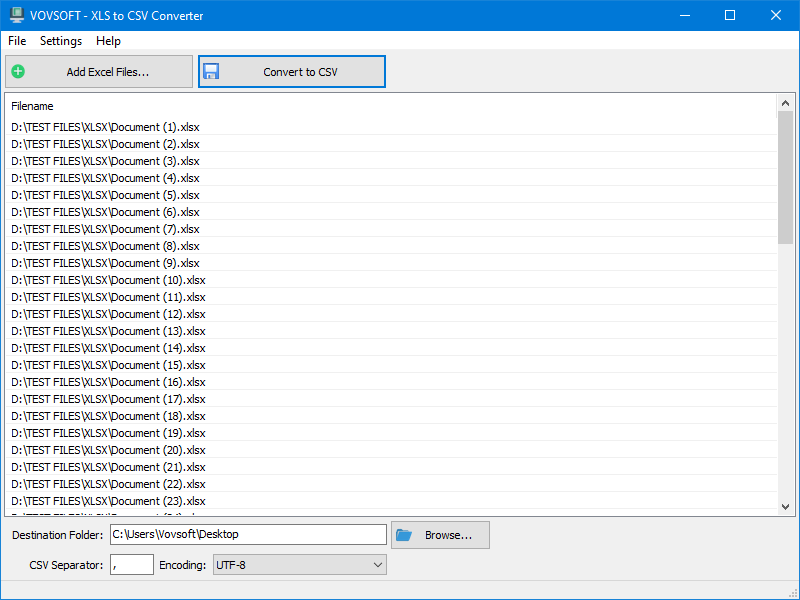
A list of XLSX files with the destination folder, CSV separator and encoding options below.
Features
Every worksheet, not just the first
XLS to CSV Converter handles workbooks with multiple worksheets, and a setting puts each sheet's name in its CSV file name.
Encoding and separator control
XLS to CSV Converter writes ANSI, UTF-8, UTF-8-BOM or UTF-16, with a separator you choose, which is what you need when a database import rejects your file.
A hands-off automatic mode
XLS to CSV Converter can add every Excel file in its own folder, convert them and close by itself, enabled in the Settings menu.
Multi-line cells preserved
XLS to CSV Converter has an option to keep cells that contain line breaks intact.
Who It's For, and Who Should Skip It
It suits people preparing many spreadsheets for a database or another system that demands a particular CSV format.
Skip it for one or two files. In Excel, File > Save As > CSV UTF-8 does it for free, though only for the active sheet.
Usage Guide
- Download the installer or the portable edition and start the program.
- Click Add Excel Files, or drag them in.
- Choose a destination folder.
- Set the separator and encoding.
- Click Convert to CSV.
Before you buy
One license covers one person on as many of their own computers as they use, or one shared workstation used by several people in turn. Using a key on too many computers at the same time can get it revoked.
Where it falls short
- There's no command-line mode, which is the top open request. The automatic launch mode is the nearest substitute.
- CSV keeps values only, so formulas, formatting and charts are gone from the output, as with any CSV export.
- The last release was June 2024.
What Users Say
What reviewers say
Vovsoft's product page shows a rating of 4.6 out of 5 from 5 reviews, with this comment.
"Excellent conversion system, we really liked the speed and ease of batch conversion" JEAN
Editions and Pricing
| Edition | Price | License | What you get |
|---|
| Trial | Free | Personal, non-commercial use | Converts a limited number of files, with a nag screen |
| Licensed | $19 one-time | Lifetime | Commercial use, no nag screen, lifetime free updates, all features |
The installer and portable editions use the same license key, and the key is delivered right after payment.
FAQs
Can XLS to CSV Converter convert every sheet in a workbook?
XLS to CSV Converter supports multiple worksheets, and it can include sheet names in the output file names.
Can XLS to CSV Converter include subfolders?
XLS to CSV Converter has an Include Subfolders setting and an Add Folder command, so a folder tree can be converted in one run.
Is the XLS to CSV Converter trial limited?
XLS to CSV Converter's trial doesn't convert unlimited files, and unlimited conversion needs the $19 license.
System Requirements
- Windows 11, 10, 8/8.1, 7, Vista and XP, 32-bit or 64-bit
- 3.35 MB for the installer, 2.05 MB for the portable edition
Conclusion
Worth $19 if you convert Excel files in bulk. The reason to buy it is batch conversion with worksheet and encoding control. The reason not to is a handful of files, where Excel's Save As is free and fine.
Download Free TrialBuy Now