Vovsoft QR Code And Barcode Reader: Decode Codes on Your PC, Offline
QR Code And Barcode Reader is a $19 Windows program from Vovsoft that reads QR codes and barcodes from image files, the clipboard or a webcam, without an internet connection. The $19 is a one-time lifetime license, and there's a free trial.
Your phone already reads QR codes for free. This is for codes that are stuck on a computer: in a screenshot, a scan or a folder of images.
Quick facts
- Version: 1.7, released October 30, 2026
- Developer: Vovsoft
- Platform: Windows 11, 10 and 8/8.1, 32-bit and 64-bit. No Mac or Linux version
- Sources: Clipboard, image files (PNG, WEBP, JPEG, TIFF, GIF, BMP), webcam
- Formats: 19, including QR, Code 128, Code 39, EAN-13, UPC-A, PDF 417, Aztec, Data Matrix
- Detection: Code type detected automatically
- Editions: installer (10.79 MB) and portable (12.25 MB), one license for both
- Price: $19, one-time payment, lifetime license with free updates
- Trial: free to try. Reads codes, with a nag screen. It isn't allowed for commercial use
- Refunds: Vovsoft's general policy is no refunds, since a free trial comes first. An order placed by accident is generally refunded, at the company's discretion, and PayPro Global has the final say on orders placed through it
- What we checked: installer file version 1.7.0.0 (11,317,704 bytes) with a valid code signature, downloaded from the vendor on November 10, 2026, and $19.00 total on the order page with no auto-renewal on November 10, 2026. We didn't scan any codes ourselves
Download Free TrialBuy Now
Overview
Paste an image, browse to a file, or switch to the Webcam tab. The decoded text appears in the panel at the bottom, ready to copy or save, and a setting can copy it to the clipboard automatically.
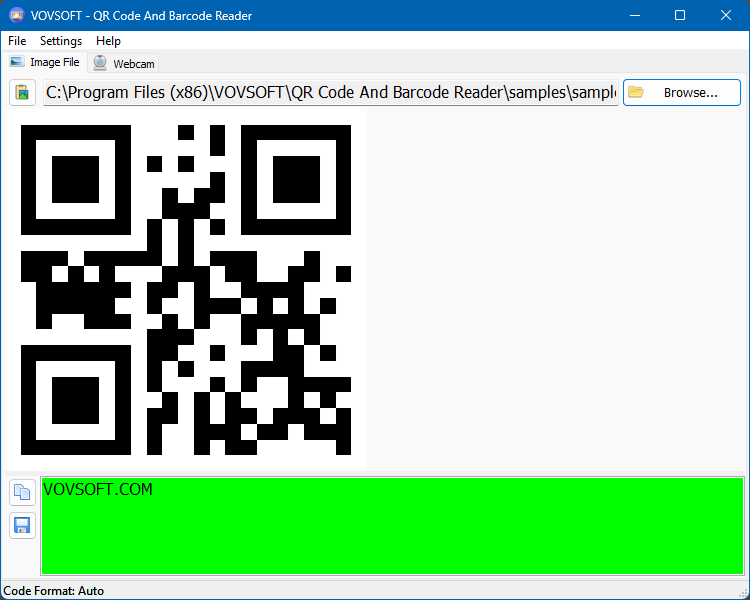
A sample QR code opened from a file, with the decoded text in the green panel below.
Features
Three ways to supply a code
QR Code And Barcode Reader reads the clipboard, including images copied from File Explorer, image files in six formats, and a live webcam.
Offline decoding
QR Code And Barcode Reader doesn't need an internet connection and sends nothing online, unlike the online decoders you'd otherwise upload an image to.
1D and 2D formats, detected for you
QR Code And Barcode Reader handles Aztec, Codabar, Code 128, Code 39, Code 93, Data Matrix, EAN-13, EAN-8, ITF, MaxiCode, MSI, PDF 417, Plessey, QR Code, RSS 14, RSS Expanded, UPC-A and UPC-E, picking the type automatically.
Who It's For, and Who Should Skip It
It suits people who get codes on screen or in files and want the text on the same PC, such as support staff, testers and anyone working with labels.
Skip it if you can point a phone at the code: phone cameras read QR codes for free. It also isn't an inventory scanner.
Usage Guide
- Download the installer or the portable edition and start the program.
- Click Browse to open an image, or paste one from the clipboard.
- Or open the Webcam tab and hold the code up to the camera.
- Copy or save the decoded text.
Before you buy
One license covers one person on as many of their own computers as they use, or one shared workstation used by several people in turn. Using a key on too many computers at the same time can get it revoked.
Where it falls short
- It can't read a code directly off the screen, or from a PDF. Both are open requests, so take a screenshot or export the image first.
- Data Matrix codes are read only when centered in the image.
- It needs Windows 8 or later, while many Vovsoft tools still run on older versions.
What Users Say
What reviewers say
Vovsoft's product page shows a rating of 4.2 out of 5 from 6 reviews, with this comment.
"Good Software, Thank you very much. Martin" Martin Koster
Editions and Pricing
| Edition | Price | License | What you get |
|---|
| Trial | Free | Personal, non-commercial use | Reads codes, with a nag screen |
| Licensed | $19 one-time | Lifetime | Commercial use, no nag screen, lifetime free updates, all features |
The installer and portable editions use the same license key, and the key is delivered right after payment.
FAQs
Can QR Code And Barcode Reader read a QR code from a screenshot?
QR Code And Barcode Reader can read a screenshot pasted from the clipboard or saved as an image file.
Does QR Code And Barcode Reader work without internet?
QR Code And Barcode Reader decodes everything offline, and no code data is sent anywhere.
Is QR Code And Barcode Reader a subscription?
QR Code And Barcode Reader is a one-time purchase, with a license that doesn't expire and free updates.
System Requirements
- Windows 11, 10 and 8/8.1, 32-bit or 64-bit
- 10.79 MB for the installer, 12.25 MB for the portable edition
Conclusion
Worth $19 if codes regularly arrive on your PC rather than in front of your phone. The reason to buy it is offline decoding from files, the clipboard and a webcam. The reason not to is that a phone camera already handles most everyday QR codes for free.
Download Free TrialBuy Now