ConnectCode Code 39 Barcode Font: Simple Code 39 Barcodes You Can Type, Plus Code 93, MSI and POSTNET
ConnectCode Code 39 Barcode Font is a $99 one-time purchase for Windows that prints Code 39, Code 39 ASCII (Extended), Code 93, MSI and POSTNET barcodes from Excel, Word, Access, Crystal Reports or any program that lets you choose a font. It suits asset tags, ID badges, inventory bins and internal labels, where Code 39 is still the easiest barcode to set up.
Code 39 is the barcode you can make without any software logic: wrap your data in asterisks, type *123456*, set the cell to the font, and you're done. That simplicity is why so many warehouses and IT departments still use it. ConnectCode adds the parts you can't type easily: an optional check character, full-ASCII encoding and clean bar heights.
Quick facts
- Developer: ConnectCode Pte Ltd, Singapore (barcoderesource.com)
- Version: 11.8 of the ConnectCode barcode package
- Barcodes: Code 39, Code 39 ASCII (Extended), Code 93, MSI (Modified Plessey) and POSTNET
- Fonts: CCode39_S1 to CCode39_S7 (seven bar heights) and CCode39_HS3 with human-readable text, as TrueType, OpenType, PostScript, WOFF and WOFF2
- Platform: Windows XP to Windows 11 and Windows Server 2003 to 2022; the font files also work on macOS and Linux
- Price: $99 Single User, $229 Enterprise Site, $369 Distribution, $699 Unlimited Distribution. One-time payment
- Included: one year of upgrades and priority support
- Trial: all ConnectCode fonts and tools; trial barcodes carry lines and demo wording
- What we checked: the trial packages from barcoderesource.com (the 26.6 MB setup ZIP, and the 33.3 MB ZIP whose font folder holds the trial Code 39 and Code 93 fonts) and the four Code 39 license prices on the order page on November 23, 2026. We didn't scan a printed barcode ourselves.
Before you buy
- Code 39 is wide. For long data or small labels, Code 128 fits the same data in much less space.
- The Font Pack may be better value. ConnectCode Barcode Font Pack ($149) includes this family plus Code 128, UPC/EAN, ITF14 and the rest.
- One user, one computer on the Single User license; teams need the Enterprise Site license ($229).
Download Free TrialBuy Single UserBuy Enterprise SiteBuy DistributionBuy Unlimited Distribution
Overview
Code 39 encodes 43 characters: digits, upper-case letters, space and - . $ / + %. Every barcode starts and ends with an asterisk, and a check character is optional. Because there's no math required, you can type it straight into Word or Excel. For anything beyond those 43 characters, Code 39 ASCII swaps each character for a two-character sequence, which is where ConnectCode's encoder and macros come in.
The same license also covers Code 93 (a denser cousin of Code 39), MSI (used on retail shelf tags) and POSTNET (the old US postal barcode).
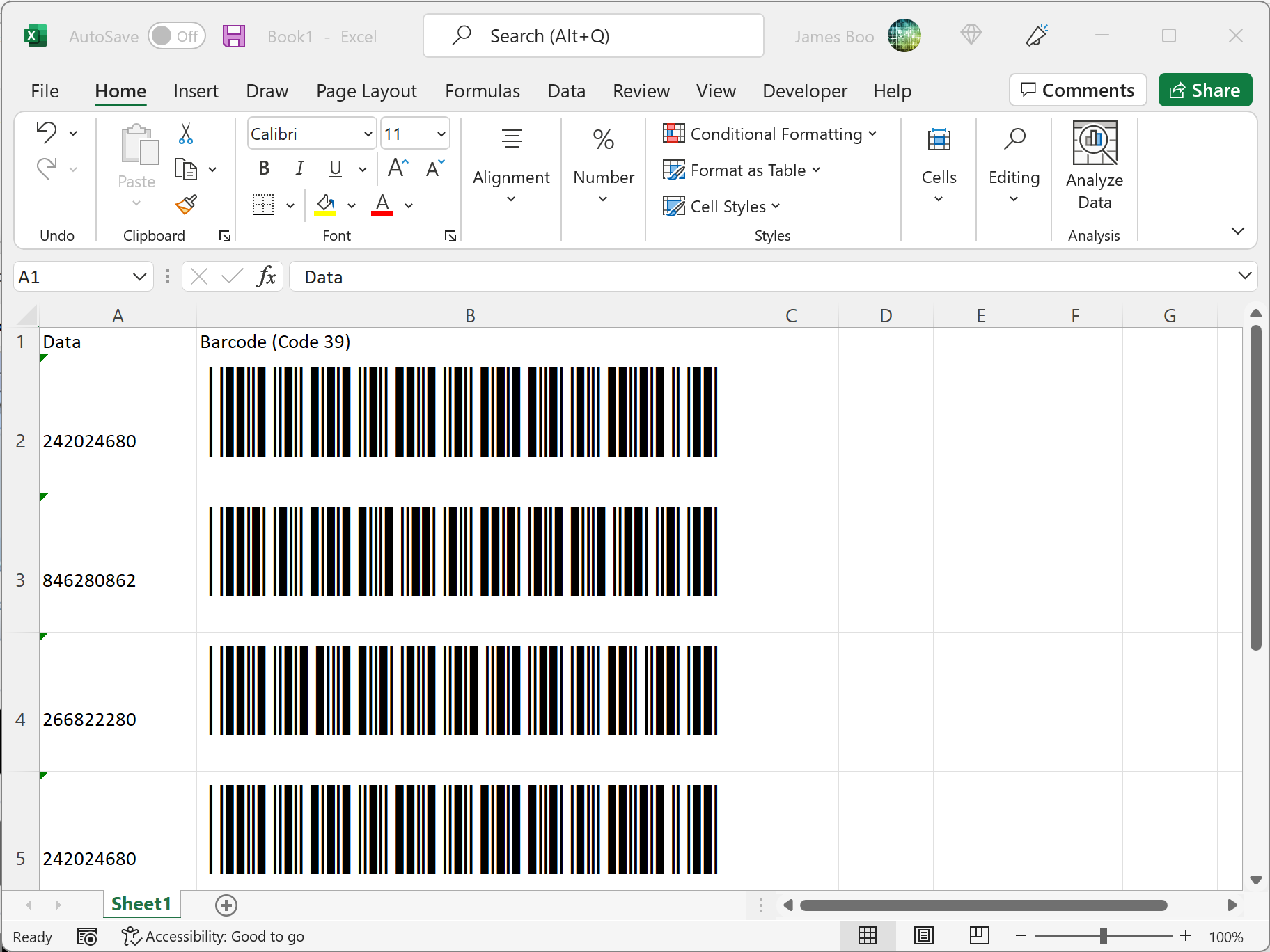
Excel with nine-digit numbers in column A and the matching Code 39 barcodes in column B, the data sheet ConnectCode's Word mail merge guide starts from.
Features
Type-it-yourself Code 39
ConnectCode Code 39 maps each character directly, so *45346345* in the font is a valid barcode with no encoder. Add the optional modulo 43 check character when a system requires it: the encoder and macros calculate it, or you can follow the worked example on the vendor's Code 39 page.
Full ASCII with Code 39 Extended
ConnectCode Code 39 supports Code 39 ASCII, which encodes lower-case letters and symbols as pairs such as +A for "a" or /A for "!". The substitution is tedious by hand, so ConnectCode recommends the Software Encoder or the supplied VB macros for it.
Seven bar heights and a human-readable version
ConnectCode Code 39 ships as seven fonts, CCode39_S1 (shortest) to CCode39_S7 (tallest), plus CCode39_HS3 with the text printed under the bars. Pick the height by font name and the width by font size.
Works in Office, reports and code
ConnectCode includes Excel VBA formulas, Word mail-merge instructions, Access and Crystal Reports formulas, Reporting Services guides and .NET, COM, Java and JavaScript encoders, plus web fonts for printing barcodes from a browser.

The ConnectCode Barcode Fonts Encoder, shown here on a Code 128 barcode: choose the symbology, type the data, set the check digit, then copy the barcode into another program.
Benefits
- Nothing to set up for basic use. Asterisks and a font are enough, which makes it easy to hand off to other staff.
- Prints sharp on any printer, since the barcode is a font, not an image.
- One payment covers five related symbologies.
Real-World Uses
- Asset tags: equipment IDs from an Access or Excel inventory, printed on label stock with a Word mail merge.
- Employee badges and library cards: an ID number as a Code 39 barcode on a card template.
- Bin and shelf labels: location codes in a warehouse, readable by any basic scanner.
- Document batches: barcoded cover sheets that tell a scanner where each batch belongs.
Who It's For, and Who Should Skip It
It's for offices and small warehouses that use Code 39 for internal labels and want it in Word, Excel or Access, and for anyone with an old system that expects Code 93, MSI or POSTNET.
Skip it if you're labeling retail products (you need UPC/EAN) or shipping to retailers (GS1-128): get the Font Pack. And if plain Code 39 is all you need, start with ConnectCode's own Free Barcode Fonts package: it includes Code 39, Industrial 2 of 5 and POSTNET fonts with an encoder, Excel/Word/Access macros and a command-line tool, at no cost.
Usage Guide
- Download the trial, extract the ZIP and run the setup; choose Yes to install the fonts into Windows.
- In Word or Excel, type your data between asterisks, for example
*ABC-123*.
- Select the text and choose a CCode39 font; change size and height to fit the label.
- For a check character or lower-case data, use the Barcode Fonts Encoder or the Excel macros instead of typing.
- Print a test sheet and scan it before you print the batch.
Where it falls short
- Forgetting the asterisks gives a barcode that won't scan; the start/stop characters are required.
- Lower-case letters don't exist in standard Code 39. Use Code 39 ASCII through the encoder, and make sure your scanner has full-ASCII mode on.
- Wide barcodes can overflow small labels; switch to Code 128 for long data.
- Font must be installed on every PC that opens the file, or embedded in a PDF.
What Users Say
Customer comments published by ConnectCode
"It solved all my problems with bar-coded for our computer system and scanning equipment. It was an all in one solution." D.C. (Catholic Education Office)
"I just purchased your software to get some barcode fonts that were needed. I Am using them in MS Word as fonts, this Add-in could be really usefull for me." Eero Kaur (AS Liviko)
"The font allows for the barcode to be consistantly sized and placed regardless of what data the initial page of the document uses to generate its code." Glyn Rowling (Amethyst Mailing)
These comments come from ConnectCode's own feedback page and cover the fonts in general. We found no independent ratings for the Windows product, so try the trial with your own scanner and labels.
Comparisons
Code 39 font vs the ConnectCode Font Pack
The Code 39 family is $99 and covers Code 39, Code 39 ASCII, Code 93, MSI and POSTNET. The Font Pack is $149 and adds Code 128, GS1-128, UPC/EAN, ITF14, Interleaved 2 of 5, Codabar and GS1 DataBar.
Paid Code 39 vs ConnectCode's free barcode fonts
ConnectCode gives away a Free Barcode Fonts package with Code 39, Industrial 2 of 5 and POSTNET, an encoder, VB macros for Excel, Word and Access, and a command-line tool. The $99 family adds Code 39 ASCII (full ASCII), Code 93 and MSI, the Enterprise Site and Distribution license options, and a year of upgrades and priority support. If standard Code 39 covers your data, the free package is the place to start.
Editions and Pricing
| License | Price | Who it covers | Buy |
|---|
| Single User | $99 | One user on one computer | Buy Single User |
| Enterprise Site | $229 | All users on multiple computers in your organization | Buy Enterprise Site |
| Distribution | $369 | Royalty-free inside your application, up to 10,000 users | Buy Distribution |
| Unlimited Distribution | $699 | Royalty-free inside your application, any number of users | Buy Unlimited |
Each license is a one-time payment with a year of upgrades and priority support, and each button orders that license.
FAQs
Do I need the encoder to make a ConnectCode Code 39 barcode?
No. ConnectCode Code 39 works by typing the data between asterisks and choosing the font. You need the encoder or macros only for the optional check character, Code 39 ASCII or Code 93.
Can ConnectCode Code 39 encode lower-case letters?
Yes, through Code 39 ASCII (Extended), which ConnectCode's encoder produces. The scanner must have full-ASCII Code 39 enabled to read it back as lower case.
Is the ConnectCode Code 39 license a subscription?
No. ConnectCode charges once and includes a year of upgrades and priority support; the fonts keep working after that.
Why does my ConnectCode Code 39 barcode show as letters?
The text isn't set to a CCode39 font, or the font isn't installed on that PC. Install the fonts on every computer that prints, or save to PDF with the fonts embedded.
Can I use the ConnectCode Code 39 font in a web page?
Yes. ConnectCode supplies WOFF and WOFF2 versions and a JavaScript encoder. Putting the fonts inside software or a site you distribute needs a Distribution license.
System Requirements
- Windows XP to Windows 11, or Windows Server 2003 to 2022
- 256 MB RAM and 100 MB of disk space
- Any program that uses installed fonts; Excel 2007 to Microsoft 365 for the VBA formulas
Conclusion
ConnectCode Code 39 Barcode Font is worth $99 if your labels need Code 39 ASCII (lower case and symbols), Code 93 or MSI, or if you need a site-wide or distribution license with support behind it. The reason to buy it is how little setup Code 39 takes: asterisks, a font, print, with the encoder and Office macros for the harder cases. The reasons not to: for plain Code 39, ConnectCode's free package already does the job, and if you need retail or shipping barcodes too, the $149 Font Pack is the smarter purchase. Try the trial with your own scanner first.
Download Free TrialBuy Single UserBuy Enterprise SiteBuy DistributionBuy Unlimited Distribution