ConnectCode Code 128 Barcode Font: Code 128 and GS1-128 Barcodes From Excel, Word and Crystal Reports
ConnectCode Code 128 Barcode Font is a $99 one-time purchase for Windows that prints Code 128 (Auto, A, B and C) and GS1-128 (UCC/EAN-128) barcodes from any program that uses fonts, with an encoder and ready-made Excel and Crystal Reports formulas that calculate the check character for you. It's for anyone who needs Code 128 or shipping labels with GS1 Application Identifiers and doesn't need the other barcode types.
Code 128 is the dense, alphanumeric barcode behind most shipping labels, packing slips and serial numbers. You can't type it by hand the way you can type a Code 39 barcode, because every Code 128 barcode needs a start character, a modulo 103 check character and a stop character, and Code 128 Auto also switches between code sets mid-barcode. That math is what this package's encoder and formulas do.
Quick facts
- Developer: ConnectCode Pte Ltd, Singapore (barcoderesource.com)
- Version: 11.8 of the ConnectCode barcode package
- Barcodes: Code 128 Auto, Code 128A, Code 128B, Code 128C and GS1-128 (also called UCC-128 or EAN-128)
- Fonts: CCode128_S1 to CCode128_S7 (seven bar heights) plus CCode128B_HS3 with human-readable text, as TrueType, OpenType, PostScript, WOFF and WOFF2
- Platform: Windows XP to Windows 11 and Windows Server 2003 to 2022; the font files also work on macOS and Linux
- Price: $99 Single User, $229 Enterprise Site, $369 Distribution, $699 Unlimited Distribution. One-time payment
- Included: one year of upgrades and priority support
- Trial: the free trial has every ConnectCode font, but trial barcodes carry lines and demo wording
- What we checked: the trial packages from barcoderesource.com (the 26.6 MB setup ZIP, and the 33.3 MB ZIP whose font folder holds the trial Code 128 font) and the four Code 128 license prices on the order page on November 23, 2026. We didn't scan a printed barcode ourselves.
Before you buy
- Need a second barcode type? The ConnectCode Barcode Font Pack ($149) includes Code 128 plus Code 39, UPC/EAN, ITF14, Interleaved 2 of 5, GS1 DataBar and more. Two single families would cost $198.
- Single User means one user on one computer. For a team, the Enterprise Site license ($229) covers all users in your organization.
- No QR codes. 2D barcodes are separate ConnectCode products.
Download Free TrialBuy Single UserBuy Enterprise SiteBuy DistributionBuy Unlimited Distribution
Overview
The package is a set of fonts plus the tools that feed them. You give the encoder, an Excel formula or a Crystal Reports formula your data, and it returns a short string of characters: start code, your data (compressed into digit pairs where Code 128C helps), the check character and the stop code. Set that string in a CCode128 font and it becomes the barcode. Because it's text, it prints at the printer's resolution and stays crisp on small labels.
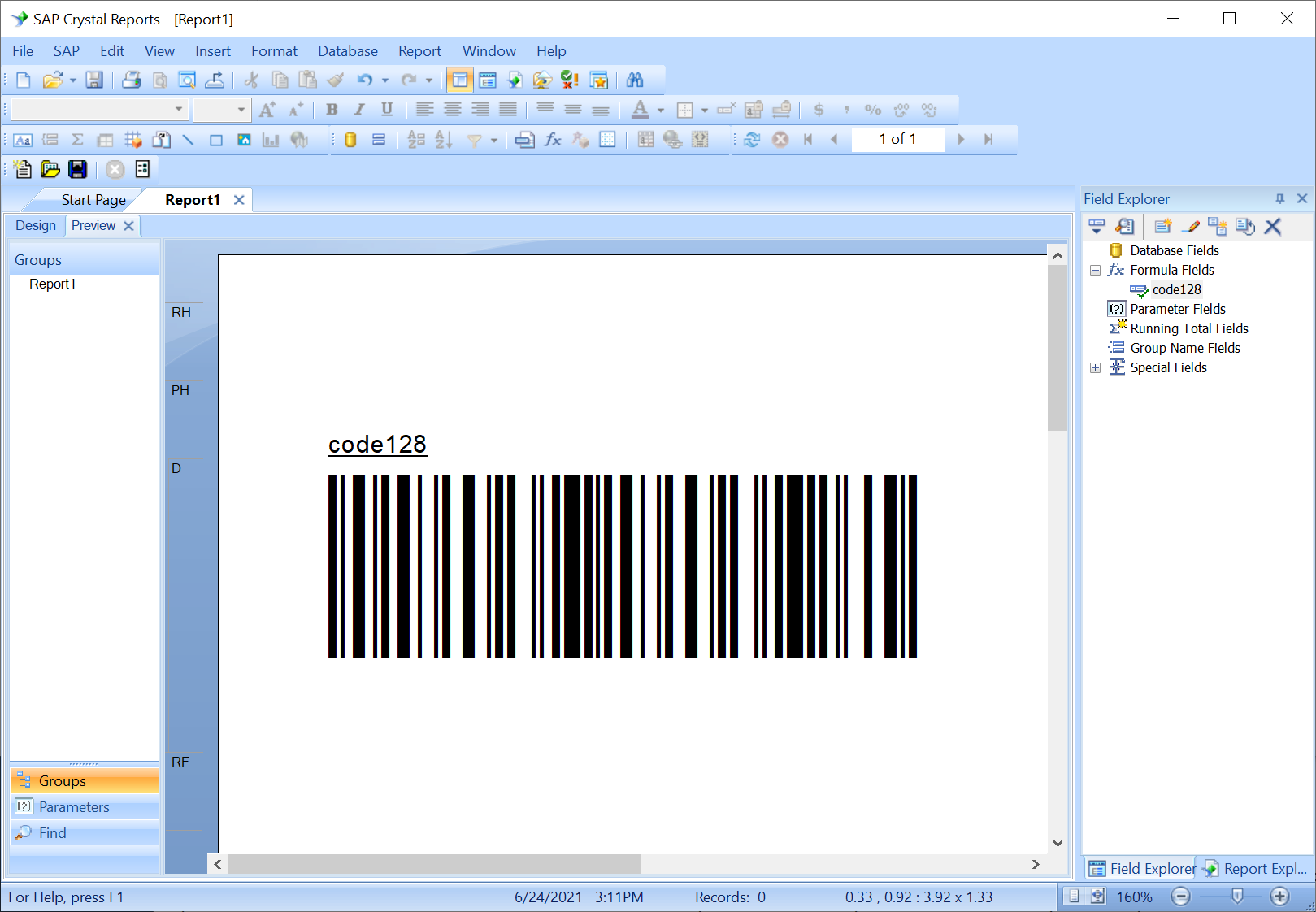
SAP Crystal Reports previewing a Code 128 barcode made with the ConnectCode font, with the code128 formula field in the Field Explorer.
Features
Code 128 Auto picks the shortest encoding
ConnectCode's Code 128 Auto mode switches between code sets A, B and C on its own and optimizes the characters, so a mix of letters and long digit runs comes out as short as possible. You can also force a single set: 128A for upper case and control characters, 128B for upper and lower case, 128C for numbers only. ConnectCode recommends the encoder or the macros for Auto, since the switching is impractical by hand.
GS1-128 with Application Identifiers
ConnectCode Code 128 Barcode Font also covers GS1-128, the Code 128 variant used on shipping and pallet labels. Data is split into Application Identifiers such as (00) for an 18-digit SSCC, (01) for a GTIN, (10) for a batch or lot and (17) for an expiry date. The encoder has a Strict GS1 Compliance option; without it, it produces the looser UCC/EAN format many legacy systems read.
Excel, Word, Access and report formulas
ConnectCode Code 128 works in Excel through VBA formulas like =Encode_Code128Auto(A2) (Excel 2007 to Microsoft 365) or the Office Barcode Add-In for Microsoft 365, in Word through mail merge, and in Crystal Reports and SQL Server Reporting Services through supplied formulas. Developers get .NET, COM, Java, JavaScript and native DLL encoders.
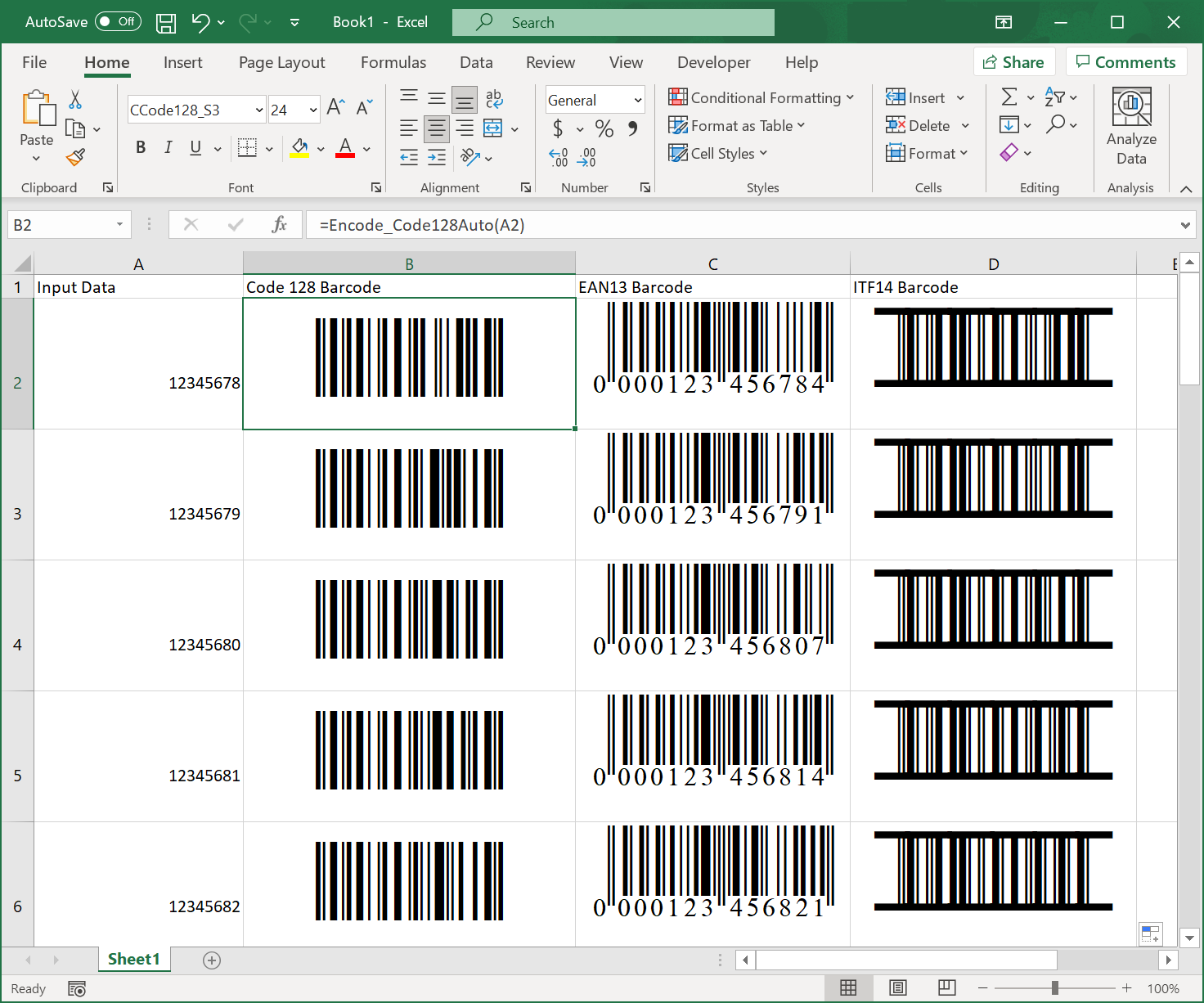
Excel with =Encode_Code128Auto(A2) in column B and the CCode128_S3 font selected. The EAN-13 and ITF14 columns next to it need other ConnectCode font families (included in the Font Pack).
Seven heights instead of stretching
ConnectCode supplies the Code 128 font in seven heights, S1 (shortest) to S7 (tallest), and a 128B font with the text printed under the bars. You change the bar height by changing the font name and the width by changing the font size, which keeps the bar ratios correct for scanners.
Benefits
- Correct check characters every time. The modulo 103 math is done for you, which is where hand-made Code 128 barcodes usually fail.
- Cheaper than the full pack when Code 128 and GS1-128 are all you print.
- Works in tools you have. No separate label program to buy or learn.
Real-World Uses
- Packing slips and invoices: an order number as a Code 128 barcode in a Crystal Reports or SSRS report, so the warehouse scans instead of typing.
- Serial number labels: a column of serials in Excel turned into barcodes and printed on label sheets.
- Pallet and carton labels: GS1-128 codes with an SSCC, a GTIN and a lot number for a retailer's receiving dock.
- Document control: barcoded cover sheets so a scanner files each batch automatically.
Who It's For, and Who Should Skip It
It's for people who only need Code 128 or GS1-128, in Excel, Word, Access, Crystal Reports, SSRS or their own software.
Skip it if you also need UPC/EAN retail codes or Code 39: buy the $149 Font Pack instead. Skip it if you want a point-and-click label designer, or if you need QR codes.
Usage Guide
- Download the trial, extract the ZIP and run the setup; choose Yes to install the fonts into Windows.
- Open the Barcode Fonts Encoder, choose Code 128 Auto (or GS1-128), type the data and click Encode.
- Click Copy Barcode and paste into Word, or use the Excel VBA module from the Resource folder and fill
=Encode_Code128Auto(A2) down a column.
- Set the result cell's font to CCode128_S3 (or another height) and adjust the size.
- Print a sample and scan it before you print a batch.
Where it falls short
- Typing data straight into the font won't work for Code 128: without the encoder's start, check and stop characters the barcode won't scan.
- Missing font, missing barcode. A document opened on a PC without the font shows text characters; embed the fonts in a PDF to share.
- "#NAME?" in Excel means the VBA module isn't in that workbook.
- Few independent reviews. There's no Capterra, G2 or Trustpilot page to check others' experience against, so rely on the trial.
What Users Say
Customer comments published by ConnectCode
"I have used several bar code font applications over the past 20 years and found that ConnectCode is the cleanest solution I have found. It works perfectly with Crystal Reports and doesn't have any issues embedding the bar code fonts into a PDF." T.M. (BrassCraft)
"I use your product to create barcodes from huge lists of account numbers and other indexing information. The bar codes are read by high volume document scanners which create the main index for our document search utility." Edgar Martinez (CTO - Record Guardian Inc.)
"Product is easy to use and extremely versatile." J.G (Cadex Electronics Ltd)
These are the vendor's own testimonials, and they're about the ConnectCode fonts in general rather than the Code 128 family alone. We found no independent ratings for the Windows product: the Microsoft Store trial app has none yet. Crystal Reports users are the ones who mention it most.
Comparisons
Code 128 font vs the ConnectCode Font Pack
The Code 128 family is $99 for one user; the Font Pack is $149 and adds Code 39, Code 93, UPC/EAN, ISBN/ISSN, ITF14, Interleaved 2 of 5, Codabar, MSI, POSTNET and GS1 DataBar. The encoder and formulas work the same way in both.
Code 128 vs Code 39
Code 39 is simpler (you can type *DATA* without an encoder) but much wider for the same data and limited to 43 characters. Code 128 is denser and covers full ASCII, which makes it the better choice for long serials and shipping labels.
Editions and Pricing
| License | Price | Who it covers | Buy |
|---|
| Single User | $99 | One user on one computer | Buy Single User |
| Enterprise Site | $229 | All users on multiple computers in your organization | Buy Enterprise Site |
| Distribution | $369 | Royalty-free inside your application, up to 10,000 users | Buy Distribution |
| Unlimited Distribution | $699 | Royalty-free inside your application, any number of users | Buy Unlimited |
Each license is a one-time payment with a year of upgrades and priority support, and each button orders that license.
FAQs
Does ConnectCode Code 128 Barcode Font include GS1-128 (UCC-128)?
Yes. ConnectCode sells this family as "Code 128 (Auto, A, B, C) and UCCEAN": GS1-128 uses the same CCode128 fonts, and the encoder formats the Application Identifiers.
Can I type a Code 128 barcode without the encoder?
Only if you add the start character, the modulo 103 check character and the stop character yourself. ConnectCode's Code 128 page shows the calculation, but in practice you use the encoder, the Excel formulas or the report formulas.
Is the ConnectCode Code 128 license a subscription?
No. ConnectCode charges once. The price includes a year of upgrades and priority support, and the fonts keep working afterwards.
Will ConnectCode Code 128 work in Excel on a Mac?
The ConnectCode fonts install on macOS, and the vendor has a guide for Office for Mac and Numbers. The installer and encoder app are Windows programs.
System Requirements
- Windows XP to Windows 11, or Windows Server 2003 to 2022
- 256 MB RAM and 100 MB of disk space
- Excel 2007 to Microsoft 365 for the VBA formulas
Conclusion
ConnectCode Code 128 Barcode Font is a sensible $99 buy if Code 128 and GS1-128 are the only barcodes you print, especially from Excel or Crystal Reports. The reason to buy it is that the encoder and formulas get the check characters and code-set switching right without any manual work. The reason to look elsewhere: if you'll ever need a second barcode type, the $149 Font Pack is the better value, and if you want a visual label editor, a label program suits you better. Test the trial with your own scanner first.
Download Free TrialBuy Single UserBuy Enterprise SiteBuy DistributionBuy Unlimited Distribution