ConnectCode Barcode Font Pack: Every Common 1D Barcode as a Font, for Excel, Word and Crystal Reports
ConnectCode Barcode Font Pack is a $149 one-time purchase for Windows that installs barcode fonts for Code 128, Code 39, UPC/EAN, GS1-128, ITF14, Interleaved 2 of 5, GS1 DataBar and more, so you can print scannable barcodes from Excel, Word, Access, Crystal Reports or any program that lets you pick a font. It's for offices, warehouses and developers who need barcodes inside documents and reports they already make, not for designing labels from scratch.
If you've ever typed a product number into a spreadsheet and wished the next column could just be the barcode, that's what this does. A formula like =Encode_Code128Auto(A2) works out the check character and start/stop codes, and the ConnectCode font draws the bars. Because the barcode is text, it prints at your printer's full resolution instead of as a fuzzy picture.
Quick facts
- Developer: ConnectCode Pte Ltd, Singapore (barcoderesource.com)
- Version: 11.8 (owners of any 11.x version upgrade free)
- Platform: Windows XP to Windows 11 and Windows Server 2003 to 2022; the fonts themselves also install on macOS and Linux
- Barcodes: Code 39, Code 39 ASCII, Code 93, Code 128 (Auto/A/B/C), GS1-128 (UCC/EAN), Codabar, Interleaved and Industrial 2 of 5, ITF14, MSI, POSTNET, UPC-A, UPC-E, EAN-13, EAN-8, ISBN/ISSN with EXT2/EXT5, GS1 DataBar 14/Truncated/Limited/Stacked/Expanded
- Font formats: TrueType, OpenType, PostScript, WOFF and WOFF2
- Price: $149 Single User, $399 Enterprise Site, $469 Distribution, $899 Unlimited Distribution. One-time payment, no renewal
- Included: one year of upgrades and priority support
- Trial: every font and tool, but trial barcodes carry diagonal or horizontal lines and demo wording
- What we checked: the trial setup ZIP (26.6 MB, the installer inside dated June 30, 2021) and the production ZIP (33.3 MB, April 16, 2024) downloaded from barcoderesource.com, the Microsoft Store trial app (last updated April 2, 2026), and all four license prices on the order page on November 23, 2026. We didn't scan a printed barcode ourselves.
Before you buy
- The Single User license covers one user on one computer. Several people printing barcodes need the Enterprise Site license ($399), and shipping the fonts inside your own app needs a Distribution license.
- The pack is 1D barcodes only. QR Code, DataMatrix and PDF417 are separate ConnectCode products sold at $99 each.
- If you only need one barcode type, ConnectCode also sells single families for $99, such as Code 128 with GS1-128, or Code 39 with Code 93, MSI and POSTNET. The pack pays off once you need two.
- The Mac app is a separate purchase. ConnectCode Barcode Software for Mac is sold on the Mac App Store ($139.99), not under this license.
Download Free TrialBuy Single UserBuy Enterprise SiteBuy DistributionBuy Unlimited Distribution
Overview
A barcode font maps each character to a pattern of bars. Type the right characters, select the font, and you have a barcode. The catch is that most symbologies need start and stop characters and a calculated check character, so typing them by hand is error-prone. ConnectCode solves that part with an encoder: a desktop app, Excel and Word macros, Crystal Reports formulas and programming libraries that turn your data into the exact string the font needs.
Each barcode type comes in up to seven bar heights (CCode128_S1 to S7, for example), plus versions with human-readable text under the bars, so you pick a height by picking a font instead of stretching an image.

The Barcode Fonts Encoder on Windows 11: Code 128 Auto selected, the input 12345667, the trial font CCode128_S3_Trial at size 24, the barcode preview and a Copy Barcode button.
Features
Barcodes in Excel with ordinary formulas
ConnectCode Barcode Font Pack adds VBA formulas such as Encode_Code128Auto to Excel 2007 through Microsoft 365, so a whole column of product codes becomes a column of barcodes when you fill the formula down and set the font. For Microsoft 365 there's also an Office Barcode Add-In with cloud formulas, and older Excel 2002/2003 is covered by the classic macros.
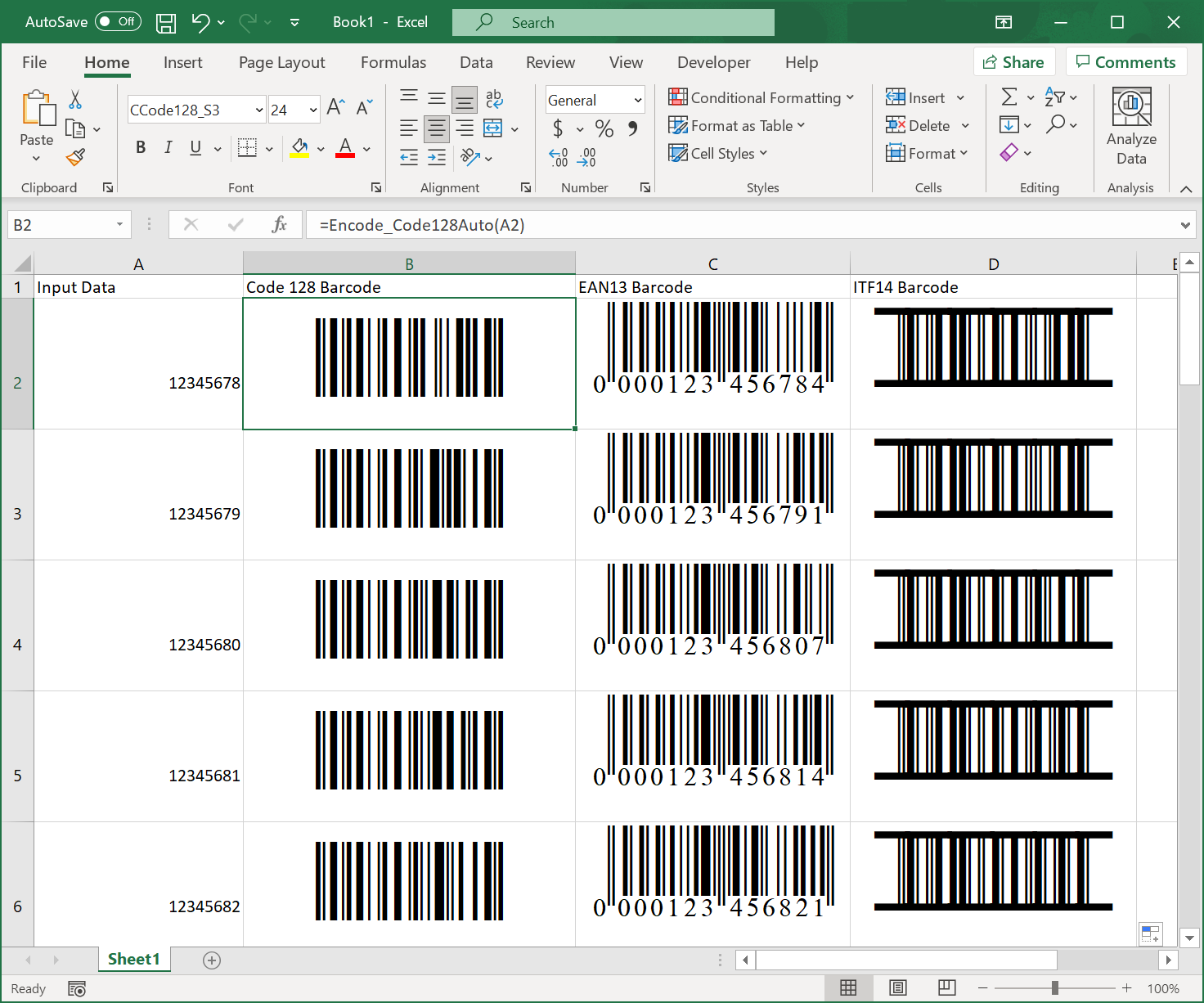
Excel with the formula =Encode_Code128Auto(A2): input numbers in column A, and Code 128, EAN-13 and ITF14 barcodes in the next three columns.
Reports and mail merges: Crystal Reports, SSRS, Word and Access
ConnectCode ships ready-made formulas for Crystal Reports (including Crystal Reports for Visual Studio) and instructions for SQL Server Reporting Services RDL and RDLC reports, Report Builder and Access. In Word, a mail merge field plus the barcode font prints a different barcode on every letter or label.
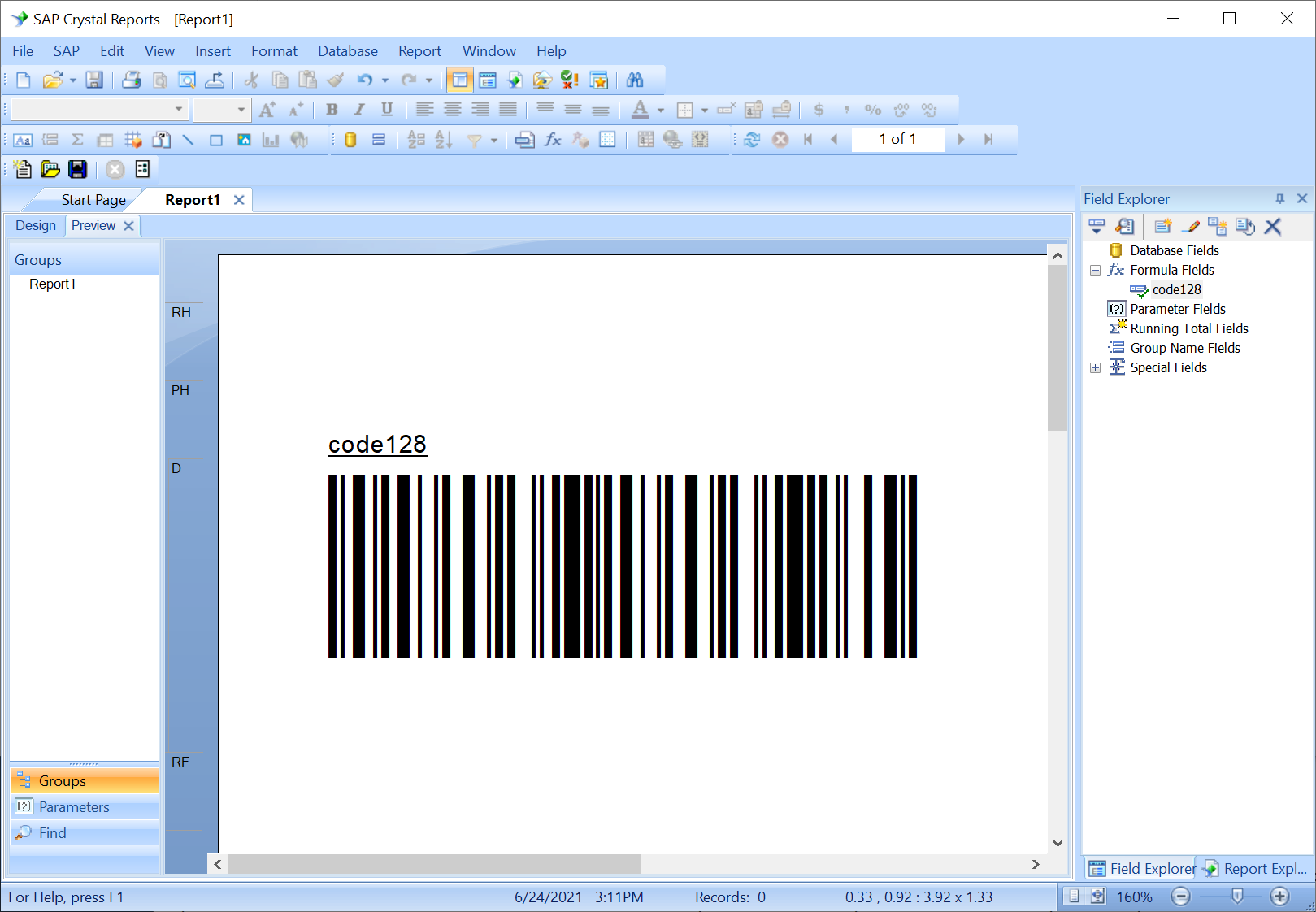
SAP Crystal Reports previewing a Code 128 barcode, with the code128 formula field listed in the Field Explorer.
Libraries for developers
The ConnectCode package includes a .NET DLL (also on NuGet), a COM library, a native Windows DLL, Java classes, JavaScript and web fonts, Oracle PL/SQL and T-SQL samples, and guides for C#, VB.NET, WPF, WinUI, .NET MAUI, Blazor, React, Angular and PowerBuilder. Your code calls the encoder, and the font renders the result in your UI, report or web page. Shipping the fonts with your software needs a Distribution license.
GS1 options handled for you
The ConnectCode encoder enforces the rules that make retail barcodes pass verification: UPC/EAN parity, EXT2/EXT5 add-ons, ISBN and ISSN numbers printed over an EAN-13, bearer bars for ITF14, a strict GS1-128 mode and the segments-per-row setting for GS1 DataBar Expanded Stacked. ConnectCode says customers have passed GS1/ISO verification tests with it.
Fonts you can take anywhere
ConnectCode exports every barcode font as TrueType, OpenType, PostScript (PFA/PFB), WOFF or WOFF2 from the encoder's Setup screen, so the same barcodes work in Illustrator, Photoshop, LibreOffice on Linux, Numbers on a Mac or a web page.
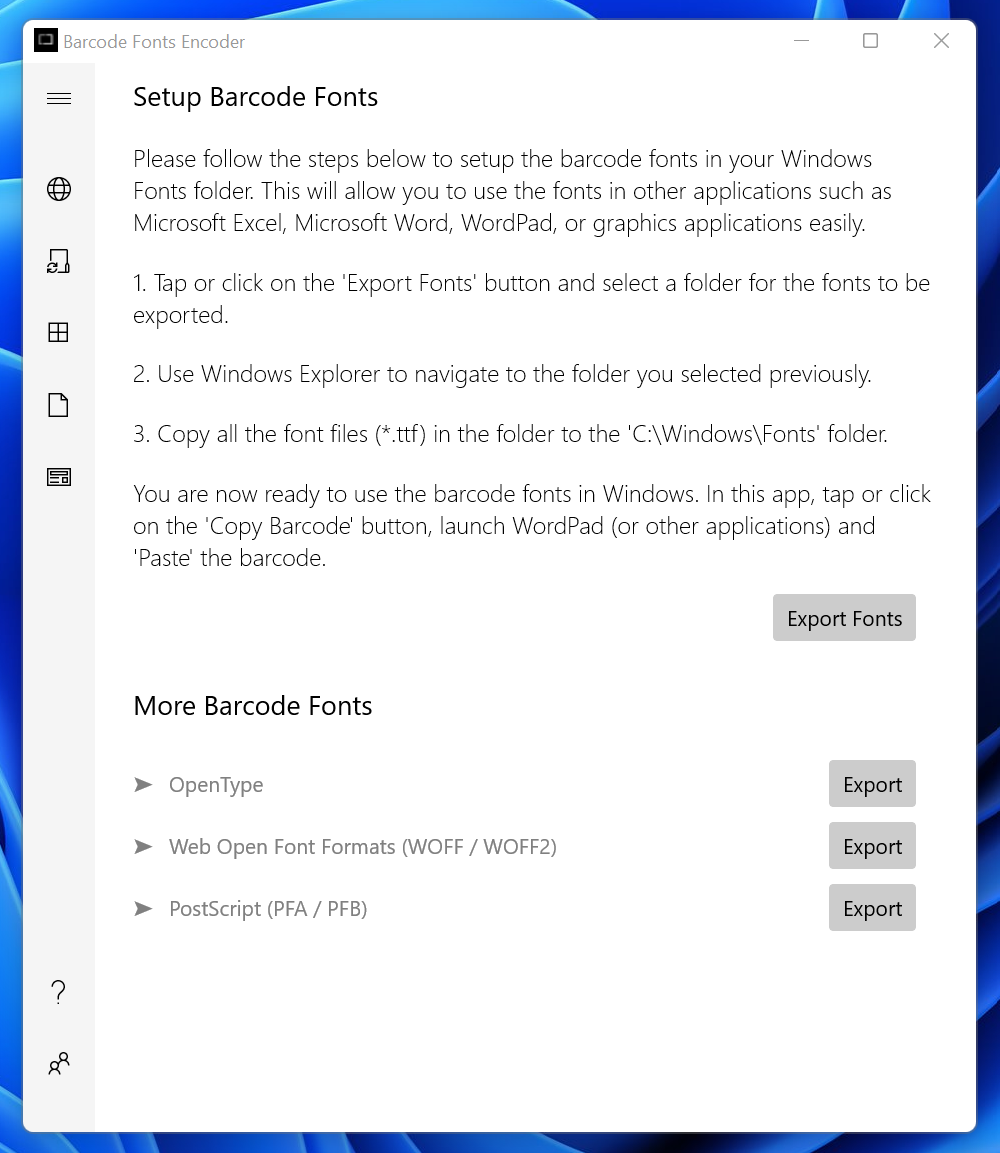
The encoder's Setup Barcode Fonts screen: steps to copy the TrueType fonts into Windows, and Export buttons for OpenType, WOFF/WOFF2 and PostScript.
Benefits
- No new program to learn. Your barcodes live in the spreadsheet, document or report you already maintain, and update when the data does.
- Sharp output at any size. A font barcode prints at the printer's resolution, which matters on small labels and thermal printers.
- Pay once. There's no subscription; the license keeps working after the first year, you just stop getting upgrades and priority support.
- Covers mixed needs. One purchase handles a Code 39 asset tag, a GS1-128 shipping label and an EAN-13 retail code.
Real-World Uses
- Price and shelf labels: a product list in Excel with EAN-13 or UPC-A barcodes, printed on label sheets.
- Document scanning: barcode cover sheets built from account numbers, so high-volume scanners can index each batch automatically.
- Shipping and pallets: GS1-128 and ITF14 codes on carton and pallet labels generated from an order report.
- Asset tags: Code 39 tags for equipment, printed from an Access database or a Word mail merge.
- In-house software: a .NET or web app that shows or prints barcodes without a third-party image service.
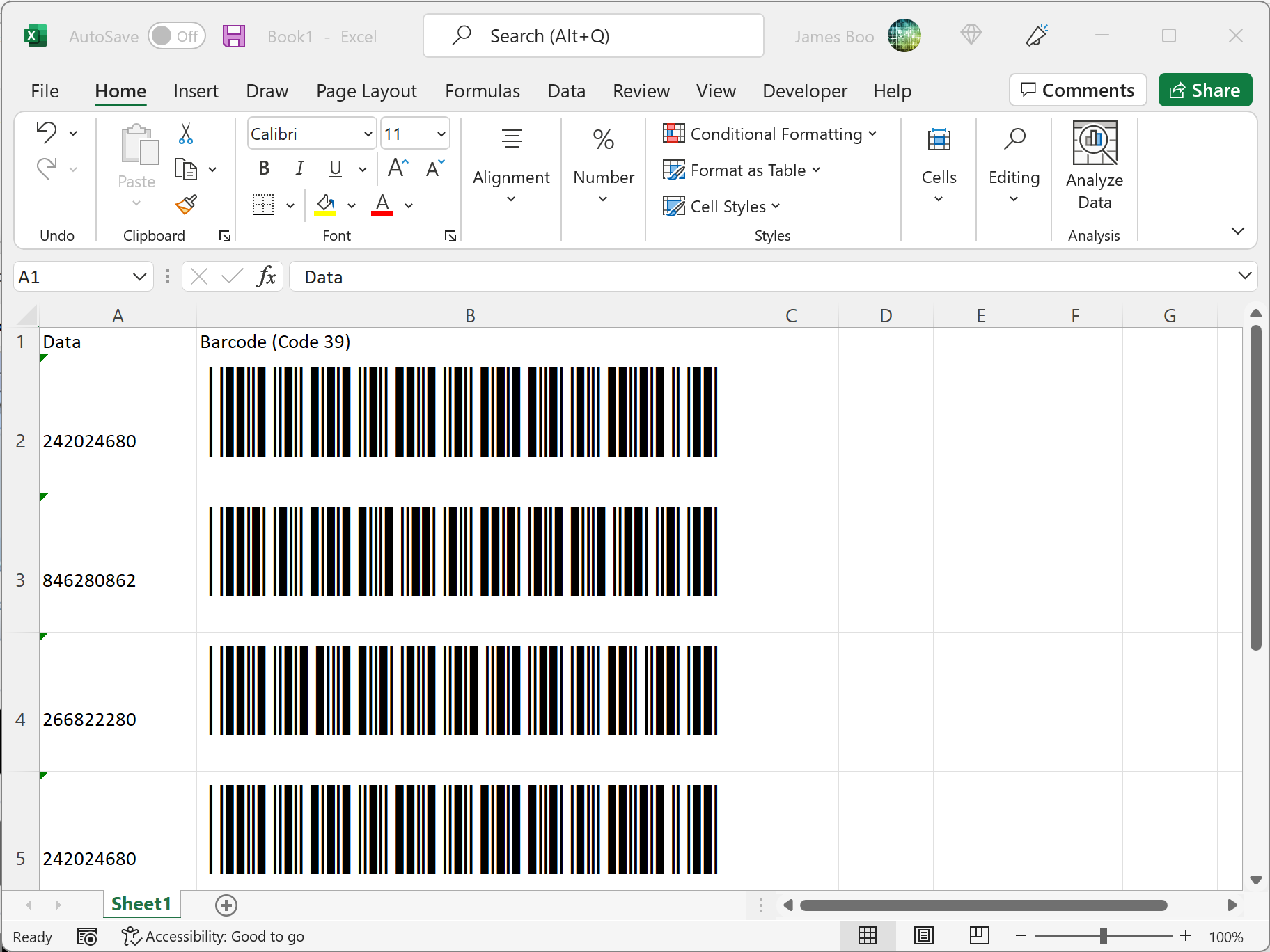
A Code 39 barcode column next to the data column in Excel, the kind of sheet ConnectCode's guide uses as the source for a Word mail merge.
Who It's For, and Who Should Skip It
It's for office staff, inventory and logistics teams, and report developers who already work in Excel, Word, Access, Crystal Reports or SSRS and need several barcode types. It's also a good fit for developers who want a font they can ship with their own application.
Skip it if you need a full label designer with templates and printer drivers: a dedicated label program is easier. Skip it if you only need QR codes or DataMatrix, which aren't in this pack. And if you only ever print one symbology, the $99 single-family license is cheaper.
Usage Guide
- Download the trial ZIP, extract it and run the setup. Choose Yes when it asks to install the fonts into Windows. Close other programs first: the installer copies fonts into C:\Windows\Fonts and can stall if a program has them open. On Windows Server, choose No and install the fonts manually.
- Start the Barcode Fonts Encoder from the Start menu, pick a symbology, type your data and click Encode.
- Click Copy Barcode and paste into Word or WordPad, or use the Excel formulas from the Resource folder for a whole column.
- Change the bar height by choosing another font of the same family (S1 to S7), and the size with the font size.
- After you buy, install the registered version: the demo lines disappear and the font names lose the "_Trial" suffix, so update any formulas or reports that name the trial fonts.
Where it falls short
- Text characters instead of bars is the classic problem: it means the cell or field isn't set to the barcode font, or the font wasn't installed on the PC that prints. ConnectCode's FAQ starts with this one.
- "#NAME?" in Excel means the VBA module or add-in isn't loaded in that workbook.
- An extra digit under a barcode is the automatic check digit, which you can turn off where the symbology allows.
- The trial installer is old. The setup ZIP on the download page is dated 2021, even though the store app and add-ins have been updated since.
- Font barcodes depend on the font being present. A file sent to someone without the font shows plain characters, unless the barcode is embedded in a PDF.
What Users Say
ConnectCode has no independent review profile to speak of: no Capterra, G2 or Trustpilot page, and its Microsoft Store trial app shows no ratings yet. What exists is the vendor's own customer feedback page and one App Store review of the separate Mac app.
Customer comments published by ConnectCode
"I have used several bar code font applications over the past 20 years and found that ConnectCode is the cleanest solution I have found. It works perfectly with Crystal Reports and doesn't have any issues embedding the bar code fonts into a PDF." T.M. (BrassCraft)
"We chose to use your product because it installed flawlessly into excel and we were able to document the creation process so that staff can produce the barcodes in 4 simple steps." Edgar Martinez (CTO - Record Guardian Inc.)
"The font allows for the barcode to be consistantly sized and placed regardless of what data the initial page of the document uses to generate its code." Glyn Rowling (Amethyst Mailing)
"I produce barcode scanning book to work with my cash register, it works wonders." David Cheng (Best2all.com)
A critical review of the Mac app (Mac App Store)
"Clugey at best", wrote gnew18 in February 2018 about ConnectCode Barcode Software for Mac: "This software works, but only one way." The reviewer had to copy the barcode from the app into TextEdit and then copy it again into Pages: "Seems as if this could be better designed but well it is not." That's the Mac product, not this Windows pack, but it shows the copy-and-paste workflow can feel clumsy outside Excel and Word.
The common thread: people who use it inside Excel, Crystal Reports or a mail merge praise how predictable the output is. The weak spots are the workflow outside those programs and the lack of public reviews to compare against.
Comparisons
Font Pack vs single barcode families
Each single family costs $99 for one user and covers related symbologies: Code 128 comes with GS1-128, Code 39 with Code 39 ASCII, Code 93, MSI and POSTNET, and UPC/EAN with ISBN/ISSN and add-ons. Two families already cost $198, so the $149 pack is the better buy as soon as you need a second type.
Barcode fonts vs a label program
A label designer gives you templates, printer setup and database merges in one window. Fonts give you barcodes inside the tools you already use, at printer resolution, and inside your own software. ConnectCode also sells a Label Software ($99) and a Barcode & Label app if you want both.
Editions and Pricing
| License | Price | Who it covers | Buy |
|---|
| Single User | $149 | One user on one computer | Buy Single User |
| Enterprise Site | $399 | All users on multiple computers in your organization | Buy Enterprise Site |
| Distribution | $469 | Royalty-free inside your application, up to 10,000 users | Buy Distribution |
| Unlimited Distribution | $899 | Royalty-free inside your application, any number of users | Buy Unlimited |
Every license is a one-time payment that includes a year of upgrades and priority support. Each button orders that license.
FAQs
Can ConnectCode Barcode Font Pack's trial barcodes be scanned?
ConnectCode's trial fonts draw lines and demo wording across the barcodes, so treat them as a layout test, not as labels to use. The registered fonts print clean barcodes.
Does ConnectCode Barcode Font Pack include QR codes?
No. The pack covers 1D (linear) barcodes and GS1 DataBar. ConnectCode sells QR Code, DataMatrix and PDF417 fonts separately, $99 each for a single user.
Is ConnectCode a subscription?
No. ConnectCode licenses are one-time purchases with no automatic renewal. The price includes one year of upgrades and priority support, and the fonts keep working after that year.
Can I use the ConnectCode fonts on a Mac or Linux?
The ConnectCode font files work on macOS and Linux, and the vendor has install guides for Ubuntu, Red Hat, Debian and the Mac, including Excel for Mac and Numbers. The encoder app and installer are Windows programs, and the full Mac app is a separate App Store purchase.
Which license do I need for a shared office PC used by three people?
ConnectCode's Single User license allows one user on one computer, so three people need the Enterprise Site license, which covers all users on multiple computers in your organization.
Can I move my ConnectCode license to a new PC or another company?
ConnectCode's license agreement allows a one-time permanent transfer of all your rights to another person or company, as long as you keep no copies.
Will ConnectCode barcodes work with a thermal label printer?
Yes, as long as you print from a program that uses Windows fonts, such as Word, Excel or Crystal Reports. Because the barcode is a font, it's rendered at the printer's own resolution.
System Requirements
- Windows XP to Windows 11, or Windows Server 2003 to 2022
- 256 MB RAM and 100 MB of disk space
- Excel 2007 to Microsoft 365 for the VBA formulas; Microsoft 365 for the Office Barcode Add-In
- Fonts: TrueType, OpenType, PostScript, WOFF and WOFF2 for use on Windows, macOS, Linux and the web
Conclusion
ConnectCode Barcode Font Pack is worth $149 if you make barcodes inside Excel, Word, Access or reports and need more than one symbology. The one reason to buy it is how much it covers for a single payment: every common 1D barcode, the check-digit logic, and ready-made formulas for the programs offices already use. The main reason not to is that it's a toolkit, not a label designer, and it has almost no independent reviews, so download the trial and test it with your own scanner before you buy. Pick the Enterprise Site license if more than one person will print barcodes.
Download Free TrialBuy Single UserBuy Enterprise SiteBuy DistributionBuy Unlimited Distribution