Business Barcodes: DRPU's Professional Barcode Label Maker for Windows
Business Barcodes is the Professional edition of DRPU Barcode Label Maker, a $69 one-time-purchase Windows program that designs barcode labels and prints them in batches from a series or an Excel sheet. It's meant for small shops, warehouses and offices that need a few hundred labels with linear barcodes or QR codes, without paying for an enterprise labeling suite.
If you've ever typed stock codes into a Word table and fought with a barcode font to get scanners to read them, this is the tool that replaces that routine: you draw the label once, point it at a list of values, and it prints a sheet of numbered labels.
Quick facts
- Developer: DRPU Software Pvt. Ltd., sold through businessbarcodes.org
- Edition: Barcode Label Maker - Professional
- Version: 11.3.1.6 (installer dated November 8, 2024)
- Platform: Windows only; the Mac version is a separate product
- Barcodes: 27 linear types (Code 128, Code 39, EAN13, UPCA, ITF-14, USPS and more) and 2D types including QR Code, Data Matrix, PDF417, Aztec and MaxiCode
- Batch data: sequential, constant or random series, or an Excel file
- Output: printed labels, PDF, and JPEG, TIFF, BMP, PNG, WMF, EMF, EXIF or GIF images
- Price: $69 one-time on the order page, with no renewal
- Trial: free demo download (5.8 MB)
- What we checked: the demo installer from businessbarcodes.org (5.8 MB), whose file properties report "DRPU Barcode Label Maker (Professional)" version 11.3.1.6, and the order page, which charged $69.00 for "Barcode Label Maker - Professional Edition" as a one-time purchase on November 4, 2026, and again on November 5, 2026, when DRPU's edition comparison chart showed the same features for the Standard and Professional editions. We didn't print labels with it or test it with a scanner.
Before you buy
- The trial's limits aren't spelled out. Install the demo and print a test sheet on your own printer and label stock before paying, since that's where label tools usually disappoint.
- No published system requirements or refund terms. The site lists neither, so ask service@businessbarcodes.org before buying if either matters to you.
- It isn't a database labeling system. Data comes from a series or an Excel file, not a live connection to your inventory or accounting software.
Download Free TrialBuy Now
Overview
The program opens with two tabs. Quick Barcode Mode makes one barcode at a time: pick linear or 2D, choose the symbology, type a value, header and footer, and copy, export or print it. Barcode Designing Mode is a small label editor with a toolbox down the left side (text, barcode, image, line, shapes, symbol, signature, watermark and label info), a ruler and grid, a list of numbered labels, and a properties panel on the right for whatever object you've selected.
Business Barcodes is one of several storefronts DRPU runs for the same barcode engine. DRPU's own comparison chart gives the Professional edition the same features as the $59 Standard edition (sold as Business Barcode Labeling Software): the designing view, Excel batch processing, both print modes and the same 49 barcode types. Only the $79 Corporate edition adds something, a built-in e-mail setting.
Features
Design a full label, not just a barcode
Business Barcodes' designing view lets you build a complete label: a company name in a large font, an address block, a QR code, a reference number and a linear barcode, separated by lines and boxes. Objects can be moved, locked, aligned and centered from the toolbar, and you can undo mistakes. A label made this way is saved and reused for every print run.
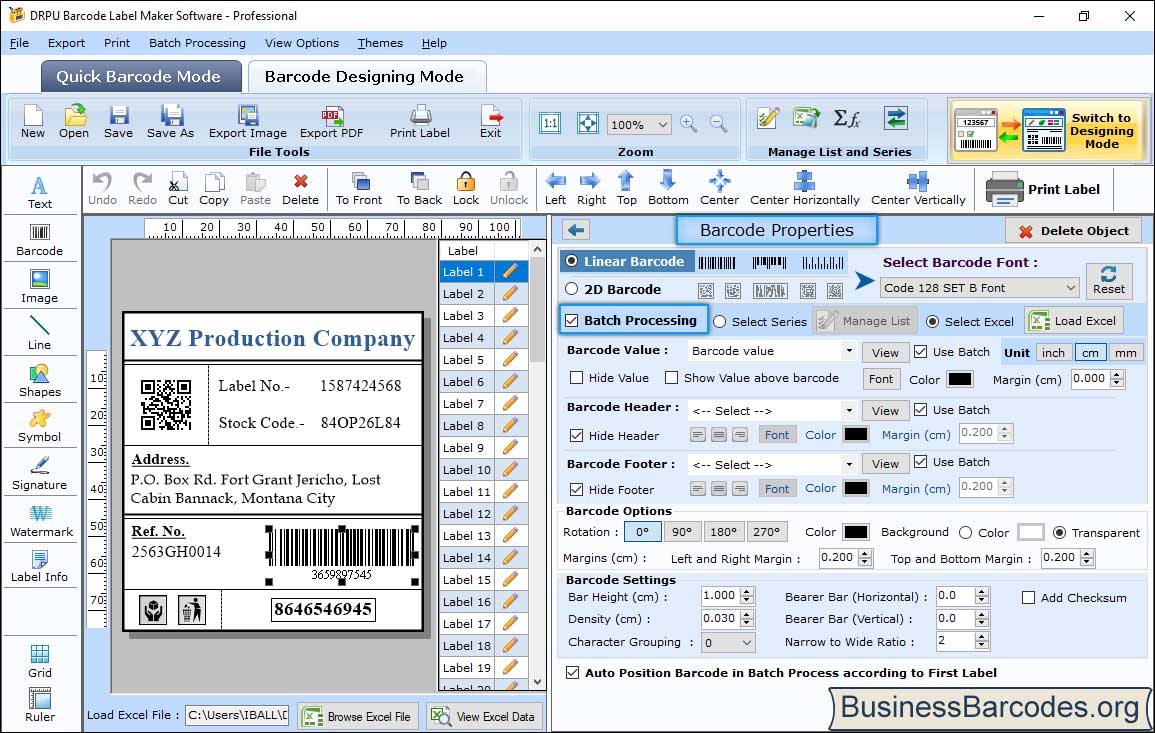
Barcode Designing Mode: a label with a QR code, address and Code 128 barcode, the numbered label list, and Barcode Properties with batch processing set to load values from Excel.
Fill hundreds of labels from a series or an Excel sheet
Business Barcodes generates barcode values three ways: a sequential series (1587424568, 1587424569 and so on), a constant value repeated on every label, or a random series. With batch processing on, the barcode value, header and footer can each come from a column of an Excel file instead, and text fields on the label can be tied to the same data, so every label in a run gets its own stock code and address.
Linear and 2D symbologies, with control over the bars
Business Barcodes covers the retail and shipping codes most small businesses need: EAN13, EAN8, UPCA, UPCE, ISBN 13, ITF-14, Code 128 (sets A, B and C), Code 39, Code 93, Codabar, MSI Plessey, Postnet, Planet and USPS sack and tray labels. The 2D side includes QR Code, Data Matrix, PDF417, MicroPDF417, Aztec, MaxiCode and the GS1 Databar family. Bar height, density, bearer bars, narrow-to-wide ratio, margins, rotation and an optional checksum are all set by number, which matters when a scanner or a retailer's spec is fussy.
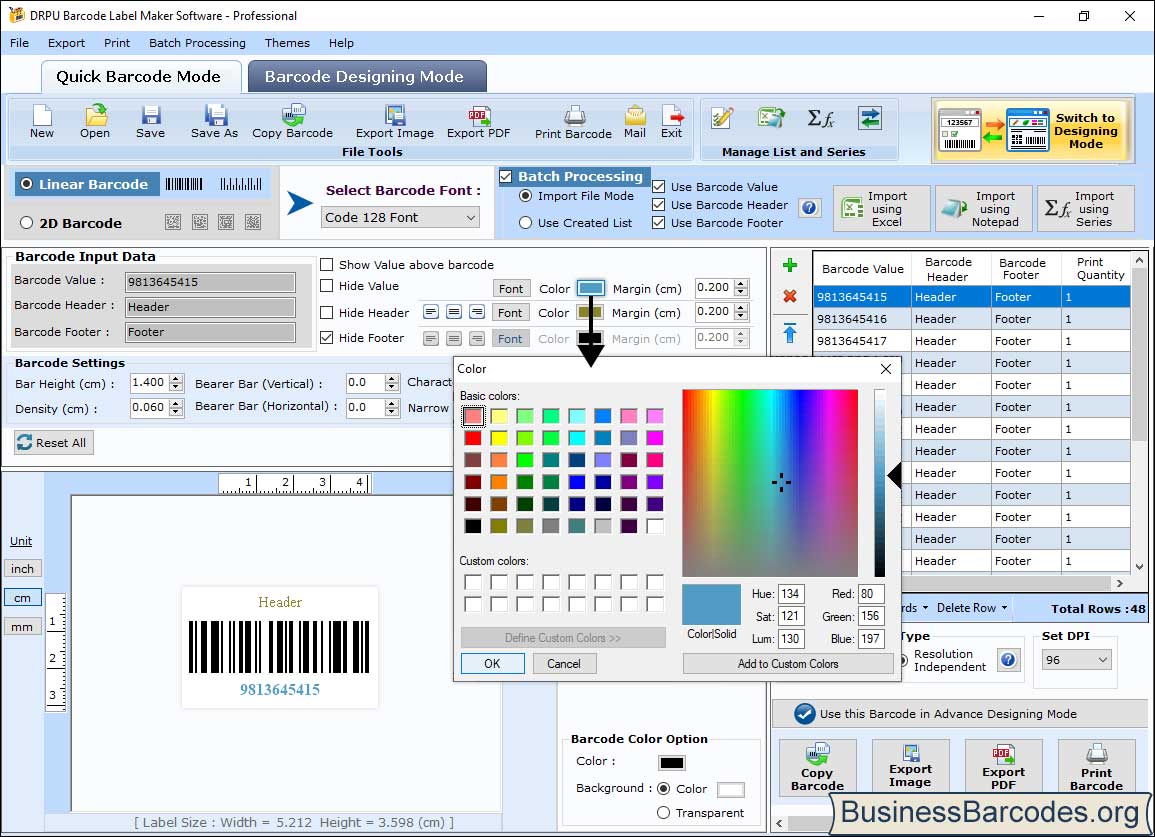
Quick Barcode Mode: a Code 128 barcode with header and value colors being changed, and a batch list of 48 sequential values on the right.
Print on label stock or export images and PDF
Business Barcodes prints in two modes: Pre Define Label Stock, where you pick a label product and the rows, columns and margins are filled in, or Manual Setting, where you enter columns, rows, label size and margins yourself. You can print all labels or a range, set the number of copies and preview the sheet first. Barcodes and labels also export as PDF or as images (JPEG, TIFF, BMP, PNG, WMF, EMF, EXIF, GIF) for use in other documents.
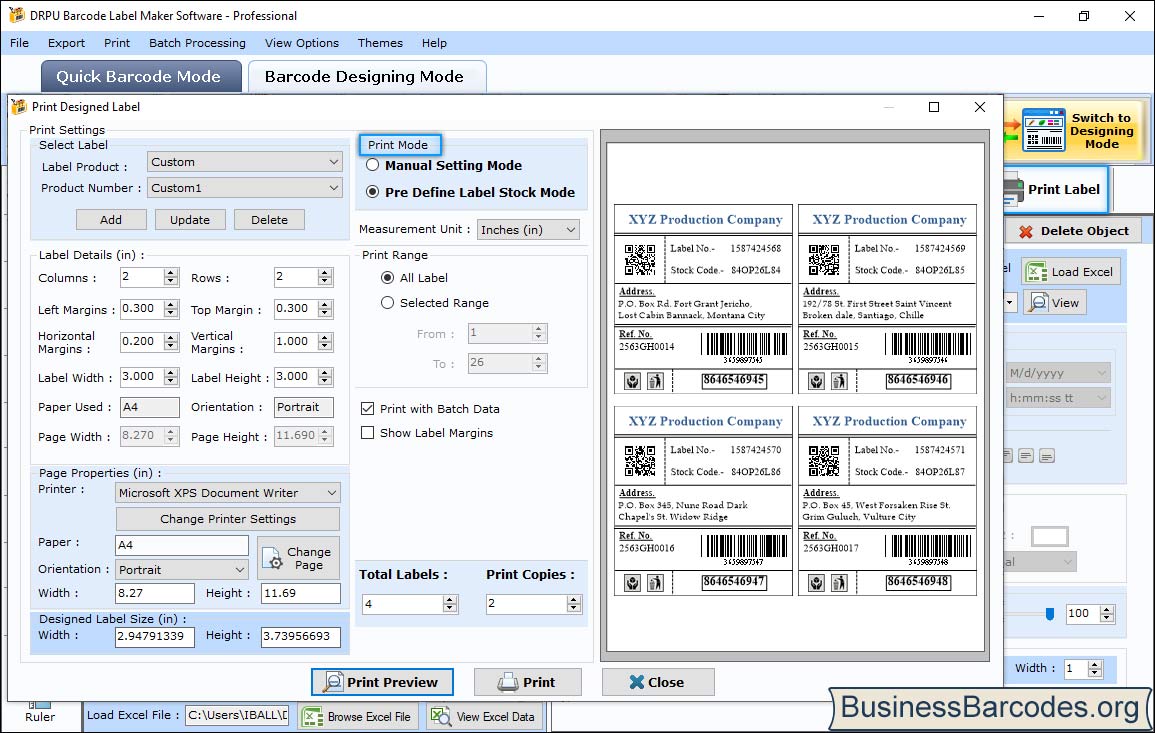
The Print Designed Label dialog: label layout (2 x 2 on A4), print mode, print range, batch data and a preview with four numbered labels.
Benefits
- One payment. At $69 with no subscription, it costs less than a year of most cloud label services.
- Fewer typing errors. Series and Excel import mean nobody keys in 500 stock numbers by hand.
- Works offline. Everything runs on the PC, so labels still print when the internet doesn't.
Real-World Uses
- Stock labels for a small warehouse: export the item list from a spreadsheet and print a Code 128 label with the item name for every shelf bin.
- Retail price stickers: print EAN13 or UPCA codes for products you package yourself, once you have GS1 numbers.
- Asset tags: number laptops, tools and furniture with a sequential series and a QR code that holds the asset ID.
- Shipping and mailing labels: combine an address block from Excel with a reference barcode on each label.
Who It's For, and Who Should Skip It
Business Barcodes suits a small business or office on Windows that prints labels in batches from spreadsheets and wants to own the software outright. It's a good middle ground between free online barcode generators, which make one image at a time, and enterprise label software that connects to databases and printers across a network.
Skip it if you're on a Mac (DRPU sells a separate Mac edition), if you need labels printed straight from a live database or ERP system, or if you only need one or two barcodes, which a free online generator handles fine. If you want to send labels by e-mail from the program, compare the $79 Corporate edition, and if you want the same features for $10 less, the Standard edition.
Usage Guide
- Download the demo from businessbarcodes.org, run the installer and start DRPU Barcode Label Maker (Professional).
- For a single barcode, stay in Quick Barcode Mode: choose Linear or 2D, pick the font (symbology) and type the value, header and footer.
- For labels, switch to Barcode Designing Mode, set the label size, and add text, barcode, image and shape objects from the left toolbar.
- Select the barcode, tick Batch Processing, and choose Select Series (sequential, constant or random) or Select Excel and load your file.
- Open Print Label, choose Pre Define Label Stock or Manual Setting, check the preview, set the copies and print, or export to PDF or images instead.
Where it falls short
- Thin documentation. The site has short step lists and screenshots but no full manual, so expect some trial and error with print alignment.
- Confusing product range. DRPU sells the same engine under many names and sites (Standard, Professional, Corporate and several industry editions), which makes it hard to tell what each one adds beyond the short feature lists.
- Dated look. The interface is functional but crowded, with many small buttons on each panel.
What Users Say
Download sites
There are very few published reviews of this edition. Free Download Manager's listing for DRPU Barcode Label Maker (Professional) shows a user rating of 3.3 out of 5 from 12 votes. Its editorial summary says "One standout feature is the inbuilt Barcode Designing View functionality" and calls the program "an essential tool for businesses needing precise and varied barcode solutions," but adds as a con that it is "Mainly geared towards inventory tasks, it might not be as useful for businesses outside this scope."
SourceForge and SoftwareReview.com list DRPU Barcode Label Maker with no user reviews yet. With so little feedback, the trial is the real test: print a full sheet on your own labels before you buy.
Editions and Pricing
| Edition | Price (order page) | Platform | What it adds |
|---|
| Standard | $59 | Windows | Same features as Professional in DRPU's comparison chart |
| Professional (this listing) | $69 | Windows | Designing view, Excel batch data, label stock printing, 49 barcode types |
| Corporate | $79 | Windows | Built-in e-mail settings |
| Mac edition | $69 | macOS | Barcode label maker for Mac |
FAQs
Is Business Barcodes a subscription?
No. Business Barcodes Professional is a one-time $69 purchase on the order page, with no renewal charge.
Is Business Barcodes the same as DRPU Barcode Label Maker?
Yes. Business Barcodes is DRPU's own storefront, and the installer is DRPU Barcode Label Maker (Professional), made by DRPU Software Pvt. Ltd. in India.
Can Business Barcodes make QR codes?
Yes. Business Barcodes includes QR Code among its 2D symbologies, along with Data Matrix, PDF417, Aztec and MaxiCode, and a QR code can sit on the same label as a linear barcode.
Does Business Barcodes give me valid UPC or EAN numbers?
No. Business Barcodes draws the barcode for whatever number you enter. Retail UPC and EAN numbers that stores will accept come from GS1, which you join separately.
Does Business Barcodes run on a Mac?
No. Business Barcodes Professional is Windows software. DRPU sells a separate Barcode Label Maker for Mac at $69.
Which printers does Business Barcodes work with?
Business Barcodes prints through the normal Windows printer driver, so any printer Windows can print to will work, from an office laser printer with sheet labels to a label printer. The print dialog takes custom page and label sizes.
System Requirements
- Windows PC (no minimum version or hardware is published)
- About 6 MB for the installer
- Microsoft Excel file for batch import (optional)
- A Windows printer for printed labels
Conclusion
Business Barcodes Professional is a fair buy at $69 for a Windows user who prints batches of barcode labels from spreadsheets and doesn't want a subscription. The reason to buy it is the combination of a real label designer, Excel-driven batch printing and a long list of symbologies for a one-time price. The reason to hesitate is how little independent feedback exists and how thin the documentation is, so run the demo with your own printer and labels first, and buy it once a full sheet prints and scans correctly.
Download Free TrialBuy Now