Short answer
The best barcode generator software for printing labels on Windows, for most small businesses, is DRPU Barcode Label Maker. It's sold as Business Barcodes (Professional edition, $69 once) and as Business Barcode Labeling Software (Standard edition, $59 once). It makes 27 linear and 22 2D barcode types, including QR Code and Data Matrix, designs full labels, and prints a label for every row of an Excel sheet. DRPU's own comparison chart gives both editions the same features, so the $59 Standard edition is the better value unless you prefer the Professional storefront.
Clinics and pharmacies can save $10 with the DRPU Healthcare Industry Barcode Label Maker ($49), which has fewer barcode types. If your codes must pass GS1 checks (GS1 DataMatrix, GS1-128, GS1 Digital Link), pay for TEC-IT Barcode Studio instead. Barcode Label Studio ($49.95) is a simpler label printer for Avery sheets, and Barillo is free if all you need is a UPC or EAN image.
At a glance
|
Price (1 PC) |
Barcode types |
Labels from Excel |
Trial |
Business Barcodes / Business Barcode Labeling Software
Best overall |
$69 (Professional) or $59 (Standard), one-time |
27 linear, 22 2D |
✓ Reads Excel files directly |
Free demo, limits not published |
DRPU Healthcare Barcode Label Maker
For clinics and pharmacies |
$49, one-time |
14 linear, 4 2D |
✓ Reads Excel files directly |
Free demo, limits not published |
TEC-IT Barcode Studio
Best for GS1 and print artwork |
€75 a year (Lite) or €249 a year (Pro) |
100+ (Pro), with GS1 checks |
Via CSV or text file |
10-day test license, "demo" marker on codes |
Barcode Label Studio
Simplest label sheets |
$49.95, one-time, free upgrades |
24 linear, 4 2D |
✓ Excel, CSV or text |
30 days, watermark on labels |
Barillo
Best free (UPC/EAN only) |
Free |
4 (UPC-A, UPC-E, EAN-13, EAN-8) |
✗ One barcode at a time |
Not needed, no limits |
How we picked
- We started from the barcode programs listed on Ivertech. There are hundreds, but most are fonts, developer components, or old versions of the same DRPU program under different names. We kept Windows programs that create barcodes and print them, and that the vendor still sells or offers for download.
- We read each vendor's product page, order page, download page and manual, and counted the barcode types in each one's own list or comparison chart.
- We checked the price on each order page and what the trial restricts, where the vendor says.
- We checked each installer: its version, size and file date.
- What we checked: on November 5, 2026 the order page charged $69.00 for Barcode Label Maker - Professional Edition, $59.00 for DRPU Barcode Label Maker and Print Creator (Standard) and $49.00 for the Healthcare edition, with no discount line. The three DRPU demo installers (5.8 to 5.9 MB) are all dated November 8, 2024. We also checked TEC-IT's Barcode Studio 17.2.1 installer (19.4 MB, released May 27, 2026) and its pricing table, the Barcode Label Studio 2.4.0 installer (22.6 MB, dated July 18, 2020) and price, and Barillo 1.01 (the installer's file version, digitally signed by NCH Software).
We compared features, prices, trials and barcode lists. We didn't print label sheets with each program or test the codes with a scanner or a GS1 verifier.
1D, 2D, QR Code, Data Matrix and GS1: what you're choosing between
Before comparing programs, it helps to know which barcode you need, because that rules some tools out right away.
- 1D (linear) barcodes are the familiar bars. EAN-13 and UPC-A go on retail products, Code 128 and Code 39 are the usual choice for stock, asset and shipping labels, and ITF-14 and GS1-128 go on cartons and pallets. They hold a short number or code, typically up to a few dozen characters.
- 2D barcodes store data in a grid. A QR Code holds a web address, contact card or text and scans with any phone camera. Data Matrix fits a lot of data into a tiny square, which is why it's used on electronic parts, medicine packs and medical devices. PDF417 appears on ID cards and shipping documents.
- GS1 is the organization that issues retail product numbers (GTINs) and sets the rules for GS1-128, GS1 DataBar and GS1 DataMatrix. No barcode generator software gives you a valid product number: you join GS1 and get a company prefix. The software then draws the barcode for the number you enter. What differs is whether the program understands GS1 data (Application Identifiers like (01) GTIN, (17) expiry date and (10) batch) and checks it, or just draws whatever you type.
If you only need a retail EAN or UPC, any tool here works. If you need labels with text around the barcode, printed from a spreadsheet, you want a label maker (the DRPU programs or Barcode Label Studio). If you need GS1 DataMatrix or GS1-128 that a retailer, distributor or pharmacy wholesaler will check, you want TEC-IT Barcode Studio.
Number of barcode types (vendor's own lists)
TEC-IT Barcode Studio (Pro)100+
Business Barcodes / Business Barcode Labeling Software49
DRPU Healthcare Barcode Label Maker18
Counted from DRPU's edition comparison chart, SoftRM's and NCH's product pages and TEC-IT's "100+" figure, on November 5, 2026. More types only matters if you need one of the rarer ones.
DRPU Barcode Label Maker (Business Barcodes and Business Barcode Labeling Software)
Best overall for printing barcode labels
- Listings: Business Barcodes (Professional) and Business Barcode Labeling Software (Standard)
- Price: $69 (Professional) or $59 (Standard) on the order page, one-time, no renewal
- Platform: Windows (DRPU's Mac barcode maker is a separate product)
- Version: 11.3.1.6, installers dated November 8, 2024
- Best for: small shops, warehouses and offices that print stock labels, price labels, asset tags or QR codes from a spreadsheet
DRPU Barcode Label Maker is the most complete label tool in this roundup for the money. It has two modes. Quick Barcode Mode is a single form: pick linear or 2D, choose the barcode type, type the value, header and footer, and copy, export or print it. Barcode Designing Mode is a small label editor with text, barcode, image, line, shape, symbol, signature and watermark tools, so a label can carry your company name, an address block, a QR code and a Code 128 barcode together.
The reason to buy it is batch printing. The barcode value, header, footer and print quantity can each come from a column of an Excel file, or from a sequential, constant or random series, and every row becomes its own label. The print dialog has a Manual Setting mode (paper size, margins, gaps, rows and columns) and a Pre Define Label Stock mode with layouts from Avery (A4, US Letter and Zweckform), Herma, APLI, A-ONE, Sigel, Tico, Tower and other label brands. Barcodes and labels also export as PDF or as JPEG, PNG, BMP, TIFF, GIF, WMF, EMF or EXIF images.
The barcode list is long: 27 linear types (EAN-13, EAN-8, UPC-A, UPC-E, ISBN 13, ITF-14, Code 128 sets A, B and C, Code 39, Code 93, UCC/EAN-128, Codabar, MSI Plessey, Postnet, Planet, USPS sack and tray labels and more) and 22 2D types (QR Code, Data Matrix, PDF417, MicroPDF417, Aztec, MaxiCode and the GS1 DataBar family). Bar height, density, bearer bars, narrow-to-wide ratio, margins, rotation and the check digit are all set by number.

DRPU Barcode Label Maker Professional in Barcode Designing Mode: a label with a QR code, address block and Code 128 barcode, the numbered label list, and Barcode Properties with Batch Processing set to Select Excel and a Load Excel button.
Standard or Professional?
DRPU's comparison chart gives the Standard edition ($59) and the Professional edition ($69) exactly the same ticks: the same 49 barcode types, the designing view, Excel batch processing, both print modes and the same image settings. Only the Corporate edition ($79) adds something, a built-in e-mail setting for sending labels from the program. The two editions are sold from different DRPU websites, and the Professional site puts more weight on label design, but on the features DRPU lists, the Standard edition is the one to buy. Both run the same version, 11.3.1.6.

The Standard edition's Print Designed Label dialog: Manual Setting Mode, page and label margins, a 2 by 2 layout, Print with Batch Data ticked, and a preview of four shipping labels, each with its own serial number, barcode and Data Matrix code.
What we like
- A real label designer plus Excel-driven batch printing for $59 or $69, paid once
- 49 barcode types, including QR Code, Data Matrix, PDF417 and GS1 DataBar
- Ready-made layouts for common label sheets, or any custom layout
- Prints through any Windows printer, from an office laser to a label printer
Watch out for
- The same program is sold under many names and sites, so it's easy to buy it twice
- No published trial limits, system requirements, change log or refund terms
- No GS1 data checks: it draws whatever value you enter
- A crowded, dated interface, and no full manual
What users say
Published reviews are scarce. Free Download Manager's listing for DRPU Barcode Label Maker (Professional) shows a user rating of 3.3 out of 5 from 12 votes. Its editorial summary says "One standout feature is the inbuilt Barcode Designing View functionality", and lists as a con: "Mainly geared towards inventory tasks, it might not be as useful for businesses outside this scope." With so little feedback, the demo is the real test: print a full sheet on your own labels before you buy.
Download Business Barcode Labeling Software TrialBuy Business Barcode Labeling Software ($59)
Download Business Barcodes TrialBuy Business Barcodes ($69)
DRPU Healthcare Industry Barcode Label Maker
For clinics, pharmacies and medical suppliers
- Listing: DRPU Healthcare Industry Barcode Label Maker Software
- Price: $49 on the order page, one-time
- Platform: Windows
- Barcodes: 14 linear (Code 128, Code 39, EAN-13, UPC-A, UCC/EAN-128, LOGMARS and more) and 4 2D (QR Code, Data Matrix, PDF417, Aztec)
- Best for: equipment tags, pharmacy stock labels and supply boxes with lot numbers and dates
The DRPU Healthcare Industry Barcode Label Maker is the same DRPU engine, version 11.3.1.6, with the same two modes, Excel batch processing and label-sheet printing, at $10 less than the Standard edition. What you give up is barcode types: 18 instead of 49. It keeps the ones healthcare labels usually need (Code 128, UCC/EAN-128, Data Matrix and QR Code) but drops the GS1 DataBar family, MaxiCode, ITF-14 and the postal codes. Its sample labels are built around lot numbers, batch numbers, GTINs and manufacture dates.
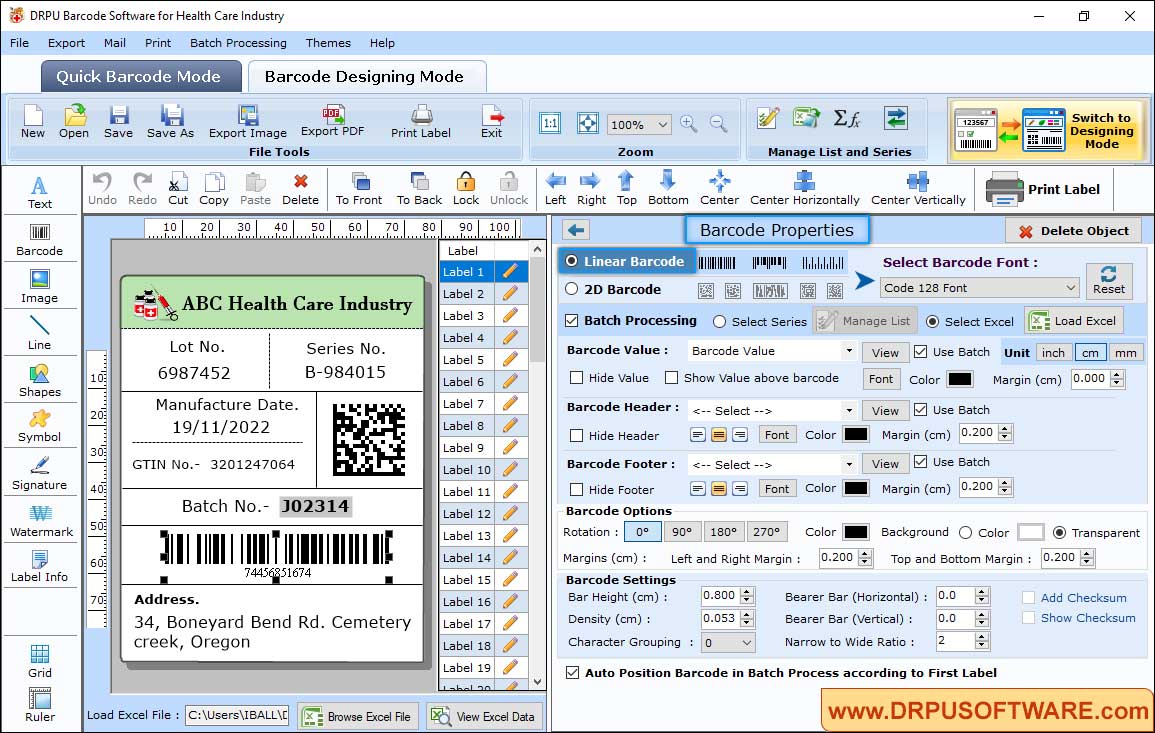
The healthcare edition's Barcode Designing Mode: a label with lot number, series number, manufacture date, GTIN, a Data Matrix code and a Code 128 barcode, with Batch Processing reading values from Excel.
Be clear about what it isn't: it's a label designer, not a compliance system. It doesn't check a label against FDA UDI or GS1 rules or keep an audit trail. If your labels are regulated, use it for layout and printing, and have the content checked separately.
What we like
- The cheapest DRPU edition with the full designer and Excel batch printing
- Data Matrix, QR Code and UCC/EAN-128, the codes medical labels use most
- One-time $49
Watch out for
- 18 barcode types, so check yours is on the list first
- No UDI or GS1 validation
- No published reviews of this edition
Download Healthcare Edition TrialBuy DRPU Healthcare Barcode Label Maker ($49)
TEC-IT Barcode Studio
Best 2D barcode generator for GS1 and print artwork
- Listing: Barcode Studio
- Price: Lite €6.25 a month (€75 a year), Pro €20.75 a month (€249 a year), per device, billed annually
- Platform: Windows 10 (1809 or later), Windows 11, Windows Server 2019 and 2022, and macOS
- Version: 17.2.1, released May 27, 2026
- Best for: GS1 DataMatrix, GS1-128 and GS1 Digital Link codes, and barcodes for packaging artwork
TEC-IT Barcode Studio comes from an Austrian company that has made barcode software since 1996, and it's the most thorough barcode generator here. It makes more than 100 symbologies, including the GS1 family (GS1-128, GS1 DataBar, GS1 DataMatrix, GS1 Composite and GS1 Digital Link), Micro QR, DotCode, MaxiCode, and postal codes such as USPS Intelligent Mail and Royal Mail 4-State. Two things set it apart. A Data Assistant helps you enter GS1 Application Identifiers correctly, and a code quality rating (0 to 100%) tells you whether the barcode will read well at the size and printer resolution you've chosen, with an option to optimize it.
Barcode Studio also does batches. You import a data list from a text or CSV file (save your Excel sheet as CSV first) or generate serial numbers, then export one file per row or print the list as simple labels on predefined or custom label sheets. A command line lets you automate exports. Its label printing is basic compared with DRPU's designer, though: it prints barcodes on labels, not full labels with logos, address blocks and several fields. TEC-IT sells a separate label designer for that.
The catch is the licensing. Barcode Studio is a yearly subscription, priced in euros. Lite is limited to a smaller set of barcode types and doesn't allow bulk export. Pro has every symbology, batch output from data lists, and vector export (PDF, EPS, SVG, AI) with CMYK color for prepress. Most people buying it for GS1 or batch work need Pro, so a single PC costs €249 every year. The free demo draws a demo marker across every code, and after installing it you can request a free 10-day test license.
We didn't find a plain screenshot of the current version on TEC-IT's site: its product page uses illustrations instead. Public user reviews are also scarce, with one short 5-star "Very professional" review on AlternativeTo.
What we like
- 100+ symbologies, with GS1 Application Identifier help and Digital Link
- Code quality rating for the chosen size and resolution
- Vector export with CMYK for packaging (Pro)
- Actively maintained: six releases between October 2025 and May 2026
Watch out for
- Subscription only, priced in euros, €249 a year for Pro
- Lite has fewer barcode types and no bulk export
- Basic label printing, no full label designer
- Imports CSV and text files, not Excel workbooks directly
Download Barcode Studio Demo
Barcode Label Studio
Simplest way to print barcode labels on Avery sheets
- Listing: Barcode Label Studio
- Price: $49.95 per computer, one-time, with lifetime free upgrades
- Platform: Windows XP SP3 to Windows 11, needs .NET Framework 4
- Version: 2.4.0 (installer dated July 18, 2020)
- Best for: rows of identical-layout labels (a barcode with a header and footer) on Avery sheets
Barcode Label Studio from SoftRM does one job: it turns a list of values into sheets of barcode labels. Each label is a barcode with up to two header lines and two footer lines. Data comes from an Excel, CSV or text file, or from a generated sequential number, and preset templates line the labels up on Avery label paper. Labels export as PNG, BMP, JPG, EMF, TIFF or WMF images (with a transparent background and your chosen DPI) or as PDF.
Barcode Label Studio covers 24 linear types, including EAN-13, UPC-A, Code 128, Code 39, ITF-14, GS1-128, GS1 DataBar and USPS Intelligent Mail, and four 2D types: QR Code, PDF417, Data Matrix and GS1 Data Matrix. That makes it a cheaper route to a GS1 DataMatrix than TEC-IT, though without TEC-IT's GS1 data help and quality rating.

Barcode Label Studio's Label tab: Code 128 labels numbered 001 to 004 in two columns on Letter paper, with page and label spacing settings on the right and 100 data rows in the status bar.
It's the easiest program here to learn, with a ribbon toolbar and three tabs (Barcode, Data, Label). It's also the least maintained: the current installer dates from July 2020, and we found no published user reviews. It has no free-form label designer either, so there's no room for logos, address blocks or several barcodes on one label.
What we like
- Excel, CSV and text import plus Avery templates, for $49.95 once
- GS1-128 and GS1 Data Matrix in the list
- The only program here that states its trial limits clearly: 30 days, watermark
Watch out for
- No update since July 2020
- Barcode plus header and footer only, no label designer
- No reviews to go on
Download Barcode Label Studio Trial
Barillo (free)
Free UPC and EAN barcode images
- Listing: Barillo Barcode Software
- Price: free
- Platform: Windows (NCH lists XP to Windows 10)
- Version: 1.01, released July 2015
- Best for: one retail barcode at a time for packaging artwork
Barillo, from NCH Software, is a free generator for the four retail barcodes: UPC-A, UPC-E, EAN-13 and EAN-8. You type the GTIN, it shows the check digit and a live preview, you set the height and width, and export a BMP, PNG, GIF, TGA, TIF or PCX image to place in your packaging or label design. The download is tiny (0.2 MB) and digitally signed by NCH Software.
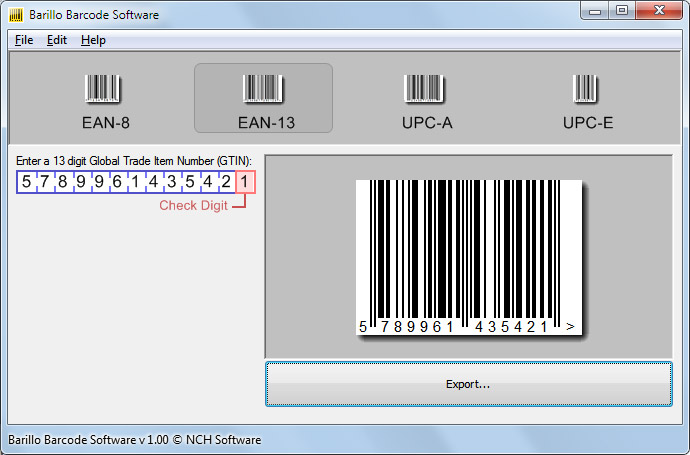
Barillo with EAN-13 selected: the 13-digit GTIN entry boxes with the check digit highlighted, and the barcode preview above the Export button.
That's all Barillo does. There's no Code 128, no QR Code or Data Matrix, no batch list and no label printing, and it hasn't been updated since 2015. For one product barcode it's all you need. For a sheet of labels, it isn't.
Download Barillo (Free)
Price for one PC, first year
What one Windows PC costs in the first year
DRPU Healthcare Barcode Label Maker$49
Barcode Label Studio$49.95
Business Barcode Labeling Software (Standard)$59
Business Barcodes (Professional)$69
TEC-IT Barcode Studio Lite (per year)€75
TEC-IT Barcode Studio Pro (per year)€249
DRPU prices from the order page, SoftRM's and TEC-IT's from their own sites, checked on November 5, 2026. TEC-IT prices are in euros and renew every year. All the others are one-time payments. Bar widths treat euros and dollars as equal.
Over three years the gap grows: the DRPU editions and Barcode Label Studio cost the same $49 to $69 they cost on day one, while Barcode Studio Pro comes to €747.
How to print barcode labels from Excel
Printing barcode labels from Excel is the job most people buy this kind of software for, and the steps are much the same in each program that supports it.
- Prepare the sheet. One row per label, one column per field (barcode value, product name, price, lot number). Keep leading zeros by formatting the barcode column as text, or EAN and UPC numbers lose their first digit.
- Design one label. In DRPU Barcode Label Maker, use Barcode Designing Mode and place the barcode and text fields. In Barcode Label Studio, choose the barcode type and the header and footer lines.
- Connect the data. DRPU: select the barcode, tick Batch Processing, choose Select Excel and Load Excel, then pick which columns fill the value, header and footer. Barcode Label Studio: Import Data from the Excel, CSV or text file. TEC-IT Barcode Studio: save the sheet as CSV and import it into the Data List.
- Pick the label sheet. Choose a predefined label stock (Avery and other brands) or enter the rows, columns, label size and margins yourself.
- Print a test page on plain paper, hold it against a label sheet to check the alignment, then scan a few codes before printing the whole run.
Which barcode generator software should you choose?
| Your situation |
Pick |
Why |
| Stock, shelf or asset labels from a spreadsheet |
Business Barcode Labeling Software ($59) |
Full label designer, direct Excel import, 49 barcode types, paid once |
| You prefer DRPU's Professional edition and storefront |
Business Barcodes ($69) |
Same features as Standard in DRPU's chart, sold as the Professional edition |
| Clinic, pharmacy or medical supply labels |
DRPU Healthcare Barcode Label Maker ($49) |
Same designer and Excel batch, with Data Matrix and UCC/EAN-128, for less |
| GS1 DataMatrix, GS1-128 or Digital Link that a retailer or distributor will check |
TEC-IT Barcode Studio Pro (€249 a year) |
GS1 Application Identifier help and a code quality rating |
| Barcode images for packaging artwork (vector, CMYK) |
TEC-IT Barcode Studio Pro |
PDF, EPS, SVG and AI export with CMYK color |
| Simple numbered labels on Avery sheets |
Barcode Label Studio ($49.95) |
Easiest to learn, clear 30-day trial |
| One UPC or EAN barcode for a product box |
Barillo (free) |
Free, with check-digit preview and image export |
Who should skip each one
- DRPU Barcode Label Maker (all editions): skip it on a Mac, if you need labels printed straight from a live database or ERP system, or if a buyer will verify your GS1 codes.
- TEC-IT Barcode Studio: skip it if you want to pay once, or if you need full labels with logos and address blocks rather than barcodes.
- Barcode Label Studio: skip it if your label needs more than a barcode and four lines of text, or if you want software that's still being updated.
- Barillo: skip it for anything but UPC and EAN images.
What commonly goes wrong
- Made-up retail numbers. A barcode generator will happily draw any EAN or UPC you type. Stores and marketplaces check the number against GS1's records, so get a GS1 company prefix before printing retail barcodes.
- Lost leading zeros. Excel turns 012345678905 into 12345678905. Format the column as text before importing.
- Codes too small for the printer. A Data Matrix or a dense Code 128 printed small on a 203 dpi label printer or an inkjet may not scan. Print bigger, raise the DPI setting, and test with the scanner you'll actually use. TEC-IT's quality rating warns you about this; the others don't.
- Labels drifting down the sheet. Alignment on label sheets is the most common complaint about any label tool. Print a test page on plain paper first, and adjust the top margin and vertical gap.
- Buying the same DRPU program twice. DRPU sells one engine under many product names and websites. Check the edition name on the order page.
FAQs
What is the best barcode generator software for Windows?
For printing barcode labels, DRPU Barcode Label Maker is the best value: Business Barcode Labeling Software (Standard, $59) and Business Barcodes (Professional, $69) both design full labels, read Excel files and make 49 barcode types for a one-time price. For GS1-checked codes, TEC-IT Barcode Studio is the stronger tool, at €249 a year for Pro.
Which 2D barcode generator makes Data Matrix codes?
Every program here except Barillo makes Data Matrix codes. DRPU Barcode Label Maker, the DRPU Healthcare edition and Barcode Label Studio all list Data Matrix, and Barcode Label Studio and TEC-IT Barcode Studio also list GS1 Data Matrix. TEC-IT is the only one that helps you enter GS1 Application Identifiers and rates the code's quality.
Can I make QR codes with these programs?
Yes, DRPU Barcode Label Maker, the Healthcare edition, Barcode Label Studio and TEC-IT Barcode Studio all make QR codes. DRPU's label maker can put a QR code on the same label as a linear barcode and text, and its QR settings include a logo in the middle. Barillo doesn't make QR codes.
Do I need a special barcode printer?
No. DRPU Barcode Label Maker, Barcode Label Studio and TEC-IT Barcode Studio print through the normal Windows printer driver, so an office laser or inkjet printer with sheet labels works, and so does a thermal label printer with a Windows driver. Set the label size to match your roll or sheet.
Does barcode generator software give me a UPC or EAN number?
No, none of these programs issues product numbers. Barillo, the DRPU label makers, Barcode Label Studio and TEC-IT Barcode Studio draw the barcode for the number you enter. Retail GTINs that stores accept come from GS1, which you join separately.
Is there a free barcode label maker?
Barillo is free, but it only makes UPC and EAN barcode images, one at a time, with no labels or batches. The other programs here are paid. The DRPU editions and TEC-IT Barcode Studio have free demos, and Barcode Label Studio has a 30-day trial that puts a watermark on labels.
Is DRPU's Professional edition worth $10 more than Standard?
Not on DRPU's own comparison chart, which gives Business Barcodes (Professional, $69) and Business Barcode Labeling Software (Standard, $59) the same features and the same 49 barcode types. Only the $79 Corporate edition adds something, a built-in e-mail setting. Both run version 11.3.1.6.
Do these programs run on a Mac?
TEC-IT Barcode Studio runs on both Windows and macOS. The DRPU editions in this article, Barcode Label Studio and Barillo are Windows programs. DRPU sells a separate Mac barcode maker, which a Windows license doesn't cover.