DRPU Healthcare Barcode Label Maker: Print Labels for Medical Devices, Medicines and Pharmacy Stock
DRPU Barcode Software for Health Care Industry is a $49 Windows program for designing and printing barcode labels for medical equipment, medicines and pharmacy products, with batch printing from Excel. It's aimed at small hospitals, clinics, pharmacies and medical suppliers that want labels without a full labeling system.
A clinic tagging its equipment, or a pharmacy relabeling stock with lot numbers and expiry dates, needs a few hundred labels that each carry different data. This program designs the label once, pulls the values from a spreadsheet, and prints the whole run.
Quick facts
- Version: 11.3.1.6, released November 8, 2024
- Developer: DRPU Software Pvt. Ltd.
- Platform: Windows
- Barcode types: 14 linear (Code 128, Code 39, EAN, UPC, Codabar and more) and 4 2D (QR Code, DataMatrix, PDF417, Aztec)
- Batch data: from an Excel file or a number series
- Output: any barcode or standard printer, plus JPEG, GIF, BMP, TIFF, PNG and PDF
- Price: $49, one-time
- Installer: 5.9 MB, free trial download
What we checked: the installer from DRPU's site reports version 11.3.1.6, is 5.9 MB and is digitally signed by Pro Data Doctor Pvt. Ltd., DRPU's parent company (downloaded October 17, 2026). The price was $49.00 on the order page on October 17, 2026. We didn't print labels with it, and DRPU doesn't publish what the trial version restricts.
Download Free TrialBuy Now
Overview
The program has two modes. Quick Barcode Mode makes a plain barcode fast: pick the type, type or import the values, set colors. Barcode Designing Mode is a small label editor with a canvas, rulers and a grid, where you place text, barcodes, images, lines, shapes, symbols, a signature and a watermark on the label. A list down the side shows every label in a batch, so you can check each one before printing.

Barcode Designing Mode with a label holding a manufacture date, item number and two barcodes, and the Print Designed Label dialog laying out 22 labels on an A4 sheet.
Features
Design the whole label, not just the barcode
DRPU's healthcare label maker lets you build a complete label: your clinic or company name, lot and series numbers, manufacture and expiry dates, an address, handling symbols and a logo, around one or more barcodes. Labels can be rectangles, rounded rectangles or ellipses, with a border, a solid, gradient or image background, and basic image adjustments (brightness, contrast, hue, grayscale, flip).
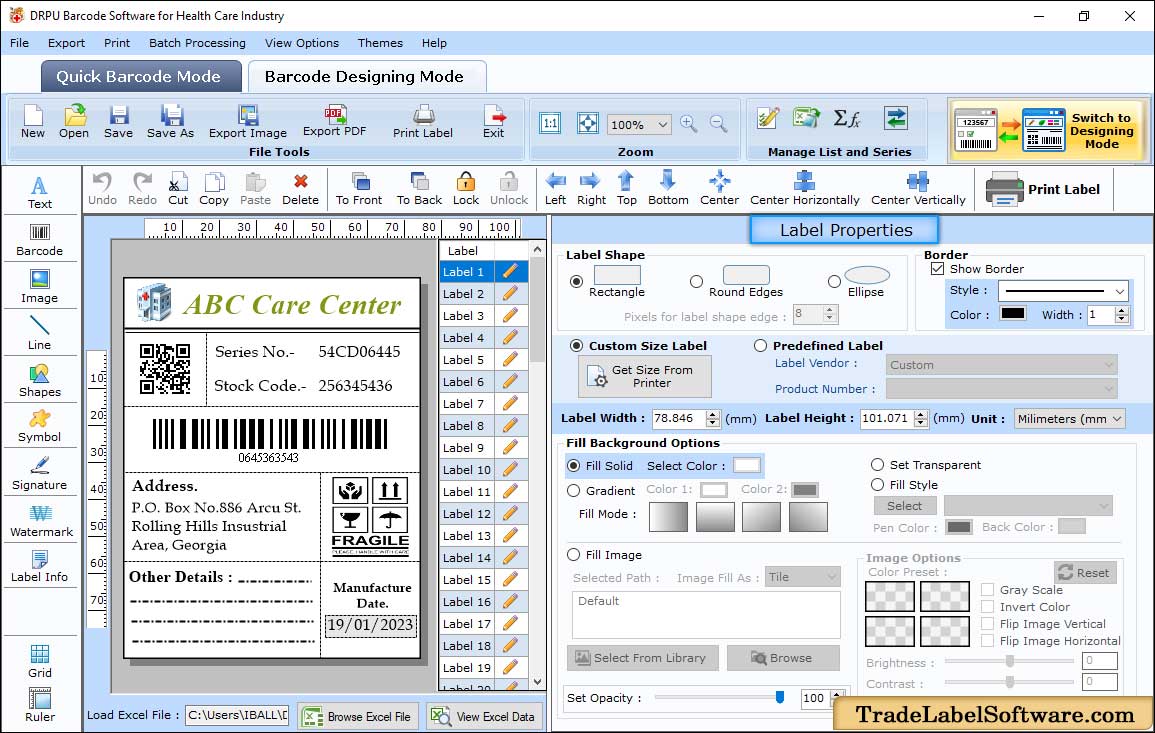
The Label Properties panel: shape, border, custom or predefined label size, and background fill, next to a care-center label with a QR code, a linear barcode and fragile-handling symbols.
Linear and 2D barcodes, with full control over each
DRPU's healthcare label maker supports Code 128 (sets A, B and C), Code 39 and Code 39 Full ASCII, Codabar, EAN-8, EAN-13, UPC-A, UPC-E, Interleaved 2 of 5, LOGMARS and UCC/EAN-128, plus QR Code, DataMatrix, PDF417 and Aztec. For each barcode you set the value, header and footer text, fonts and colors, bar height, density, rotation (0, 90, 180 or 270 degrees), margins, bearer bars, character grouping and an optional checksum.
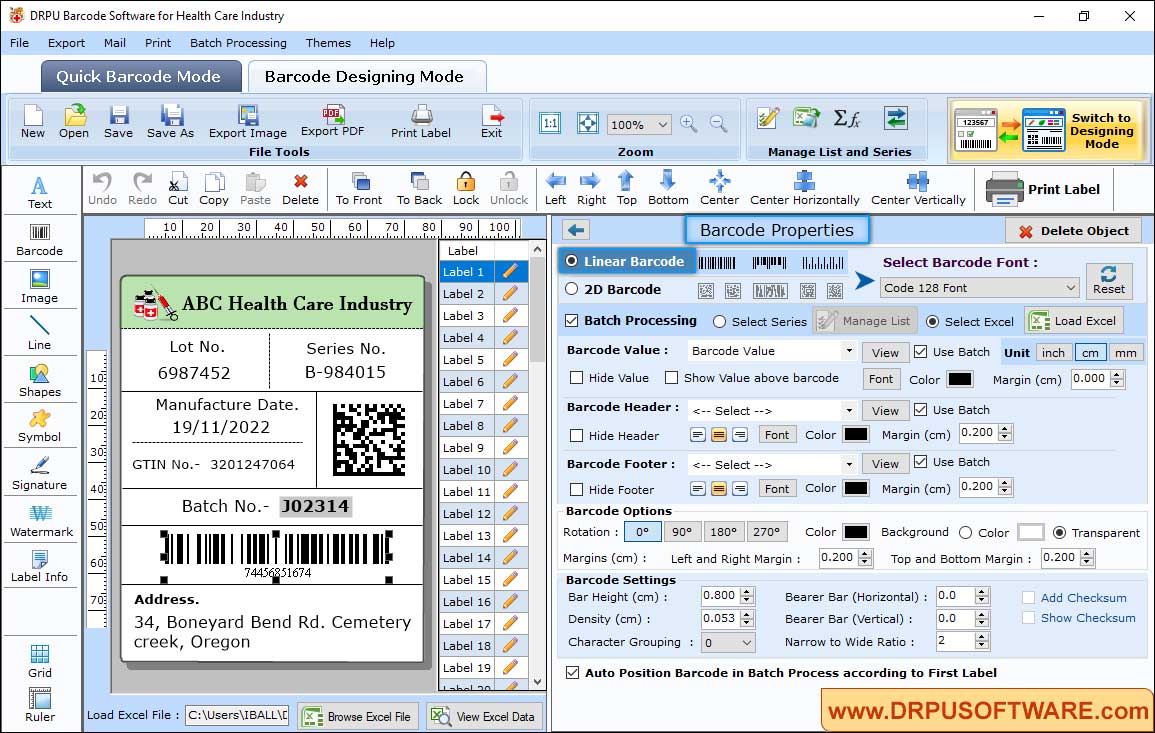
Barcode Properties for a Code 128 barcode with Batch Processing set to an Excel file, on a label with lot number, series number, GTIN, manufacture date and a DataMatrix code.
Batch processing from Excel
DRPU's healthcare label maker can fill each label's barcode value, header and footer from an Excel file, or count through a series, so one design prints hundreds of labels with different lot numbers or item codes. Load the spreadsheet, map the columns, and the label list on the side shows every generated label.
Print on label stock or plain paper
DRPU's healthcare label maker prints on barcode label printers or ordinary office printers. Choose a predefined label stock (such as Apli/Agipa sheets) or set the layout by hand: page size, margins, gaps between labels, rows and columns, total labels and copies. Print profiles save your settings, and a print preview shows the full sheet before you commit.
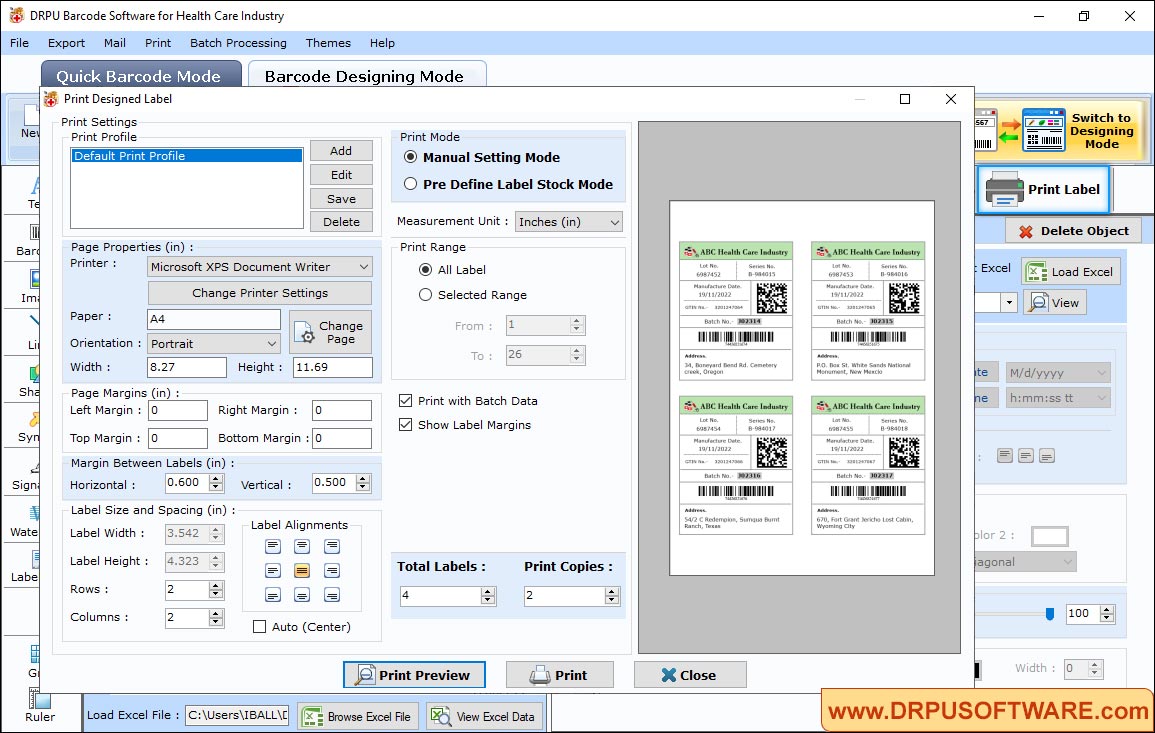
Print settings in Manual mode: A4 paper, a 2 by 2 layout, margins between labels, and a preview of four batch labels with different lot and batch numbers.
Save labels as images or PDF
DRPU's healthcare label maker exports finished labels as JPEG, GIF, BMP, TIFF or PNG images, or as a PDF, and you can paste them into Word, Excel or Paint. That's useful when labels go into a document or a supplier's form rather than onto a sticker.
Benefits
The point is price and simplicity. Enterprise labeling systems cost hundreds or thousands of dollars and assume an IT department. This is a one-time $49 program that runs on the PC next to your printer and does the one job: lay out a label, fill it from a spreadsheet, print the sheet.
Batch printing from Excel removes the typing. Your inventory list already has the item codes and lot numbers, so the labels come straight from it with no retyping errors.
Real-World Uses
- Equipment tagging: a clinic labels its devices with an asset number, a barcode and the next service date.
- Pharmacy stock: a pharmacy prints labels with item code, lot number and expiry date for repacked medicines.
- Medical supplies: a supplier labels boxes with GTIN, batch number, manufacture date and a DataMatrix code.
- Sample and specimen trays: a small lab prints numbered barcode labels in series for trays and containers.
Who It's For, and Who Should Skip It
It suits small healthcare businesses on Windows that need to design and print their own barcode labels a few hundred at a time, from a spreadsheet, without paying for an enterprise system.
Skip it if:
- You need regulated UDI labeling with validation and audit trails. This is a label designer. It doesn't check your labels against FDA UDI or GS1 rules, keep audit records or connect to a hospital system.
- You're on a Mac. This edition is Windows only. DRPU sells separate Mac barcode makers.
- You only need a few barcode images. A free online barcode generator is enough for that.
Usage Guide
- Install: download the 5.9 MB installer from DRPU, run it and start the program.
- Design the label: open Barcode Designing Mode, set the label size and shape in Label Properties, then add text, a barcode, images and symbols from the toolbar on the left.
- Set the barcode: double-click the barcode, choose Linear or 2D and the barcode type, and set its value, header, footer, size and colors.
- Load your data: turn on Batch Processing, choose Select Excel, load the file and pick which columns fill the value, header and footer.
- Print: click Print Label, choose a predefined label stock or Manual mode, set rows, columns and margins, check Print Preview, then print.
Where it falls short
- No compliance features. Nothing checks that a label meets UDI, GS1 or pharmacy labeling rules. You're responsible for the content and format.
- Thin documentation. DRPU's pages describe the steps briefly, with no full manual or system requirements published, and they don't say what the trial version restricts. Test the trial with your own printer and label stock before buying.
- Few reviews. There are no published user reviews of this edition, so you'll be relying on your own trial.
- The same software under many names. DRPU sells this program through many websites and product names (Healthcare Industry Barcode Label Maker, Medical Barcodes Generator and others). They're the same installer, so don't buy it twice.
Comparisons
Healthcare edition vs DRPU's general barcode label editions
DRPU also sells general Barcode Label Maker editions (Standard, Professional and Corporate) and editions for other industries such as retail, publishing and post offices. The healthcare edition has the same kind of designer and batch printing, aimed at healthcare labels. Pick the healthcare edition if that's your use, and look at the Corporate or Professional editions if you need labels for several kinds of business.
DRPU vs free barcode generators
A free generator makes a barcode image. DRPU's program makes a full label around it, fills hundreds of labels from Excel and prints them laid out on label sheets. If you print labels regularly, that's what the $49 buys.
FAQs
Can DRPU's healthcare label maker print QR codes and DataMatrix codes?
Yes. DRPU Barcode Software for Health Care Industry prints QR Code, DataMatrix, PDF417 and Aztec 2D codes as well as 14 linear barcode types, including Code 128, EAN-13 and UPC-A.
Do I need a special barcode printer?
No. DRPU's healthcare label maker prints on barcode label printers and on ordinary office printers, using label sheets or plain paper.
Can it make labels from my Excel inventory list?
Yes. DRPU's healthcare label maker's batch processing reads barcode values, headers and footers from an Excel file, one label per row.
Is the $49 a subscription?
No. DRPU Barcode Software for Health Care Industry is a one-time $49 purchase at checkout.
Does it work on a Mac?
No. This edition runs on Windows. DRPU sells separate Mac barcode label makers.
Will its labels meet FDA UDI requirements?
DRPU's healthcare label maker prints DataMatrix and UCC/EAN-128 barcodes, the kinds UDI labels often use, but it doesn't validate labels against the UDI rules. Check the requirements for your device class yourself.
Can I use the labels in Word or Excel documents?
Yes. Finished labels can be saved as images or PDF, or pasted directly into Word, Excel and Paint.
System Requirements
- Windows PC
- A barcode label printer or any standard printer
- About 6 MB for the installer
Conclusion
A reasonable buy for small healthcare businesses that print their own labels on Windows. For a one-time $49 you get a proper label designer, every common linear and 2D barcode, batch printing from Excel and flexible sheet layouts. That covers equipment tags, pharmacy stock and supply boxes without an enterprise system.
The main reason to hesitate: it's a basic tool from a vendor with thin documentation and no reviews to go on, and it does nothing to check labeling compliance. Run the trial with your own printer and label stock, and buy it if the labels come out right.
Download Free TrialBuy Now