Business Barcode Labeling Software: DRPU's $59 Barcode Label Maker for Windows
Business Barcode Labeling Software is DRPU Software's Barcode Label Maker - Standard Edition, a Windows program that creates and prints barcode labels in nearly 50 linear and 2D symbologies, from UPC and EAN to QR Code and DataMatrix. It costs $59, and a free trial download lets you design and test labels first.
It's meant for small shops, warehouses, offices and libraries that need to print price tags, stock labels, asset tags or QR codes on an ordinary office printer or a label printer, often hundreds at a time from a spreadsheet, without paying for an enterprise labeling system.
Quick facts
- Also sold as: DRPU Barcode Label Maker Software - Standard, and "DRPU Barcode Label Maker and Print Creator" on the order page
- Current version: 11.3.1.6 for Windows
- Developer: DRPU Software (sold through tradelabelsoftware.com and drpusoftware.com)
- Barcodes: 27 linear types and 22 2D types, including Code 128, Code 39, EAN13, UPCA, ITF-14, ISBN 13, USPS, QR Code, DataMatrix, PDF417, Aztec and GS1 Databar
- Output: any Windows printer or barcode printer, images (JPEG, PNG, BMP, TIFF, GIF, WMF, EMF, EXIF) and PDF
- Price: $59 for the Standard edition
- Download: 5.9 MB installer
- What we checked: the installer we downloaded from the vendor on October 20, 2026 is DRPU Barcode Label Maker (Standard) version 11.3.1.6 (5.9 MB), digitally signed by Pro Data Doctor Pvt. Ltd., with a file date of November 8, 2024. The order page showed "DRPU Barcode Label Maker and Print Creator" at $59.00 on October 20, 2026, with no discount line. We didn't install it or print labels with it.
Before you buy
DRPU sells the same barcode program under many names (Business Barcode Labeling Software, Barcode Label Maker and Print Creator, and a series of industry editions), so don't buy two of them by mistake: this one is the Standard edition. It runs on Windows only, and DRPU doesn't publish what the trial version restricts or a minimum PC spec, so install the trial and print a test sheet on your own printer and labels before you pay. The current installer dates from November 2024, and DRPU publishes no change log.
Download Free TrialBuy Now
Overview
The program has two tabs. Quick Barcode Mode is a form: pick Linear or 2D, choose a barcode font, type the value, header and footer, and the preview at the bottom updates as you go. A list on the right holds the values for batch printing. Barcode Designing Mode is a small label editor with text, barcode, image, line, shape, symbol, signature and watermark tools, for labels that need a company name, address or logo around the barcode. The File Tools bar along the top saves, exports images and PDFs, and prints.
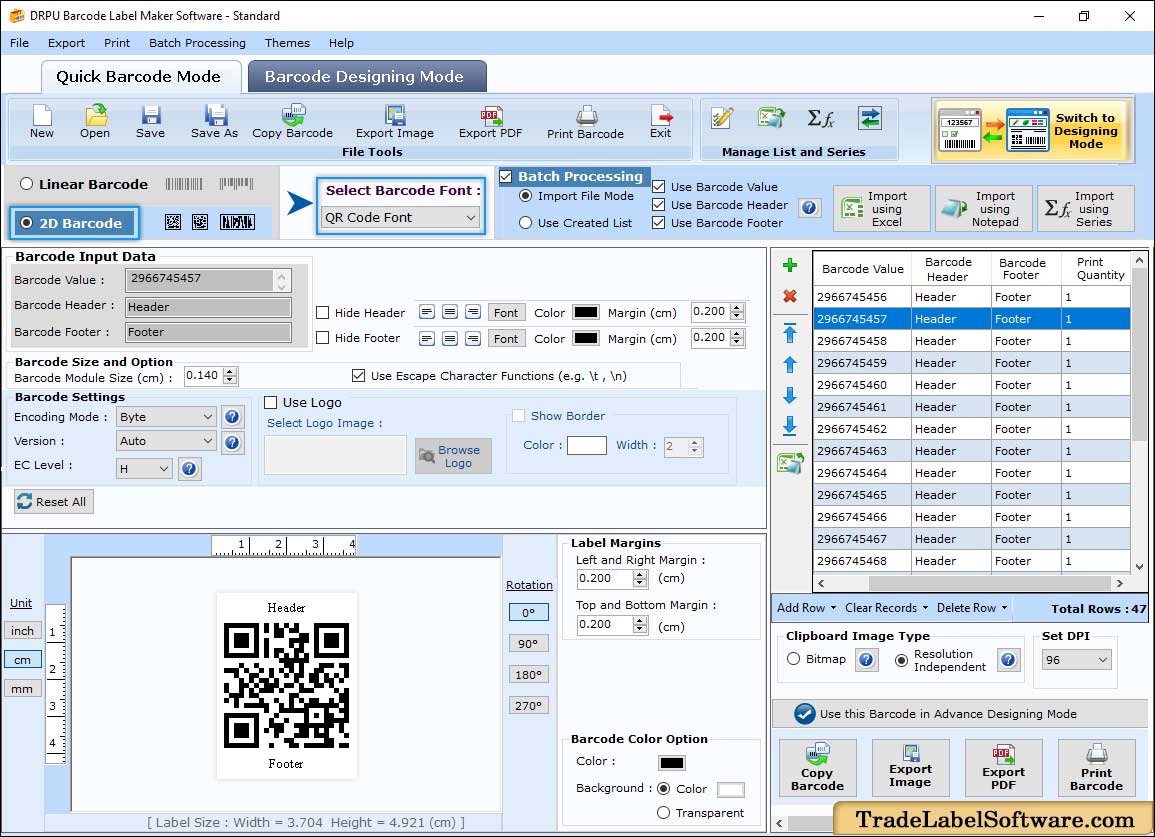
Quick Barcode Mode, from the vendor's product page: QR Code font selected with encoding mode, version and error correction level, header and footer settings, and a batch list of 47 sequential barcode values on the right.
Features
Nearly 50 barcode types
Business Barcode Labeling Software makes the retail codes (UPCA, UPCE, EAN13, EAN8, ISBN 13, ITF-14), the warehouse and industrial codes (Code 128 in all three sets, Code 39, Code 93, Interleaved 2 of 5, LOGMARS, UCC/EAN-128), postal codes (Postnet, Planet, USPS Sack and Tray Label) and 2D codes (QR Code, DataMatrix, PDF417, MicroPDF417, Aztec, MaxiCode and the GS1 Databar family). QR codes can carry a logo in the middle and get their own encoding mode and error-correction level.
Batch labels from a series or a spreadsheet
Business Barcode Labeling Software can produce hundreds of labels with different values in one go. The Create List dialog builds a sequential list (with prefix, suffix, start, end and step), a constant values list or a random list, and you can import values, headers, footers and print quantities from Excel or a text file instead. Each row of the list becomes a label.
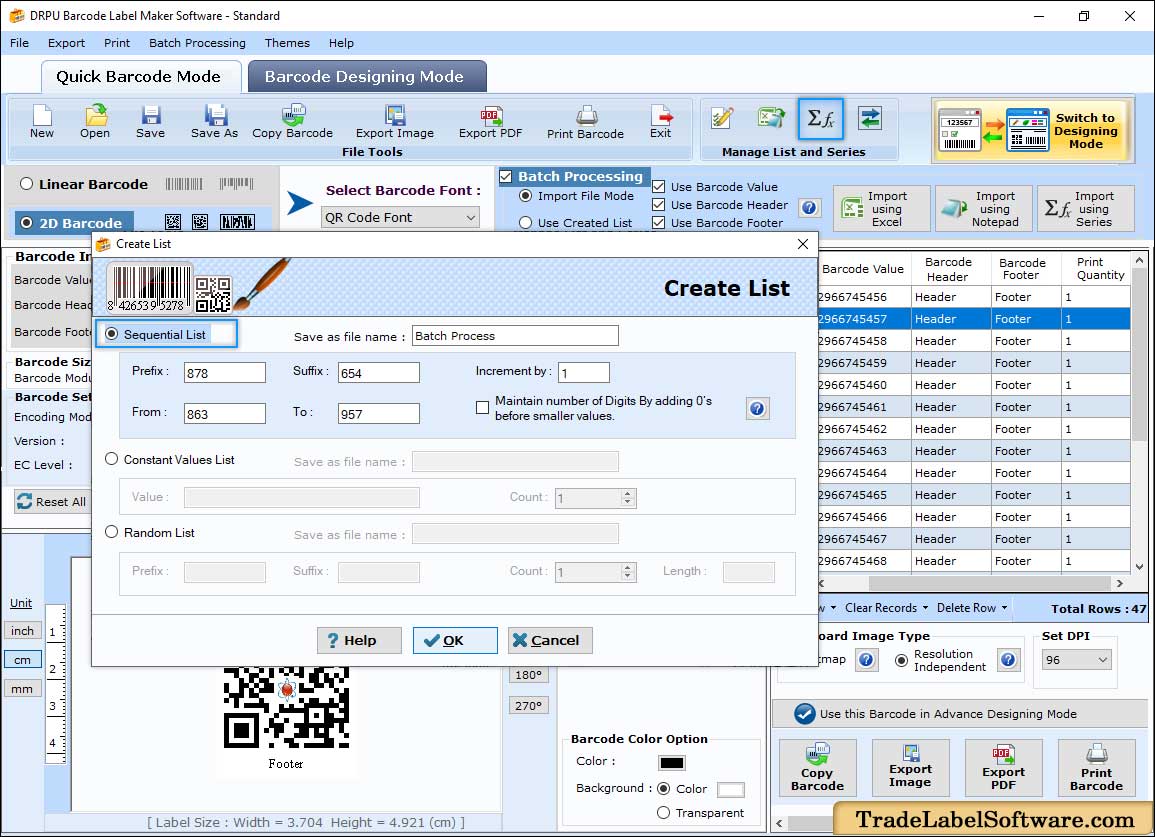
The Create List dialog, from the vendor's product page: a sequential list from 863 to 957 with prefix 878, suffix 654 and an increment of 1, plus the constant and random list options.
Print on sheets or a label printer
Business Barcode Labeling Software prints to any Windows printer. Manual Setting Mode lets you set the paper size, orientation, page margins, the gap between labels and the number of rows and columns. Pre Define Label Stock Mode has ready-made layouts for label sheets from brands such as Avery A4, A-ONE, APLI, Herma, Formtec, Sigel, Tico and Tower. You can print a range of labels and several copies of each, and save print profiles for reuse.
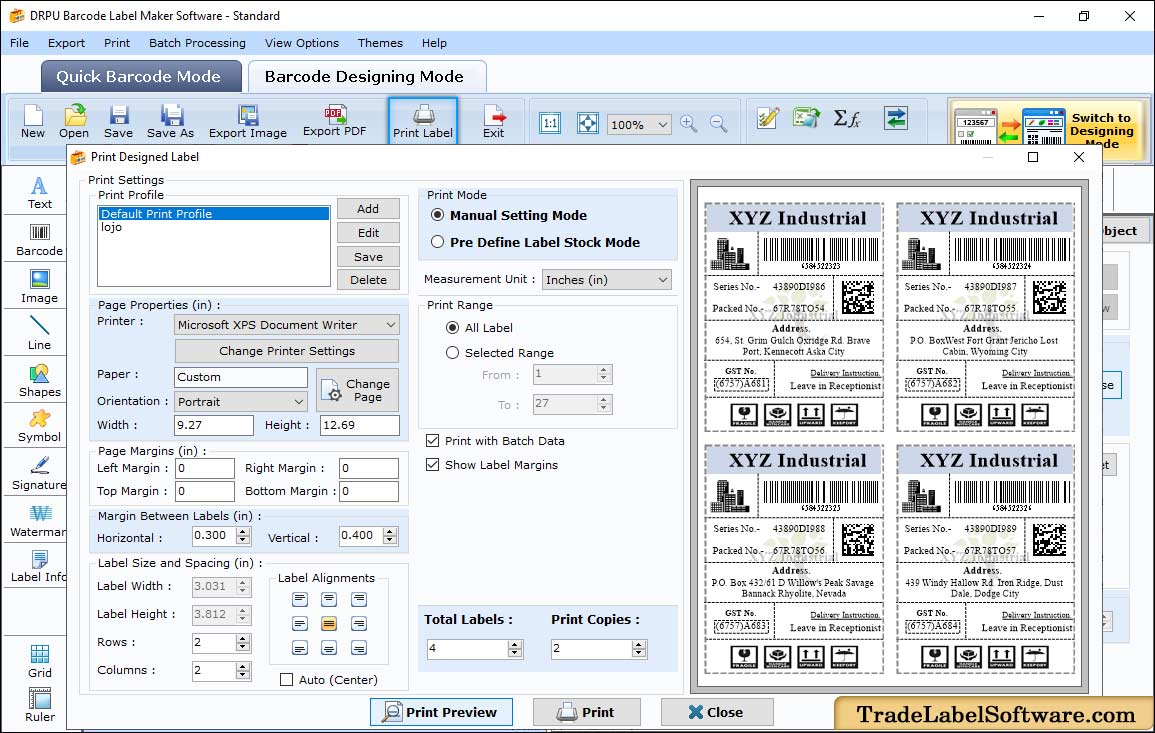
Print settings, from the vendor's product page: Manual Setting Mode with page margins, label spacing, 2 rows by 2 columns, "Print with Batch Data" ticked, and a preview of four shipping labels each with its own barcode and serial number.
Export barcodes to images, PDF and Office
Business Barcode Labeling Software saves barcodes as JPEG, PNG, BMP, TIFF, GIF, WMF, EMF or EXIF images, or as PDF, with a DPI setting and a choice of bitmap or resolution-independent copies. The Copy Barcode button puts the barcode on the clipboard so you can paste it into Word, Excel or Paint, for example into a product sheet or an invoice template.
Benefits
- No label printer required. It prints on standard label sheets in an office printer, so you can start with what you have.
- A spreadsheet becomes labels. Export your product or asset list to Excel, import it, and print every label in one run instead of typing each value.
- One-time price. $59 once, with no subscription.
- Easy for occasional users. Quick Barcode Mode is a single form, so someone who prints labels twice a month doesn't need training.
Real-World Uses
- A small retail shop: print EAN13 or UPCA price labels for products that arrive without barcodes, on Avery sheets.
- Office asset tracking: generate a sequential series of Code 128 asset tags from IT-0001 to IT-0500 and stick them on laptops and monitors.
- A warehouse: import SKU numbers and quantities from Excel and print shelf and bin labels.
- A school or church library: print ISBN or Code 39 labels for books and member cards.
- Marketing: export a QR code with the company logo in the middle as a PNG for flyers and packaging.
Who It's For, and Who Should Skip It
Business Barcode Labeling Software suits small businesses and offices on Windows that print barcode labels in batches from lists and want a low one-time price.
Skip it if you use a Mac (DRPU sells a separate Mac edition), if you need to print straight from a live database or connect to an ERP or inventory system (enterprise labeling software does that), or if you want to email labels from inside the program, which only DRPU's Corporate edition does. If you only need one or two barcodes, a free online barcode generator is enough.
Usage Guide
- Install and launch. Download the trial, run the installer and open DRPU Barcode Label Maker. It starts in Quick Barcode Mode.
- Choose the barcode. Select Linear Barcode or 2D Barcode and pick the font, for example EAN13 or QR Code.
- Enter the data. Type the barcode value, header and footer, and set the size, colors, rotation and margins. The preview updates as you type.
- Add a batch (optional). Tick Batch Processing, then import a list from Excel or Notepad, or click the series button to create a sequential, constant or random list.
- Design a full label (optional). Click "Switch to Designing Mode" to add text, images, shapes and a logo around the barcode.
- Print or export. Click Print Barcode, choose Manual Setting Mode or a predefined label stock, check the preview and print. Or export the barcodes as images or PDF.
Where it falls short
- Confusing product line. DRPU lists the same barcode engine as Standard, Professional, Corporate and eight industry editions, and its own comparison chart shows the same features for Standard and Professional. It's hard to tell what the extra $10 buys.
- Thin documentation. No published system requirements, trial limits, change log or refund terms on the product pages.
- No live data connections. Batch data comes from lists you create or import from Excel and text files, not from a database you can keep in sync.
- Windows only. The Mac version is a separate purchase.
- Dated look. The interface is crowded with buttons and small text, typical of older Windows utilities.
Comparisons
Standard vs. Professional vs. Corporate
All three DRPU editions make the same linear and 2D barcodes, have the designing view and batch processing, and print in manual or predefined label stock mode, according to DRPU's comparison chart. The Corporate edition ($79) adds built-in e-mail settings to send labels from the program. The Professional edition ($69) shows the same feature ticks as Standard in that chart, and its product page puts more weight on designing full labels. For printing barcode labels from lists, the $59 Standard edition covers the same ground.
DRPU vs. free online barcode generators
A free website can make a single barcode image. Business Barcode Labeling Software earns its price when you need many labels at once: batch lists, Excel import, label sheet layouts and print quantities, all offline on your own PC.
Editions and Pricing
| Edition |
Price |
Platform |
What it adds |
| Standard (this listing) |
$59 |
Windows |
Linear and 2D barcodes, designing view, batch processing, label stock printing |
| Professional |
$69 |
Windows |
Same features as Standard in DRPU's comparison chart |
| Corporate |
$79 |
Windows |
Built-in e-mail settings |
Prices are from DRPU's Trade Label Software product pages on October 20, 2026. DRPU also sells Mac editions and industry editions (healthcare, retail, publishing, post office, warehousing and others) separately.
FAQs
Is Business Barcode Labeling Software a subscription?
No. Business Barcode Labeling Software, the Standard edition of DRPU Barcode Label Maker, is sold for a one-time $59 at checkout, and the order page sets up no renewal.
Does it work with Zebra or other thermal label printers?
Business Barcode Labeling Software prints through Windows, so it works with any printer that has a Windows driver, including barcode label printers as well as ordinary inkjet and laser printers. Set the label size in Manual Setting Mode to match your roll.
Can I print Avery label sheets with DRPU Barcode Label Maker?
Yes. DRPU Barcode Label Maker's Pre Define Label Stock Mode includes layouts for Avery A4 sheets and other brands such as A-ONE, APLI, Herma, Formtec, Sigel, Tico and Tower, so the labels line up with the sheet.
Can it create QR codes with a logo?
Yes. Business Barcode Labeling Software has a Use Logo option for 2D barcodes, so you can place your logo in the middle of a QR code and set the error-correction level high enough for it to still scan.
Will the barcodes scan with a normal barcode scanner?
DRPU says the barcodes its software creates are readable by commonly used barcode scanners. Print quality still matters: test a few labels with your own scanner, and use a higher DPI setting for small barcodes.
Is there a Mac version?
Yes, but it's a separate product. DRPU sells Mac Barcode Standard and Corporate editions. This Windows license doesn't cover a Mac.
System Requirements
- Operating system: Windows
- Printer: any printer with a Windows driver, or none if you only export images and PDFs
- Disk space: about 6 MB for the installer
Conclusion
Business Barcode Labeling Software is worth $59 if you're a small business on Windows that needs batches of barcode labels from a list or spreadsheet, printed on label sheets or a label printer, and you want to pay once. The one reason to buy it is the batch printing: Excel import, series and label stock layouts make hundreds of labels a few minutes' work. The main reason to hesitate is the vendor: a confusing line of near-identical editions, no published requirements, trial limits or change log, and a dated interface. Install the trial and print a test sheet first, and if it works with your printer and labels, the Standard edition is the one to buy.
Download Free TrialBuy Now