Vovsoft Retail Barcode: A $19 Cash Register for a Very Small Shop
Retail Barcode is a $19 Windows point of sale program from Vovsoft for small shops: it rings up sales from a barcode scanner, tracks stock, and records customers who buy on credit. The $19 is a one-time lifetime license, and the free trial isn't licensed for commercial use.
A kiosk or hardware shop that keeps its accounts in a notebook is the customer here. A business with VAT reports and several tills isn't.
Quick facts
- Version: 5.8, released February 15, 2026
- Developer: Vovsoft
- Platform: Windows 11, 10, 8/8.1, 7 and Vista, 32-bit and 64-bit. No Mac or Linux version
- Scanners: Barcode and QR code scanners, or typed store codes
- Sales modes: Sell by cash and sell by credit
- Printing: Receipts and Code 39 barcode labels
- Data: Embedded SQLite database
- Editions: installer (8.4 MB) and portable (7.91 MB), one license for both
- Price: $19, one-time payment, lifetime license with free updates
- Trial: free to try. Point of sale functions, with a nag screen. It isn't allowed for commercial use
- Refunds: Vovsoft's general policy is no refunds, since a free trial comes first. An order placed by accident is generally refunded, at the company's discretion, and PayPro Global has the final say on orders placed through it
- What we checked: installer file version 5.8.0.0 (8,811,504 bytes) with a valid code signature, downloaded from the vendor on November 10, 2026, and $19.00 total on the order page with no auto-renewal on November 10, 2026. We didn't run it with a scanner ourselves
Download Free TrialBuy Now
Overview
The main screen is big buttons: scan or type a code, set the quantity, and press Sell by Cash or Sell by Credit. Totals and stock update automatically. Products, Customers and Sellings have their own screens.
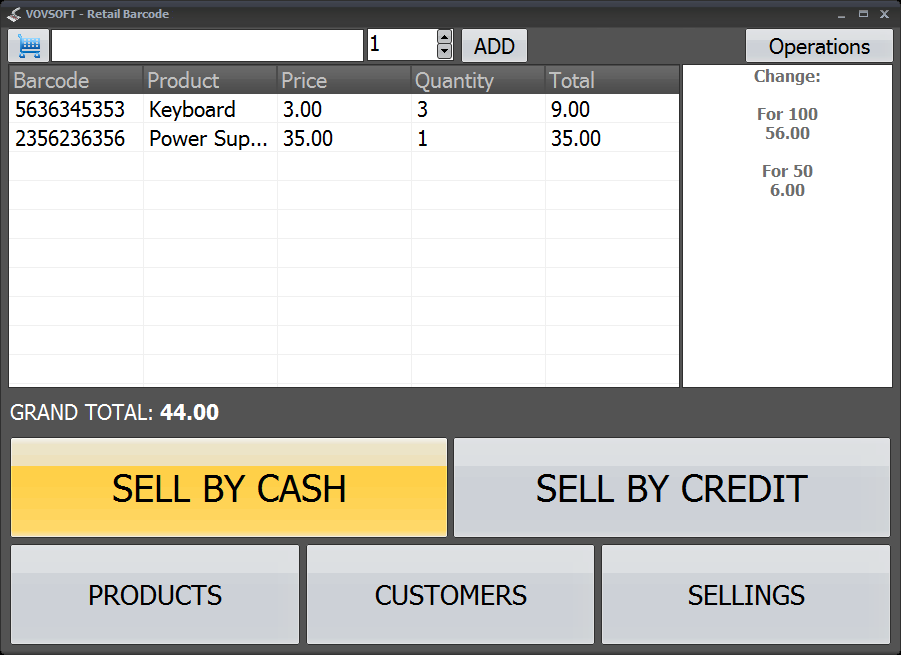
The sales screen with two products, a grand total of 44.00, and change suggestions on the right.
Features
Works with no barcodes on the stock
Retail Barcode accepts standard barcode and QR code scanners, and for unlabelled goods you can invent short store codes such as 1, 2 and 3.

The product form: barcode, name, price and stock balance.
Credit sales tied to customers
Retail Barcode's Sell by Credit mode records a sale against a named customer. When they pay, you clear the balance, so the shop's tab lives in the same program as its cash sales.

Selling on credit asks which customer the sale belongs to.
Administrator and cashier passwords
Retail Barcode separates the two roles. Cashiers can only make sales, while the administrator can reach all settings and delete a sale for a return or a mistake, which restores the stock since version 5.8.
Excel import, receipts and labels
Retail Barcode imports and exports products through Excel, prints receipts, prints Code 39 barcode labels, applies discounts at checkout, and totals sales for any date range.
Who It's For, and Who Should Skip It
It suits a single-till shop, kiosk or market stall that wants stock, sales and customer credit on one Windows PC for a one-time $19.
Skip it if you need tax handling, several tills sharing stock, supplier and purchasing records, or card payments integrated into the sale. There's no free built-in Windows option for this job, but cloud point of sale apps with free tiers exist and do far more, if you're happy with a monthly upsell and your data on someone else's server.
Usage Guide
- Download the installer or the portable edition and start the program.
- Set the administrator and cashier passwords.
- Add products by hand or import them from Excel.
- Add customers if you sell on credit.
- On the sales screen, scan or enter items and press Sell by Cash or Sell by Credit.
Before you buy
One license covers one person on as many of their own computers as they use, or one shared workstation used by several people in turn. Using a key on too many computers at the same time can get it revoked.
Where it falls short
- There's no tax rate setting. Adding a tax ratio is an open request.
- It doesn't warn you or block a sale when a product is out of stock, another open request.
- Accounts are one administrator and cashier passwords, not individual users, and there's no password recovery, so note it down.
- There's no automatic database backup. Copy the database yourself.
- Number formats don't follow regional settings, which can matter if you use a decimal comma.
What Users Say
What reviewers say
Vovsoft's product page shows a rating of 4.2 out of 5 from 9 reviews, alongside these comments.
"This is VERY good looking software to start out, and behaves smoothly. I love your themes and coloration options." Anonymous User
"I really liked the program, fast & easy. I am a guy who does technical support onsite and the program can be very useful for bookstores, hardware stores, kiosks, mini markets, even veterinarians." Anonymous User
"Retail Barcode is an effective sales tracking application that can be praised for its simplicity and ease of use." Mircea Saveanu
Editions and Pricing
| Edition | Price | License | What you get |
|---|
| Trial | Free | Personal, non-commercial use | Point of sale functions, with a nag screen |
| Licensed | $19 one-time | Lifetime | Commercial use, no nag screen, lifetime free updates, all features |
The installer and portable editions use the same license key, and the key is delivered right after payment.
FAQs
Can Retail Barcode be used in a real shop on the trial?
Retail Barcode's trial doesn't allow commercial use, so running a shop on it needs the $19 license.
Does Retail Barcode work with a USB barcode scanner?
Retail Barcode supports barcode and QR code scanners, and a shop without barcodes can use short store codes typed by hand.
Is Retail Barcode a subscription?
Retail Barcode is a one-time purchase. Vovsoft license keys don't expire, and updates are free.
System Requirements
- Windows 11, 10, 8/8.1, 7 and Vista, 32-bit or 64-bit
- 8.4 MB for the installer, 7.91 MB for the portable edition
Conclusion
Good value for a one-till shop with simple needs. The reason to buy it is credit tracking and scanner sales for a single one-time $19. The main reason not to is the missing tax handling: if your shop has to report sales tax, this isn't enough.
Download Free TrialBuy Now