Vovsoft Bulk Barcode Generator: A Text List In, Barcode Images Out
Bulk Barcode Generator is a $19 Windows program from Vovsoft that turns a text file of codes into one barcode image per line, in 85 barcode types. The $19 is a one-time lifetime license, and there's a free trial.
It makes image files and nothing more. It doesn't design labels and it doesn't print.
Quick facts
- Version: 1.1, released August 3, 2025
- Developer: Vovsoft
- Platform: Windows 11, 10, 8/8.1, 7, Vista and XP, 32-bit and 64-bit. No Mac or Linux version
- Barcode types: 85, including Code 128, Code 39, EAN-13, UPC-A, ITF-14, PDF417, Data Matrix, QR Code
- Output: PNG, JPG, GIF and BMP files
- Input: A plain text file, one code per line
- Editions: installer (3.66 MB) and portable (2.5 MB), one license for both
- Price: $19, one-time payment, lifetime license with free updates
- Trial: free to try. Creates barcodes, with a nag screen. It isn't allowed for commercial use
- Refunds: Vovsoft's general policy is no refunds, since a free trial comes first. An order placed by accident is generally refunded, at the company's discretion, and PayPro Global has the final say on orders placed through it
- What we checked: installer file version 1.1.0.0 (3,840,632 bytes) with a valid code signature, downloaded from the vendor on November 10, 2026, and $19.00 total on the order page with no auto-renewal on November 10, 2026. We didn't generate a batch ourselves
Download Free TrialBuy Now
Overview
You load a text file with File > Load, the codes appear in a list with a preview of the selected barcode, and File > Save all to folder writes the whole batch as image files.
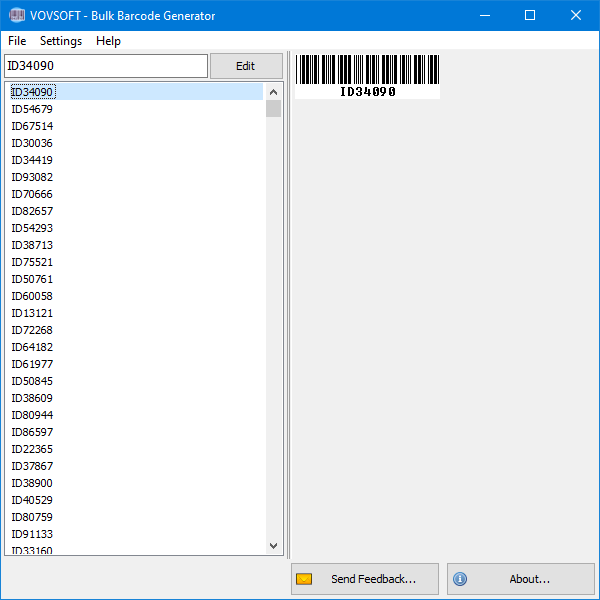
A list of IDs loaded from a text file, with a preview of the selected barcode.
Features
85 symbologies from one tool
Bulk Barcode Generator covers common retail and logistics types (Code 128, Code 39, EAN-13, UPC-A, ITF-14, GS1 DataBar), postal codes (USPS OneCode, Royal Mail, Australia Post), healthcare codes (PZN, HIBC) and 2D codes (PDF417, Data Matrix, QR, Aztec).
Batch export to image files
Bulk Barcode Generator saves every line of your list as its own PNG, JPG, GIF or BMP in the folder you pick.
Offline processing
Bulk Barcode Generator doesn't send your codes anywhere, which matters if they're internal serials or asset tags.
Who It's For, and Who Should Skip It
It suits someone who already has a list of codes, from a spreadsheet or inventory system, and needs image files to drop into a label template.
Skip it if you need a few barcodes, because free online generators handle that. If you want to design and print labels, you want label software: this produces images only.
Usage Guide
- Download the installer or the portable edition and start the program.
- Prepare a text file with one code per line.
- Open it with File > Load.
- Choose the barcode type.
- Use File > Save all to folder to write the images.
Before you buy
One license covers one person on as many of their own computers as they use, or one shared workstation used by several people in turn. Using a key on too many computers at the same time can get it revoked.
Where it falls short
- It doesn't print, and you can't set the output image size. Both are open requests on the vendor's list.
- You have to bring your own codes. A request for consecutive barcodes is still open, so make the sequence in Excel first.
- The barcode has to be valid for its type. Retail numbers such as EAN and UPC have to be assigned to you, and the software doesn't get them for you.
- It has had one update since its 2022 release, in August 2025.
What Users Say
What reviewers say
Vovsoft's product page shows a rating of 3.7 out of 5 from 13 reviews, a lukewarm score, with this comment.
"Hello, i love this program that is easy to all fonctionality. Thank you." Anonymous User
Editions and Pricing
| Edition | Price | License | What you get |
|---|
| Trial | Free | Personal, non-commercial use | Creates barcodes, with a nag screen |
| Licensed | $19 one-time | Lifetime | Commercial use, no nag screen, lifetime free updates, all features |
The installer and portable editions use the same license key, and the key is delivered right after payment.
FAQs
Which barcode types does Bulk Barcode Generator support?
Bulk Barcode Generator supports 85 types, including Code 39, Code 128, EAN-13, UPC-A, ITF-14, PDF417, Data Matrix, QR Code and Aztec Code.
Can Bulk Barcode Generator print labels?
Bulk Barcode Generator doesn't print. It saves image files, which you then place into your label or document software.
Does Bulk Barcode Generator work on Windows XP?
Bulk Barcode Generator runs on Windows XP through Windows 11, in 32-bit and 64-bit.
System Requirements
- Windows 11, 10, 8/8.1, 7, Vista and XP, 32-bit or 64-bit
- 3.66 MB for the installer, 2.5 MB for the portable edition
Conclusion
Worth $19 if you need hundreds of barcode images from a list you already have. The reason to buy it is the breadth of 85 types with batch output. The reason not to is printing: it stops at image files, and users rate it only 3.7.
Download Free TrialBuy Now