Vovsoft Image to PDF Converter: Scans and Photos into One PDF
Image to PDF Converter is a $19 Windows program from Vovsoft that combines JPG, PNG, TIF, GIF and BMP images into a single PDF or one PDF per image. The $19 is a one-time lifetime license, and there's a free trial.
Windows can already do the simple version of this for free, so the question is whether you need the layout controls this adds.
Quick facts
- Version: 3.3, released October 16, 2026
- Developer: Vovsoft
- Platform: Windows 11, 10, 8/8.1, 7 and Vista, 32-bit and 64-bit. No Mac or Linux version
- Input formats: JPG, TIF, PNG, GIF and BMP
- Output: One combined PDF or one PDF per image
- Page controls: Resize %, orientation, scale, margin in mm, image watermark
- Editions: installer (4.11 MB) and portable (3.14 MB), one license for both
- Price: $19, one-time payment, lifetime license with free updates
- Trial: free to try. Creates PDFs in full, with a nag screen. It isn't allowed for commercial use
- Refunds: Vovsoft's general policy is no refunds, since a free trial comes first. An order placed by accident is generally refunded, at the company's discretion, and PayPro Global has the final say on orders placed through it
- What we checked: installer file version 3.3.0.0 (4,313,240 bytes) with a valid code signature, downloaded from the vendor on November 10, 2026, and $19.00 total on the order page with no auto-renewal on November 10, 2026. We didn't build a PDF ourselves
Download Free TrialBuy Now
Overview
You add images, drag them into the order you want, set the page options at the top of the window and click Create PDF. There's no printer involved, and the PDF can open automatically when it's done.
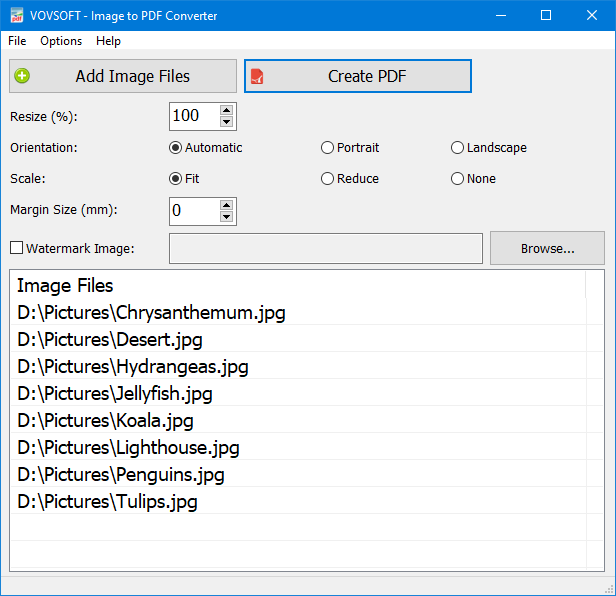
Eight photos queued, with resize, orientation, scale, margin and watermark settings above the list.
Features
One PDF or many from the same list
Image to PDF Converter makes a single document from all the images, or a separate PDF for each, and it can name each PDF after its source image.
Page layout you actually control
Image to PDF Converter sets resize percentage, orientation (automatic, portrait or landscape), scale (fit, reduce or none) and a margin in millimeters. A Crop to Image Size option makes the page match the picture.
Reordering and a watermark
Image to PDF Converter lets you drag files to reorder them, which decides the page order, and it can stamp an image watermark on the pages.
Who It's For, and Who Should Skip It
It suits people who regularly turn scans or photos into PDFs and care about margins, page fit or watermarks.
Skip it for the occasional job. Select your pictures in File Explorer, right-click, choose Print and pick the Microsoft Print to PDF printer, and Windows makes one PDF for free. You'd pay here for the margin, watermark, and one-PDF-per-image options.
Usage Guide
- Download the installer or the portable edition and start the program.
- Click Add Image Files, or drag images onto the window.
- Drag the list into page order.
- Set resize, orientation, scale and margin, and pick a watermark if you want one.
- Click Create PDF.
Before you buy
One license covers one person on as many of their own computers as they use, or one shared workstation used by several people in turn. Using a key on too many computers at the same time can get it revoked.
Where it falls short
- There's no way to run it from the command line without its window, which is the one open request on the vendor's list.
- It doesn't OCR scans, so the PDFs it makes aren't text-searchable.
- It takes only the five image types above, so a WEBP or HEIC photo has to be converted first.
What Users Say
What reviewers say
Vovsoft's product page shows a rating of 4.8 out of 5 from 6 reviews, with these comments.
"It’s cute and simple and easy to use." Ofra Ora
"Love the program works well - Thank YOU" Bernie McInerney
"This is actually very good." Anonymous User
Editions and Pricing
| Edition | Price | License | What you get |
|---|
| Trial | Free | Personal, non-commercial use | Creates PDFs in full, with a nag screen |
| Licensed | $19 one-time | Lifetime | Commercial use, no nag screen, lifetime free updates, all features |
The installer and portable editions use the same license key, and the key is delivered right after payment.
FAQs
Can Image to PDF Converter put each image in its own PDF?
Image to PDF Converter can create either one PDF from every image or a separate PDF for each one.
Do I need Adobe Acrobat for Image to PDF Converter?
Image to PDF Converter is standalone. It needs neither Acrobat nor a printer driver.
Is Image to PDF Converter available in other languages?
Image to PDF Converter's interface is available in around 30 languages, including Spanish, French, German, Arabic and Chinese.
System Requirements
- Windows 11, 10, 8/8.1, 7 and Vista, 32-bit or 64-bit
- 4.11 MB for the installer, 3.14 MB for the portable edition
Conclusion
Worth $19 only if you do this often and want control over the page. The reason to buy it is the layout options and the one-PDF-per-image mode. The reason not to is that Windows' own Print to PDF already handles a simple stack of photos at no cost.
Download Free TrialBuy Now