Vovsoft Convert Video to Audio: Pull the Soundtrack Out of a Batch of Videos
Convert Video to Audio is a $19 Windows program from Vovsoft that extracts the sound from video files in batches and saves it as MP3, WAV, FLAC and eight other formats. The $19 is a one-time lifetime license, and there's a free trial with some limits.
Lectures on your phone, band rehearsals on a camera, a folder of interviews you want to hear on a walk. You don't need the picture, and you don't want to upload private footage to a website to lose it.
Quick facts
- Version: 2.4, released May 14, 2025
- Developer: Vovsoft
- Platform: Windows 11, 10, 8/8.1 and 7, 32-bit and 64-bit. No Mac or Linux version
- Reads: MP4, MKV, AVI, MPEG, MOV, WMV, FLV, F4V and WEBM, including H.264, H.265, AV1 and VP9 video
- Writes: MP3, WMA, FLAC, WAV, AIFF, AAC, M4A, OGG, OPUS, AC3 and EAC3
- Editions: installer (16.41 MB) and portable (19.45 MB), one license for both
- Price: $19, one-time payment, lifetime license with free updates
- Trial: free to try and it does extract audio, but Audio Settings and command line use need a license. It has a nag screen and isn't allowed for commercial use
- Refunds: Vovsoft's general policy is no refunds, since a free trial comes first. An order placed by accident is generally refunded, at the company's discretion, and PayPro Global has the final say on orders placed through it
- What we checked: installer file version 2.4.0.0 (17,208,168 bytes) with a valid code signature, downloaded from the vendor on November 10, 2026, and $19.00 total on the order page with no auto-renewal on November 10, 2026. We didn't convert sample files ourselves
Download Free TrialBuy Now
Overview
Add videos one at a time or a whole folder, pick an output Profile such as MP3, choose a Destination and press Convert. A Result column reports how each file went. The conversion engine is FFmpeg, bundled with the program, so there are no codecs to hunt down and install.
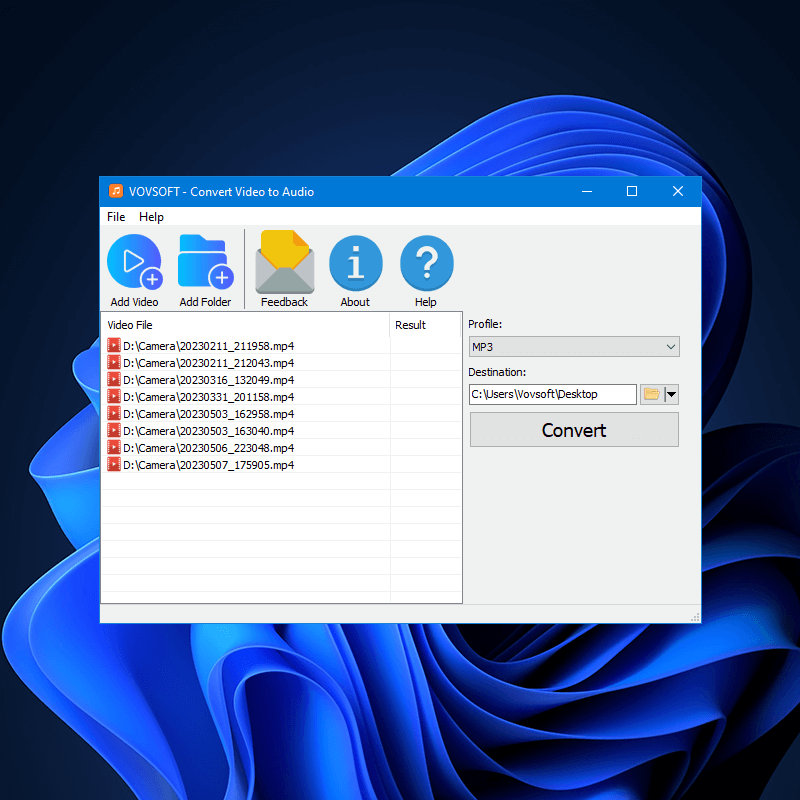
Eight camera MP4 files queued, MP3 as the Profile, and a Destination folder ready to convert.
Features
Batch extraction from the common video formats
Convert Video to Audio takes a queue of MP4, MKV, AVI, MPEG, MOV, WMV, FLV, F4V and WEBM files, added file by file, by folder, or by dragging a directory onto the window.
Eleven output formats
Convert Video to Audio saves to MP3, WMA, FLAC, WAV, AIFF, AAC, M4A, OGG, OPUS, AC3 or EAC3, so you can choose FLAC or WAV for quality or MP3 for a small file.
Audio Settings for bitrate and channels (licensed)
Convert Video to Audio's Audio Settings button changes the bitrate, sampling rate and audio channels. This is one of the two features the trial leaves out.
Command line conversion (licensed)
Convert Video to Audio can be scripted through convertva.exe with -input and -output arguments, using start /wait to run conversions one after another from a batch file. The trial doesn't include this.
Careful file handling
Convert Video to Audio creates a new file instead of overwriting one that already exists, creates the output folder if it's missing, and remembers the last output folder.
Benefits
- Your footage stays on your own PC, with no upload and no file-size limit from a web service.
- A whole folder takes the same few clicks as one file.
- You don't need to learn FFmpeg's command syntax to use FFmpeg's conversion.
Real-World Uses
- Lectures and courses: turn recorded classes into MP3s for listening on the go.
- Musicians: pull a rehearsal recording from camera footage into WAV or FLAC.
- Podcasters and interviewers: extract the sound from video calls for editing.
- Home archives: build a sound collection from old camera clips.
Who It's For, and Who Should Skip It
It suits people who extract audio often enough to want a small dedicated program with a queue.
Skip it if you only need this once or twice, since free tools such as VLC can do it, with more clicks. It's also the wrong tool for trimming a clip or editing the sound, because it converts whole files only.
Usage Guide
- Download the installer or the portable edition and start the program.
- Click Add Video or Add Folder, or drag a folder onto the window.
- Pick a format under Profile.
- Choose a Destination folder.
- Click Convert and check the Result column.
Before you buy
- One license covers one person on as many of their own computers as they use, or one shared workstation used by several people in turn. Using a key on too many computers at the same time can get it revoked.
- In the trial you get the default audio quality for each format. Changing the bitrate needs the license, so judge the output against what you need first.
- The last release was in May 2025.
Where it falls short
- For an MKV with several audio tracks, extracting all of them is still an open feature request.
- It has no trimming or editing, and no way to convert only part of a video.
- The interface is English only.
What Users Say
On Vovsoft's own site
Vovsoft's product page shows a rating of 4.5 out of 5 from 4 reviews.
"I like it! Nice Program." Sheriff Kenny
There isn't much user feedback for this one, so weigh the trial more heavily than the rating.
Comparisons
Convert Video to Audio vs VLC
VLC is free and can convert a video to audio through its Convert/Save dialog, with more settings to work through. Vovsoft's program is a simpler window for repeat batch work, at $19.
Convert Video to Audio vs Vovsoft Batch Audio Converter
Batch Audio Converter changes audio files from one format to another, while Convert Video to Audio takes video files as its input. If your sources are already MP3 or WAV, you want the other one.
Editions and Pricing
| Edition | Price | License | What it adds |
|---|
| Trial | Free | Personal, non-commercial use | Audio extraction, with a nag screen |
| Licensed | $19 one-time | Lifetime | Audio Settings, command line use, commercial use, no nag screen, lifetime free updates |
The installer and portable editions use the same license key, the key is delivered right after payment, and the order page offers a volume discount if you buy several.
FAQs
Does Convert Video to Audio convert MP4 to MP3?
Convert Video to Audio converts MP4 to MP3 directly: add the file, leave MP3 selected as the Profile and click Convert.
Does Convert Video to Audio need an internet connection or extra codecs?
Convert Video to Audio converts on your own PC with its bundled FFmpeg, and no additional codec has to be installed.
Can Convert Video to Audio change the MP3 bitrate?
Convert Video to Audio changes bitrate, sampling rate and channels through Audio Settings, which needs a license.
Can Convert Video to Audio read H.265 and AV1 videos?
Convert Video to Audio supports H.264, H.265 (HEVC), AV1 and VP9 video codecs.
Can Convert Video to Audio also convert audio files?
Convert Video to Audio's product page says it reads MP3, WAV, WMA, FLAC and M4A as well, but Vovsoft Batch Audio Converter is the dedicated tool for audio-to-audio work.
Is Convert Video to Audio a subscription?
Convert Video to Audio is a one-time purchase. Vovsoft license keys don't expire, updates are free for the life of the license, and the same key works on a new computer.
System Requirements
- Windows 11, 10, 8/8.1 or 7, 32-bit or 64-bit
- 16.41 MB for the installer, 19.45 MB for the portable edition
- English interface
Conclusion
Worth $19 if you regularly turn folders of video into audio and want it on your own PC. The one reason to buy it is the straightforward queue with FFmpeg's format support behind it. The main reason not to is that free tools can do the same job if it's occasional, and the trial holds back bitrate control, so you can't fully test output settings before paying.
Download Free TrialBuy Now