Vovsoft Serial Port Monitor: A Small Terminal for Reading and Sending COM Port Data
Vovsoft Serial Port Monitor is a $19 Windows program that connects to a COM port so you can read what a device sends and send data back, in ASCII, hex, decimal, octal or binary. The $19 is a one-time lifetime license, and there's a free trial.
Despite the name, it works as a serial terminal and logger: it opens the port itself. It doesn't quietly capture a port that another program already has open, which matters a lot depending on what you're trying to debug.
Quick facts
- Version: 2.0, released December 13, 2025
- Developer: Vovsoft
- Platform: Windows 11, 10, 8/8.1, 7 and Vista, 32-bit and 64-bit. No Mac or Linux version
- Devices: RS-232, RS-422, RS-485 and compatible serial devices, including USB-to-serial adapters that appear as a COM port
- Data formats: ASCII, hexadecimal, decimal, octal, binary
- Editions: installer (3.48 MB) and portable (2.16 MB), one license for both
- Price: $19, one-time payment, lifetime license with free updates
- Trial: free to try with reading and sending included. It has a nag screen and isn't allowed for commercial use
- Refunds: Vovsoft's general policy is no refunds, since a free trial comes first. An order placed by accident is generally refunded, at the company's discretion, and PayPro Global has the final say on orders placed through it
- What we checked: installer file version 2.0.0.0 (3,652,880 bytes) with a valid code signature, downloaded from the vendor on November 10, 2026, and $19.00 total on the order page with no auto-renewal on November 10, 2026. We didn't connect it to serial hardware
Download Free TrialBuy Now
Overview
Everything sits on one screen. A row across the top sets the port, baud rate, parity, data bits and stop bits. Below that is a send box with a Send button, then a row of format buttons, then a large window for received data. The status bar counts bytes read and sent.

Before connecting: COM1 at 9600 baud with no parity, 8 data bits and 1 stop bit, and ASCII selected.
Version 2.0 added a File mode for sending a file's contents, with Auto Start, Auto Repeat and Auto Close options, and fixed a bug in Send Periodically.
Features
Five ways to read the same data
Vovsoft Serial Port Monitor switches the display between ASCII, HEX, DEC, OCT and BIN with one click, and the same formats are available when you send.
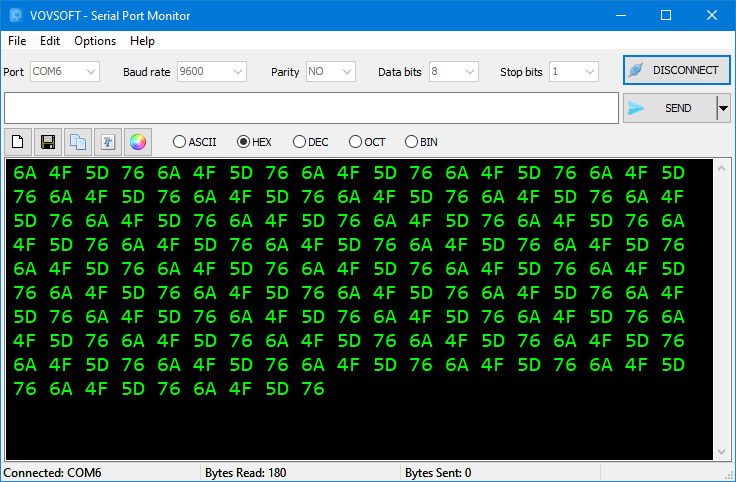
Connected to COM6 at 9600 baud with received data shown in hex, 180 bytes read.
Full control of the connection
Vovsoft Serial Port Monitor lets you set baud rate, parity (none, odd, even, mark or space), data bits, stop bits and flow control (none, XON, RTS or DSR). An Auto Detect button finds the COM port, and ports numbered COM10 and above are supported.
Timed and repeated sending
Vovsoft Serial Port Monitor can send the same command every so many milliseconds with Send Periodically, or once at a future date and time with Send Later, which suits simple soak tests.

Sending "Testing..." repeatedly on COM6, with the Send button turned into Stop and 430 bytes sent.
File mode for scripted sends
Vovsoft Serial Port Monitor can send a file's contents, repeat it automatically, start on launch and close when finished, so you can run a test sequence from a shortcut.
Logging and saving
Vovsoft Serial Port Monitor can log the session, and Clear, Save to file and Copy to clipboard buttons sit above the data window. The font and background color can be changed from the menu.
Benefits
- You can talk to a device within a minute of launching it, without learning a terminal program's settings menus.
- Viewing hex and binary saves converting values by hand while you work out a protocol.
- Portable and tiny, so it can live on a USB stick in a field kit.
Real-World Uses
- Microcontroller projects: read debug output from a board and send test commands.
- Car diagnostics: send AT commands and OBD-II PID requests to an ELM327 USB adapter, such as 010C for engine RPM.
- Testing a serial cable or adapter: loop data through a USB-to-RS232 converter and watch the byte counters.
- Soak testing a device: resend a command at a fixed interval and log the replies.

The same session style with received data displayed in binary, 470 bytes read.
Who It's For, and Who Should Skip It
It suits electronics hobbyists, students and technicians who need to read from and write to one serial device at a time.
Skip it if you need to watch the traffic between an existing Windows application and its device. A true port sniffer that hooks a port already in use is the right kind of tool for that. It's also the wrong choice for watching several ports at once.
Usage Guide
- Plug in your device or USB-to-serial adapter. Windows lists it in Device Manager under Ports (COM & LPT).
- Close any other program using that port.
- Start Serial Port Monitor, pick the port or click Auto Detect, and match the device's baud rate and settings.
- Click Connect and watch the data window.
- Type in the send box and click Send. Send Periodically, Send Later and File mode cover timed and repeated sending.
Before you buy
- One license covers one person on as many of their own computers as they use, or one shared workstation used by several people in turn. Using a key on too many computers at the same time can get it revoked.
- Modern PCs have no built-in serial port, so you may need a USB-to-RS232 adapter. Straight-through cables work for devices, and PC-to-PC needs a null modem cable.
- Vovsoft documents a workaround for sniffing a port in use, built from the free com0com and hub4com tools. It takes real setup.
Where it falls short
- It can't monitor a port another application is using without that virtual-port setup, and users have asked for this directly.
- One port at a time. Monitoring several at once is an open request.
- A user reports that received values from 0x80 upward don't display correctly, so check this if your protocol uses high bytes.
- There's no automatic reconnect after a disconnect or restart, and devices that don't present a COM port, such as some FTDI driver models, can't be opened.
What Users Say
On Vovsoft's own site
Vovsoft's product page shows a rating of 4.4 out of 5 from 5 reviews.
"Best serial port monitor app ever! Very easy to use!!! Thank you..." Rohaan Handley
Independent reviews of this particular tool are scarce, so treat the rating as a small sample. The public feature-request list is more telling: its top requests are multi-port monitoring, simpler control-code sending and correct display of high byte values.
Comparisons
Vovsoft Serial Port Monitor vs Electronic Team Serial Port Monitor
The two share a name but do different jobs. Electronic Team's product, formerly sold under the Eltima name, is built to capture traffic between an application and its device. Vovsoft's is a $19 one-time terminal that talks to a free port directly. If you need to see what another program is doing, the Electronic Team tool is the right kind of product.
Editions and Pricing
| Edition | Price | License | What it adds |
|---|
| Trial | Free | Personal, non-commercial use | Reading and sending included, with a nag screen |
| Licensed | $19 one-time | Lifetime | Commercial use, no nag screen, lifetime free updates |
The installer and portable editions use the same license key, the key is delivered right after payment, and the order page offers a volume discount if you buy several.
FAQs
Does Vovsoft Serial Port Monitor work with USB-to-serial adapters?
Vovsoft Serial Port Monitor works with any adapter that Windows exposes as a COM port. Check Ports (COM & LPT) in Device Manager for its number.
Can Vovsoft Serial Port Monitor use RS-485?
Vovsoft Serial Port Monitor lists RS-485 and RS-422 as supported, as long as your adapter presents them to Windows as a COM port.
Can Vovsoft Serial Port Monitor save what it receives?
Vovsoft Serial Port Monitor saves received data with its Save to file button and has logging for a session, added in version 1.5.
Is Vovsoft Serial Port Monitor safe to use on a live production device?
Vovsoft Serial Port Monitor only reads what arrives and sends what you tell it to, but sending to a live device is your risk. Test with a harmless command first.
Is Vovsoft Serial Port Monitor a subscription?
Vovsoft Serial Port Monitor is a one-time purchase. Vovsoft license keys don't expire, and updates are free for the life of the license.
Can I move my Vovsoft Serial Port Monitor license to another PC?
Vovsoft Serial Port Monitor activates on a new computer with the same key, with no need to deactivate the old one.
System Requirements
- Windows 11, 10, 8/8.1, 7 or Vista, 32-bit or 64-bit
- A COM port or a USB-to-serial adapter
- 3.48 MB for the installer, 2.16 MB for the portable edition
- English interface
Conclusion
Worth $19 if you want a simple one-port serial terminal without a subscription. The one reason to buy it is how quickly it gets you reading and sending in five number formats, with scheduling and file sending included. The main reason not to is the name: if you need to sniff a port another program is using, this isn't the tool without a virtual-port workaround. Free terminal programs exist too, so try it first and buy it only if you prefer this layout.
Download Free TrialBuy Now