Leawo UHD Drive Tool: Downgrade a Blu-ray Drive's Firmware So It Can Read 4K UHD Discs
Leawo UHD Drive Tool is a $99.95-a-year Windows utility that downgrades the firmware on certain LG, ASUS, Buffalo and Archgon Blu-ray drives to an older, "UHD-friendly" version, so ripping and copying software can read 4K Ultra HD Blu-ray discs in them. It's a narrow tool for a narrow audience: people who own one of the listed drives and want to back up or rip their own 4K UHD discs.
If your drive already works with your 4K ripping software, you don't need it. Leawo's own FAQ says so.
Quick facts
- Current version: 1.0.0.2, installer dated May 18, 2026
- Developer: Leawo Software Co., Ltd.
- Runs on: Windows 7, 8, 8.1, 10 and 11. A Mac version is sold separately.
- Price: $99.95 for 1 year (auto-renews) or $109.95 lifetime, one PC
- Bundle: UHD Ripper + UHD Copy + UHD Drive Tool, lifetime, $154.91
- Money-back: 5 days on the 1-year license, 14 days on the lifetime license
- Free trial: can't downgrade firmware; you must buy and activate first
What we checked: the Windows installer on Leawo's download page (uhddrivetool_setup.exe, about 65.7 MB, file version 1.0.0.2), Leawo's supported drive list, its downgrade guide and FAQ, the trial limit in its registration guide, and the $99.95, $109.95 and $154.91 prices on the product page, all on October 31, 2026. We didn't flash a drive ourselves.
Before you buy
- Check your exact drive model first. Only the drives on Leawo's list are supported, and several come with conditions, such as "Firmware V1.02 and previous" for the LG BH14NS58 and BH16NS58, or "BU13 not included" for the BU40N.
- The free trial can't downgrade. Leawo's registration guide says "people can't commence downgrading the firmware in the free trial version", so compare your drive's exact model and firmware with Leawo's list before you pay.
- Don't interrupt a downgrade. Leawo's guide says the tool warns users "not to power off, disconnect the drive or close the UHD Drive Tool when the downgrade process is in progress." Use a desktop on a stable power supply, or a charged laptop that's plugged in.
- Ask about your warranty. Leawo's pages don't say whether changing the firmware affects the drive maker's warranty, so check with the maker if that matters to you.
- Buying a new drive? Leawo's own note says "Friendly drives are highly recommended, especially to those who plan to purchase new drives." A drive that works out of the box saves you the $99.95.
Download Free TrialBuy Now
Overview
Many Blu-ray drives can physically read 4K UHD discs, but newer firmware on them blocks third-party ripping and backup software from accessing those discs. Leawo calls these drives "UHD-unfriendly". UHD Drive Tool replaces the drive's firmware with an older version that allows access, after which programs such as Leawo UHD Ripper, UHD Copy and Blu-ray Player can read your 4K discs.
The tool is a single window. It lists your optical drives, shows each one's interface, whether it's UHD-compatible ("Friendly" or "Official"), its current firmware and the compatible firmware versions you can switch to, and logs every step.
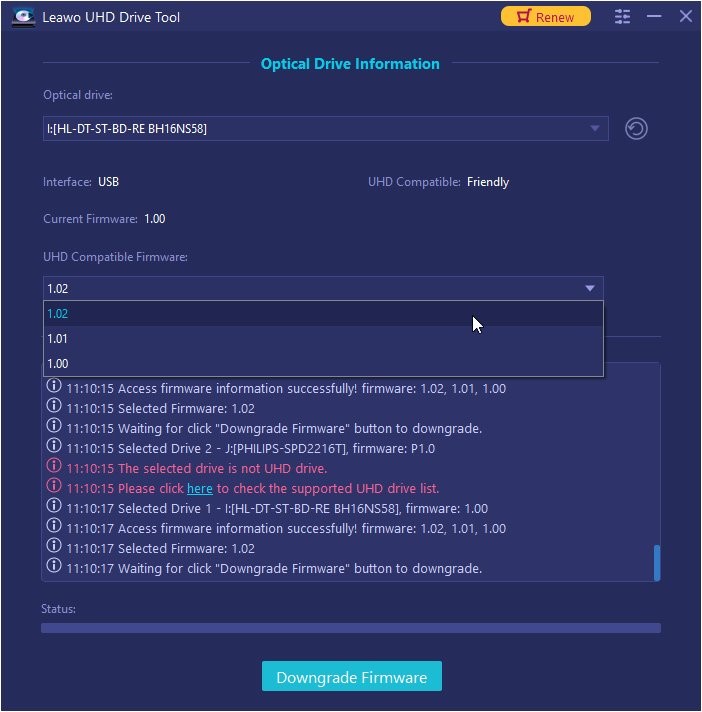
Leawo UHD Drive Tool with an LG BH16NS58 drive selected: USB interface, UHD Compatible "Friendly", current firmware 1.00, and the UHD Compatible Firmware list open with 1.02, 1.01 and 1.00. The log notes that a second drive (a Philips) isn't a UHD drive.
Supported drives
Leawo's supported drive list, as published on October 31, 2026. Leawo marks the first group "Tested".
| Status | Drives |
|---|
| Tested | ASUS BC-12D2HT, ASUS BW-16D1HT, LG BH16NS40, LG BH16NS55, LG WH16NS58, LG WH16NS60 (Official), LG BU40N / Buffalo / hp HLDS BDRE BU40N (Official, BU13 not included), LG BU50N / hp HLDS BU50N (Official), LG BH14NS58 and BH16NS58 (firmware V1.02 and earlier), LG WH14NS40, LG WH16NS40, LG WP50NB40 |
| Listed | ASUS BC-12B1ST b, ASUS BW-16D1H-U, LG BE16NU50, LG BH14NS50, LG BH16NS50, LG BH16NS60, LG BP50NB40 (Official), LG BP55EB40, LG BP60NB10 (Official), LG CH12NS40, LG UH12NS40, Buffalo BRUHD-PU3-BK (Official), Archgon MD-8107S-U3-UHD BU40N (Official) |
Leawo's FAQ explains the labels: an "Official" drive is designed for UHD Blu-ray, while a "Friendly" drive isn't designed for it "but it still can be used on such discs after downgrading the firmware."
Features
Detects your drive and its firmware
Leawo UHD Drive Tool searches for connected drives, reads the current firmware and says whether a drive is UHD-friendly. Internal SATA drives, external drives and USB drives are all covered, as long as the model is on the list.
Downloads, validates and flashes the firmware
Leawo UHD Drive Tool fetches the target firmware itself, validates it, and flashes it to the drive, so you don't have to hunt down firmware files. The status bar and log show each stage, with a red "DO NOT POWER OFF!" while the flash runs.
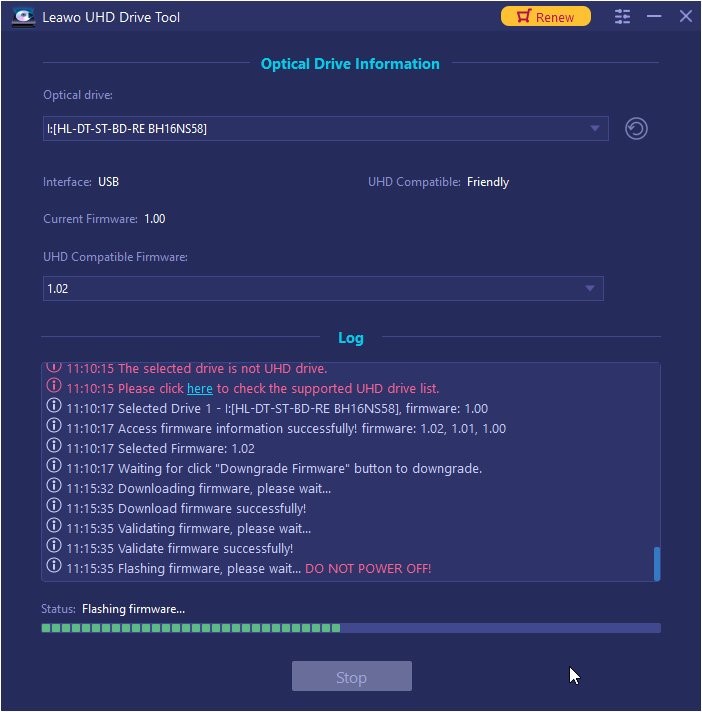
A downgrade in progress: the log shows "Download firmware successfully!", "Validate firmware successfully!" and "Flashing firmware, please wait... DO NOT POWER OFF!", with the status bar partly filled.
Restart and you're done
When Leawo UHD Drive Tool finishes, it reports that the firmware was refreshed and recommends restarting the computer so the drive comes back with the new firmware.
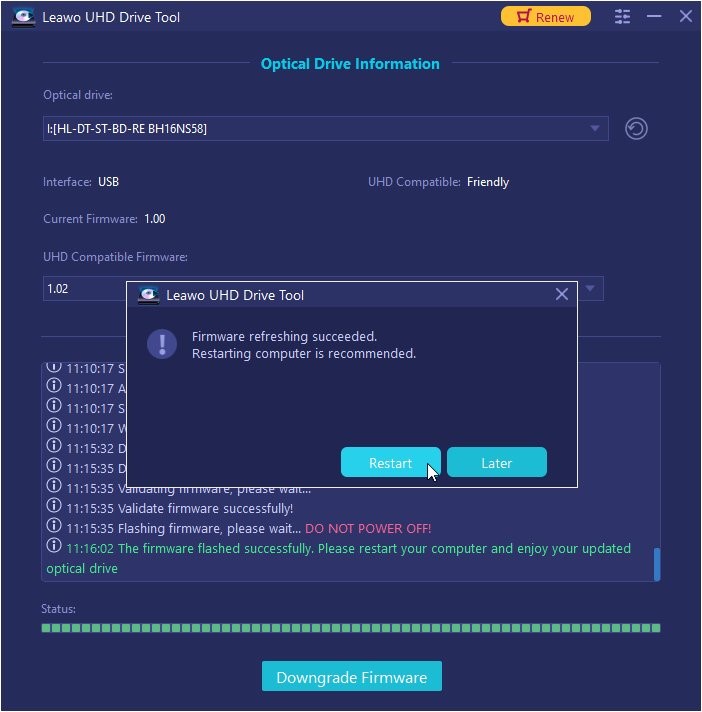
The finished downgrade: "Firmware refreshing succeeded. Restarting computer is recommended." with Restart and Later buttons, and the log's last line saying the firmware flashed successfully.
Benefits
- Use the drive you already own. A supported drive becomes usable for 4K UHD ripping without buying a different one.
- No firmware hunting. The tool picks the compatible firmware for your model and fetches it, which avoids flashing the wrong file from a forum download.
- A published drive list. Leawo lists each supported model and firmware condition, so you can check yours before you pay.
Real-World Uses
- A new 4K ripping setup: you bought an LG WH16NS40 and UHD Ripper won't read your 4K discs. Downgrade the drive, restart, and rip.
- A firmware update gone wrong: a drive that worked stopped reading 4K discs after a firmware update; roll it back to a compatible version.
Who It's For, and Who Should Skip It
Good fit: owners of a listed LG, ASUS, Buffalo or Archgon drive who want to rip or back up their own 4K UHD discs with Leawo's UHD tools.
Skip it if:
- Your drive already reads 4K discs in your ripping software. Leawo's FAQ: "You don't have to downgrade/flash the firmware as your UHD drive can work with Leawo's products perfectly."
- Your drive isn't on the list. The tool won't downgrade it.
- You only have DVDs or regular Blu-rays. Firmware only matters for 4K UHD discs.
- You're buying a drive anyway. Leawo itself recommends a UHD-friendly drive for new purchases.
Usage Guide
Leawo's downgrade guide gives four steps:
- Select the drive: connect the UHD drive, start Leawo UHD Drive Tool and choose the drive from the Optical drive list.
- Choose a target firmware: pick a version from the UHD Compatible Firmware list, click Downgrade Firmware, read the warning and click Continue.
- Downgrade: wait while the tool downloads, validates and flashes the firmware. Don't power off, disconnect the drive or close the tool.
- Restart: restart the computer when the tool reports success.
Where it falls short
- High price for one job. $99.95 a year is more than UHD Ripper or UHD Copy cost, for a tool most people run once per drive. The $109.95 lifetime license, or the $154.91 bundle with UHD Ripper and UHD Copy, is better value.
- A short list. Only about two dozen drive models are supported, and some only up to a certain firmware version.
- No independent reviews. We couldn't find a hands-on review of the current version. The testimonials on Leawo's product page are about its Cinavia Removal tool, not this one.
- The Mac version needs Rosetta on Apple silicon Macs, according to Leawo's Mac requirements.
What Users Say
We found no independent reviews of Leawo UHD Drive Tool. Coverage online is Leawo's own pages, its press releases and competitors' guides, which we don't quote.
Trustpilot (Leawo overall)
For the company behind it, Leawo's Trustpilot page showed a TrustScore of 4.3 out of 5 from 158 reviews on October 31, 2026, with 63% five-star and 25% one-star ratings. Reviewers often praise support response times (Fred Pratt, 5 stars, October 2026: "The team answered and followed up on my support ticket within thirty minutes."), while the one-star reviews mostly concern refunds and software that didn't work for the buyer. None of the reviews we saw mention UHD Drive Tool.
Editions and Pricing
| License | Price | Term | Money-back |
|---|
| 1 Year | $99.95 | 1 PC, auto-renews | 5 days |
| Lifetime | $109.95 | 1 PC, one-time payment | 14 days |
| UHD Ripper + UHD Copy + UHD Drive Tool | $154.91 (list $309.85) | 1 PC, lifetime | Not stated on the card |
Since most people downgrade a drive once, the lifetime license costs only $10 more than one year and is the sensible choice. If you also need UHD Ripper and UHD Copy, the $154.91 bundle is cheaper than buying them separately.
FAQs
Can I try Leawo UHD Drive Tool before buying?
Only up to a point. Leawo says the Leawo UHD Drive Tool trial can't start a firmware downgrade, so the real check is to compare your drive's exact model and firmware with Leawo's supported list before buying, and to use the 14-day money-back guarantee on the lifetime license if it doesn't work.
Do I need UHD Drive Tool to rip 4K Blu-rays with Leawo UHD Ripper?
Only if your drive won't read 4K discs as it is. Leawo's FAQ says you don't have to downgrade a drive that already works with Leawo's products, and "Official" UHD drives are designed for 4K discs.
What happens if the power goes out during a downgrade?
Leawo UHD Drive Tool's warning tells you not to power off, disconnect the drive or close the program while the firmware is flashing, and Leawo's pages don't describe a recovery process. Run the downgrade on a stable power supply and leave the computer alone until it finishes.
Does Leawo UHD Drive Tool work with external USB drives?
Yes, if the model is on Leawo's list. Leawo UHD Drive Tool supports internal SATA drives, external drives and USB drives, and Leawo's own screenshots show an LG BH16NS58 connected over USB.
Is there a Mac version of Leawo UHD Drive Tool?
Yes, sold separately. Leawo lists macOS 10.10 or later for it, and on Apple M1 and M2 Macs it needs Rosetta.
System Requirements
- Windows: 7, 8, 8.1, 10 or 11
- Processor: Intel Core 2 Quad or better
- Memory: 2 GB RAM
- Disk: 10 GB free
- Other: an internet connection and a supported 4K-capable Blu-ray drive
Conclusion
Leawo UHD Drive Tool is worth buying only if you own one of its listed drives and that drive won't read 4K UHD discs in your ripping software. For that one situation it's a simple, guided fix that finds and flashes the right firmware for you.
For everyone else it's an expensive extra: $99.95 a year for a tool you'll likely use once, with no independent reviews yet. Check your drive against Leawo's supported list, buy the $109.95 lifetime license rather than the yearly one, and follow Leawo's warning not to interrupt the flash.
Download Free TrialBuy Now