Vovsoft Watermark Image: Tiled Logo Watermarks for Photos on Windows
Watermark Image (the program calls itself Vov Watermark Image) is a $19 Windows tool from Vovsoft that covers a photo with a repeating, semi-transparent logo: load the picture, load your watermark image, set the transparency, save. The $19 is a one-time lifetime license, and the free trial adds watermarks too.
It's aimed at one specific job: making a photo or screenshot hard to reuse without your mark on it, by tiling the watermark over the whole image rather than tucking it into one corner where it can be cropped away.
Quick facts
- Version: 2.1, released May 13, 2026
- Developer: Vovsoft, the one-person software company of Fatih Ramazan Çıkan in Turkey
- Platform: Windows 11, 10, 8/8.1, 7 and Vista, 32-bit and 64-bit. No Mac or Linux version
- Editions: installer (3.43 MB) and portable (2.09 MB), one license for both
- Formats: PNG, JPG and BMP; saves as PNG, JPEG or BMP since version 2.1
- Watermark type: an image (such as a PNG logo), tiled across the whole picture. No text watermarks
- Price: $19, one-time payment, lifetime license with free updates
- Trial: free and not time-limited, adds watermarks, but with a nag screen and no commercial use
- Refunds: no money-back guarantee; refunds are at the vendor's discretion, mainly for accidental orders
- What we checked: the installer we downloaded from vovsoft.com on November 8, 2026 is version 2.1.0.0, 3.44 MB, digitally signed by Fatih Ramazan Çıkan; the order page showed $19.00 with no auto-renewal on November 8, 2026. We didn't install the program or watermark any images.
Overview
Watermark Image is about as simple as a graphics program gets. The window has a Load Image button, a Load Watermark button, a Transparency slider, three previews side by side (the original, the watermark and the result) and Save to File. MajorGeeks sums it up accurately: "You have access to only one adjustment, which is the transparency of the watermark."
The program dates from 2018. It sat largely unchanged after a UI refresh in January 2023 until version 2.1 in May 2026, which finally added saving as PNG and JPEG (earlier versions saved only BMP), a Remember Settings option and Reset to Defaults.
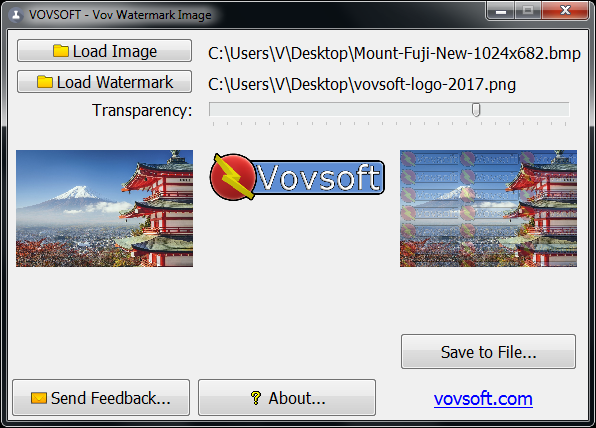
A Mount Fuji photo, the Vovsoft logo as the watermark, and the result with the logo tiled across the picture. This is an older screenshot in a Windows 7 style window.
Features
Tiled watermark across the whole image
Watermark Image repeats your watermark image in a grid over the entire photo. A corner logo can be cropped or cloned out in seconds; a pattern across every part of the picture can't, which is why MajorGeeks calls it "definitely a tamperproof watermark".
One-slider transparency with a live preview
Watermark Image's transparency slider sets how strongly the watermark shows, from barely visible to bold, and the result preview updates as you drag it, so you can find the point where the photo is still enjoyable but the mark is obvious.
PNG, JPEG or BMP output and remembered settings
Watermark Image 2.1 saves the finished image as PNG, JPEG or BMP, and with Remember Settings on (the default) it keeps your watermark file and transparency for the next photo.
Who It's For, and Who Should Skip It
A good fit if you occasionally need a strong, all-over logo watermark on a few images, such as proofs sent to a client, screenshots you sell, or listing photos, and want the simplest possible tool with a lifetime license.
Skip it if you need to watermark a whole folder at once, add a text or copyright line, or place a small logo in one corner: Watermark Image does one image at a time, image watermarks only, tiled only. A batch watermarking program or a photo editor fits those jobs better, and several free tools cover the basics. For video, Vovsoft sells a separate Watermark Video.
Usage Guide
- Download the installer or the portable edition from vovsoft.com and run it.
- Click Load Image and pick the PNG, JPG or BMP photo.
- Click Load Watermark and pick your logo. A PNG with a transparent background looks best when tiled.
- Drag the Transparency slider until the result preview looks right.
- Click Save to File... and choose PNG, JPEG or BMP.
- After buying, enter your key using Vovsoft's "How to Activate using License Key" steps; offline activation is available.
Before you buy
- Try it on your own logo first. Since you can't set the size or number of tiles, check that your watermark looks right at the scale it's applied. Vovsoft generally doesn't refund purchases, because the trial is there to evaluate the program; refunds are at its discretion, mostly for orders placed by accident.
- Keep your originals. Save the watermarked version as a new file so you still have a clean copy.
- One license per person. Vovsoft's EULA lets one person use a license on all of their own computers, or several people use one shared workstation, but not both.
Download Free TrialBuy Now
Where it falls short
- One adjustment only. No control over tile size, spacing, number of tiles, angle or position; MajorGeeks wished for a setting for the number of tiles.
- One image at a time. There's no batch mode.
- No text watermarks. You need a ready-made watermark image.
- Little feedback. The product page shows a single vote (4.0 out of 5), and we found no hands-on reviews beyond download-site write-ups.
What Users Say
Feedback on Watermark Image is scarce, so this section is short.
MajorGeeks
MajorGeeks' write-up of version 2.1 says it "enables you to watermark images in a fast and super simple way" and that it applies "the watermark layer in a tiled configuration covering the entire face of the main image - definitely a tamperproof watermark." Its one wish: "The only thing that would be an excellent addition to Vov Watermark Image is the ability to select the number of watermark tiles that overlay the main image for custom applications." MajorGeeks visitors rated it 5 out of 5 from 6 votes.
Vovsoft's product page and Trustpilot
On Vovsoft's own page it's rated 4.0 out of 5 from a single vote. Vovsoft as a company has a TrustScore of 4.6 from 410 Trustpilot reviews, 78% of them 5-star and 6% 1-star; those cover all its programs and support, not this tool in particular.
In short: those who've tried it find it fast and simple, and the main wish is more control over the tiling.
Comparisons
Watermark Image vs batch watermarking software
Batch watermarking programs process whole folders and add text, logos, positions, rotation and resizing in one pass, usually for more money. Watermark Image does one photo at a time with one tiled logo and one slider, for $19 once. It wins only on simplicity.
Watermark Image vs Vovsoft Watermark Video
Vovsoft's Watermark Video is a separate $19 program for adding watermarks to video files. Watermark Image covers still images only. The $99 Universal License includes both, along with the rest of Vovsoft's programs.
Editions and Pricing
| Option | Price | License term | What you get |
|---|
| Free trial | $0 | No time limit | Watermarking with a nag screen; personal use only |
| Watermark Image license | $19 | One-time payment, lifetime, free updates | Commercial use, no nag screen; installer and portable |
FAQs
Is Watermark Image a subscription?
No. Watermark Image costs $19 once. Vovsoft licenses never expire and include future updates, and the order page shows no auto-renewal.
Can Watermark Image add a text watermark?
No. Watermark Image uses an image file as the watermark. To use text, save it as a PNG image first (for example in Paint) and load that as the watermark.
Can Watermark Image watermark many photos at once?
No. Watermark Image works on one image at a time.
Can I put the watermark in just one corner with Watermark Image?
No. Watermark Image always tiles the watermark across the whole picture.
Can I use Watermark Image's free version at work?
No. Watermark Image's trial doesn't allow commercial use; the $19 license does.
Can I move my Watermark Image license to a new PC?
Yes. Vovsoft says you can activate the same key on your new computer without deactivating the old one. A lost key can be retrieved from Vovsoft's User Panel with your purchase email.
System Requirements
- Windows 11, 10, 8/8.1, 7 or Vista, 32-bit or 64-bit
- About 4 MB of disk space (3.43 MB installer, 2.09 MB portable)
- Internet connection only for online license activation (offline activation is available)
Conclusion
Watermark Image is worth $19 only if you specifically want an all-over tiled logo watermark with zero learning curve and value a lifetime license; for that one job it's quick and does what it says. For most people the limits are the reason not to buy: one image at a time, no text, no position or tile-size control. Try the free version with your own logo first, and look at a batch watermarking tool if you have more than a handful of photos.
Download Free TrialBuy Now