Aiseesoft MKV Converter: Pick the Right Audio Track and Subtitle, Then Turn MKV into MP4
Aiseesoft MKV Converter is a $45 Windows program (lifetime license, one PC) that converts MKV files to MP4, AVI, MOV, WMV, MP3 and other formats, and converts other videos into MKV. It's for people with a folder of MKV movies or episodes that won't play on a phone, a TV's USB port, an older media player or a video editor.
MKV is a container, not a codec, and that's both its strength and the reason it causes trouble. One MKV file can hold a video stream, three or four audio tracks (say English 5.1, an English stereo mix and a commentary) and a stack of subtitle tracks. Plenty of devices and apps either refuse the file or play the wrong soundtrack. MKV Converter's job is to let you choose which of those tracks survive and pack them into a format the target device understands.
Quick facts
- Version: 9.2.38 (installer dated January 9, 2024)
- Developer: Aiseesoft Studio
- Runs on: Windows 11, 10, 8.1, 8, 7, Vista and XP (SP2 or later). A separate Mac edition is sold on its own.
- Input: MKV plus MP4, AVI, WMV, MOV, FLV, WebM, VOB, MTS/M2TS, MXF, MOD/TOD and more
- Output: MP4, H.264, AVI, MOV, WMV, FLV, MKV, WebM, VOB, TS, 3GP and more, plus MP3, AAC, AC3, FLAC, ALAC, WAV, WMA, OGG and M4A audio
- Hardware acceleration: NVIDIA, Intel and AMD buttons in the toolbar
- Price: $45.00 one-time on the order page for a lifetime license on one PC
- Trial: full features, but only the first 5 minutes of each file are converted (half of a file shorter than that)
- Refunds: 30-day money-back guarantee when there's a quality problem with the software
- What we checked: the 41.4 MB installer, whose file version is 9.2.38, and the order page, which sells the Lifetime license for $45.00, on November 4, 2026. We didn't run conversions with the program.
Before you buy
Aiseesoft's bigger Video Converter Ultimate reads MKV too, and on Aiseesoft's own store its lifetime license costs about the same as this one. If you might ever need DVD ripping, compression or a toolbox of extras, compare the two first.
The money-back guarantee covers quality problems, not a change of mind, so use the trial on your own files before paying. The trial's 5-minute cut-off is enough to check that the right audio track and subtitles come through.
Download Free TrialBuy Now
Overview
MKV Converter uses the same window layout as Aiseesoft's other single-format converters. Files sit in a list on the left. Each row shows the source and output resolution and duration, and under it two drop-downs: one for the audio track and one for the subtitle. That second row of controls is what matters most with MKV files, since it's where you decide which of the file's soundtracks and subtitles end up in the converted copy. A preview player sits on the right, and the Profile, Destination and Convert controls run along the bottom.

The main window with two files queued, each with its own audio track and subtitle menu, the NVIDIA, Intel and AMD acceleration buttons at top right, and the HD MKV profile selected at the bottom.
Features
Choose which audio track and subtitle to keep
Aiseesoft MKV Converter shows every MKV file's audio tracks and subtitles in drop-downs right in the file list, so you can keep the English stereo track instead of the 5.1 commentary, or switch subtitles off. A plus button next to each menu adds an external audio track or subtitle file. This is the feature that separates an MKV tool from a generic converter: most playback problems with MKV come from the wrong track, not the wrong codec.
MKV to MP4, AVI, MOV, WMV and back
Aiseesoft MKV Converter converts MKV to the formats phones, TVs, editors and websites accept: MP4 and H.264, AVI, MOV, WMV, FLV, WebM, VOB and others, in SD, HD and 4K HEVC profiles. It also works the other way, turning MP4, AVI, camcorder MTS or MXF clips into MKV when you want one file that holds several audio tracks and subtitles.
Device profiles instead of codec settings
Aiseesoft MKV Converter has ready-made profiles grouped by brand: iPhone, iPad and Apple TV, Samsung, Huawei, Sony, LG, Xiaomi and HTC phones, PS3, PS4, Xbox and PSP, TVs, and editing apps such as Avid Media Composer and Adobe Premiere/Sony Vegas. A search box finds a profile by name. The Settings button opens the encoder, resolution, frame rate and bitrate if you want to change them.

The profile list: device brands, game consoles, editing apps and PowerPoint on the left, H.264 MP4 profiles for HTC phones on the right, and a profile search box at the bottom.
Pull the soundtrack out as MP3 or FLAC
Aiseesoft MKV Converter extracts a video's audio to MP3, AAC, AC3, AIFF, M4A or OGG, or to lossless FLAC, ALAC, WAV or WMA. With an MKV concert film or music video, you choose the audio track in the list first, then pick an audio profile, so you get the mix you want rather than whichever track comes first.
Basic editing, merging and 3D
Aiseesoft MKV Converter's Edit window has Rotate, 3D, Crop, Effect and Watermark tabs, with an output preview. You can trim by start and end time, crop away black bars, adjust brightness, contrast, saturation, hue and volume, add a text or picture watermark, and tick Merge into one file to join several episodes. The 3D tab turns 2D video into red/cyan anaglyph, side-by-side or top-and-bottom 3D with a depth slider. A snapshot button saves the current preview frame as a picture.
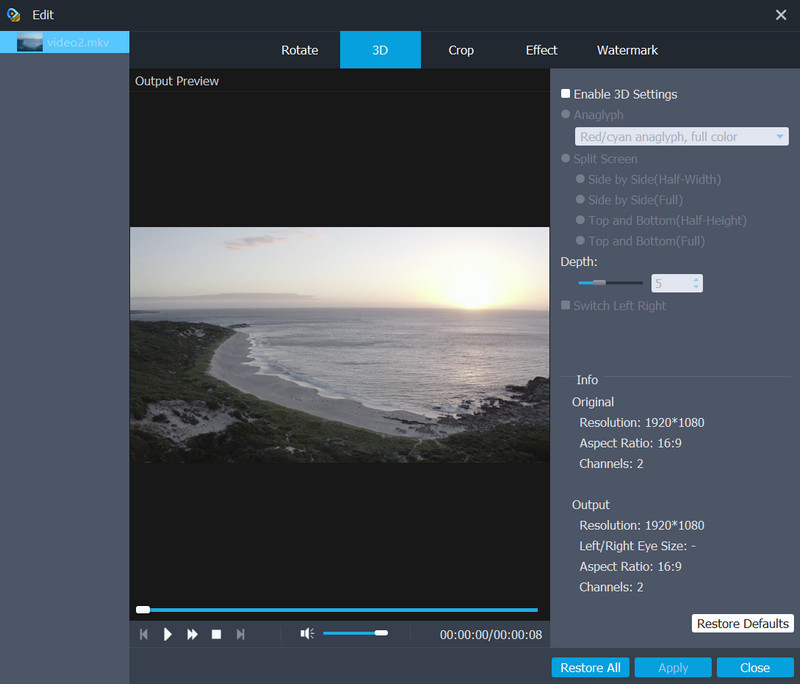
The Edit window on the 3D tab for a 1920x1080 MKV: anaglyph and split-screen modes, a depth slider, and the original and output resolution, aspect ratio and channels.
Benefits
The real benefit is fewer surprises on the playback side. MKV files downloaded from a camera app, recorded by OBS or ripped from your own discs often play perfectly on the PC and then fail on a phone, a car screen or an older smart TV. Converting to an MP4 profile for that device, with one chosen audio track and only the subtitle you want (or none), gets you a file that simply plays. Batch conversion means a whole season goes through in one run, and the GPU buttons cut the time on a recent graphics card.
Real-World Uses
- A TV that won't play MKV from USB: convert a folder of episodes to an MP4 TV profile and copy them back to the stick.
- OBS recordings for YouTube or an editor: OBS often records to MKV because it survives a crash. Convert the recording to MP4 for the upload, or to a Premiere/Vegas profile for editing.
- The wrong language on a tablet: keep only the English track and drop the rest so the iPad can't pick the wrong one.
- A concert MKV you want on your phone as music: extract the stereo track to MP3 or the surround mix to FLAC.
- Combining several clips into one MKV: convert MP4 or camcorder files to MKV and add a separate commentary track or subtitle file.
Who It's For, and Who Should Skip It
It suits Windows users who mostly deal with MKV files and want a simple window with track and subtitle menus, device profiles and batch conversion, without learning a free tool's settings.
Skip it if you're on a Mac (buy the Mac edition instead), or if you only need to change the container. Free tools such as MKVToolNix and HandBrake handle MKV well, and HandBrake also lets you pick audio tracks and subtitles. Skip it too if you work with many formats and DVDs: Aiseesoft Video Converter Ultimate costs about the same on Aiseesoft's store and does much more.
Usage Guide
- Download the trial (41.4 MB), run the installer and launch Aiseesoft MKV Converter. The Getting Started screen lists the four steps.
- Click Add File or drag MKV files into the window.
- For each file, choose the audio track and subtitle from the menus under it.
- Optionally open Clip to trim, 3D for 3D output, or Edit for cropping, effects and watermarks.
- Pick a Profile (search for your device or "MP4"), click Apply to All for a batch, and set the destination folder.
- Turn on the NVIDIA, Intel or AMD button if your PC has a supported GPU, then click Convert. A progress window shows each file and the total time.
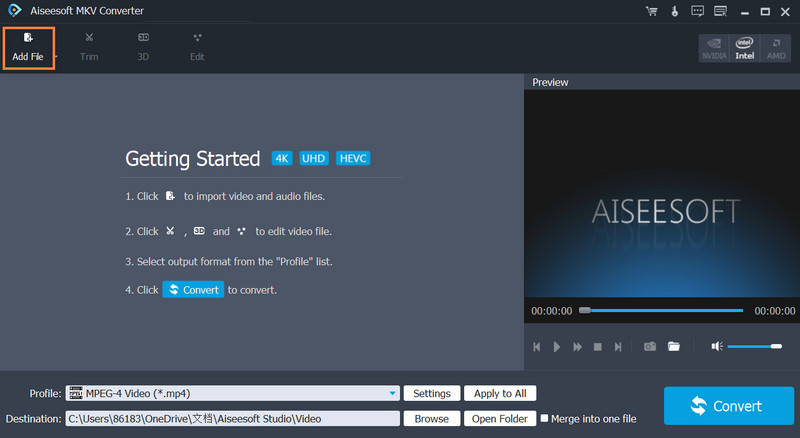
The empty window after launch: Add File highlighted, the four Getting Started steps, the MPEG-4 Video profile and the Merge into one file box at the bottom.
Where it falls short
- It's a re-encoder. Converting to MP4 through a profile re-encodes the video, which takes time and can cost a little quality. When the MKV already holds H.264 video that your device plays, a free remux tool only changes the container, in seconds.
- Dated device list. The tech specs list phones up to the iPhone 11 and Samsung Galaxy models of that era. Newer phones play the generic MP4 profiles fine, but don't expect a profile with your phone's name.
- Slow development. The installer was last rebuilt in January 2024. It works on Windows 11, but it isn't getting new features.
- Refunds are narrow. Aiseesoft's guarantee is for quality problems, and some Trustpilot reviewers were refused refunds for other reasons.
What Users Say
Independent reviews of this particular converter are thin: it's a small, older product, and most write-ups are download-site summaries. Here's what's out there.
On Aiseesoft's product page
The page shows 138 reviews. The quotes it displays are, naturally, the positive ones:
- "I have this very funny video and want to upload it to YouTube, but it's an MKV video, which YouTube doesn't support. This video converter truly solved my problem." (John Justin)
- "I have tried this MKV converter to convert videos to play on my phone, and it worked well. Highly recommend it. By the way, I'm using Samsung Note 3." (Peter)
- "This video converter is very easy but with very powerful and multiple functions. I think its 3D effect is very amazing." (Sophia)
Download sites
FileHippo's editors' review (April 4, 2025) calls it "an excellent choice for anyone looking to manage MKV files effectively" and notes that "its trial version is a great way for users to explore its capabilities, although some features may be limited." (FileHippo's text was read through a page summarizer.)
Users on Free Download Manager rate it 3.4 out of 5 from 45 votes, which is a more lukewarm picture than the vendor's page.
Trustpilot: Aiseesoft as a company
Aiseesoft has a TrustScore of 3.8 from 610 reviews. None of the recent ones are about MKV Converter, but they show what buying from Aiseesoft is like. Most five-star reviews praise support for resetting a license after a new PC, like Lowell's "Company reset my registration to…" and Ro's "Customer Support as it should be." The one-star reviews are mostly about refunds being refused, for example "Refusal to comply with consumer rights" from a buyer who was charged after a trial, and about slow back-and-forth email.
The pattern: people who use it for its narrow job, getting MKV onto a phone or a website, are happy with it. The lukewarm download-site score and the refund complaints are the reason to test the trial thoroughly first.
Comparisons
Aiseesoft MKV Converter vs. HandBrake
HandBrake is free, open source and also converts MKV to MP4 with chosen audio tracks and subtitles, and it gets regular updates. Its settings are more technical. MKV Converter's advantages are the simpler window, brand-named device profiles, the merge option and the watermark and 3D tools. If you're comfortable with HandBrake's presets, you don't need to pay.
MKV Converter vs. Aiseesoft Video Converter Ultimate
Video Converter Ultimate converts MKV and every other format, rips DVDs, compresses video and adds a toolbox of extras. On Aiseesoft's store its lifetime license costs only a little more than MKV Converter's price on our order page, so for most buyers it's the better value. MKV Converter makes sense only if you want the smaller, simpler program.
Editions and Pricing
| License |
Where |
Price |
Term |
PCs |
| Lifetime | Buy Now button on this page | $45.00 | One-time, lifetime updates | 1 |
| 1 Year | Aiseesoft store | $32.00 list | 1 year | 1 |
| Multiple-User Personal | Aiseesoft store | $229.00 list | Lifetime | Up to 8 |
Aiseesoft's own store often shows a 20% coupon on these list prices.
FAQs
Does Aiseesoft MKV Converter keep all the audio tracks and subtitles?
Aiseesoft MKV Converter lets you choose one audio track and one subtitle per file from the menus in the file list, and add external ones. If you need every track kept untouched, a remux tool like MKVToolNix is the better fit.
Can Aiseesoft MKV Converter handle 4K or HEVC MKV files?
Aiseesoft MKV Converter reads 4K MKV files and has 4K HEVC and 1080p HD output profiles. Turn on GPU acceleration for big files, since 4K re-encoding on the CPU alone is slow.
Does the Windows license work on a Mac?
No. Aiseesoft sells MKV Converter for Mac as a separate product with its own license.
What does the Aiseesoft MKV Converter trial limit?
Aiseesoft's trial for its video converters converts only the first 5 minutes of each file, or half of a shorter file. That's enough to test playback on your device, but not to finish a real job.
Can I move the license to a new PC?
Aiseesoft licenses are for one PC, but support resets registrations when you replace a computer; many Trustpilot reviews mention exactly that.
Can I get a refund if it doesn't suit me?
Aiseesoft's 30-day guarantee applies when there's a quality problem with the software. A refund for simply changing your mind isn't promised, so test the trial first.
System Requirements
- Windows 11, 10, 8.1, 8, 7, Vista or XP (SP2 or later)
- 1 GHz Intel or AMD processor
- 1 GB RAM or more
- About 42 MB for the installer, plus space for converted files
- Optional: NVIDIA, Intel or AMD graphics for hardware-accelerated conversion
Conclusion
Aiseesoft MKV Converter does one thing sensibly: it shows each MKV's audio tracks and subtitles up front and turns the file into something your phone, TV or editor will play. The track menus, device profiles and batch mode make it easy for someone who doesn't want to learn HandBrake.
Buy it if you want a simple, dedicated MKV tool on Windows and the trial plays correctly on your device. Skip it if free HandBrake or MKVToolNix already does the job for you, or if you'd get more from Aiseesoft Video Converter Ultimate for little extra money.
Download Free TrialBuy Now