Aiseesoft HD Converter for Mac: One App for the Odd HD Files Your Mac Won't Play
Aiseesoft HD Converter for Mac is a $45 Mac app (lifetime license, one Mac) that converts high-definition and 4K video in formats macOS doesn't handle well, such as WMV, AVCHD MTS and M2TS, TS recordings and MKV, into MP4, MOV and other formats, and converts or extracts audio too. It runs on Intel and Apple silicon Macs and suits people with a mixed bag of HD video files from different sources.
A Mac plays MP4 and MOV beautifully and almost nothing else. The trouble starts when a friend sends WMV files from a Windows PC, a TV tuner or set-top box records .ts files, an old camcorder leaves .mts clips, or a downloaded film comes as .mkv. Rather than buying a single-format converter for each, HD Converter for Mac takes all of them and turns them into files QuickTime, Photos, iMovie, the TV app and your iPhone accept.
Quick facts
- Version: 9.2.28.97409 (disk image dated January 31, 2024)
- Developer: Aiseesoft Studio
- Runs on: Mac OS X 10.7 or later, including macOS Sequoia, on Intel and M-series Macs
- HD input: MTS, M2TS, TS, TP, TRP, MPEG, MP4, WMV and QuickTime HD MOV, plus 4K/UHD and many SD formats
- Output: MP4, H.264, MOV, M4V, MKV, AVI, MPEG, FLV, WebM, WMV, TS, DV and VOB, or MP3, AAC, AC3, AIFF, FLAC, WAV, WMA audio
- Audio: keeps 5.1 Dolby surround sound
- Price: $45.00 one-time on the order page for a lifetime license on one Mac
- Trial: converts the first 5 minutes of each file (half of a shorter file)
- What we checked: the 49.9 MB disk image, whose app reports version 9.2.28.97409, and the order page, which sells the Lifetime license for $45.00, on November 4, 2026. We didn't run conversions on a Mac.
Before you buy
Aiseesoft sells several Mac converters that overlap heavily: HD Converter, 4K Converter, MTS Converter, M2TS Converter and the bigger Mac Video Converter Ultimate. HD Converter is the generalist of the small ones: buy it for mixed formats. If your files are almost all camcorder footage headed for Final Cut, the MTS Converter's editing profiles fit better.
"Convert SD to HD" makes a bigger file at a higher resolution, but it can't add detail that wasn't recorded. Don't expect old DVD or phone clips to look like real HD.
Download Free TrialBuy Now
Overview
HD Converter for Mac follows Aiseesoft's standard Mac layout: Add File, Enhance, Trim, 3D and Edit across the top, a list of files on the left with audio and subtitle menus for each, a preview player on the right, and Profile, Destination, Merge into one file and an orange Convert button at the bottom. It accepts audio files as well as video, so you can mix a .m4a and a .mov in the same batch.
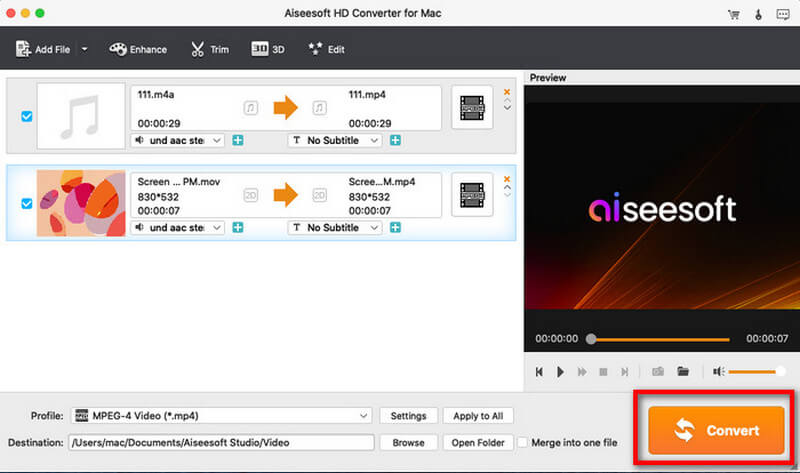
An M4A audio file and an 830x532 MOV screen recording queued for MPEG-4 output, each with audio and subtitle menus, and the Convert button highlighted.
Features
Opens the HD formats macOS ignores
Aiseesoft HD Converter for Mac reads HD WMV from Windows PCs, AVCHD MTS and M2TS from camcorders, TS, TP and TRP from TV recorders and broadcast captures, HD MPEG and H.264, and QuickTime HD MOV, along with common SD formats and MKV. One app covers the whole collection instead of one converter per format.
Downscale 4K, or move between HD formats
Aiseesoft HD Converter for Mac converts 4K UHD and 1080p video to smaller HD or SD files for older iPads, Apple TVs and phones, or keeps the resolution and only changes the format. HEVC (H.265) isn't in its listed output formats, so the most efficient output is H.264 MP4.
An audio converter too
Aiseesoft HD Converter for Mac converts between general and lossless audio formats and extracts soundtracks from video into MP3, AAC, AC3, AIFF, FLAC, WAV or WMA. It also keeps 5.1 Dolby surround sound when the output format supports it, which matters for TV recordings and Blu-ray-sourced video.
Edit window with Enhance, Crop and Watermark
Aiseesoft HD Converter for Mac's Edit window has Rotate, 3D, Crop, Effect, Enhance and Watermark tabs. Crop sets an exact area size and margins, keeps or changes the aspect ratio and offers Letterbox and other zoom modes, which is how you remove the black bars baked into a TV recording. Effect handles brightness, contrast, saturation and hue; Watermark adds text or a logo; Trim cuts start and end points.
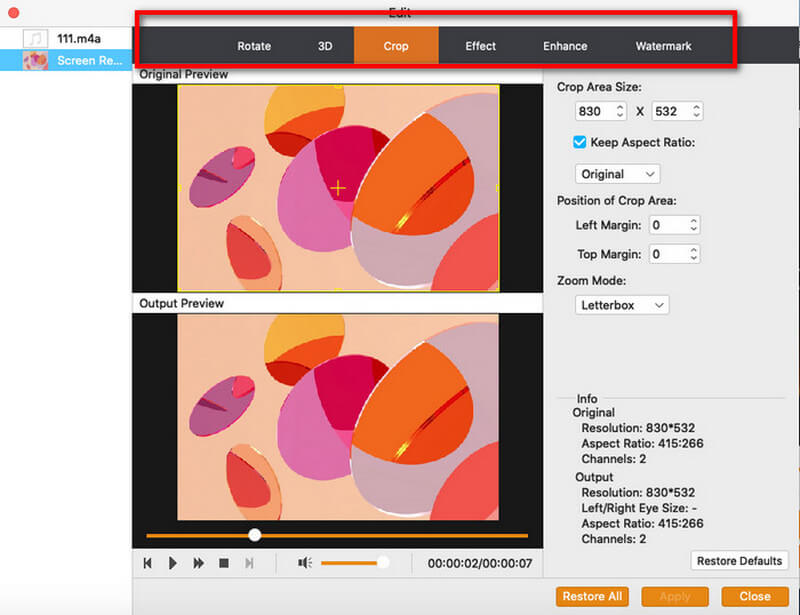
The Edit window's Crop tab: crop area size, Keep Aspect Ratio, left and top margins, Letterbox zoom mode, and the original and output resolution in the Info panel. The Enhance tab sits next to Effect.
Benefits
The benefit is consolidation: one app, one license and one workflow for every awkward video file that lands on your Mac, and the result is a library of MP4 and MOV files that just work in Apple's apps and devices. Batch conversion means you can clear a whole folder of mixed formats in one run, and the preview lets you check a file before committing.
Real-World Uses
- WMV files from a Windows-using relative: convert the family videos to MP4 so they play in Photos and on an iPhone.
- TV recordings in .ts: crop the letterbox bars, keep the 5.1 sound and save them as MP4 for the TV app.
- Sony camcorder M2TS for an iPad Pro: one reviewer on Aiseesoft's page bought it for exactly this.
- A 4K drone or phone clip for an older iPad: downscale it to 1080p.
- Soundtrack only: pull a concert's audio out to AAC for Apple Music, or to FLAC to keep the full quality.
Who It's For, and Who Should Skip It
It suits Mac users who regularly receive or own HD video in many non-Apple formats and want one simple batch converter for all of them.
Skip it if you only handle one kind of file (a single-purpose tool or free HandBrake will do), if you want DVD ripping, compression and a toolbox of extras (Mac Video Converter Ultimate), or if you need editing intermediates like ProRes for Final Cut (Aiseesoft's MTS Converter for Mac has those profiles). There's also a Windows HD Video Converter; this license is Mac-only.
Usage Guide
- Download the 49.9 MB disk image, drag the app to Applications and open it.
- Click Add File and choose your videos or audio files; mixed formats are fine.
- Check the audio and subtitle menus on each row.
- Use Trim, Enhance or Edit for cuts, cropping, color and watermarks.
- Pick a Profile: MP4 or MOV for general use, a device profile for iPhone, iPad or Apple TV, or an audio format. Click Apply to All to use it for the whole batch.
- Choose the destination folder and click Convert.
Where it falls short
- Overlapping product line. Its feature set is close to Aiseesoft's other single converters, and Mac Video Converter Ultimate does all of it and more.
- Upscaling is just resizing. SD to HD conversion raises the resolution, not the detail.
- Last rebuilt in January 2024. Aiseesoft lists macOS Sequoia and M-series support, but the app isn't gaining features.
- Older reviews. The most recent user review on Aiseesoft's page is from 2018, so there's little recent feedback.
What Users Say
Aiseesoft's review page for HD Converter for Mac
- "Its very intuitive to use, fast, with a clean looking application window." (Natalie, 2018-07-15)
- "I have downloaded an HD movie and want to watch it on my TV, however, the video format is not supported. Thanks to this video converter, I can easily convert HD videos and watch it on my TV" (Morgan, 2017-03-01)
- "Did a couple of smaller vids & then a choose a 15min video ... & it converted in just under 4 min." (Sacha, 2014-11-17)
- "Converts my AVCHD .mts file to MP4 format fast and with almost no quality loss." (Ryan, 2014-1-8)
- "Time from installation to first video conversion: 3 minutes." (Yasir, 2014-12-24)
The reservations
Even on the vendor's own page, Luigi (2014-11-17) wrote that the "2D to 3D conversion is cool but could be better in the future." Aiseesoft's product page also shows four undated quotes, including one from a Sony camcorder owner converting M2TS to MP4 for an iPad Pro.
Trustpilot: Aiseesoft as a company
Aiseesoft holds a TrustScore of 3.8 from 610 reviews. Mac customers there include Kirill Yanovsky, who in December 2025 praised the ease of use and interface of Aiseesoft's Mac software after six years, and Bernhard, who in February 2026 reported trouble saving files on a Mac that support's first suggestions didn't fix. The one-star reviews mostly concern refunds and slow email.
The pattern: buyers liked the speed and the clean window, and it solved specific "my Mac won't play this" problems. Reviews are old and few, so the trial is your best evidence.
Comparisons
HD Converter for Mac vs. Aiseesoft Mac Video Converter Ultimate
Mac Video Converter Ultimate converts every format HD Converter does and adds DVD ripping, compression and many extra tools, at a higher price. If you'll use any of those extras, it's the better buy; if you just need format conversion, HD Converter is the leaner choice.
HD Converter for Mac vs. HandBrake
HandBrake is free and reads most of the same formats, but it outputs only MP4, MKV and WebM and has no audio-only conversion, merging or watermark tools. For a Mac user who wants MOV output, audio extraction and a simpler window, HD Converter earns its price; for plain MP4 conversions, HandBrake is enough.
Editions and Pricing
| License |
Where |
Price |
Macs |
| Lifetime | Buy Now button on this page | $45.00 | 1 |
| 1 Year | Aiseesoft store | $32.00 list ($25.60 with coupon) | 1 |
| Multiple-User Personal, lifetime | Aiseesoft store | $229.00 list ($183.20 with coupon) | Up to 8 |
FAQs
Does Aiseesoft HD Converter for Mac work on Apple silicon Macs?
Yes. Aiseesoft lists Intel processors and Apple M-series chips, including M5, in HD Converter for Mac's tech specs.
Will HD Converter for Mac play WMV files on my Mac?
Aiseesoft HD Converter for Mac doesn't play them for watching; it converts WMV to MP4 or MOV, which then play in QuickTime and Photos.
Can it convert copy-protected DVDs or Blu-rays?
No. Aiseesoft HD Converter for Mac works on video files. Disc ripping is part of Aiseesoft's Mac Video Converter Ultimate.
What does the HD Converter for Mac trial limit?
The trial of Aiseesoft HD Converter for Mac converts the first 5 minutes of each file, or half of a file under 5 minutes.
Does the license include the Windows version?
No. Aiseesoft's Windows HD Video Converter is a separate product.
Can I get a refund?
Aiseesoft's 30-day money-back guarantee applies when there's a quality problem with the software, not a change of mind, so judge it with the trial first.
System Requirements
- Mac OS X 10.7 or later, including macOS Sequoia
- Intel processor or Apple M-series chip
- 512 MB RAM or more
- 800x600 display, 16-bit graphics or better
- About 50 MB for the app, plus space for converted files
Conclusion
Aiseesoft HD Converter for Mac is a tidy, general-purpose converter for the WMV, TS, MTS, M2TS and MKV files that macOS won't open, with audio extraction and a useful crop tool. It's not new or unique, but it saves you buying one converter per format.
Buy it if mixed-format HD video regularly lands on your Mac and you want MOV or MP4 copies with minimal fuss. Skip it if free HandBrake's MP4 output covers your needs, or if you'd use Mac Video Converter Ultimate's extra tools.
Download Free TrialBuy Now