Cisdem AppCrypt for Mac: Lock Apps and Block Websites with One Password
Cisdem AppCrypt for Mac is a $39.99 one-time-purchase app that puts a password on chosen Mac apps and blocks websites, keywords and whole site categories. It is for parents, people sharing a Mac, and anyone trying to keep themselves off social media during work hours.
macOS Screen Time can limit apps, but it isn't built around a simple locked-app password. AppCrypt is: open a locked app, and a full lock screen asks for the password first.
Quick facts
- Version: 7.11.0, released July 22, 2026
- Developer: Cisdem
- Platform: macOS 10.15 Catalina through macOS 27 Golden Gate, Intel and Apple Silicon. Windows, Android and iOS versions are sold separately.
- Blocks in: Chrome, Safari, Edge, Opera, Brave, Arc, Dia and Ecosia on Mac
- Price: $39.99 one-time for one Mac at checkout
- Trial: all features for 3 days
- Guarantee: 30-day money back
- What we checked: installer size 7.2 MB from the vendor's download link, dated July 22, 2026, release notes, tech specs and FAQ on the vendor's site, order page price $39.99 for the one-time license on November 6, 2026. We did not try to break its locks.
Download Free TrialBuy Now
Before you buy
AppCrypt locks apps, not files. It can't password-protect a folder or a document, so a person who opens a file some other way isn't stopped by it. Also keep your order email: a forgotten password is reset with a one-time secret code from Cisdem support, tied to the email address of your purchase.
Overview
AppCrypt has two main tabs. App Lock is the list of protected apps, and Web Block is the list of sites and keywords. A shared Schedule tab decides when each applies, and the app sits in the menu bar. Version 7.10 in July 2026 added full Apple Silicon support and blocking in Arc, Dia and Ecosia, while 7.11 improved browser authorization and fixed background crashes.

The App Lock tab with seven locked apps and the Switch to Allowlist control at the bottom.
Features
Lock individual apps, or everything except a few
Cisdem AppCrypt for Mac asks for a password whenever a locked app is opened. It can relock apps after a period of inactivity, when you leave the Mac, or when it goes to sleep. The Allowlist switch reverses the logic, locking all apps except the ones you approve, which works well on a child's Mac or a library computer.
Block sites, keywords and categories
Cisdem AppCrypt for Mac blocks specific URLs and pages, any URL containing a keyword, and ready-made categories such as social, games, gambling, shopping and adult sites. You can import your own text list, block all websites at once, or block everything except an Always Allow list. Blocking also applies in private or incognito windows.
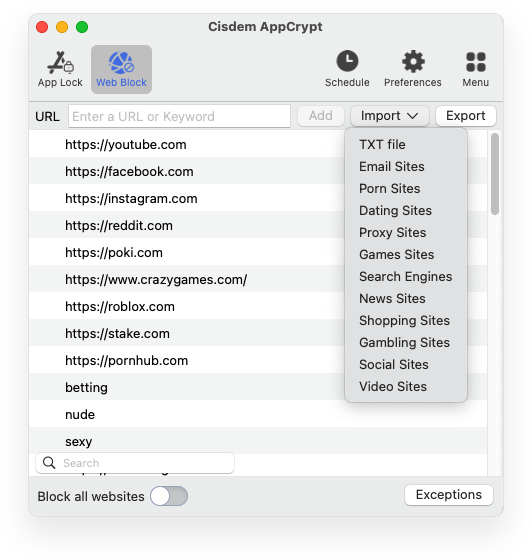
The Web Block tab with URLs and keywords. The Import menu loads ready-made lists such as Social Sites and Gambling Sites.
Schedules for school, work and bedtime
Cisdem AppCrypt for Mac applies restrictions all day or at set times, with a general schedule for everything or a custom schedule per app or site. Always Block entries ignore schedules. A bedtime crossing midnight takes two schedules, such as 23:00 to 23:59 and 00:00 to 05:00.
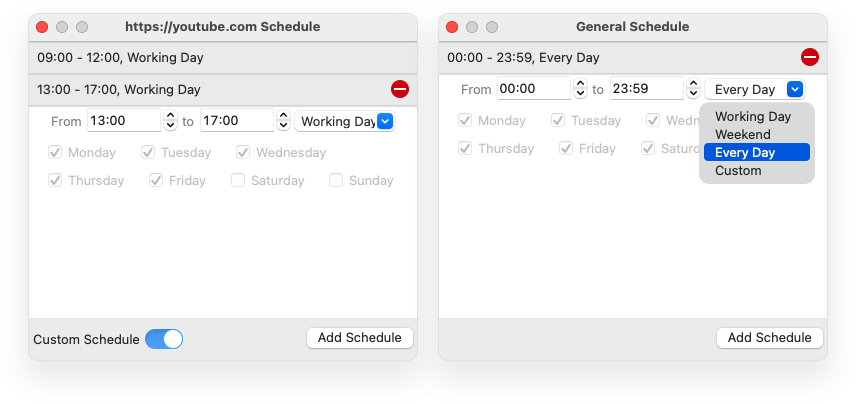
Custom schedules for one site on the left, and a general schedule on the right.
A log of who tried to get in
Cisdem AppCrypt for Mac records failed unlock attempts with the app name and time. Turn on the option and it also takes a photo with the Mac's camera, which is either reassuring or a little creepy depending on the household. If a family shares the Mac, tell them it is on.
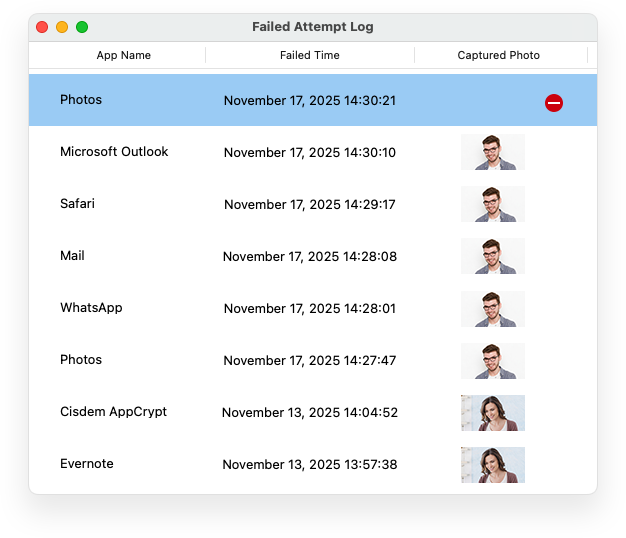
The Failed Attempt Log lists the app, the time and a captured photo.
Benefits
- You can hand a Mac to a child or a colleague without exposing Mail, Messages or Photos.
- A single password and schedule replace browser-by-browser blocker extensions.
- A separate person can hold the password, which turns the blocker into real accountability.
- One payment, with no monthly fee to keep the blocks running.
Real-World Uses
- A parent blocks game sites and game apps during online lessons, then opens them after 5 pm.
- A freelancer blocks YouTube and Reddit from 9 to 5 on working days and adds exceptions for client sites.
- A library locks admin tools on public computers.
- Someone with a gambling problem has a partner set the password and imports the Gambling Sites list.
- A student blocks everything except the course site during exam revision.
Who It's For, and Who Should Skip It
Cisdem AppCrypt for Mac suits households, small shared Macs and self-control users who want a simple locker and blocker together.
Skip it if you need to encrypt files, since AppCrypt doesn't touch them: use an encrypted disk image or FileVault. Skip it if you need usage reports for your child, because it has no time statistics. It is also the wrong tool for protecting a Mac against a determined person with an administrator account. Give restricted users a standard account instead.
Usage Guide
- Download the DMG, drag the app to Applications and set your password on first launch. macOS will ask for browser permissions.
- In Preferences, tick Launch at system startup.
- Under App Lock, click + and add apps, or turn on the Allowlist.
- Under Web Block, enter URLs or keywords, or use Import to load a list. Open Exceptions for Always Allow and Always Block.
- Under Schedule, set times. Check the padlock in the menu bar shows App Lock and Web Block are enabled.
Where it falls short
The biggest gap is browser coverage: Cisdem lists Firefox as Windows only, so on a Mac, an unsupported browser can get around the website blocks. Remove or lock other browsers if you depend on the block. One MacUpdate reviewer on an older version found blocks lapsed if the app wasn't running after start-up, so make sure Launch at system startup is on. There are no usage statistics, a request that came up in several reviews.
What Users Say
MacUpdate: 4.1 out of 5 from 16 ratings
- "It's a simple and useful app with a clean interface. I use it for self control, but I think parents could also use it" Alex0101, May 29, 2026, version 7.9.1, 4 stars
- "I have been using this software for a while and it has helped me get rid of my YouTube addiction." tadeomcdaniel, June 13, 2025, version 7.9.0
- "It's not reliable. if you dont open the app when you open ur laptop, everything you have blocked will be available." rgamwo, October 2, 2022, version 7.6.0, 1 star
SourceForge: 4.5 out of 5 from 4 reviews
The likes and the wishes here are very consistent.
- "One feature I really like is the flexible scheduling." Katharina S., May 7, 2026, who adds: "The only thing missing is a statistics or tracking feature."
- "The website blocking works really well." Emily C., April 17, 2026, who adds: "I wish there was a weekly report showing how much time I saved."
- "It can be a bit inconvenient when my son needs to change settings" Stephanie K., April 3, 2026
Mac App Store: 3.7 out of 5 from 7 ratings
This is Cisdem's separate App Store edition of AppCrypt, so features can differ from the version sold here.
- "This is the only app I've found that works to block websites on non-safari browsing apps" gkffjh
- "It works perfectly to both lock the Minecraft app and block access to Minecraft website" Chirs_Alen.M, December 26, 2023
AlternativeTo and Trustpilot
AlternativeTo shows 7 likes. Trustpilot shows 4.9 out of 5 from 304 reviews of Cisdem as a whole, mostly about support.
- "Quite easy to use." Noel01 on AlternativeTo, May 19, 2025
- "Great tool to use for system settings protection. Fast customer support. Highly recommended" Dr.Localize on Trustpilot, October 14, 2026
Quoted on Cisdem's own site
The vendor picks these, so give them less weight. The app's reviews there show 56 entries.
- "I am very impressed with AppCrypt. I will admit that sometimes I'm leery of security utilities because I feel like they overcomplicate the regular workflow of a computer, but AppCrypt is so easy to use that I forget it's even running." Robyn, MacSources
- "Perfect!! The keyword blocker is a life saver for some people!" JP van Kranenburg, NL
The pattern: people like the easy setup, schedules and keyword blocking, and several use it to break their own habits. The complaints are missing statistics and reliability on older versions. Rating counts are small everywhere, so test it in the 3-day trial.
Comparisons
AppCrypt vs. Screen Time
Screen Time is free, built into macOS, and adds usage reports and iPhone sync, none of which AppCrypt offers on the Mac. AppCrypt gives you a true password prompt on individual apps, keyword blocking, ready-made category lists and an intruder log. Many families can start with Screen Time and only buy AppCrypt if that isn't enough.
AppCrypt vs. Cisdem Focus
Focus is Cisdem's separate app for timed focus sessions. AppCrypt is the better fit when someone else holds the password, and Focus when you are managing your own attention.
Editions and Pricing
| Plan | Price | License term | Devices |
|---|
| One-Year Subscription | $19.99 | One year | 1 Mac |
| One-Time Purchase | $39.99 | Lifetime | 1 Mac |
| One-Time Purchase | $55.99 | Lifetime | 2 Macs |
| One-Time Purchase | $99.99 | Lifetime | 5 Macs |
| Business License | $54.99 | One-time | 1 Mac |
Prices are from Cisdem's buy page. The Buy Now button here is for the one-time 1-Mac license. AppCrypt also comes in a $59.99 bundle with Duplicate Finder and a $99.99 bundle that adds ContactsMate.
FAQs
Does Cisdem AppCrypt work in incognito mode?
Yes. On a Mac, Cisdem AppCrypt blocks listed sites in private and incognito windows too, as long as the browser is one it supports.
What if I forget my Cisdem AppCrypt password?
Email Cisdem support from your purchase address with your order number. They send a one-time secret code, which you paste in after clicking Forget on the unlock window.
Can Cisdem AppCrypt lock files or folders?
No. Cisdem AppCrypt for Mac works only with apps and websites.
Can I add a website without unlocking Cisdem AppCrypt?
Yes. Click the padlock in the menu bar and choose Quickly add URLs to block. That helps when you are blocking something for yourself in the moment.
Why doesn't Cisdem AppCrypt ask for a password on a locked app?
Check the menu bar padlock to see that App Lock is enabled, then check whether a schedule is limiting the lock to other hours.
What is the difference between Always Allow and Always Block?
In Cisdem AppCrypt, Always Allow sites stay reachable even if another list blocks them, while Always Block sites stay blocked regardless of schedule or block status.
Does one Cisdem AppCrypt license cover Mac and Windows?
No. This plan covers one Mac. Cisdem sells a Windows version separately, plus a Mac and Windows bundle.
System Requirements
- macOS 10.15 Catalina, 11 Big Sur, 12 Monterey, 13 Ventura, 14 Sonoma, 15 Sequoia, 26 Tahoe or 27 Golden Gate
- Intel or Apple Silicon processor
- 512 MB RAM or more
- 50 MB free space or more for installation
Conclusion
Cisdem AppCrypt for Mac is worth $39.99 if you want password-locked apps and scheduled site blocking in one small app, particularly on a family Mac or for your own focus. The one-time price beats paying yearly if you plan to keep it.
The main reason not to buy it is a need for real security or usage reports: it doesn't encrypt anything and it won't stop someone with an administrator account. Use the 3-day trial to confirm your browsers are covered.
Download Free TrialBuy Now