Coolmuster PDF Locker: Password Protect a Batch of PDFs on Windows
Coolmuster PDF Locker, formerly PDF Encrypter, is a $15.95-a-year Windows program that adds open passwords, permission limits and up to 256-bit AES encryption to PDFs in batches.
You have twenty payslips or client reports to send out, and each should be locked before it leaves your PC. Doing that by hand in a PDF editor is slow, and uploading them to a free web service defeats the purpose.
Quick facts
- Version: 3.0.2 (April 30, 2026), which added 256-bit AES
- Developer: Coolmuster
- Platforms: Windows 11, 10, 8, 7 only
- Encryption: 40-bit RC4, 128-bit RC4, 128-bit AES, 256-bit AES
- Passwords: user (open) and owner (permissions)
- Trial: free download with a cap on free use, according to one Softpedia review
- Price: $15.95 for one PC for one year at checkout, renewing automatically unless you cancel
- Refund: 30 days on one-year and lifetime licenses, 7 days on monthly ones
- What we checked: the trial installer from coolmuster.com (57.54 MB, server date April 30, 2026) and the $15.95 price on the order page on November 10, 2026. We read Coolmuster's specifications and user guide, but we didn't install the program or run it on our own files.
Before you buy
Keep a copy of your passwords. A strong open password on a PDF can't simply be reset later. Choose 128-bit or 256-bit AES and skip the RC4 options unless an old PDF reader forces them. Each level's label shows the Acrobat version it needs, for example Acrobat 10 or later for 256-bit AES, and your recipients need a reader that can open that level.
Download Free TrialBuy Now
Overview
PDF Locker is the current name of Coolmuster's PDF Encrypter: the old page on the vendor's site redirects to this one. You load PDFs, set the passwords, encryption level and permissions once, and it writes protected copies to your output folder.
Its right-hand panel folds out into three sections, Set Password, Encryption Level and Set Permission(s), which keeps a screen full of options manageable.
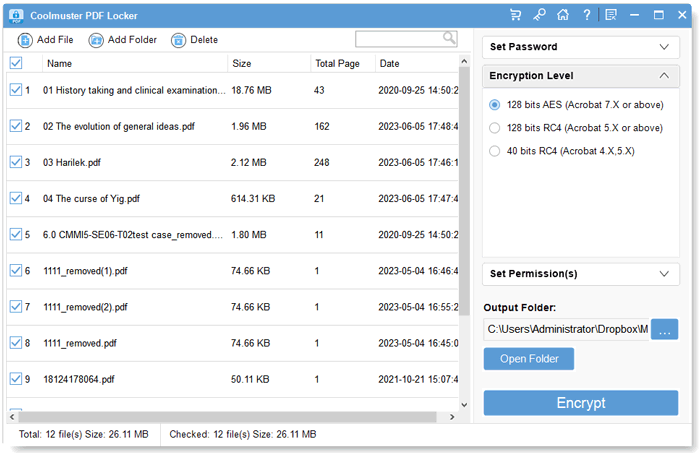
Eight PDFs loaded with the Encryption Level section open, showing the four options.
Features
User and owner passwords
Coolmuster PDF Locker can set a user password that's required to open a file, an owner password that controls what's allowed once it's open, or both.
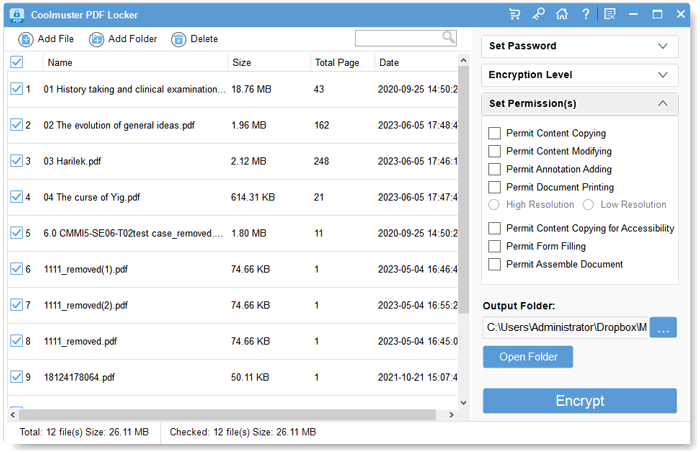
The Set Permission(s) section, listing content copying, modifying, annotations, printing, form filling and assembly.
Four encryption levels including 256-bit AES
PDF Locker offers 40-bit RC4, 128-bit RC4, 128-bit AES and 256-bit AES. The 256-bit AES option arrived in version 3.0.2 on April 30, 2026.
Permission settings
PDF Locker can allow or block content copying, modifying, adding annotations, printing at high or low resolution, copying for accessibility, form filling and assembling the document.
Batch encryption
PDF Locker protects every selected file in one run with a single set of passwords and permissions, after you add them with Add File or Add Folder or by dragging them in.
Benefits
- A stack of documents can be protected in one run with identical settings.
- Files stay on your PC, which is the point for sensitive documents.
- Permissions let you share a PDF for reading without letting people copy or print it.
Real-World Uses
- Locking payslips or HR letters before emailing them.
- Sending a client report that can be read but not copied or edited.
- Protecting scanned identity documents stored on a shared drive.
- Adding AES encryption to an archive of financial records.
Who It's For, and Who Should Skip It
It's for small offices and individuals who need PDFs password protected regularly and want it done offline.
Skip it if you're on a Mac, since it's Windows only, or if you'd rather not pay yearly for something you do twice a year. Microsoft Word can add a password when it exports a document as a PDF, which covers the occasional file. It also isn't a place to store passwords, and a shared single password isn't access control.
Usage Guide
- Install PDF Locker from the Download Free Trial button and launch it.
- Click Add File or Add Folder, or drag PDFs into the window.
- Tick User Password, Owner Password or both, and type them.
- Open Encryption Level and pick a level, then Set Permission(s) if you're using an owner password.
- Choose an output folder and click Encrypt.
Where It Falls Short
- Windows only.
- Softpedia's editor reported that drag and drop didn't work during testing, so files had to be added through the file browser.
- Every file in a batch gets the same password unless you run separate batches.
What Users Say
Coolmuster's site shows customer reviews, but it also runs a "Win Free Coolmuster License Code" offer for writing one, and many entries are short and unspecific. Treat them as a sign of what buyers care about, not as independent testing. PDF Locker has just four reviews there, three dated June 6, 2023, and one from January 2, 2025.
Reviews on Coolmuster's own site
- Safeguarding PDFs with Confidence "Coolmuster PDF Locker has made it incredibly simple for me to protect the integrity of my PDF files." G. Ala, June 6, 2023
- Simple and Effective Protection "The software also supports batch processing, which is incredibly convenient when I have a large number of files to protect." Isacboom, June 6, 2023
- Excellent PDF Security Solution! "The batch processing feature is a real time-saver, as I can protect multiple files simultaneously." PDFbirdy, June 6, 2023
Independent coverage
Softpedia's editor review likes the password, encryption-level and permission options and the batch mode, and judges it sufficient for locking a few documents occasionally. It notes a cap on free use, and that drag and drop failed in its test.
There's not much feedback to go on. The vendor's reviews are all positive, and three of the four share one date. The only independent review found it adequate rather than impressive.
Comparisons
PDF Locker vs PDF Password Remover
PDF Locker adds protection and Coolmuster PDF Password Remover takes it away. They're separate programs, so you'd buy both only if you do both jobs.
PDF Locker vs Microsoft Word
Word can password protect a PDF when you export it, for one file at a time. PDF Locker works on existing PDFs in bulk and sets detailed permissions.
Editions and Pricing
| Seats | 1 month | 1 year | Lifetime |
|---|
| 1 PC | $9.95 | $15.95 | Not on the order page |
| 5 PCs (business) | $19.95 | $25.95 | $35.95 |
| 10 PCs (business) | $29.95 | $35.95 | $45.95 |
Prices exclude VAT. Monthly and yearly licenses renew automatically until you cancel, and the yearly plan includes free upgrades for that year.
FAQs
Is Coolmuster PDF Locker the same as Coolmuster PDF Encrypter?
Yes. Coolmuster PDF Locker is the current name, and the old PDF Encrypter page on Coolmuster's site redirects to the PDF Locker page.
Which encryption level should I choose in PDF Locker?
128-bit AES or 256-bit AES are the sensible choices in PDF Locker. Use the older RC4 options only if a recipient's PDF reader can't open AES-protected files.
Does the one-year PDF Locker license renew automatically?
Yes. The one-year PDF Locker license at $15.95 renews automatically after 12 months, and Coolmuster's order page says you get a notification email before the renewal date and can cancel at any time. It includes free upgrades during that year.
What is the refund period for PDF Locker?
PDF Locker has a 30-day money-back guarantee on one-year and lifetime licenses and 7 days on monthly licenses. Orders can't be canceled once payment has gone through, because the license is issued right away, and a refund goes through support@coolmuster.com with your order ID or receipt.
Does Coolmuster PDF Locker work on a Mac?
No. Coolmuster lists PDF Locker for Windows 11, 10, 8 and 7 only.
Can PDF Locker stop someone printing a PDF?
PDF Locker can turn off printing, or limit it to low resolution, through an owner password. Permission limits rely on the reader honoring them, so don't treat them as hard security.
System Requirements
- Windows 11, 10, 8 or 7
- Intel or AMD processor faster than 750 MHz
- 512 MB RAM or more
- 1 GB of free disk space
Conclusion
Coolmuster PDF Locker is worth $15.95 if you regularly protect PDFs in batches on Windows and want AES and detailed permissions without a full editor.
The one reason to buy it is batch encryption with permissions. The main reason not to is occasional use, where Word's own export password is enough.
Download Free TrialBuy Now