Krylack Archive Password Recovery: One $29.95 Tool for ZIP, RAR and 7-Zip Passwords
Krylack Archive Password Recovery is a $29.95 Windows tool that finds forgotten passwords to your own ZIP, RAR and 7-Zip archives. It's the edition to buy if you have more than one archive type, or you just aren't sure what you've got.
Quick facts
- Version: 4.3.3, by Krylack
- Formats: ZIP, ZIPX, RAR3, RAR5, 7-Zip (.7z)
- Encryption: ZipCrypto, WinZip AES 128/256, RAR, 7-Zip AES-256, header encryption
- Platform: 64-bit Windows 10 or 11
- Price: $29.95, one-time, with free updates within the edition
- Trial: recovers passwords of up to 3 characters, no time limit
What we checked: installer version 4.3.3 (92 MB, code signature valid) downloaded from Krylack on November 10, 2026, checkout price $29.95 on November 10, 2026. We didn't run a recovery on a real locked archive.
Before you buy
This replaces the old 3.x Archive tool. ACE archives, which the old version handled, aren't on Krylack's current format list. If you need ACE, this isn't the tool.
Download Free TrialBuy Now
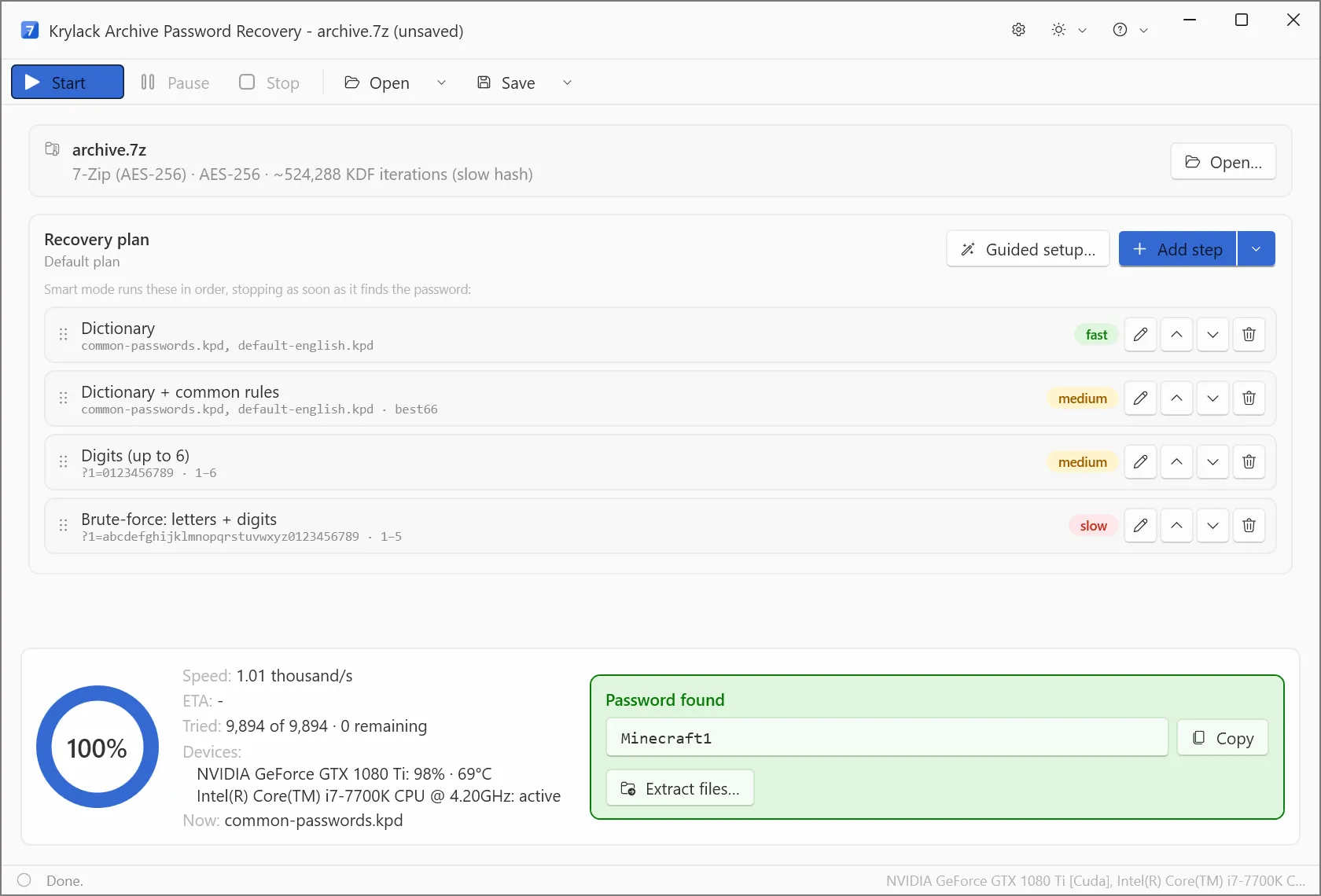
Krylack's own screenshot: the Archive edition on a .7z file with about 524,288 key-derivation rounds, at 1.01 thousand guesses per second on a GTX 1080 Ti.
Overview
Archive formats differ enormously in how hard they are to search, and Krylack Archive Password Recovery has to deal with all of them. Using the speeds in Krylack's own product screenshots on the same GTX 1080 Ti, here's the time to try every six-letter lowercase password, by our arithmetic:
| Format | Key rounds shown | Guesses per second | Six lowercase letters |
|---|
| WinZip AES-256 | about 1,000 | 890,590 | about 6 minutes |
| RAR5 | about 32,768 | 35,040 | about 2.4 hours |
| 7-Zip AES-256 | about 524,288 | 1,020 | about 3.5 days |
Legacy ZipCrypto is faster still, because it's comparatively weak. The point of a single multi-format tool is that you open the file, it tells you which row you're on, and you plan accordingly.
Features
Three families, one window
Krylack Archive Password Recovery opens ZIP, RAR and 7-Zip files in the same program and detects the format and encryption automatically, so you never pick the wrong mode.
Hidden file names are handled
Krylack Archive Password Recovery works on header-encrypted RAR (-hp) and 7-Zip archives, where you can't see what's inside until the password turns up.
A reorderable search plan
Krylack Archive Password Recovery runs dictionary, rules, digits and brute-force steps in order and stops at the first hit, and you can add masks for what you remember.
Extract after recovery
Krylack Archive Password Recovery shows an Extract files button with the found password, as Krylack's screenshot shows, so you can unpack without switching programs.
Real-World Uses
- You have a folder of old backups in a mix of .zip and .rar, all with passwords from the same era.
- A .7z from a colleague and a .zipx from a client both need opening this week.
- You don't know whether an archive with a renamed extension is ZIP or RAR, and detection answers that for you.
Who It's For, and Who Should Skip It
Buy it if two or more archive formats are in play, since it costs less than two $19.95 single editions. Skip it if you only ever meet one format, and take that format's single edition instead. If you also have Office or PDF files, the $39.95 Suite is the better fit. Password-recovery software isn't for other people's files, and Krylack sells this only for archives you own or may open.
Usage Guide
- Install the trial and open the archive. The app reports format, encryption and iteration count.
- Look at that iteration count, then decide how far brute force is worth taking.
- Add a mask or a custom wordlist if you remember anything.
- Press Start, saving the project if you need to stop.
- Copy the password or use Extract files.
What Users Say
Krylack's rebuilt 4.x tools have no independent reviews yet that we could find. What exists covers the old 3.x versions, and it's worth reading to see what the rebuild had to fix.
dotTech review of the old KRyLack Archive Password Recovery 3.45.58 (May 5, 2013)
dotTech tested the older tool: "Supports cracking of password-protected ZIPs (ZipCrypto) but not ZIPs encrypted using AES-256," it noted, along with an "Ugly, outdated interface" and software that "Comes bundled with crapware during installation (two, by my count)". On the plus side, it found the tool "Straightforward and easy to use — shows you password on-screen after it has finished cracking".
Its verdict: "You are more than welcome to grab KRyLack Archive Password Recovery if you want, but I don’t recommend it."
A buyer of the old KRyLack RAR Password Recovery (Free Download Manager)
The one user comment on Free Download Manager's page for the old RAR tool (rated 3.2 from 6 votes there) is harsh. User Alaunus wrote: "Don't go there, KryLack is a complete waste of money." The buyer reported brute force running at only about 30 passwords a second, and said requests to support went unanswered.
What has changed since
Version 4.x is a rewrite on paper: WinZip AES and 7-Zip AES-256 are listed, the screenshots show GPU load, and Krylack's site says there are no toolbars or bundled offers in the installer. We found no independent review of 4.x, so treat those complaints as history and the fixes as Krylack's claims until someone tests them.
Editions and Pricing
| Edition | Covers | Price |
|---|
| Krylack Archive Password Recovery | ZIP, RAR, 7-Zip | $29.95 |
| Krylack ZIP, RAR or 7-Zip Password Recovery | One format | $19.95 each |
| Krylack Password Recovery Suite | Archives, Office, PDF | $39.95 |
| Free ZIP, RAR and 7-Zip tools | One format each, CPU brute-force only | Free |
FAQs
Does Krylack Archive Password Recovery support RAR5?
Krylack Archive Password Recovery supports RAR3 and RAR5, header-encrypted or data-encrypted.
Does Krylack Archive Password Recovery still open ACE archives?
Krylack Archive Password Recovery's current format list names ZIP, ZIPX, RAR and 7-Zip, with no ACE.
Should I buy Krylack Archive Password Recovery or a single-format edition?
Krylack Archive Password Recovery makes sense when you deal with more than one format. For just one format, the $19.95 edition is enough.
Is Krylack Archive Password Recovery a subscription?
Krylack Archive Password Recovery is a one-time purchase with a perpetual license and free updates within the edition.
Is an old KRyLack Archive license still valid?
Krylack doesn't say whether old 3.x keys carry over to 4.x, so ask Krylack support with your order details before buying again.
System Requirements
- 64-bit Windows 10 or Windows 11
- A compatible GPU recommended for AES-based formats, not required
- No extra runtimes, about 92 MB installer
Conclusion
Worth $29.95 if you handle more than one archive format. It's the cheapest way to cover all three, and format detection is genuinely useful when you don't know what you've got. The main reason not to buy is doubt about the speed claims: independent testing of 4.x doesn't exist yet, so run your own short-password test with the trial.
Download Free TrialBuy Now