Krylack PDF Password Recovery: Two Very Different PDF Passwords, One $19.95 Tool
Krylack PDF Password Recovery is a $19.95 Windows tool for PDFs you own. It lifts printing, copying and editing restrictions straight away, and it searches for a forgotten password that stops the file from opening at all.
Those are two separate jobs, and knowing which one you have saves you time and possibly money.
Quick facts
- Version: 4.3.3, by Krylack
- Covers: owner (permissions) passwords and user (open) passwords
- Encryption: 40-bit RC4 through 256-bit AES in PDF 2.0
- Platform: 64-bit Windows 10 or 11
- Price: $19.95, one-time, with free updates within the edition
- Trial: recovers passwords of up to 3 characters, no time limit
What we checked: installer version 4.3.3 (92 MB, code signature valid) downloaded from Krylack on November 10, 2026, checkout price $19.95 on November 10, 2026. We didn't test removal or recovery on a real locked PDF.
Download Free TrialBuy Now
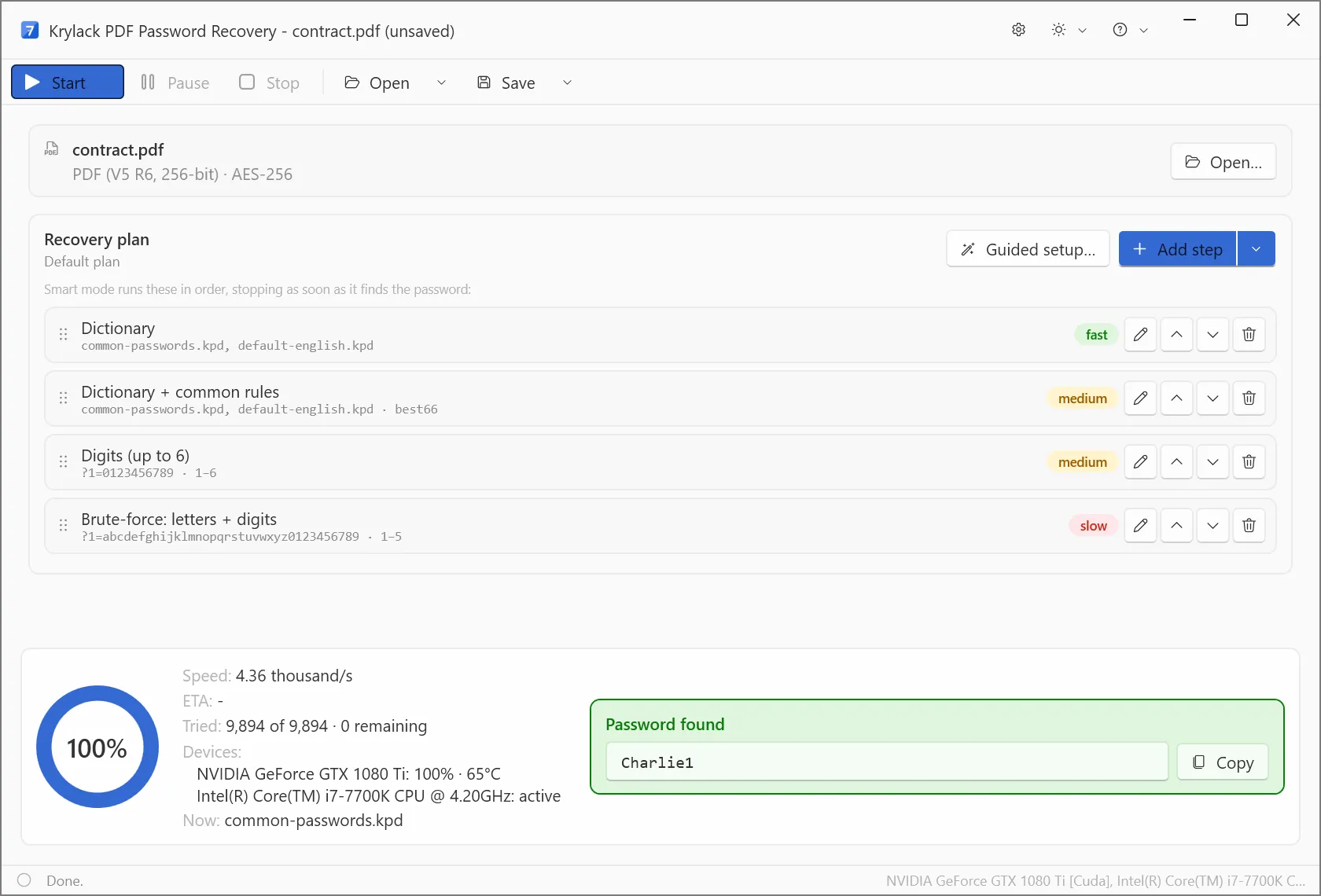
Krylack's own screenshot: contract.pdf detected as PDF V5 R6 256-bit AES, with the password found at 4.36 thousand guesses per second on a GTX 1080 Ti.
Overview
A PDF can carry an owner password, which restricts printing, copying or editing, or a user password, which blocks opening. If the file opens and only some actions are greyed out, you have the first kind. Krylack PDF Password Recovery removes that restriction directly, with no search. If the file demands a password just to open, it has to be found by guessing, and the encryption revision decides how hard that is.
| PDF revision | Encryption | Search difficulty |
|---|
| Revision 2 | 40-bit RC4 | Weak, recovery is fast |
| Revisions 3-4 | 128-bit RC4 or AES | Common in everyday PDFs |
| Revision 5 | 256-bit AES | Modern and strong |
| Revision 6, PDF 2.0 | 256-bit AES with a heavy key step | Slow by design |
Features
Instant removal of owner restrictions
Krylack PDF Password Recovery lifts print, copy and edit limits on your own PDF in one direct operation at any revision. This is the part of the product you can rely on regardless of how the password was chosen.
Search for forgotten open passwords
Krylack PDF Password Recovery tries likely candidates first: dictionary, dictionary with rules, digits, then letters and digits. You can add masks for anything you remember, such as a length or a known prefix.
GPU acceleration on AES
Krylack PDF Password Recovery uses a supported graphics card on the AES revisions. Its screenshot shows both a GTX 1080 Ti and an Intel Core i7 working on one file.
What the numbers mean for an open password
At the 4,360 guesses per second in Krylack's revision 6 screenshot, every six-letter lowercase password takes about 20 hours and eight lowercase letters takes about 1.5 years, by our arithmetic from that screenshot. Older RC4 PDFs are far quicker. So on a modern file, anything you remember about the password is worth more than extra hours of brute force.
Real-World Uses
- A manual you own can't be printed for the workshop. That's an owner restriction, and it goes straight away.
- Your scanned contract from years ago opens only with a password you've lost. A common word with a number on the end is well within reach.
- An accountant has dozens of old statements protected with an old 128-bit scheme and a familiar pattern, and can build a mask for it.
Who It's For, and Who Should Skip It
Buy it if you have your own PDF with either kind of password and the password wasn't randomly generated. Skip it if the document isn't yours, since Krylack sells this for your own files only. A bank or court PDF locked with a long, random code is the hard case for every tool. Mac users have no version here.
Usage Guide
- Install the trial and open your PDF. The app reports the revision and encryption.
- If the file opened and only actions are limited, choose the owner-password removal.
- For an open password, review the recovery plan, add a mask if you remember part of it, and press Start.
- Save the project if it runs long, then resume later.
- Copy the found password and open the PDF as normal.
Where it falls short
- A long random password on 256-bit AES, especially revision 6, is unlikely to fall.
- The trial only proves passwords of up to 3 characters.
- We found no independent review of the 4.x line, so speed figures are Krylack's.
- Windows only: 64-bit, version 10 or 11.
Compared with the free tool and the wider editions
Free PDF Password Recovery runs a CPU-only brute-force search with no time limit, and it's worth a go if your password is short. The paid edition adds GPU speed plus dictionary and mask methods. If you also have Office or archive files, the Krylack Password Recovery Suite at $39.95 covers PDF too for about the price of two single editions.
Editions and Pricing
| Edition | Covers | Price |
|---|
| Krylack PDF Password Recovery | PDF, all revisions | $19.95 |
| Krylack Password Recovery Suite | PDF plus ZIP, RAR, 7-Zip and Office | $39.95 |
| Free PDF Password Recovery | PDF, CPU brute-force only | Free |
FAQs
How do I know which kind of PDF password I have?
A PDF that opens but blocks printing or copying has an owner password, which Krylack PDF Password Recovery removes directly. A PDF that asks for a password before it opens has a user password, which must be searched for.
Does Krylack PDF Password Recovery need the password to remove print limits?
Krylack says owner restrictions are removed directly on your own PDF, with no search needed.
Can Krylack PDF Password Recovery handle PDF 2.0?
Krylack PDF Password Recovery supports 256-bit AES in PDF 2.0, which is revision 6. It's the slowest case to search.
Is the PDF license a subscription?
Krylack PDF Password Recovery is a one-time purchase with a perpetual license.
Do I need a graphics card for Krylack PDF Password Recovery?
Krylack PDF Password Recovery runs on any PC, but a supported GPU speeds up open-password recovery on the AES revisions a lot.
System Requirements
- 64-bit Windows 10 or Windows 11
- A compatible GPU recommended, not required
- No extra runtimes, about 92 MB installer
Conclusion
A fair buy at $19.95 for a PDF you own, especially if it's an owner restriction you need gone. That job is immediate and doesn't depend on luck. The reason to hold off is a modern open password you can't remember anything about, where the search may never finish, so try the free CPU tool first if the password was short.
Download Free TrialBuy Now