Accent EXCEL Password Recovery: Unprotect a Sheet or Find a Lost Workbook Password
Accent EXCEL Password Recovery is a $40-a-year Windows tool from Passcovery that removes Excel's sheet, workbook, modify and VBA passwords instantly and searches for a forgotten Password to Open in .xls, .xlsx, .xlsm and .xlsb files from Excel 6 to Excel 2024 and Microsoft 365. It's for anyone locked out of their own spreadsheet, at home or at work.
Two very different problems hide behind "my Excel file is locked". If you can open the workbook but can't edit a sheet or change its structure, the fix takes under a second. If Excel asks for a password just to open it, the file is encrypted and the password has to be found by trying candidates, which is fast on old .xls files and slow on modern .xlsx ones.
Quick facts
- Version: 25.04, released April 2025
- Developer: Passcovery Co. Ltd., St. Petersburg (earlier versions were sold under the AccentSoft name)
- Platform: Windows 10 and 11, 32-bit build
- Files: .xls, .xlsx, .xlsm, .xlsb and templates from Excel 6 to Excel 2024 and Microsoft 365
- Removed instantly: Protect Sheet, Protect Workbook (structure), Password to Modify and VBA project passwords
- Found by attack: the Password to Open ("Encrypt with Password"), on the CPU only
- Price: Home license $40.00 for the first year on one PC, renewing at $12.00 a year. Business license $60.00
- Trial: full-speed demo that shows only the first two characters of the password, stops each attack after 30 minutes and can't save a session
- Refunds: only for a confirmed software defect, not when a password can't be found
- What we checked: the installer AccentEPR_25.04.msi (8.2 MB) on the vendor's server, and the order page prices of $40.00 (Home) and $60.00 (Business) with automatic renewal at $12.00 and $18.00 a year, all on November 8, 2026. We didn't run a recovery ourselves.
Before you buy
Open the file in the free demo first. For a protected sheet or workbook, the demo finds a working password at once but hides most of it: Excel stores only a short hash of those passwords, so the result is usually a different, longer password that Excel accepts just the same. You need the license to see it. For a Password to Open, look at the estimated time: on an .xlsx from Excel 2013 or later, a six-character letters-and-digits password can take most of a year by brute force on a fast CPU. Passcovery doesn't refund a password that couldn't be recovered.
The license is an auto-renewing yearly subscription on the order page (you can switch it to manual renewal). It covers activations and updates for a year; an activated copy keeps working afterwards.
Download Free TrialBuy Now
Overview
Accent EXCEL Password Recovery (AccentEPR) is Passcovery's Excel-only tool. It shares its engine, attack types and interface with Accent OFFICE Password Recovery and Passcovery Suite, without the graphics card support. Open the workbook and the program reads its Excel version and protection, removes the simple passwords on the spot, and sets up an attack for the Password to Open if there is one. Everything runs offline on your PC.
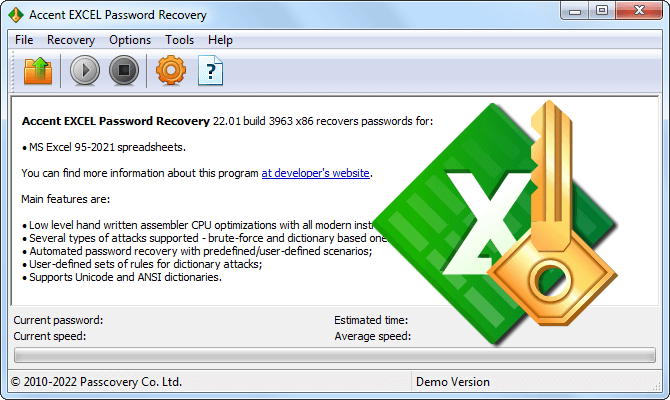
The Accent EXCEL Password Recovery 25.04 window (Home Edition) before a file is opened, with the current password, speed and estimated time fields at the bottom.
Features
Sheet, workbook, modify and VBA passwords removed instantly
Accent EXCEL Password Recovery clears Protect Sheet, Protect Workbook (structure), Password to Modify and VBA project passwords in under a second, whatever their length, because Excel keeps them as hash values inside the file instead of encrypting the data with them. Excel 2 to 95 files use a simple XOR scheme, so even their Password to Open comes back immediately.
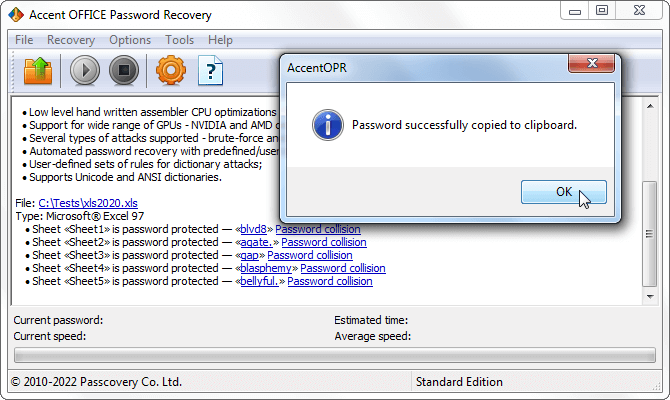
Sheet passwords of an Excel 97 workbook found at once, each marked "Password collision" (a working substitute for the original). The window is the sibling Accent OFFICE Password Recovery, which Passcovery shows on this product's page for the same function.
A fast CPU search for the Password to Open
Accent EXCEL Password Recovery uses hand-optimized assembly for Intel and AMD processors on every core. Passcovery's benchmarks for version 25.04 on a Ryzen 9 9950X: 58.5 million passwords a second on Excel 97-2003, 17,600 on Excel 2007, and 1,825 on Excel 2013-2024 files with AES-256 and 100,000 PBKDF2 rounds. A Core i5-12400F runs at roughly 30 percent of that.
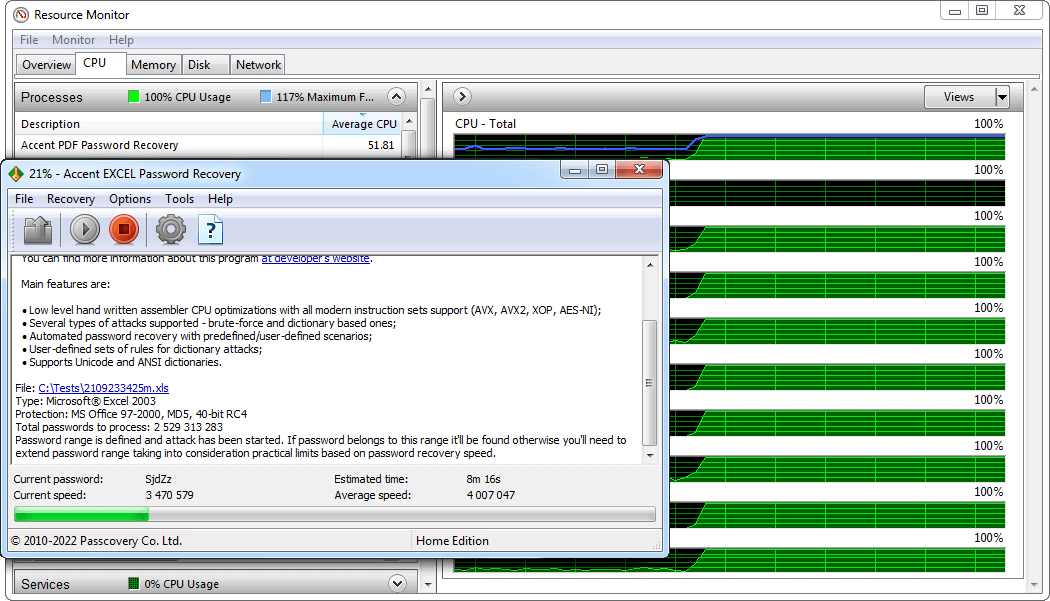
An attack on an Excel 2003 .xls (40-bit RC4): 2.53 billion passwords to try at an average of 4 million a second, estimated time 8 minutes 16 seconds (product page screenshot from an older build on an older PC).
Positional masks cut the search to what you remember
Accent EXCEL Password Recovery's positional mask sets the allowed characters for each position. Passcovery's example: an eight-character letters-and-digits password is 218 trillion candidates, and a targeted mask brings it down to 61 billion, turning months of brute force on an .xls into hours.
Dictionaries with mutations, and attack scenarios
Accent EXCEL Password Recovery loads up to four dictionaries in Unicode, UTF-8 or ANSI, combines them and applies more than 20 kinds of mutation (capitalize the first letter, append a year, swap a for @), with a preview before you start. Scenarios run any mix of attacks in order and stop when the password turns up, with progress saved so you can resume. There's also a command line.
Benefits
- The most common lockout is solved outright. A forgotten sheet or workbook protection password stops being a problem in seconds.
- Old .xls files are realistic targets. At millions of guesses a second, short and medium open passwords fall in minutes to hours.
- You know the odds before paying. The demo runs at full speed on your file and shows the estimate.
- Confidential workbooks stay on your PC. Nothing is uploaded.
Real-World Uses
- A budget template with locked sheets. The person who protected the formulas has left; the sheet protection is removed and the formulas can be edited again.
- A VBA project you can't open. A macro workbook's code is password-protected; the VBA password is cleared so the macros can be fixed.
- An old .xls of accounts. An Excel 2003 file with a short open password is recovered by brute force over lunch.
- A recent .xlsx with a password you partly recall. A dictionary of your usual words with year and symbol rules, or a mask, runs overnight.
Who It's For, and Who Should Skip It
It's for home users, accountants and office staff with protected sheets, workbooks or VBA projects, and people with an older .xls they can't open.
Skip it if you need to open a modern .xlsx whose long password you don't remember at all: a CPU-only search won't get there. If you also have Word files, or a strong graphics card, Accent OFFICE Password Recovery covers Word, Excel, PowerPoint, Access and OpenOffice/LibreOffice with GPU acceleration. For one Excel 97-2003 .xls, Passcovery's AccessBack.com service decrypts the file whatever the password. Mac users have no version.
Usage Guide
- Install the demo from the .msi on a Windows 10 or 11 PC, ideally your fastest one.
- Open the workbook (File, or the green arrow). The window shows the Excel version, the protection found and the size of the default password range.
- Sheet, workbook, modify and VBA passwords are found straight away; the demo shows only their first two characters.
- For the Password to Open, pick an attack in the wizard: brute force, a positional mask, a dictionary with mutations, or a scenario.
- Check the estimated time, narrow the length or character set if needed, and let it run.
- Buy and activate the license to see the full password, then type it into Excel to unprotect the sheet or open the file.
Where it falls short
- No GPU acceleration. Passcovery's own figures put Accent OFFICE Password Recovery on an RTX 5090 at about 78,000 passwords a second on Excel 2013 and later, roughly 40 times this tool's best CPU speed.
- Modern .xlsx open passwords are slow. Passcovery estimates about 360 days for a six-character letters-and-digits password on a Ryzen 9.
- Sheet passwords come back as substitutes. They remove the protection, but you won't learn the original password you typed.
- Some buyers expected more. One Trustpilot reviewer felt misled when a newer Excel file couldn't be recovered and a different product was suggested (quoted below).
What Users Say
There's no independent hands-on review of the Excel tool alone. TechRadar reviewed the Passcovery product family, Trustpilot has a few reviews of the company, and Passcovery publishes customer comments, many of them about this product.
TechRadar (John Faulds, January 2021): 3.5 out of 5
TechRadar's verdict on the Passcovery range: "Passcovery can recover passwords from a wider range of apps than the competition, but it's only a viable solution if your passwords aren't too long or complicated."
On pricing: "Accent PDF Password Recovery, Accent EXCEL Password Recovery, and Accent WORD Password Recovery have two licenses at $40 and $60." Reasons to buy: "Easy to use" and "Supports a large number of different software". Reasons to avoid: "Windows only" and "Requires the latest graphics cards for best performance" (the GPU editions; this one is CPU-only).
Trustpilot: 11 reviews of passcovery.com, none in the last 12 months
Tontin Bearing (5 stars, September 2019): "excellent! removed the password i forgot on my excel workbook to prevent editing... lol couldnt update the spreadsheet myself..."
Jonathan C (1 star, February 2021): "Complete rip-off. DO NOT USE. Take money and then claim they cannot fix the problem for Excel younger than 2013!!! And then try to upsell another program for another fee of course. Total bait and switch merchants."
The other reviews are short and mostly positive, plus one 1-star complaint that a license key wouldn't validate. With so few reviews, and none recent, treat the score lightly; the 1-star Excel review is a reminder to check the demo's estimate before buying.
Customers on Passcovery's testimonials page
Selected and published by Passcovery, so expect only the successes:
- Kenneth Klinzing (Kenneth B Klinzing CPA, S.C.), USA: "Great product. Saved me 5 hours from rebuilding the spreadsheet. Easy to use. Highly recommend."
- David Stojakovich (Hoeganaes), United States: "Accent Password Recovery for Excel truly works. I made an xlsm file as part of a work flow in SharePoint in July and for some reason I did not use my routine password. Now in October I went back to modify the file and realize I had totally forgotten what password I created."
- Aaron Cash, USA: "This program took less than 20 seconds to recover the sheet password. Thank you. You saved me many hours."
- Randell Canady: "It was a long process, but it did recover the password that was set to open the file. I would recommend this software for anyone that needs an excel file password recovered. But a warning of the time should be made up front."
- Mike Chalbyshev, Russia: "It's a good product. It all depends on how powerful your rig is. Mine has a Xeon, and it was giving me 2.7 million selections per second."
- Martin Nappert, France: "Great job guys, this worked and I recovered the lost password on my xlsx document. Case closed."
- Pieter Swart: "The best Excel password recovery software I evaluated. Super fast compared to other programs available and easy to use."
The themes line up: sheet and workbook protection comes off quickly and reliably, open passwords on older files are found, and the complaints are about time and about newer .xlsx files, where speed depends on your hardware and on what you remember.
Comparisons
Accent EXCEL Password Recovery vs Accent OFFICE Password Recovery
Accent OFFICE Password Recovery covers Word, Excel, PowerPoint, Access and OpenOffice/LibreOffice, and from its $120 Standard license adds GPU acceleration. For sheet and VBA passwords or older .xls files, Accent EXCEL at $40 does the same job. For an unknown open password on a modern .xlsx, the GPU in Accent OFFICE is worth paying for.
Accent EXCEL Password Recovery vs AccessBack.com
AccessBack.com is Passcovery's online service for Excel and Word 97-2003 files: you upload the file, it decrypts it by searching the 40-bit key instead of the password, and you pay only after seeing the result. It's guaranteed for those files but useless for .xlsx, and you have to upload the workbook. Accent EXCEL works offline on every Excel version.
Editions and Pricing
Both licenses have the same features, a year of updates and support, and one PC. They differ only in business use. First-year prices from the order page on November 8, 2026:
| License | First year | Yearly renewal | PCs | Business use |
|---|
| Home | $40.00 | $12.00 | 1 | No |
| Business | $60.00 | $18.00 | 1 | Yes, internal corporate use |
Buy Home for your own spreadsheets and Business when the workbooks belong to a company.
Buy Home ($40.00)Buy Business ($60.00)
FAQs
Why does Accent EXCEL Password Recovery show a different sheet password from the one I set?
Accent EXCEL Password Recovery finds a password that matches Excel's short stored hash of the sheet password. Many passwords match the same hash, so the one it finds is usually different and longer than your original, but Excel accepts it and the sheet unprotects.
How long will it take to recover my Excel open password?
Accent EXCEL Password Recovery shows an estimate before each attack. As a guide from Passcovery's benchmarks, a five-character password on an Excel 97-2003 file takes seconds and seven characters take hours, while a six-character letters-and-digits password on an Excel 2013-2024 file can take most of a year by plain brute force.
Does Accent EXCEL Password Recovery support .xlsb and macro workbooks?
Yes. Accent EXCEL Password Recovery supports .xls, .xlsx, .xlsm and .xlsb workbooks and templates from Excel 6 to Excel 2024 and Microsoft 365, including the VBA project password in macro workbooks.
Can I get a refund if the password isn't found?
No. Passcovery's refund policy excludes passwords that couldn't be recovered. It guarantees a full refund only for a confirmed defect it can't fix within 30 days, requested within 30 days of purchase, so test your file in the demo first.
Does Accent EXCEL Password Recovery keep working after the license year?
Yes. An activated copy of Accent EXCEL Password Recovery keeps working. The $12 renewal pays for new activations and updates, and it's charged automatically unless you switch the subscription to manual renewal.
Is my workbook uploaded anywhere?
No. Accent EXCEL Password Recovery works entirely on your PC; only the one-time activation connects to Passcovery.
Is there a Mac version?
No. Accent EXCEL Password Recovery is Windows only. Mac users can run it on a Windows PC or virtual machine and copy the workbook across.
System Requirements
- Windows 10 or Windows 11
- Any modern Intel or AMD processor
- About 8 MB for the installer
- Internet connection once, for activation
Conclusion
Accent EXCEL Password Recovery is worth $40 if your problem is a protected sheet, workbook or VBA project, or an older .xls you can't open: those are fast, near-certain fixes, done offline. The reason to buy it is that it removes the everyday Excel protections in seconds and tells you the odds on an open password before you pay. The reason not to is a modern .xlsx with a long password you can't remember any part of, where a CPU-only search is too slow and Passcovery won't refund a failure; Accent OFFICE with a graphics card is the better choice there. Try the demo on your workbook first.
Download Free TrialBuy Now