Accent ZIP Password Recovery: Recover a Lost ZIP Password, Fast on Old Encryption and Feasible on AES
Accent ZIP Password Recovery is a $60-a-year Windows tool from Passcovery that finds forgotten passwords of .zip and .zipx archives, both classic ZipCrypto and WinZip AES, using your CPU and an NVIDIA, AMD or Intel Arc graphics card. It's for anyone with a ZIP file from WinZip, 7-Zip, PKZIP or WinRAR whose password is lost.
Which encryption your archive uses decides almost everything. Most ZIP files still use the old ZIP 2.0 "ZipCrypto" cipher from 1993, which a graphics card tests at billions of passwords a second. Archives with WinZip AES are thousands of times slower to attack. Accent ZIP Password Recovery detects which one you have the moment you open the file.
Quick facts
- Version: 25.04, released April 2025
- Developer: Passcovery Co. Ltd., St. Petersburg (earlier versions were sold under the AccentSoft name)
- Platform: Windows 10 and 11, 64-bit only
- Archives: .zip and .zipx with ZIP 2.0 (ZipCrypto) or WinZip AES-128/AES-256 encryption. Not .7z
- Speed (vendor figures): 24 billion ZipCrypto passwords a second and 10.9 million WinZip AES passwords a second on an RTX 5070 Ti
- Price: Standard license $60.00 for the first year on one PC (CPU plus one GPU, business use allowed), renewing at $18.00 a year
- Trial: full-speed demo that shows only the first two characters of the password, stops each attack after 30 minutes and uses one GPU
- Refunds: only for a confirmed software defect, not when a password can't be found
- What we checked: the installer AccentZPR_25.04_x64.msi (9.0 MB) on the vendor's server, and the order page price of $60.00 with automatic renewal at $18.00 a year, both on November 8, 2026. We didn't run a recovery ourselves.
Before you buy
Open the archive in the free demo and look at the protection line. "ZIP/Classic" means a six-character letters-and-digits password falls in seconds on a GPU and an eight-character one in hours. "WinZip/AES" means six characters take hours and eight take weeks, and Passcovery says a random password over 10 characters is a matter of months with no guarantee. Passcovery doesn't refund a password that couldn't be recovered.
The license is an auto-renewing yearly subscription on card and PayPal orders (switchable to manual renewal). It covers activations and updates for a year; an activated copy keeps working afterwards.
Download Free TrialBuy Now
Overview
Accent ZIP Password Recovery (AccentZPR) is Passcovery's ZIP-only tool, sharing its engine and interface with Passcovery Suite. It works with archives from any archiver, including WinZip, 7-Zip, PKZIP, WinRAR and the macOS Archive Utility, as long as they're in ZIP format. It doesn't remove the password: it finds it, and then you open the archive in whatever archiver you already use.
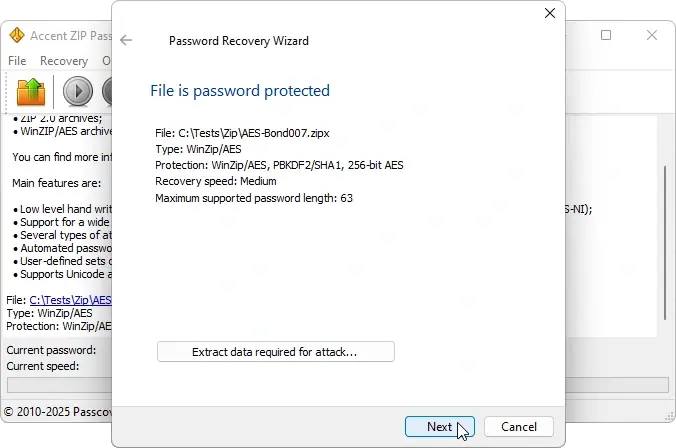
The recovery wizard after opening a .zipx archive: type WinZip/AES, PBKDF2/SHA1 with 256-bit AES, recovery speed "Medium", maximum password length 63.
Features
Both ZIP encryptions, detected automatically
Accent ZIP Password Recovery handles classic ZIP 2.0 (ZipCrypto) archives compressed with Stored, Deflate or Deflate64, and WinZip AES-128 and AES-256 archives with any compression method, including those 7-Zip creates in ZIP format. The encryption type is read from the file, so you don't need to know it.
Billions of passwords a second on the CPU and GPU
Accent ZIP Password Recovery uses assembly-optimized code with SSE, AVX and AES-NI on every CPU core, and NVIDIA, AMD and Intel Arc graphics cards on top. Passcovery's benchmarks: a Ryzen 9 9950X tests 1.29 billion ZipCrypto passwords a second and 497,000 WinZip AES passwords; an RTX 5070 Ti tests 24.3 billion and 10.9 million. For a six-character letters-and-digits AES password, that's the difference between about 31 hours on the CPU and under two hours on the GPU.
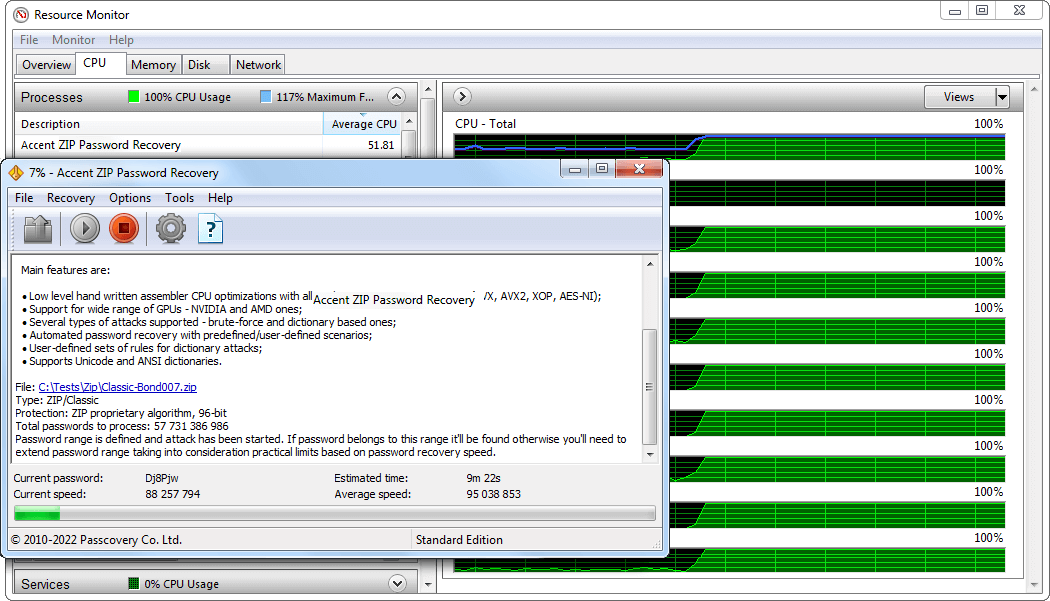
An attack on a classic ZIP archive running on all CPU cores: 57.7 billion passwords to try at about 95 million a second, estimated time 9 minutes 22 seconds (product page screenshot from an older build).
Positional masks for partly remembered passwords
Accent ZIP Password Recovery's mask sets the allowed characters for each position. Passcovery's example: an eight-character letters-and-digits password is 218 trillion combinations; knowing that the first four were lowercase and the last four were digits cuts it to 4.57 billion, 47,700 times fewer. On a WinZip AES archive, that turns a hopeless search into a short one.
Mutated dictionaries and attack scenarios
Accent ZIP Password Recovery combines up to four dictionaries and applies more than 20 mutation rules, so "archive" and "2026" become Archive2026, @rchive2026, ARCHIVE2026! and more. When you remember nothing, a scenario runs a series of attacks of growing size from a text file, unattended, with progress saved for resuming after an interruption. A command line is available for automation.
Benefits
- Most everyday ZIP passwords are within reach. ZipCrypto is still the default in most archivers, and short-to-medium passwords on it fall quickly.
- You see the odds first. The demo reports the encryption type, the speed on your PC and the estimated time.
- Nothing is uploaded. Recovery runs offline on your machine.
- Cheap compared with the all-format Suite if ZIP is your only problem.
Real-World Uses
- An old ZIP of family photos. Created years ago with WinZip's default encryption and a short password; a GPU brute force finds it in seconds to minutes.
- A client's AES-encrypted delivery. You know their password pattern (company name plus digits); a dictionary with a digit rule tries exactly that.
- Archived work files after staff turnover. IT runs a scenario overnight over a set of locked archives.
Who It's For, and Who Should Skip It
It's for home users and IT staff with locked ZIP archives, especially old ZipCrypto ones, or AES ones whose password they partly remember.
Skip it if your file is a .7z archive (7-Zip's own format isn't supported), if it's a RAR archive (that's Accent RAR Password Recovery), or if the password was long and random on WinZip AES. Mac users have no version. If you're at home with the command line, the free hashcat and John the Ripper also attack ZIP files.
Usage Guide
- Install the demo on 64-bit Windows 10 or 11, ideally on the PC with the strongest graphics card.
- Open the archive. The wizard shows ZIP/Classic or WinZip/AES, the expected speed and the maximum password length.
- Choose the attack: brute force for short passwords on ZipCrypto, a mask if you remember the structure, a dictionary if it was a word, or a scenario if you have no idea.
- Check the estimated time, and narrow the length or character set if it's too long.
- Buy and activate the license (Register, Ctrl+R) to see the whole password, then extract the archive in WinZip, 7-Zip or WinRAR.
Where it falls short
- Some ZipCrypto archives can't be attacked. If the archive uses classic encryption with PPMd, WavPack, LZMA or BZip2 compression, the program can't check candidates, because it verifies each password by decompressing part of the file.
- No .7z support, even though 7-Zip users often expect it.
- No password removal. There's no shortcut on ZIP; the password must be found.
- Long random AES passwords stay out of reach, as with every tool.
What Users Say
The only independent hands-on test we found is TechRadar's, and it happens to use ZIP files. Passcovery also publishes customer comments on its site.
TechRadar (John Faulds, January 2021): 3.5 out of 5
TechRadar tested ZIP passwords on an i3-3160 CPU with a GTX 1060: "For passwords of four characters using a mix of standard characters and symbols, the results were nearly instantaneous." Then: "A slightly longer password like "paZs6" took two seconds for a normal zip password."
AES changed the picture: "If the password was AES-256-encrypted, it wasn't found with default settings; we had to use brute force and the estimated time varied depending on the maximum length setting. A maximum length of five characters would take two hours 46 minutes, six characters 11 days and two hours, and seven characters two years and 337 days."
Dictionary-style passwords did better: "A password that was longer in length, but made up of dictionary words, like "houseletterdrink," took 50 minutes. A password like "defense19" again required brute force but took about 10 minutes."
Pros listed: "Supports a large number of different software". Cons: "Requires the latest graphics cards for best performance". Note that TechRadar used a 2016-era GTX 1060; Passcovery's current figures are for much newer cards.
Customers on Passcovery's site
Selected and published by Passcovery:
- Andrew Mayne, United Kingdom: "Found my forgotten password quickly using a Geforce GTX650 GPU and clever combinations of attacks of AccentZPR."
- Mats K., Sweden: "Impressive piece of software!"
- Hughs Hall: "Seems to be really powerful, for anyone who needs this kind of product. Amazing."
The takeaway matches the encryption math: on classic ZIP, short and medium passwords come back fast even on modest hardware; on AES, it works when you can narrow the search with a dictionary or mask, and becomes impractical for longer random passwords.
Comparisons
Accent ZIP Password Recovery vs Passcovery Suite
Passcovery Suite ($199 Standard) contains the same ZIP engine plus RAR, Office, PDF, iPhone backups, TrueCrypt and WPA. If ZIP is all you need, Accent ZIP at $60 is the better buy.
Accent ZIP Password Recovery vs hashcat and John the Ripper
Both free tools crack ZIP hashes, hashcat on the GPU, but you extract the hash yourself and set up the attack on the command line. Accent ZIP Password Recovery opens the archive directly, estimates the time and builds masks and dictionary rules in a window.
Editions and Pricing
Every license has full CPU speed, every attack type, a year of updates and support on one PC. They differ in GPU support and business use. First-year prices from the order page on November 8, 2026:
| License | First year | Yearly renewal | Graphics cards | Business use |
|---|
| Basic | $40.00 | $12.00 | None (CPU only) | No, home use |
| Standard | $60.00 | $18.00 | 1 | Yes |
| Professional | $100.00 | $30.00 | 2 | Yes |
| Ultimate | $200.00 | $60.00 | All in the system | Yes |
Standard is the one to buy for most people: GPU support matters on AES archives. Basic can be enough at home for old ZipCrypto archives, where the CPU alone is fast.
Buy Standard ($60.00)
FAQs
Can Accent ZIP Password Recovery open a .7z file?
No. Accent ZIP Password Recovery handles .zip and .zipx archives only. 7-Zip can create ZIP archives, which are supported, but its own .7z format isn't.
How do I know if my ZIP uses ZipCrypto or AES?
Accent ZIP Password Recovery tells you when you open the archive: "ZIP/Classic" is ZipCrypto, "WinZip/AES" is AES. Most archivers use ZipCrypto by default, while WinZip 9 and later and 7-Zip can be set to AES.
Does Accent ZIP Password Recovery work without a graphics card?
Yes. Accent ZIP Password Recovery runs every attack on the CPU, and on ZipCrypto a fast CPU already tests over a billion passwords a second. A GPU matters most on WinZip AES archives, where it's about 22 times faster than a Ryzen 9 9950X.
Can I get a refund if Accent ZIP Password Recovery doesn't find the password?
No. Passcovery's refund policy excludes passwords that couldn't be recovered. It guarantees a refund only for a confirmed defect it can't fix within 30 days, requested within 30 days of purchase.
Does Accent ZIP Password Recovery keep working after the license year?
Yes. An activated copy of Accent ZIP Password Recovery keeps working. The $18 renewal covers new activations and updates, and it's charged automatically on card and PayPal orders unless you switch to manual renewal.
Is my archive sent anywhere?
No. Accent ZIP Password Recovery works offline on your PC; only the one-time activation connects to Passcovery.
System Requirements
- Windows 10 or Windows 11, 64-bit
- Any modern Intel or AMD processor (SSE, AVX and AES-NI are used)
- Optional GPU: NVIDIA GeForce GTX 750 to RTX 50 and Tesla, AMD Radeon HD 7000 to RX 9000 and FirePro, Intel Arc A310 to Battlemage
- About 9 MB for the installer
- Internet connection once, for activation
Conclusion
Accent ZIP Password Recovery is worth $60 if your locked archive uses classic ZIP encryption, where it's genuinely fast, or AES with a password you partly remember. The reason to buy it is a very fast, GPU-backed search with masks and mutated dictionaries that tells you the odds before you pay. The reason not to is a long random password on WinZip AES, which no tool cracks in a useful time, and Passcovery won't refund it. Try the demo on your archive, and buy Standard if the estimate is reasonable.
Download Free TrialBuy Now