Accent PDF Password Recovery: Lift PDF Restrictions at Once, Recover a Lost Open Password
Accent PDF Password Recovery is a $40-a-year Windows tool from Passcovery that removes a PDF's permissions (owner) password in under a second and searches for a forgotten Document Open password, for every PDF version from Acrobat 2 to Acrobat DC. It's for anyone holding their own PDF that won't print, copy or edit, or won't open at all.
Those are two different locks. The permissions password only switches off printing, copying, editing and commenting; the key to decrypt the file is inside the PDF, so the restrictions come off without guessing anything. The Document Open password is the real lock: it has to be found by trying candidates, and on a modern AES-256 PDF that's slow on any computer.
Quick facts
- Version: 25.04, released April 2025
- Developer: Passcovery Co. Ltd., St. Petersburg
- Platform: Windows 10 and 11, 64-bit only
- Files: PDF 1.1 to PDF 2.0 (encryption revisions /R2 to /R6): RC4 40-bit and 128-bit, AES-128 and AES-256
- Removed instantly: the Permissions (owner) password, on every PDF version
- Found by attack: the Document Open (user) password, on the CPU only
- Price: Home license $40.00 for the first year on one PC, renewing at $12.00 a year. Business license $60.00
- Trial: full-speed demo that shows only the first two characters of the password, stops each attack after 30 minutes and can't save a session
- Refunds: only for a confirmed software defect, not when a password can't be found
- What we checked: the installer AccentPPR_25.04_x64.msi (8.6 MB) on the vendor's server, and the order page prices of $40.00 (Home) and $60.00 (Business) with automatic renewal at $12.00 and $18.00 a year, all on November 8, 2026. We didn't run a recovery ourselves.
Before you buy
Check which lock you have. If the PDF opens but printing or copying is greyed out, Accent PDF Password Recovery removes that in a second, though for a one-off file that isn't confidential a free online tool may do the same, as Passcovery itself admits. If the PDF won't open, run the demo's attack and read the estimate: a PDF saved by Acrobat 9 or later uses AES-256, where a fast CPU tests only about 28,000 passwords a second and a six-character letters-and-digits password can take around 24 days. Passcovery doesn't refund a password that couldn't be recovered.
The license is an auto-renewing yearly subscription on the order page (you can switch it to manual renewal). It covers activations and updates for a year; an activated copy keeps working afterwards.
Download Free TrialBuy Now
Overview
Accent PDF Password Recovery (AccentPPR) is Passcovery's PDF-only tool, sharing its engine, attack types and interface with Passcovery Suite but without graphics card support. You open the PDF, the program reads its format version and encryption, then either removes the restrictions straight away or sets up an attack on the open password. It runs offline, so the document never leaves your PC.
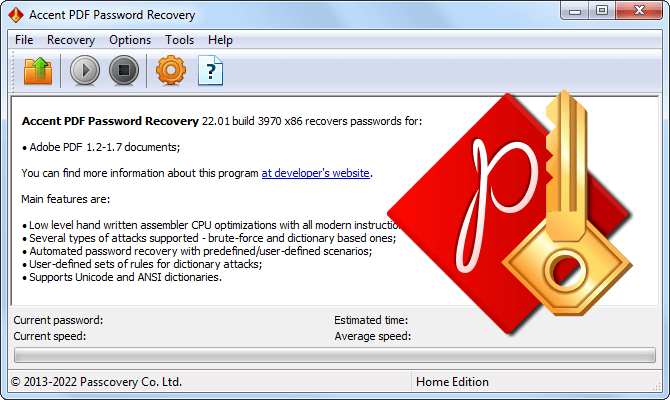
The Accent PDF Password Recovery 25.04 (x64) window before a file is opened, with the current password, speed and estimated time fields at the bottom.
Features
Printing, copying and editing restored in under a second
Accent PDF Password Recovery removes the Permissions password from any PDF version, from early RC4 to current AES-256, without a password search. It derives the encryption key from data stored in the document, decrypts the file and saves it again without the restriction list, so you get an ordinary PDF you can print, copy, edit and comment on.
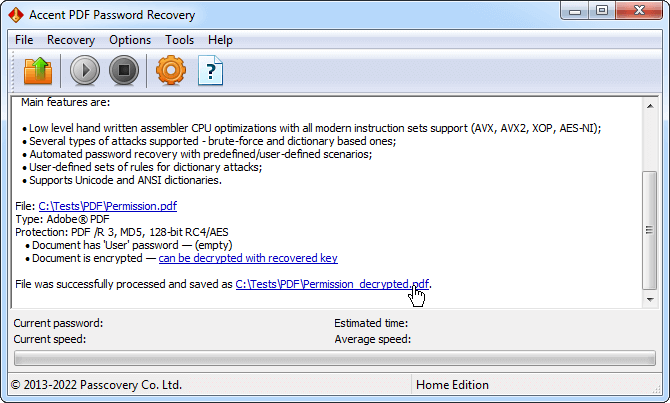
A PDF with only a permissions password (PDF /R6, 256-bit AES, empty user password): the program reports it "can be decrypted with recovered key".
The PDF version is detected for you
Accent PDF Password Recovery reads the format version and encryption when it opens the file and tells you the recovery speed to expect. PDFs from Acrobat 5 to 8, and newer ones saved with "Acrobat 7.0 and later" compatibility, use RC4 or AES-128 and are fast to attack. Files saved with "Acrobat 9.0 and later" compatibility use AES-256 and are slow. For the oldest 40-bit RC4 files, it can also search the encryption key itself, which is guaranteed to succeed regardless of the password.
The recovery wizard after opening an Acrobat DC file: PDF /R6, SHA-256/384/512 with 256-bit AES, recovery speed "Very slow", maximum password length 127.
Assembly-optimized CPU search for the open password
Accent PDF Password Recovery runs its critical code in assembly with SSE, AVX and AES-NI on every core. Passcovery's benchmarks for version 25.04 on a Ryzen 9 9950X: 4.6 million passwords a second on Acrobat 5-8 files and 28,157 a second on AES-256 files. A Core i5-12400F manages 1.37 million and 8,376. GPU acceleration for the older encryption is only in Passcovery Suite.
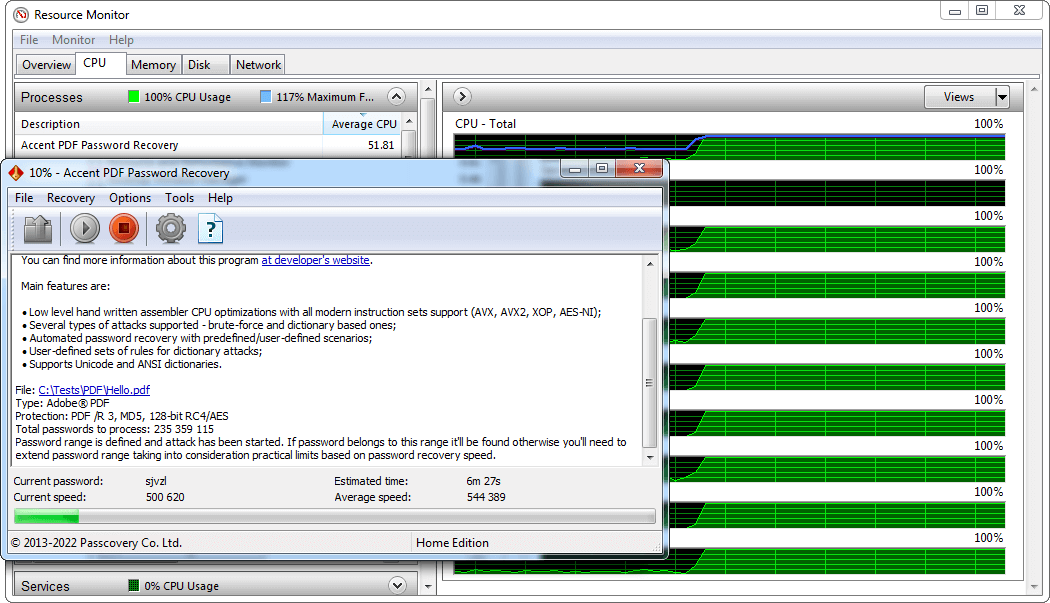
An attack on a PDF /R3 file (MD5, 128-bit RC4/AES): 235 million passwords to try at about 540,000 a second, estimated time 6 minutes 27 seconds (product page screenshot from an older build on an older PC).
Masks, mutated dictionaries and scenarios
Accent PDF Password Recovery's positional mask tests only passwords that fit what you remember. Passcovery's example: a seven-character letters-and-digits password is 3.5 trillion combinations; knowing it was four lowercase letters and three digits cuts that to 457 million, and an AES-256 search of almost four years becomes four to five hours. Dictionary attacks combine up to four word lists with mutation rules you write and preview in an editor, and scenarios chain several attacks to run unattended, saving progress as they go.
Repeatable runs for forensic and audit work
Accent PDF Password Recovery records the file's algorithm, the attack type, the range or dictionary, the rules and the number of candidates before a run, so the same search can be repeated with the same result for a report. A command line lets it run inside batch jobs.
Benefits
- Restricted PDFs are a sure thing. Removing permissions doesn't depend on the password at all.
- You know the odds first. The demo shows the encryption, the speed on your PC and the estimated time before you pay.
- Private documents stay private. Contracts and statements are processed offline, unlike online PDF tools.
- Every PDF generation is covered, from Acrobat 2 files to Acrobat DC and PDF 2.0.
Real-World Uses
- A manual you can't print. Your own PDF manual or form has printing disabled; the restriction comes off in a second.
- Old scanned archives. A folder of Acrobat 5 PDFs with a short open password is searched in minutes per file.
- A statement with a pattern password. A bank or payroll PDF uses a known scheme (name plus digits); a mask tries only that pattern.
- An investigation. A forensic examiner documents the exact attack parameters for a protected PDF found on seized media.
Who It's For, and Who Should Skip It
It's for people and offices with their own restricted or locked PDFs, especially confidential ones they won't upload, and for examiners who need repeatable attacks.
Skip it if you only need restrictions lifted from a harmless one-off PDF (a free online tool will do), or if you've lost a long random open password on an AES-256 file, which no tool recovers in useful time. If you also deal with Office files or archives, or want GPU speed on older PDFs, Passcovery Suite covers them all. Mac users have no version. The free hashcat and John the Ripper can attack PDF hashes too, if you're comfortable on the command line.
Usage Guide
- Install the demo from the .msi on 64-bit Windows 10 or 11, ideally on your fastest PC.
- Open the PDF. The wizard shows the PDF revision, the encryption, the expected recovery speed and the maximum password length.
- Restrictions only? The program detects the permissions password automatically; with a license, save the unrestricted copy and you're done.
- Open password? Choose brute force, a positional mask, a dictionary with mutations or a scenario.
- Check the estimated time, narrow the range if needed, and leave it running; progress is saved.
- Buy and activate the license to see the full password, then open the PDF in any reader.
Where it falls short
- No GPU in this edition. On RC4-128 and AES-128 files, Passcovery Suite reaches about 77.9 million passwords a second on an RTX 5070 Ti, against 4.6 million on a top CPU here.
- AES-256 can't be sped up much anyway. Passcovery says this encryption resists GPU parallelization, so even the Suite searches it on the CPU.
- Windows x64 only, with a plain, classic interface.
- Almost no independent user reviews of this product exist, so you rely on the demo and the vendor's figures.
What Users Say
We found no hands-on review of Accent PDF Password Recovery itself, and Passcovery's testimonials and Trustpilot page have no PDF-specific comments. The closest independent source is TechRadar's review of the whole Passcovery family.
TechRadar (John Faulds, January 2021): 3.5 out of 5
TechRadar's verdict: "Passcovery can recover passwords from a wider range of apps than the competition, but it's only a viable solution if your passwords aren't too long or complicated."
On pricing: "Accent PDF Password Recovery, Accent EXCEL Password Recovery, and Accent WORD Password Recovery have two licenses at $40 and $60." On the program: "Passcovery has a very simple interface."
Reasons to buy: "Easy to use" and "Supports a large number of different software". Reasons to avoid: "Windows only" and "Requires the latest graphics cards for best performance" (that applies to Passcovery's GPU editions; this one is CPU-only).
Trustpilot: 11 reviews of passcovery.com, none in the last 12 months
The company-wide reviews are short and mostly five-star ("Fantastic! Very fast and efficient", Armando, October 2020), with two one-star complaints, about an Excel file and a license key that wouldn't validate. None mentions PDF files.
With so little feedback, the free demo is the review that counts: it runs at full speed on your own file and shows whether the password is within reach.
Comparisons
Accent PDF Password Recovery vs Passcovery Suite
Passcovery Suite ($199 Standard) has the same PDF engine plus GPU acceleration for RC4 and AES-128 PDFs, and adds Office, ZIP, RAR, iPhone backups, TrueCrypt and WPA. For AES-256 PDFs both search on the CPU at the same speed, so Accent PDF at $40 is the better buy if PDF is your only problem.
Accent PDF Password Recovery vs online PDF tools
Online PDF tools remove permissions passwords for free, but you upload the document, and they rarely help with a forgotten open password, which takes hours of CPU time. Accent PDF Password Recovery does both offline.
Editions and Pricing
Both licenses support PDF 1.1 to 2.0, include a year of updates and support, and cover one PC. They differ only in business use. First-year prices from the order page on November 8, 2026:
| License | First year | Yearly renewal | PCs | Business use |
|---|
| Home | $40.00 | $12.00 | 1 | No |
| Business | $60.00 | $18.00 | 1 | Yes, internal corporate use |
Buy Home for your own documents and Business when the PDFs belong to a company.
Buy Home ($40.00)Buy Business ($60.00)
FAQs
What's the difference between a PDF owner password and a user password?
The owner (permissions) password controls what you can do with an open PDF: print, copy, edit, comment. The user (Document Open) password controls whether it opens at all. Accent PDF Password Recovery removes the first instantly and has to find the second by attack.
How long does Accent PDF Password Recovery take to find an open password?
Accent PDF Password Recovery shows an estimate before each attack. By Passcovery's figures, a six-character mixed-case letters-and-digits password on an AES-256 PDF takes about 24 days of exhaustive search on a Ryzen 9 9950X; files from Acrobat 5-8 are over 150 times faster, and a mask or dictionary can cut either to hours.
How do I know which encryption my PDF uses?
Accent PDF Password Recovery shows it when you open the file, along with the PDF revision and expected speed. As a rule, Acrobat 9 and later files saved with "Acrobat 9.0 and later" compatibility use AES-256; older files and those saved with "Acrobat 7.0 and later" compatibility use RC4 or AES-128.
Can I get a refund if the password isn't found?
No. Passcovery's refund policy excludes passwords that couldn't be recovered. It guarantees a full refund only for a confirmed defect it can't fix within 30 days, requested within 30 days of purchase, so test your file in the demo first.
Does Accent PDF Password Recovery keep working after the license year?
Yes. An activated copy of Accent PDF Password Recovery keeps working. The $12 renewal pays for new activations and updates, and it's charged automatically unless you switch the subscription to manual renewal.
Does it run on 32-bit Windows or a Mac?
No. Accent PDF Password Recovery needs 64-bit Windows 10 or 11. There's no Mac version.
System Requirements
- Windows 10 or Windows 11, 64-bit
- Any modern Intel or AMD processor (SSE, AVX and AES-NI are used)
- About 8.5 MB for the installer
- Internet connection once, for activation
Conclusion
Accent PDF Password Recovery is worth $40 if you have confidential PDFs with printing or copying blocked, or an older PDF whose open password you've lost: the first is a guaranteed one-second fix and the second is usually a matter of minutes to hours. The reason to buy it is an offline tool that removes restrictions instantly and gives an honest time estimate for the open password before you pay. The reason not to is a modern AES-256 PDF with a long password you remember nothing about, where no tool is quick and Passcovery won't refund a failure. Try the demo on your file first.
Download Free TrialBuy Now