Accent OFFICE Password Recovery: Get Back Into Locked Word, Excel, PowerPoint and Access Files
Accent OFFICE Password Recovery is a $120-a-year Windows tool from Passcovery that removes or recovers passwords on Word, Excel, PowerPoint and Access files and OpenOffice/LibreOffice documents, using your CPU and an NVIDIA, AMD or Intel Arc graphics card. It's for anyone holding an Office file they're entitled to open but can't: a forgotten open password, a protected sheet, a locked VBA project.
Not every Office password is equal. Sheet protection and "password to modify" don't encrypt anything, so this tool strips them in under a second. A modern .docx or .xlsx with an open password is properly encrypted, and the only way in is to try passwords until one fits. Accent OFFICE Password Recovery is built to do both, and to tell you up front which one you're facing.
Quick facts
- Version: 25.04, released April 2025
- Developer: Passcovery Co. Ltd., St. Petersburg (the program was first sold by AccentSoft)
- Platform: Windows 10 and 11, 64-bit only
- Files: Word, Excel and PowerPoint up to Microsoft 365, Access 6 to 2010, OpenOffice 1.1 to 4.x, LibreOffice 3.3 and later (doc, docx, xls, xlsx, xlsm, xlsb, ppt, pptx, mdb, accdb, odt, ods, odp)
- Price: Standard license $120.00 for the first year on one PC (CPU plus one GPU, business use allowed), renewing at $36.00 a year
- Trial: full-speed demo with every attack and format, but it shows only the first two characters of a found password, stops each search after 30 minutes and uses one GPU
- Refunds: only for a confirmed software defect, not when a password can't be found
- What we checked: the installer AccentOPR_25.04_x64.msi (11.6 MB) on the vendor's server, and the order page price of $120.00 with automatic renewal at $36.00 a year, both on November 8, 2026. We didn't run a recovery ourselves.
Before you buy
Open your file in the free demo first. It names the protection (for example "MS Office 2013+, SHA512, 256-bit AES"), says whether recovery will be fast or very slow, and removes weak protection outright. If your file only has sheet, workbook, VBA or modify passwords, you'll see that right away. If it's an open password on Office 2007 or later, check the time estimate: Passcovery says a random 10- to 12-character password can take months or years, and its refund policy excludes passwords that can't be recovered.
The license is an auto-renewing yearly subscription (card and PayPal payments renew automatically unless you switch to manual renewal). It lets you activate the program for one year from the first activation; a copy that's already activated keeps working afterwards.
Download Free TrialBuy Now
Overview
Accent OFFICE Password Recovery (AccentOPR for short) has been around since the AccentSoft days and is now part of Passcovery's line-up, next to the Excel-only and Word-only tools and the all-format Passcovery Suite. Version 25.04 runs only on 64-bit Windows and adds support for AMD's Radeon RX 9000 cards and faster Intel Arc performance.
The program works in three tiers. Old and weak protection is removed instantly. Word and Excel 97-2003 files can be decrypted by searching their 40-bit encryption key, which always succeeds. Everything else, the open password on Office 2007 to Microsoft 365 files and on OpenOffice/LibreOffice documents, is cracked by trying candidates on your CPU and graphics card.
The Password Recovery Wizard after opening an Excel 2013 workbook: protection MS Office 2013+, SHA512, 256-bit AES, recovery speed "Very slow", maximum password length 47.
Features
Instant removal of protection that isn't encryption
Accent OFFICE Password Recovery removes five kinds of Office passwords in a fraction of a second, whatever their length: the open password of Office 6-95 files, the password to modify in Office 6 to Microsoft 365, Excel sheet and workbook protection, VBA project passwords, and Access 6-2003 database passwords. None of these encrypt the content, so there's nothing to crack.
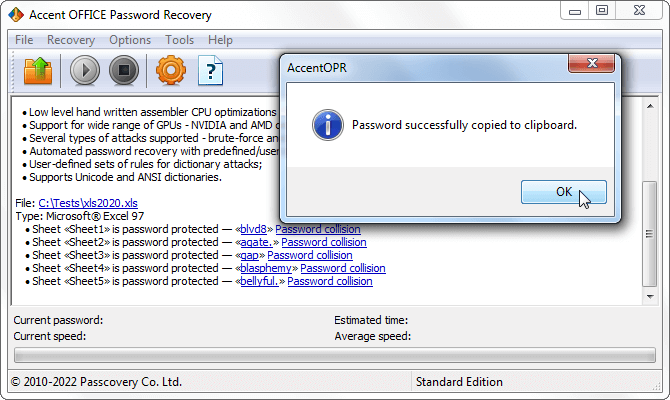
Five protected sheets in an Excel 97 workbook, each with a working password found at once, and the confirmation that a password was copied to the clipboard.
Guaranteed decryption of Word and Excel 97-2003 files
Accent OFFICE Password Recovery can skip the password entirely on .doc and .xls files from Office 97-2003. Their 40-bit RC4 key has about 1.1 trillion possible values, and the key search tries all of them, so the file opens in minutes to hours on a modern GPU no matter what password was set. You get the document, though the password itself stays unknown.
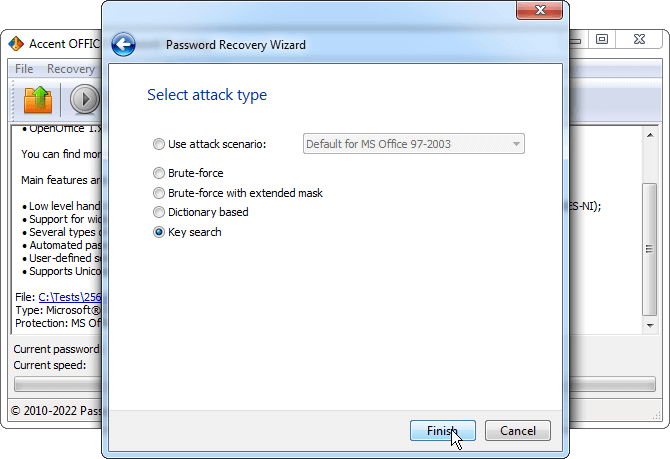
Choosing the attack type: a scenario, brute force, brute force with extended mask, dictionary, or Key search for an Office 97-2003 file.
Fast CPU cracking, with GPU help for modern files
Accent OFFICE Password Recovery uses hand-tuned assembly code on every CPU core. Passcovery's figures on a Ryzen 9 9950X: about 95 million passwords a second for Office 97-2003, 17,600 for Office 2007-2010, and 1,800 for Office 2013 to Microsoft 365. Adding a graphics card helps where it matters most: an RTX 5070 Ti reaches about 35,000 passwords a second on Office 2013-365 files, 19 times the CPU. GPU acceleration covers Office 2007 and later and OpenOffice/LibreOffice files, not Office 97-2003.
Masks, mutated dictionaries and attack scenarios
Accent OFFICE Password Recovery narrows the search three ways. A positional mask gives each position its own character set, so remembering "a capital letter first, digits at the end" removes billions of candidates. A dictionary attack merges up to four word lists and applies mutation rules such as case flipping, added digits and leet substitutions. A scenario chains attacks in a plain text file, for example dictionary first, then a mask, then short brute force, and runs them unattended with progress saved automatically.

A running attack on a PowerPoint 2013 file (256-bit AES) from the user guide: 186 million candidates at about 343 passwords a second on the CPU, estimated time 6 days 7 hours. This is why the GPU and a narrow mask matter on modern files.
Benefits
- Most "locked" spreadsheets open in seconds. Sheet, workbook and VBA protection are the most common Office passwords people forget, and they need no cracking at all.
- Old documents are a sure thing. The 97-2003 key search doesn't depend on how good the password was.
- An honest time estimate before you wait. The program counts the candidates and estimates the time, so you can tighten the mask instead of waiting blind.
- Files never leave your PC. All recovery runs locally; only activation uses the internet.
Real-World Uses
- The finance workbook nobody can edit. A colleague protected every sheet and left the company. The sheet passwords are removed instantly and the workbook is editable again.
- An Excel macro you need to fix. The VBA project is password-locked; the password is removed in under a second.
- A 2003-era Word archive. A box of old encrypted .doc files from a closed project opens through the key search, one by one.
- Your own .docx with a half-remembered password. You know it was your daughter's name plus a year. A dictionary of names with a digit-appending rule tries exactly that.
Who It's For, and Who Should Skip It
It's for office IT staff, accountants and consultants who inherit protected workbooks, and home users locked out of their own documents. The Standard license allows business use; the cheaper Basic license doesn't.
Skip it if you only have Excel or only Word files: Passcovery's Accent EXCEL and Accent WORD Password Recovery cost $40 for home use. Skip it if you also need PDF, RAR or ZIP passwords, where Passcovery Suite ($199) covers everything. It can't help with a lost Microsoft 365 account password, only file passwords, and there's no Mac version.
Usage Guide
- Install the demo from Passcovery's site (64-bit Windows 10 or 11).
- Open the file with File, Open. The wizard shows the Office version, the protection and how fast recovery will be.
- Take the instant wins. For modify, sheet, workbook or VBA passwords, the program shows or removes them straight away.
- For an Office 97-2003 open password, choose Key search for a guaranteed decryption, or brute force if you need the password itself.
- For a modern open password, pick a mask if you remember the structure, a dictionary if it was a word, or a ready-made scenario if you remember nothing. Check the estimated time at the bottom.
- Buy and activate with the registration key under Register (Ctrl+R), then rerun to see the full password.
Where it falls short
- Long random passwords on modern files are out of reach. At about 1,800 passwords a second on a fast CPU, even six characters take days; Passcovery itself says 10-12+ random characters can take months or years with a strong GPU.
- The GPU doesn't help on Office 97-2003. Those files run on the CPU only (the key search is the fast route there).
- Heavy on the PC. The single G2 reviewer complained that detection and the password search take a lot of the computer's resources, which is the nature of brute force.
- Windows 64-bit only, with a classic interface that looks dated next to newer tools.
What Users Say
There's little independent coverage of Accent OFFICE Password Recovery: one G2 review, a 2009 magazine review of a much older version, and TechRadar's review of Passcovery's whole line. Passcovery's own site has many customer comments.
TechRadar (John Faulds, January 2021): 3.5 out of 5 for Passcovery's tools
TechRadar reviewed the Passcovery range as a whole, listing Accent OFFICE Password Recovery's four licenses "ranging from $60 to $350" and noting that "The only difference between the versions of each product is in how many GPU devices are supported for faster operation."
Its verdict applies to every Passcovery tool: "Passcovery can recover passwords from a wider range of apps than the competition, but it's only a viable solution if your passwords aren't too long or complicated."
Alphr (Davey Winder, October 2009)
An early review of the AccentSoft-era program, before GPU support, made the same point about strong encryption: "Accent Office Password Recovery might seem like the perfect hacker accessory, but it's much more powerful in the hands of the document author." And: "Don't expect a fast recovery, though: even a simple five-letter word and two digits can take hours to crack."
Customers on Passcovery's site
These are selected and published by Passcovery, so they're all positive:
- Michael Kamens, United States: "I've used numerous password recovery programs in my career of 30+ years but Accent OFFICE Password Recovery application is by far the best one I've used. ... I was surprised at how fast it worked and especially that it allowed me to un-protect."
- Rom Campos, Bravo Net Solutions: "Great software! I was able to retrieve an Excel 2010 lost password very quickly using a dictionary attack. I have tried other tools with no luck."
- Mark Morris, Aardvark Forensics Ltd, United Kingdom: "Does what it says on the tin."
- MJ Fick, Petanque Consultancy, South Africa: "Of the products I tried, this was the only one that delivered what was promised. Easy to use and super fast!"
- Leti1111: "Great software for what I needed! Tried others and this was the only one that actually did what it said it would do!"
- Giancarlo Buletti, Switzerland: "The app worked perfectly and we got our forgotten password again!"
G2: 4.0 out of 5 (one review)
The only G2 review rates Accent OFFICE Password Recovery 4 out of 5; its complaint is that detecting the protection and searching for the password demand a lot of PC resources.
Put together: users like the instant removal of sheet and VBA protection and the dictionary attack's results on passwords people half-remember, and several say it worked after other tools failed. The consistent warning, from 2009 to TechRadar, is that strongly encrypted files with long passwords can take hours, days or longer.
Comparisons
Accent OFFICE vs Accent EXCEL and Accent WORD Password Recovery
Passcovery's Excel-only and Word-only tools cost $40 (home) or $60 (business) a year, against $120 for Accent OFFICE Standard. Accent OFFICE adds PowerPoint, Access and OpenOffice/LibreOffice files, the 97-2003 key search for both Word and Excel, and the choice of GPU tiers. If all your locked files are workbooks, the Excel tool is the cheaper buy.
Accent OFFICE vs Passcovery Suite
Passcovery Suite ($199 Standard) contains the same Office engine plus PDF, RAR, ZIP, iPhone backups, TrueCrypt and WPA. Buy the Suite if you'd otherwise need a second Passcovery tool; Accent OFFICE if Office files are the whole job.
Editions and Pricing
All editions include every Office format, a year of free updates and support. They differ in business use and the number of graphics cards. Prices are for the first year on one PC, read on the order page on November 8, 2026.
| License | First year | Yearly renewal | Graphics cards | Business use |
|---|
| Basic | $60.00 | $18.00 | None (CPU only) | No, home use |
| Standard | $120.00 | $36.00 | 1 | Yes |
| Professional | $200.00 | $60.00 | 2 | Yes |
| Ultimate | $350.00 | $105.00 | All in the system | Yes |
Standard is the sensible choice for a PC with one graphics card. Basic is enough only for home use when your files have weak protection or are from Office 97-2003, since it can't use the GPU on modern encryption.
Buy Standard ($120.00)
FAQs
Can Accent OFFICE Password Recovery remove an Excel sheet password without knowing it?
Yes. Accent OFFICE Password Recovery removes Excel sheet and workbook protection in under a second for every version from Excel 6 to Microsoft 365, regardless of the password's length, because that protection doesn't encrypt the file.
How long does Accent OFFICE Password Recovery take on a .docx or .xlsx open password?
Accent OFFICE Password Recovery's speed on Office 2013 to Microsoft 365 files is about 1,800 passwords a second on a top CPU and about 35,000 on an RTX 5070 Ti. Passcovery says a six-character password takes days and a random ten-character one can take months, so a mask or dictionary based on what you remember is usually the only practical route.
Is it legal to use Accent OFFICE Password Recovery?
Using Accent OFFICE Password Recovery on your own files, on files whose owner gave you permission, or on company documents as part of your job is legal. Opening someone else's data without authorization may break the law where you live.
Can I get a refund if Accent OFFICE Password Recovery doesn't find my password?
No. Passcovery doesn't refund a purchase because a specific password couldn't be recovered, or because the software didn't meet expectations. It refunds a confirmed defect it can't fix within 30 days, with requests accepted up to 30 days after purchase.
Does Accent OFFICE Password Recovery stop working after a year?
No. An activated copy of Accent OFFICE Password Recovery keeps working. The yearly license covers new activations and updates; renewal costs $36 for Standard and is charged automatically on card and PayPal orders unless you switch it off.
Does Accent OFFICE Password Recovery work with LibreOffice files?
Yes. Accent OFFICE Password Recovery attacks the open password of OpenOffice 1.1-4.x and LibreOffice odt, ods and odp files, with GPU acceleration.
System Requirements
- Windows 10 or Windows 11, 64-bit
- Any modern Intel or AMD processor
- Optional GPU: NVIDIA GeForce GTX 750 to RTX 50 and Tesla, AMD Radeon HD 7000 to RX 9000 and FirePro, Intel Arc A310 to A770 and Battlemage
- About 12 MB for the installer
- Internet connection once, for activation
Conclusion
Accent OFFICE Password Recovery is worth $120 if you regularly meet protected Office files at work, or if your locked file is a protected sheet, a VBA project or an old .doc/.xls: those it opens fast and with certainty. The best reason to buy it is that mix of instant removal, guaranteed 97-2003 decryption and GPU cracking for modern files in one tool. The main reason not to is a long, random open password on a recent Office file, which no tool can promise to crack, and Passcovery won't refund that case. Try the demo on your file; if it shows the protection is weak or the estimate is reasonable, buy Standard.
Download Free TrialBuy Now