Short answer: if you know the password, Excel removes it for free: File, Info, Protect Workbook, Encrypt with Password, clear the box and save, or Review, Unprotect Sheet for a locked sheet. If you forgot a sheet, workbook-structure or VBA password, Accent EXCEL Password Recovery ($40 first year) clears it in under a second, because those passwords don't encrypt anything. If you forgot the password that opens the file, the password has to be searched for: old .xls files usually come back fast, but a modern .xlsx is slow, and a long random password won't be found by any tool. For that case a graphics card helps, through Krylack Office Password Recovery ($29.95 once) or Accent OFFICE Password Recovery ($120 first year), which also covers Word, PowerPoint and Access. Do this only on workbooks you own or are allowed to change.
At a glance
| Free way (Excel itself) | Accent EXCEL | Accent OFFICE (Standard) | Krylack Office |
|---|
| Price at checkout | Free | $40.00 first year, then $12.00 a year | $120.00 first year, then $36.00 a year | $29.95 one-time |
| Runs on | Excel for Windows and Mac (not Excel for the web) | Windows 10, 11 | 64-bit Windows 10, 11 | 64-bit Windows 10, 11 |
| Removes a password you know | ✓ | ✗ Not needed, use Excel | ✗ Not needed, use Excel | ✗ Not needed, use Excel |
| Forgotten sheet, workbook or VBA password | ✗ Microsoft can't recover it | ✓ Instant | ✓ Instant | ✗ Open passwords only |
| Finds a forgotten open password | ✗ | ✓ CPU only | ✓ CPU plus one graphics card | ✓ CPU plus graphics card |
| Other file types | - | Excel only | Word, PowerPoint, Access, OpenOffice, LibreOffice | Word, PowerPoint, Access |
| Trial limit | None | Full speed, shows 2 characters, 30-minute runs | Same, with one graphics card | Finds passwords up to 3 characters, no time limit |
How we picked
- We split the job into the four kinds of Excel password, because they need completely different fixes and many tools handle only one.
- We took the free steps from Microsoft's own Excel help pages.
- We kept only tools that run offline on your own PC and are sold for recovering your own files.
- We read each order page for today's price and whether it renews, and each trial's limits.
- We turned the vendors' published speeds into plain waiting times.
What we checked: prices and renewal terms on the order pages, the current versions (Accent 25.04, Krylack 4.3.3) and the installer downloads on November 11, 2026. We compared features, prices and trials, and we didn't run a password search on a locked workbook, so search speeds are the vendors' figures.
First: which Excel password do you have?
Excel has four kinds of password, and only one of them is real encryption. Microsoft says it plainly: "Worksheet level protection isn't intended as a security feature." Find yours before you spend anything, because the fix is completely different for each.
| What you see | What it is | If you forgot it |
|---|
| The file opens, but cells won't change and Excel says the sheet is protected | Sheet protection | Cleared in seconds. Nothing is encrypted |
| You can't add, delete, rename or unhide sheets | Workbook (structure) protection | Cleared in seconds |
| The macro code is locked, or Excel asks for a password only to edit | VBA project password, or password to modify | Cleared in seconds |
| Excel asks for a password before it shows anything | Password to open (Encrypt with Password) | Has to be searched for: fast on old .xls, slow on modern .xlsx, hopeless if long and random |
To check which one you have, open the file in Excel. If it opens without a prompt, the lock is a sheet, workbook or modify password. If Excel demands a password just to see the data, that's the encrypted password to open, and it's the only hard case. Accent and Krylack also name the exact protection and encryption as soon as you open the file in them.
Your files only
Everything here is for workbooks you own or have the right to change: your own old files, your company's spreadsheets, a template a former colleague locked. If someone else protected a workbook you need, ask them for the password or an open copy. That's usually quicker than any software, and Microsoft won't help either way: "If you forget your password, Microsoft cannot retrieve it."
Try this free first: you know the password
When you know the password, Excel itself takes it off at no cost, and you don't need any of the tools below. You do need the desktop app: Microsoft says passwords "can't be added, changed, removed, or recovered from Excel for the web."
Remove the password to open
- Open the workbook and type the password.
- Choose File, Info, Protect Workbook, then Encrypt with Password.
- Clear the dots in the Password box and click OK.
- Save the workbook. It now opens without a password.
Unprotect a sheet
- Go to the protected sheet.
- Choose Review, then Unprotect Sheet (it's also under File, Info, Protect).
- Type the password and click OK. Repeat for each protected sheet.
Unprotect the workbook structure
- Choose Review, then Protect Workbook.
- Type the password and click OK. The structure is now editable again.
On a Mac the sheet and workbook steps are the same, on the Review tab. Microsoft notes that Excel for Mac passwords are limited to 15 characters, so a Windows workbook with a longer password to open won't open on a Mac at all. Use a Windows PC to take it off.
Where the free way stops
The free steps only work when you already know the password. Excel will not remove a lock you can't type in, and Microsoft has no supported way to recover any forgotten Excel password. Free websites offer to do it, but you'd upload a private spreadsheet to someone else's server, which is a poor idea for financial, payroll or personal files.
If you've genuinely lost the password, the rest of this guide is for you. Every tool below runs on your own computer, and the first thing it tells you is whether your case is easy or hopeless. (If your locked file is a PDF rather than a spreadsheet, see our companion guide How to Remove a Password From a PDF, which follows the same free-way-first approach.)
You forgot it: what's really possible, and the honest odds
A forgotten sheet, workbook or VBA password is near-certain to come off, because Excel never encrypts your data with those: it only stores a short hash and checks what you type against it. A forgotten password to open is a different matter. That password encrypts the whole file, so software has to try candidates until one fits, and your odds depend almost entirely on which Excel version saved the file.
| File | Saved by | Encryption | What to expect |
|---|
| .xls | Excel 97-2003 | 40-bit RC4, weak | Tens of millions of tries a second; most passwords fall in minutes to hours |
| .xlsx | Excel 2007-2010 | AES-128, 50,000 rounds | About 17,600 a second on a fast CPU; a graphics card helps a lot |
| .xlsx, .xlsm, .xlsb | Excel 2013 to Microsoft 365 | AES-256, 100,000 rounds | About 1,800 a second on a fast CPU; only short or remembered passwords are realistic |
The slowness of modern files is deliberate. Those 100,000 hashing rounds exist so that each guess costs real time, which is exactly what stops someone searching your file. It also means the search can take longer than it's worth. The table below turns the vendors' published speeds into plain waiting times, assuming the search has to try every combination (a real search often finishes sooner, when the password turns up partway through).
| Password | Old .xls (CPU) | Modern .xlsx (fast CPU) | Modern .xlsx (RTX 5070 Ti) |
|---|
| 4 digits | Instant | About 6 seconds | Under 1 second |
| 6 digits | Instant | About 9 minutes | About 29 seconds |
| 6 lowercase letters | About 5 seconds | About 2 days | About 2.5 hours |
| 6 letters and digits, mixed case | About 16 minutes | About 360 days | About 19 days |
| 8 letters and digits, mixed case | About 43 days | Thousands of years | About 198 years |
Our arithmetic from Passcovery's published speeds for Accent 25.04: 58.5 million passwords a second on old .xls and 1,825 a second on Excel 2013-2024 files, both on a Ryzen 9 9950X, and Passcovery's figure of about 35,000 a second for the same modern files on an NVIDIA RTX 5070 Ti. A slower CPU or card changes the numbers, and Accent EXCEL's demo caps each run at 30 minutes, so read the estimate it shows on your own file before you pay.
The lesson is that what you remember matters more than a faster PC. Passcovery's own example: an eight-character password of letters and digits is 218 trillion combinations, but a positional mask that fixes the parts you recall, such as a known word at the start and two digits at the end, can cut it to 61 billion and turn months of searching into hours. If you remember nothing and the password was long and random on a modern file, plan on not getting that file back, and build the next one around a password you'll keep.
Accent EXCEL Password Recovery: the one for Excel lockouts
Accent EXCEL Password Recovery
$40.00 first year at checkout, then $12.00 a year | Windows 10 and 11 | Best for a forgotten sheet, workbook or VBA password, or an open password on an older .xls
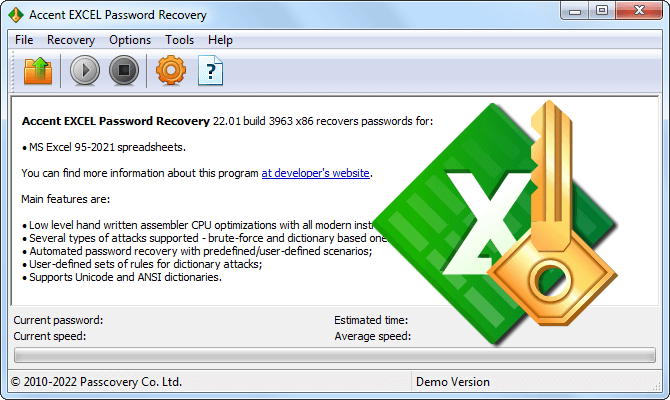
Accent EXCEL Password Recovery 25.04 (Home Edition), with the current password, speed and estimated time fields waiting at the bottom until you open a file.
Accent EXCEL Password Recovery, from Passcovery, is built only for Excel and covers every version from Excel 6 to Excel 2024 and Microsoft 365 (.xls, .xlsx, .xlsm, .xlsb). Open a workbook and it reads the Excel version and the protection, removes the simple passwords on the spot, and sets up a search for the password to open if there is one. The sheet, workbook-structure, modify and VBA passwords all come off in under a second, whatever their length, because Excel keeps them as hashes rather than using them to encrypt the data.
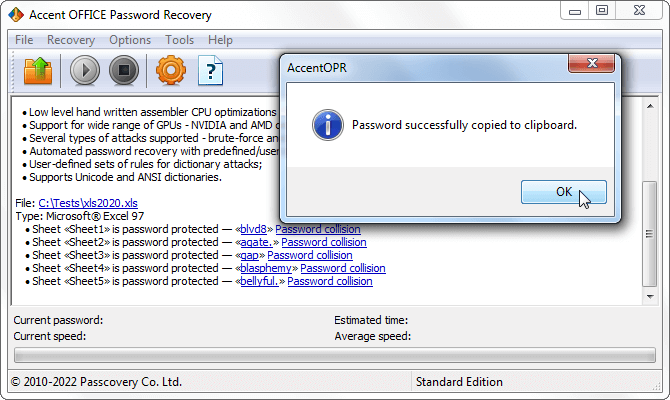
Five protected sheets in an Excel 97 workbook, each with a working password found at once and marked "Password collision". The window is the sibling Accent OFFICE Password Recovery, which Passcovery shows for the same function.
For a forgotten password to open, Accent EXCEL searches on the CPU alone, with hand-tuned assembly on every core. It offers brute force, positional masks, dictionaries with more than 20 kinds of mutation (capitalize the first letter, append a year, swap a for @), and scenarios that chain several of those and stop at the first hit, with progress saved so you can resume. The free demo runs at full speed on your own file and shows the estimate, which is the number that decides whether to bother.
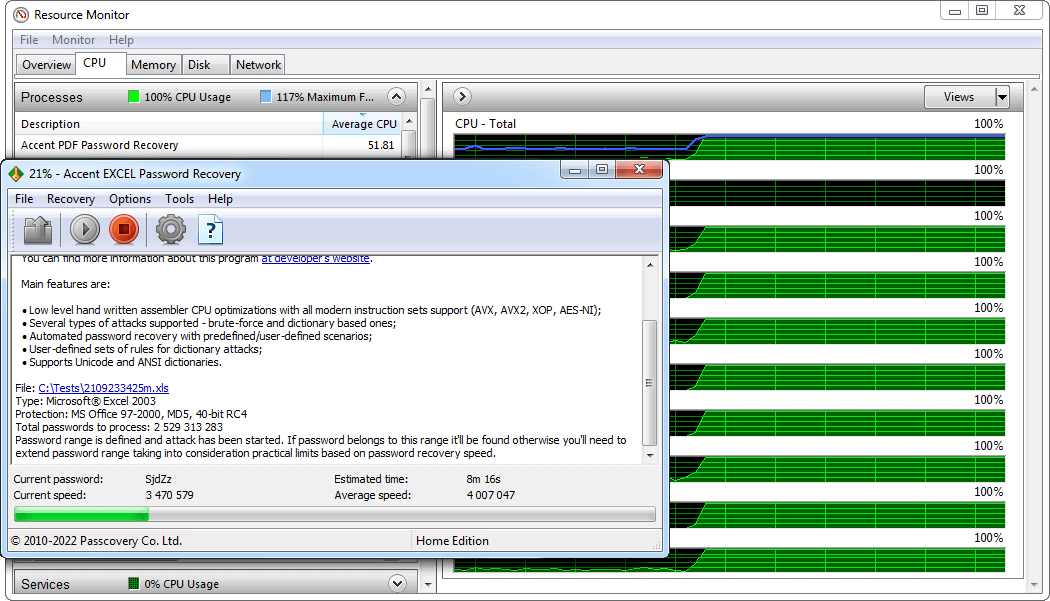
A search on an Excel 2003 .xls (40-bit RC4): 2.5 billion candidates at about 4 million a second, estimated time 8 minutes 16 seconds. This is an older build on an older PC; current speeds on .xls are far higher.
What we like
- Removes sheet, workbook, modify and VBA passwords instantly
- Free demo at full speed, with a time estimate
- Masks and mutated dictionaries narrow the search
- Cheapest way to clear a sheet, workbook or VBA lock
Watch out for
- No graphics card support, so modern .xlsx open passwords are slow
- Renews automatically at $12.00 a year unless you switch it off
- A found sheet password is usually a longer substitute, not your original
- No refund when a password can't be found
What users say
TechRadar's John Faulds rated the Passcovery family 3.5 out of 5 in January 2021: "Passcovery can recover passwords from a wider range of apps than the competition, but it's only a viable solution if your passwords aren't too long or complicated."
On Trustpilot, passcovery.com has 11 reviews, none in the last year. Tontin Bearing (5 stars, September 2019): "excellent! removed the password i forgot on my excel workbook to prevent editing... lol couldnt update the spreadsheet myself..." The one sharp complaint is from Jonathan C (1 star, February 2021), who felt misled when a newer Excel file couldn't be recovered and a different product was suggested.
With so few reviews, and none recent, treat the score lightly. The recurring theme is the honest one: sheet and workbook protection comes off fast, old open passwords are found, and the frustration is always a modern .xlsx where speed depends on your hardware and on what you remember. Check the demo's estimate first.
Download Accent EXCEL DemoBuy Accent EXCEL Password Recovery
Accent OFFICE Password Recovery: add a graphics card and the other formats
Accent OFFICE Password Recovery
$120.00 first year at checkout, then $36.00 a year | 64-bit Windows 10 and 11 | Best when a modern .xlsx open password needs a graphics card, or you also have Word, PowerPoint or Access files
The recovery wizard on an Excel 2013 workbook: protection "MS Office 2013+, SHA512, 256-bit AES", recovery speed "Very slow", maximum password length 47. The demo shows this before you pay.
Accent OFFICE Password Recovery is Passcovery's all-formats tool: Word, Excel, PowerPoint and Access files, plus OpenOffice and LibreOffice documents. It does everything Accent EXCEL does and adds two things that matter on a modern .xlsx. First, it puts a graphics card to work: an NVIDIA RTX 5070 Ti reaches about 35,000 passwords a second on Excel 2013-and-later files, 19 times a fast CPU, and it supports NVIDIA, AMD and Intel Arc cards. Second, for old Excel 97-2003 .xls files it offers a "key search" that works out the 40-bit encryption key directly, which always succeeds in minutes to hours no matter how long the password was, though it gives you the file rather than the password.
The trade-off is the price and the licensing. The Standard license is $120 for the first year against Accent EXCEL's $40, it renews at $36 a year, and the cheaper Basic license has no graphics card support at all. If your only problem is Excel and the file is old or lightly protected, Accent EXCEL is the better buy. Accent OFFICE earns its price when a modern .xlsx open password needs a graphics card, or when the lockout spans several Office programs.
What we like
- Graphics card support, far faster on modern files
- Covers Word, PowerPoint, Access and OpenOffice too
- Guaranteed key search for old .doc and .xls files
- Same instant removal of sheet, workbook and VBA passwords
Watch out for
- Three times the price of Accent EXCEL for Excel-only work
- Renews automatically at $36.00 a year
- The cheaper Basic license drops graphics card support
- Even with a card, a long random modern password can take months
What users say
The same TechRadar review covers this tool: 3.5 out of 5, praised for supporting "a large number of different software" and marked down for being Windows only and needing "the latest graphics cards for best performance". That last point is exactly the reason to pick Accent OFFICE over Accent EXCEL, since the graphics card is what makes a modern file realistic. We found no independent hands-on test of the Office tool on its own.
Download Accent OFFICE DemoBuy Accent OFFICE Password Recovery
Krylack Office Password Recovery: a one-time price for forgotten open passwords
Krylack Office Password Recovery
$29.95 one-time at checkout | 64-bit Windows 10 and 11 | Best for a forgotten open password when you'd rather pay once than subscribe
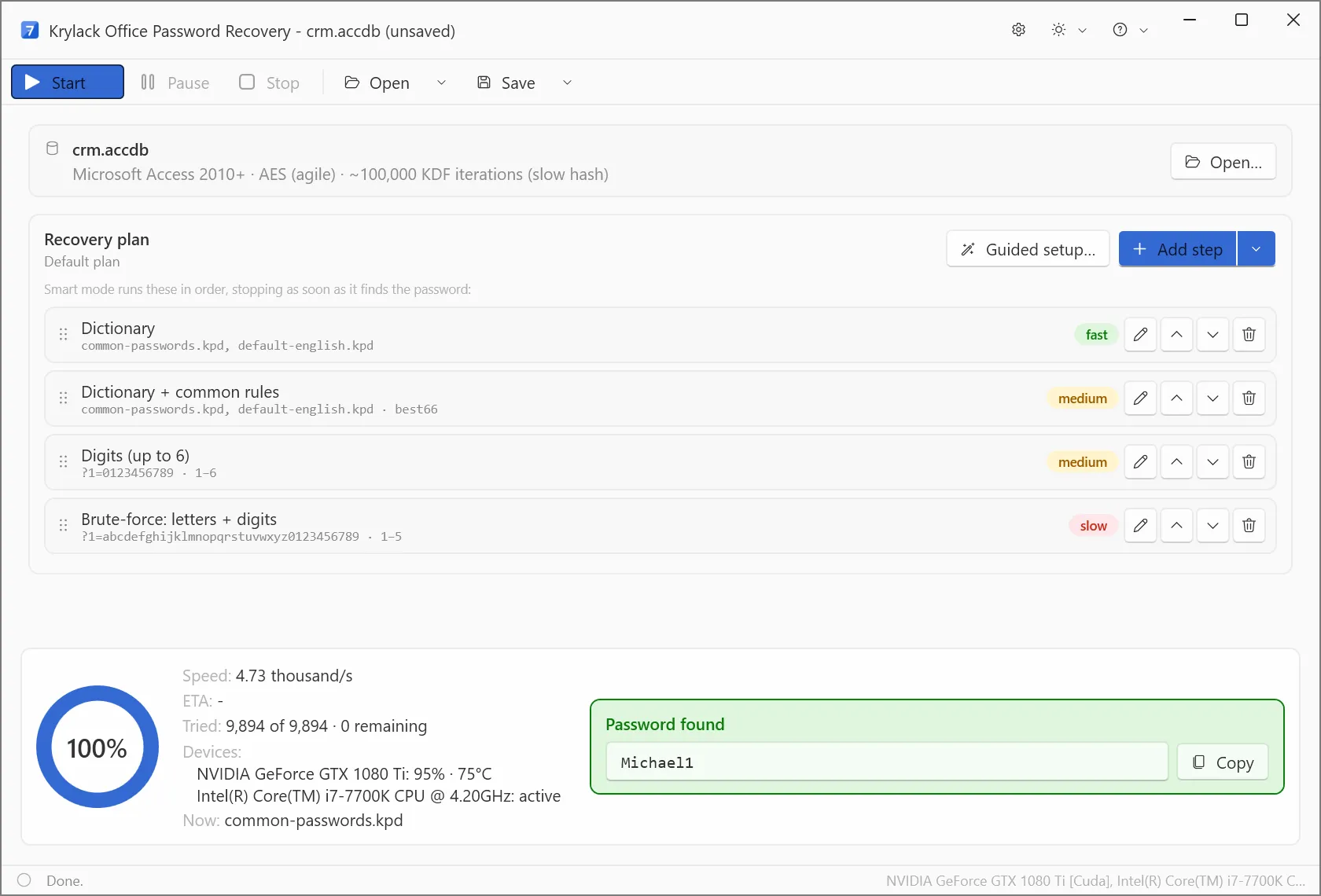
Krylack's own screenshot: an agile AES file with about 100,000 key-derivation rounds, a four-step plan, and the password found at 4.73 thousand guesses a second using a GTX 1080 Ti and a Core i7. It's an Access file, but Excel 2013-and-later files use the same agile AES-256.
Krylack Office Password Recovery searches for a forgotten open password on Word, Excel, PowerPoint and Access files, from Office 97 through Microsoft 365, under a single one-time license. It reads the file, reports the encryption, and runs a plan you can reorder: dictionary, dictionary with rules, digits, then letters and digits, with a Guided setup for anything you remember. It sends the slow modern files to a supported graphics card, and long runs can stop and resume. At $29.95 paid once, with no renewal, it's the value pick when the job is a forgotten open password and you don't want a yearly bill.
The important limit is scope. Krylack says this edition targets "the document's open password" only. A protected sheet, a workbook-structure lock or a VBA password is, in its own words, "a separate restrict-editing or worksheet-protection setting", and this tool doesn't touch it. For those, use the free Excel steps if you know the password, or Accent EXCEL if you've forgotten it.
What we like
- One-time price, no subscription
- Graphics card support for modern files
- Covers Word, PowerPoint and Access too
- Guided setup and masks for what you remember
Watch out for
- Finds open passwords only, doesn't remove sheet or VBA locks
- Windows only, 64-bit
- Antivirus tools may flag recovery software, so you may need to restore the installer from quarantine
- No independent test of the rebuilt 4.x line, so speeds are Krylack's own
What users say
We found no independent review of Krylack's current 4.x version, so don't take the speed claims on trust. Do what proves it on your own machine: protect a test file with a three-character password and run the free trial, which recovers up to three characters at no cost. It confirms the install, your graphics driver and the detection, and it reports your file's encryption, which is what really decides your odds.
Download Krylack TrialBuy Krylack Office Password Recovery
Prices side by side
Price for one PC at checkout (USD)
Krylack Office Password Recovery (one-time)$29.95
Accent EXCEL Password Recovery (first year, then $12.00 a year)$40.00
Accent OFFICE Password Recovery (first year, then $36.00 a year)$120.00
Checkout prices checked on November 11, 2026. The free way, inside Excel, costs nothing.
Guesses a second on a modern Excel file (Excel 2013-365, AES-256)
Fast CPU alone (Ryzen 9 9950X)1,825
With an RTX 5070 Ti graphics card35,000
With an RTX 5090 graphics card78,000
Passcovery's published figures for the Accent engine. A graphics card (in Accent OFFICE) is roughly 19 to 43 times a CPU on these files; on old .xls files the CPU is already fast and a card isn't needed.
Which should you choose?
| Your situation | Pick | Why |
|---|
| You know the password | The free way in Excel | Encrypt with Password or Unprotect Sheet, no cost |
| Forgot a sheet, workbook or VBA password | Accent EXCEL Password Recovery | Clears them in under a second for $40 |
| Forgot the open password on an old .xls | Accent EXCEL, or Accent OFFICE for the key search | Millions of tries a second; Accent OFFICE's key search is a sure thing |
| Forgot the open password on a modern .xlsx, and you have a graphics card | Krylack Office ($29.95 once), or Accent OFFICE if you also want instant sheet removal | The card does the heavy lifting; Krylack is the cheaper one-time buy |
| You also have locked Word, PowerPoint or Access files | Accent OFFICE, or Krylack Office | One license covers the whole Office range |
| Open password is long and random on a modern file | Stop and ask whoever made the file | No tool will find it in useful time |
Who should skip these: skip all three if you know the password, since Excel removes it free. Skip Krylack if your problem is a protected sheet or VBA code rather than an open password. Skip Accent OFFICE if your only lockout is Excel and the file is old or lightly protected, where Accent EXCEL does the same for a third of the price. And skip the paid tools entirely if the password is long, random and on a modern file: you'd be paying for a search that won't finish. There's no Mac version of any of them; a Mac user runs them on a Windows PC or copies the workbook across.
What commonly goes wrong
- Buying a tool for the wrong lock. A forgotten open password and a forgotten sheet password are different problems. Krylack handles the first, not the second; Accent EXCEL handles both. Check which one you have before you pay.
- Expecting the original sheet password back. Excel stores only a short hash of a sheet password, so a recovery tool returns a different, longer password that Excel accepts just the same. It unprotects the sheet; it won't tell you what you first typed.
- Assuming any open password can be recovered. A long random password on a modern .xlsx stays locked. Read the demo's estimate before you buy, and note that Passcovery doesn't refund a password it couldn't find.
- Setting the search too narrow. If the real password falls outside the length or character set you told the tool to try, the search ends empty after all that time. If you're unsure, widen the range, even though it's slower.
- Forgetting the copy has no protection. Once the password is off, anyone who gets the file can open it, so store the unprotected workbook with that in mind.
FAQs
How do I remove a password from an Excel file for free?
If you know the password, Excel removes it for free: open the file, go to File, Info, Protect Workbook, Encrypt with Password, clear the box and save. For a locked sheet, use Review, Unprotect Sheet. You need the Excel desktop app, because Excel for the web can't add, change or remove passwords.
Can I remove an Excel password if I forgot it?
A forgotten sheet, workbook or VBA password comes off almost at once with Accent EXCEL Password Recovery, because Excel doesn't encrypt your data with those. A forgotten password to open has to be searched for, and a short or memorable one usually comes back, while a long random one on a modern .xlsx realistically won't.
How do I unprotect an Excel sheet without the password?
Accent EXCEL Password Recovery removes a forgotten sheet or workbook-structure password from your own file in under a second, since those are stored as hashes rather than used to encrypt the data. Microsoft has no supported way to do it, and Krylack Office handles open passwords only, not sheet protection.
How long does it take to recover an Excel open password?
It depends entirely on the Excel version and the password. On an old Excel 97-2003 .xls, Accent EXCEL tries tens of millions a second, so short passwords fall in minutes. On an Excel 2013-or-later .xlsx, a fast CPU manages about 1,800 a second, so a six-character mixed password can take most of a year without a graphics card or a mask.
Does a modern .xlsx need a graphics card?
For a forgotten open password on an Excel 2013-or-later file, a graphics card helps enormously: an RTX 5070 Ti runs about 35,000 passwords a second against a fast CPU's 1,800. Accent OFFICE Password Recovery and Krylack Office both use one; Accent EXCEL is CPU only, which is fine for sheet passwords and old .xls files.
Is it safe to use an online Excel password remover?
Uploading a private workbook to a website means handing your data to a stranger's server, which is a bad idea for financial, payroll or personal spreadsheets. Accent EXCEL Password Recovery, Accent OFFICE and Krylack Office all run entirely on your own PC, and only contact the vendor once to activate.
Is there a Mac version?
None of these three tools has a Mac version; they're Windows only. A Mac user can run them on a Windows PC or virtual machine and copy the workbook across. If you know the password, Excel for Mac removes it on the Review tab, with a 15-character limit on the password length.
Is it legal to remove a password from an Excel file?
Removing a password from your own workbook, or one you're authorized to change, is normally fine. Taking protection off someone else's spreadsheet, or a file you're not entitled to open, may break the terms you received it under or the law where you live, so ask the owner first.
Conclusion
Work out which Excel password you have before you spend anything. If you know it, the free steps inside Excel are all you need. If you've forgotten a sheet, workbook or VBA password, Accent EXCEL Password Recovery clears it in a second and is the one to buy for $40. If you've lost the password that opens a file, your odds come down to the Excel version: old .xls files fall quickly, and for a modern .xlsx a graphics card through Krylack Office Password Recovery ($29.95 once) or Accent OFFICE Password Recovery ($120) is what makes it realistic. The honest limit holds for all of them: a long, random open password on a modern file won't be found, so run the free trial on your own workbook and read its estimate before you count on it.
Download Accent EXCEL DemoBuy Accent EXCEL Password Recovery