Krylack Office Password Recovery: One $29.95 License for Word, Excel, PowerPoint and Access
Krylack Office Password Recovery is a $29.95 Windows tool that finds forgotten open passwords for your own Word, Excel, PowerPoint and Access files, from Office 97 through Microsoft 365. It costs less than two of Krylack's $19.95 single-app editions, so it's the sensible buy once more than one Office program is involved.
You know the feeling: an old budget workbook or a signed-off report asks for a password nobody remembers. How much trouble you're in depends almost entirely on which Office version saved the file.
Quick facts
- Version: 4.3.3, by Krylack
- Formats: .doc, .docx, .xls, .xlsx, .ppt, .pptx, .mdb, .accdb
- Platform: 64-bit Windows 10 or 11
- Price: $29.95, one-time, with free updates within the edition
- Trial: recovers passwords of up to 3 characters, no time limit
- GPU: optional, recommended for 2013-and-newer files
What we checked: installer version 4.3.3 (92 MB, code signature valid) downloaded from Krylack on November 10, 2026, checkout price $29.95 on November 10, 2026. We didn't run a recovery on a real locked document.
Before you buy
This recovers open passwords only. If your file opens but won't let you edit, or an Excel sheet is protected, that's a separate restriction setting and Krylack's edition doesn't target it. Krylack also sells this only for files you own or are authorized to open.
Download Free TrialBuy Now
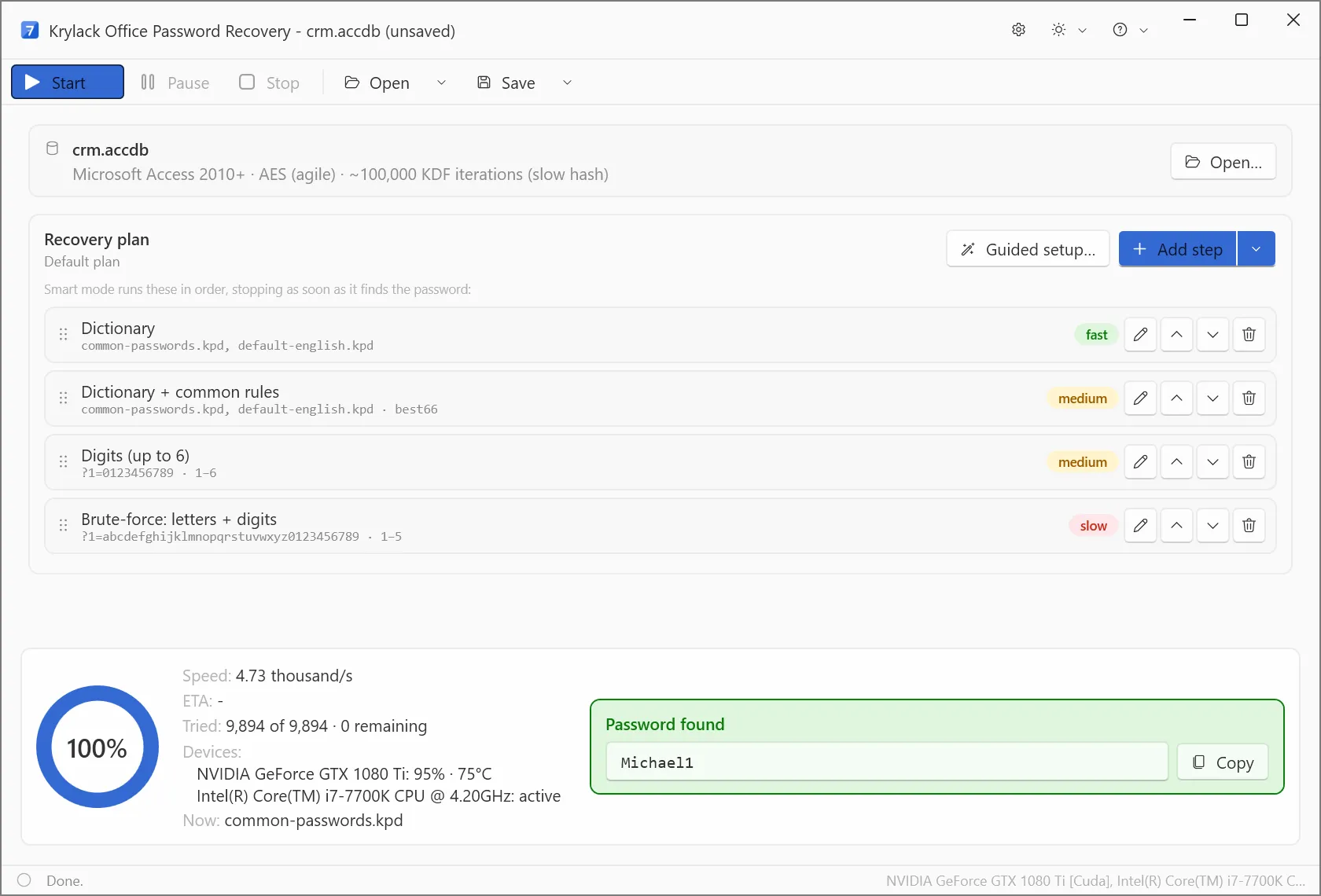
Krylack's own screenshot: an agile AES .accdb file with about 100,000 key-derivation iterations, a four-step plan, and a found password at 4.73 thousand guesses per second on an NVIDIA GTX 1080 Ti.
Overview
Microsoft has changed its file protection several times, and the save version sets your odds more than anything else. Krylack Office Password Recovery reads the file, reports the scheme, and builds a plan to match.
| File type | Saved by | Protection | What to expect |
|---|
| .doc .xls .ppt | Office 97-2003 | RC4, 40-bit | Fast, often almost instant |
| .docx .xlsx .pptx | Office 2007 | AES-128 | Reasonable to search |
| .docx .xlsx .pptx | Office 2010 | AES-128, heavier key step | Slower |
| .docx .xlsx .pptx | Office 2013 to Microsoft 365 | Agile AES-256, about 100,000 hash rounds | Slow, GPU matters most |
| .mdb | Access 97-2003 | Obfuscated, not encrypted | Almost instant, whatever the password |
| .accdb | Access 2010 and later | Agile AES-256 | Slow, same as modern Office |
Features
All four Office programs in one license
Krylack Office Password Recovery opens Word, Excel, PowerPoint and Access files with one key. Krylack also sells each program alone at $19.95, and those editions use the same recovery methods on their single file type.
A plan you can reorder
Krylack Office Password Recovery runs steps in order and stops at the first hit. The default plan goes dictionary, dictionary with common rules, digits up to six places, then letters and digits up to five. You can add a step, edit one, or use Guided setup to enter what you remember.
GPU use where it pays
Krylack Office Password Recovery sends the slow 2013-and-newer files to a supported graphics card. Krylack's screenshot shows CUDA on an NVIDIA GTX 1080 Ti at 95% load. It still runs without a graphics card, just far more slowly on those files.
Long runs can stop and resume
Krylack Office Password Recovery can save a recovery and pick it up later, which you'll want for a modern .xlsx running overnight.
How long a modern Office file really takes
Here's the number to plan around. At the 4,730 guesses per second in Krylack's screenshot, every combination of six lowercase letters takes about 18 hours, and eight lowercase letters takes about 1.4 years. Those are our sums from that one screenshot on a GTX 1080 Ti, so your card will differ. The takeaway holds: on 2013-and-newer files, what you remember about the password matters more than raw power.
Real-World Uses
- A bookkeeper inherits .xls files from a predecessor. RC4 files like these usually give up quickly.
- A small office has an old .mdb customer database and nobody knows the password. Legacy Access is the near-instant case.
- You protected a .docx in Word 2019 with a variation of a familiar phrase. Build a mask around the part you remember.
- A consultant keeps client decks and workbooks in several formats and needs one tool for all of them.
Who It's For, and Who Should Skip It
Buy it if you're locked out of files from at least two Office programs, or you expect to be again. Skip it if you only have one Excel or Word file, since the $19.95 single-app edition covers it. Skip it too if your real problem is a protected worksheet: a tool built for removing editing restrictions fits better. Mac users have no version here. If your password is long and truly random on a modern file, no consumer tool is likely to find it.
Usage Guide
- Download and install the trial, then open your locked file.
- Check the file line at the top: it names the format and the number of key-derivation rounds.
- Use Guided setup if you remember the length, a prefix or an ending year. Otherwise keep the default plan.
- Press Start. Save the project if you need to stop.
- When the password appears, copy it and open the file in Office as normal.
A tip for the trial: protect a test file of your own with a three-character password. It proves the install, your graphics driver and the detection all work before you pay.
Where it falls short
- Krylack lists Windows only, 64-bit, version 10 or 11.
- Antivirus tools may flag password-recovery software as a hacking tool, so you may need to restore the installer from quarantine.
- We found no independent test of the rebuilt 4.x line, so the speed claims are Krylack's own.
Editions and Pricing
| Edition | Covers | Price |
|---|
| Krylack Office Password Recovery | Word, Excel, PowerPoint, Access | $29.95 |
| Single-app editions | One of Word, Excel, PowerPoint or Access | $19.95 each |
| Krylack Password Recovery Suite | Office plus ZIP, RAR, 7-Zip and PDF | $39.95 |
| Krylack free tools | One format each, CPU brute-force only | Free |
FAQs
Does Krylack Office Password Recovery remove a protected Excel sheet?
Krylack Office Password Recovery targets the password that opens the file. Worksheet and workbook protection only restricts editing, and Krylack says that's outside this edition's scope.
Can Krylack Office Password Recovery open files from Microsoft 365?
Krylack Office Password Recovery covers Microsoft 365 files, which use agile AES-256. They're supported but deliberately slow, so the result depends on the password.
Do I need a subscription for Krylack Office Password Recovery?
Krylack Office Password Recovery is a one-time purchase, and the license is perpetual with free updates within the edition.
Is Krylack activation online?
Krylack sends a license key by email and activation is offline, with no account to create.
How is the Office edition different from the free Word or Excel tools?
Krylack's free tools run a CPU-only brute-force search on one format. Krylack Office Password Recovery adds GPU speed, dictionaries and masks, and handles all four programs.
Does Krylack Office Password Recovery upload my file?
Krylack Office Password Recovery works on your own PC, and Krylack says files never leave your computer.
System Requirements
- 64-bit Windows 10 or Windows 11
- A compatible GPU is recommended for the fastest recovery, not required
- No extra runtimes, about 92 MB installer
Conclusion
Worth it if two or more Office programs are in play, or you have old .doc, .xls or .mdb files that will likely fall fast. The best reason to buy is the price against the single editions. The main reason not to is a modern file with a password you can't remember anything about: you'd be paying for a search that may never finish. Try your own three-character test file first.
Download Free TrialBuy Now