Krylack Access Password Recovery: Instant for Old .mdb Files, a Real Search for .accdb
Krylack Access Password Recovery is a $19.95 Windows tool that recovers forgotten database passwords on your own Microsoft Access files. Old .mdb databases are the easy case, usually done almost at once, while modern .accdb files have to be searched.
Quick facts
- Version: 4.3.3, by Krylack
- Formats: .mdb (Access 97-2003) and .accdb (Access 2010 and later)
- Platform: 64-bit Windows 10 or 11
- Price: $19.95, one-time, with free updates within the edition
- Trial: recovers passwords of up to 3 characters, no time limit
What we checked: installer version 4.3.3 (92 MB, code signature valid) downloaded from Krylack on November 10, 2026, checkout price $19.95 on November 10, 2026. We didn't run a recovery on a real locked database.
Download Free TrialBuy Now
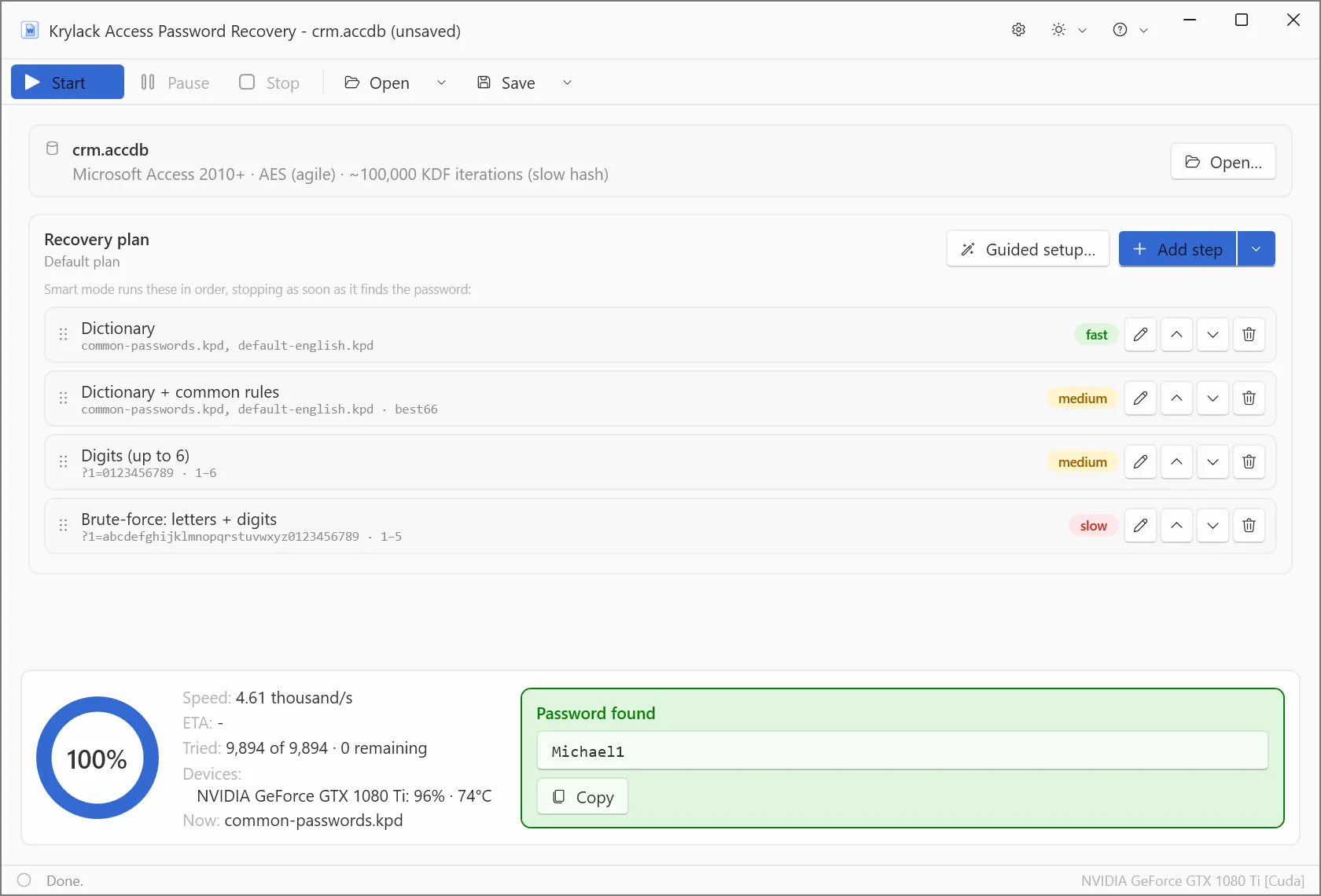
Krylack's own screenshot: crm.accdb detected as Access 2010+ agile AES with about 100,000 key-derivation iterations, found at 4.61 thousand guesses per second on a GTX 1080 Ti.
Overview
Access has two generations and they behave nothing alike. A legacy .mdb stores its password with simple obfuscation rather than real encryption, so Krylack Access Password Recovery reads it back almost instantly, however long or strange the password is. A modern .accdb uses genuine agile AES-256 with about 100,000 hash rounds per guess, so finding it depends on the password.
Check your file's extension before anything else. One answer saves an afternoon, the other starts a long search.
Features
Near-instant .mdb recovery
Krylack Access Password Recovery returns legacy .mdb passwords almost immediately because they're only obfuscated. There's no guessing involved, so password strength doesn't matter.
A searched path for .accdb
Krylack Access Password Recovery treats an .accdb like modern Office: dictionary, rules, digits, then letters and digits, with the likeliest guesses first and the option to add your own mask.
GPU acceleration for modern databases
Krylack Access Password Recovery uses a supported graphics card on .accdb files, and the screenshot shows a GTX 1080 Ti at 96% load.
Your database stays local
Krylack Access Password Recovery runs on your own PC, so a customer or payroll database doesn't go to any online service.
What an .accdb search costs
At the 4,610 guesses a second in Krylack's screenshot, every six-letter lowercase password takes about 19 hours and eight lowercase letters takes about 1.4 years, by our arithmetic from that one figure. A .mdb skips all of this.
Real-World Uses
- A small business still runs a 2003-era .mdb that a departed developer locked. This is exactly the instant case.
- An office's .accdb contacts database used a password based on the company name, and a mask gets you there.
- An IT consultant taking over old client systems meets a mix of .mdb files and needs them open today.
Who It's For, and Who Should Skip It
Buy it if you own a locked .mdb, where it's close to a sure thing, or an .accdb with a memorable password. Skip it if the file isn't yours or your organization's to open. Skip it too if you've got Word or Excel files as well, because the Office edition is only $10 more and covers all four programs. An .accdb with a long random password is the case no consumer tool solves.
Usage Guide
- Install the trial and open the database. The app reports .mdb or .accdb, and for .accdb the iteration count.
- For .mdb, start it and read the password.
- For .accdb, adjust the plan with anything you remember, and press Start.
- Save the project if it needs more than one sitting.
- Open the database in Access with the password.
Where it falls short
- The trial stops at 3 characters, so you can't prove a real password before buying, even on the easy .mdb case.
- On .accdb, the outcome depends on what you remember.
- We found no independent review of the 4.x line, so speed claims are Krylack's own.
Compared with Krylack's other options
Free Access Password Recovery uses a CPU-only brute-force search. Krylack Office Password Recovery at $29.95 adds Word, Excel and PowerPoint, and the Krylack Password Recovery Suite at $39.95 adds archives and PDF.
Editions and Pricing
| Edition | Covers | Price |
|---|
| Krylack Access Password Recovery | .mdb and .accdb | $19.95 |
| Krylack Office Password Recovery | Access, Word, Excel, PowerPoint | $29.95 |
| Krylack Password Recovery Suite | Office plus archives and PDF | $39.95 |
| Free Access Password Recovery | CPU brute-force only | Free |
FAQs
How does Krylack Access Password Recovery tell .mdb from .accdb?
Krylack Access Password Recovery detects the format itself and shows it on the file line at the top of the window.
Why does Krylack Access Password Recovery find .mdb passwords so quickly?
Krylack Access Password Recovery doesn't need to guess a legacy .mdb password, since it's stored with simple obfuscation rather than real encryption.
Does Krylack Access Password Recovery work on Access 2010 .accdb files?
Krylack Access Password Recovery covers .accdb from Access 2010 and later, which use the same agile AES-256 as recent Office.
Is Krylack Access Password Recovery a subscription?
Krylack Access Password Recovery is a one-time purchase with a perpetual license and free updates within the edition.
Do I need Access installed to use Krylack Access Password Recovery?
Krylack's installer is self-contained with no extra runtimes. You'll still need Access to use the database afterwards.
System Requirements
- 64-bit Windows 10 or Windows 11
- A compatible GPU recommended for .accdb files, not required
- No extra runtimes, about 92 MB installer
Conclusion
A good buy for a locked .mdb, and a reasonable gamble on an .accdb. The strongest reason to buy is that legacy Access files give up their passwords without any search. The main reason not to is an .accdb with a password you can't recall anything about. If Word or Excel are also in the picture, spend the extra $10 on the Office edition.
Download Free TrialBuy Now