PowerCryptor Encryption Suite: Simple Windows File Encryption, Last Updated in 2016
PowerCryptor Encryption Suite is a $19.95 Windows program that encrypts files and folders with AES 256-bit and five other ciphers, adds Explorer right-click commands, and builds self-decrypting .exe files you can email. It's easy to use, but the current installer dates from July 2016, so read the warning below first.
Quick facts
- Version: 1.05.08, by PowerCryptor Software
- Ciphers: AES 256-bit, Blowfish, DES, Triple DES, RC2, ARC4
- Platform: Windows XP to Windows 10, 32-bit and 64-bit, per the vendor
- Price: $19.95 on the order page, one-time
- Extras: self-decrypting .exe, file eraser, password generator
What we checked: installer version 1.05.08 (12.9 MB, file date July 5, 2016) downloaded from powercryptor.com on November 10, 2026, not code-signed, checkout price $19.95 on November 10, 2026. We didn't encrypt or decrypt any files with it.
Before you buy
- The last installer is from July 2016. The vendor's site doesn't list Windows 11, and we can't tell you it runs there.
- The installer is not code-signed, so Windows may warn you.
- Encryption tools are the worst place to take a chance on abandoned software. If a future Windows update breaks the program, your encrypted files are only as safe as your ability to decrypt them.
Download Free TrialBuy Now
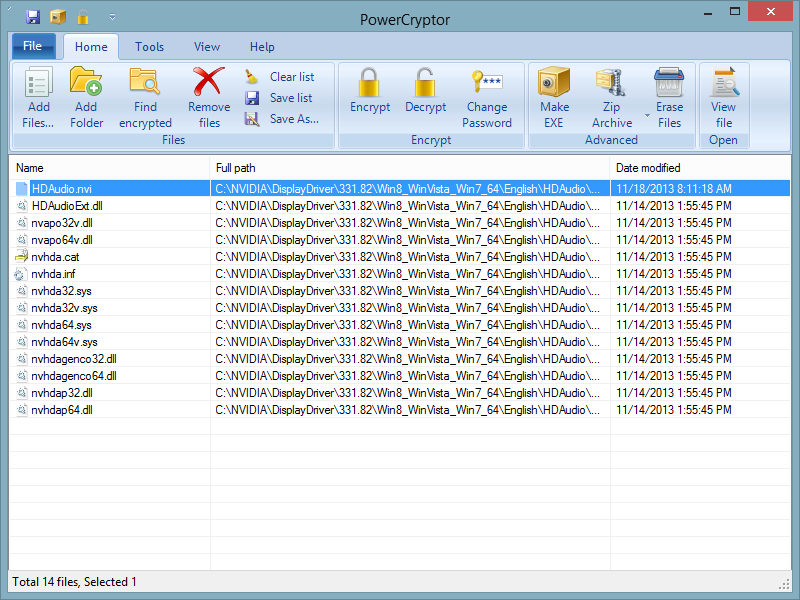
The program window from PowerCryptor's site, showing the ribbon with Add Files, Encrypt, Decrypt, Change Password, Make EXE, Zip Archive and Erase Files.
Overview
PowerCryptor Encryption Suite builds a list of files and folders, encrypts them with the cipher you choose, and undoes it the same way. The site calls the interface modern, and the ribbon is plain enough, though one reviewer in 2017 called it "a very old style interface". Pick AES 256-bit or Blowfish here: DES, RC2 and ARC4 are legacy ciphers that are weak by today's standards, and the vendor offers them alongside the strong ones without saying so.
Features
AES 256-bit encryption
PowerCryptor Encryption Suite encrypts documents, photos, music and video with AES 256-bit or five other ciphers, in place of the plain file.
Self-decrypting .exe files
PowerCryptor Encryption Suite can wrap encrypted files in an .exe the recipient opens with the password, with no copy of the program. Note that many email services block .exe attachments.
Explorer right-click commands
PowerCryptor Encryption Suite adds encrypt, decrypt and erase commands to the Windows Explorer context menu, so you can skip opening the program.
File eraser
PowerCryptor Encryption Suite permanently erases selected files and folders so recovery software can't bring them back.
Password generator
PowerCryptor Encryption Suite includes a generator for strong passwords, and the same tool is also offered separately on the vendor's site.
Real-World Uses
- Encrypting a folder of scans on a Windows 10 PC before handing it to a repair shop.
- Sending a contract as a self-decrypting file to someone who won't install anything, by a route that allows .exe files.
- Wiping a set of old documents you don't want recoverable.
Who It's For, and Who Should Skip It
Consider it if you want very simple right-click encryption on Windows 10 or older and accept that it isn't being updated. Skip it if you're on Windows 11, or if these files really matter. Current free options such as VeraCrypt or 7-Zip's built-in AES-256 are actively maintained, and that's what you want from anything guarding your data. Mac and Linux users have no version.
Usage Guide
- Download and install the trial, and expect a Windows warning for the unsigned installer.
- Add files or a folder, or right-click them in Explorer.
- Choose AES 256-bit and set a long password. Save it somewhere safe.
- Encrypt, then decrypt a test copy before trusting it with originals.
- To register, use Enter Code on the trial reminder dialog.
What Users Say
Reviews of PowerCryptor are few and mostly from 2017, and they cover the Free Edition rather than the paid Suite.
MajorGeeks, 2017 (Free Edition, version 1.5.8.0, rated 5 from 4 votes)
MajorGeeks found that "Using the context menu is a nice way to encrypt a file or folder with Windows Explorer easily" and "We tested adding a folder and concluded that it would be easy for anyone to use." Its reservation: "We'd prefer to see one more mode of encryption, but it is freemium, so only the basic encryption is provided."
TrishTech, July 27, 2017 (Free Edition)
TrishTech was less kind about the look: "PowerCryptor presents a very old style interface where you have to add various files and folders that you wish to encrypt." It also said: "Unfortunately PowerCryptor is not available in a portable version."
The common thread: easy to use, but dated. Nobody has reviewed it recently.
PowerCryptor Suite against the Free Edition
PowerCryptor Free Edition has the Explorer integration and password generator. The site reserves AES 256-bit, self-decrypting .exe creation and the File Eraser for the paid Suite.
Editions and Pricing
| Edition | Adds | Price |
|---|
| PowerCryptor Encryption Suite | AES 256-bit, self-decrypting .exe, File Eraser, free updates | $19.95 at checkout |
| PowerCryptor Free Edition | Basic encryption, Explorer integration, password generator | Free |
FAQs
Does PowerCryptor Encryption Suite work on Windows 11?
PowerCryptor Encryption Suite isn't listed for Windows 11. The vendor names Windows XP to Windows 10, and the last installer predates Windows 11.
Is PowerCryptor Encryption Suite still being updated?
PowerCryptor Encryption Suite's site still sells it and says new releases come every few months, but the installer on offer is dated July 2016.
What happens if I lose my PowerCryptor password?
PowerCryptor's site doesn't describe any way to recover a lost password, so treat a forgotten password as a lost file.
Which cipher should I pick in PowerCryptor Encryption Suite?
Choose AES 256-bit in PowerCryptor Encryption Suite. Blowfish is acceptable, while DES, RC2 and ARC4 are out of date and shouldn't protect anything important.
Is PowerCryptor Encryption Suite a one-time purchase?
PowerCryptor Encryption Suite is sold as a one-time license, and the vendor promises free lifetime updates.
System Requirements
- Windows XP, Vista, 7, 8, 8.1 or 10, 32-bit or 64-bit, per the vendor
- Windows Server editions, per the vendor
- About 13 MB installer
Conclusion
Only for simple, low-stakes encryption on older Windows, and even then it's a reluctant recommendation. The one reason to buy is genuinely easy right-click encryption for $19.95. The reason not to is that it's a closed-source encryption tool with no sign of a release since 2016, so for anything important use a maintained free tool instead.
Download Free TrialBuy Now