Krylack Password Recovery Suite: One Tool for Forgotten ZIP, RAR, 7-Zip, Office and PDF Passwords
Krylack Password Recovery Suite is a Windows 10 and 11 program that recovers forgotten passwords on your own ZIP, RAR and 7-Zip archives, Word, Excel, PowerPoint and Access files, and PDFs, all from one window. It costs $39.95 once at checkout, with free updates within the edition, and the free trial is unlimited in time but only recovers passwords of up to 3 characters.
You zipped up the tax records five years ago with a password you were sure you'd remember. Or an old spreadsheet from a former job asks for a password nobody knows. The Suite is built for exactly that moment: it reads the file, works out how it was encrypted, and starts guessing the most likely passwords first, with your graphics card doing the heavy lifting on the slow modern formats.
Quick facts
- Developer: Krylack, an independent developer making Windows password-recovery tools since 2003
- Current version: 4.3.3, installer updated October 20, 2026
- Platform: Windows 10 or 11, 64-bit only. No Mac or Linux version
- Formats: ZIP and ZIPX (ZipCrypto and WinZip AES), RAR3 and RAR5, 7-Zip, Word, Excel, PowerPoint, Access (.mdb and .accdb), PDF
- Attack methods: dictionary, dictionary with rules, Smart (masks and patterns) and brute-force
- Hardware: uses a supported GPU (the vendor's screenshots show NVIDIA CUDA) alongside the CPU; a graphics card is recommended but not required
- Price: $39.95, a one-time perpetual license, not a subscription
- Free trial: no time limit, recovers passwords up to 3 characters long
- Activation: offline, with a license key sent by email; no account needed
- What we checked: the installer krylack-password-recovery-suite.exe (92.6 MB, product name Krylack Password Recovery Suite, file version 4.3.3, digitally signed by the developer) downloaded from the vendor's site, and the order-page price of $39.95 as a one-time purchase, both on November 8, 2026. We didn't run a recovery on a test file ourselves, so the speeds below are the vendor's.
Before you buy
Krylack's 4.x tools are a complete rebuild of the old KRyLack archive crackers, with a new interface, AES and GPU support. Most reviews you'll find online are about the old versions, so test the trial first: make a copy of a file, protect it with a 3-character password you know, and see that the Suite opens it and how fast it runs on your PC. Also, if you only need one format, the single editions are cheaper (see Editions and Pricing below). And because it's a password-recovery tool, some antivirus programs flag the installer as a "hacking tool"; Krylack says to restore it from quarantine or contact them to verify the download.
Download Free TrialBuy Now
Overview
Krylack has sold archive password recovery tools since 2003. The current line splits into single-format editions (ZIP, RAR, 7-Zip, PDF, and Word, Excel, PowerPoint or Access), two category bundles (Archive and Office), and the Suite, which puts every one of them in a single application with one license.
Every edition shares the same window. You open a file, and a card at the top tells you what you're up against: the format, the cipher and how many key-derivation rounds each guess costs. Below it sits the Recovery plan, an ordered list of steps that Smart mode runs one after another, stopping as soon as the password turns up. The bottom panel shows speed, progress, the devices in use with their load and temperature, and the found password with Copy and Extract files buttons.
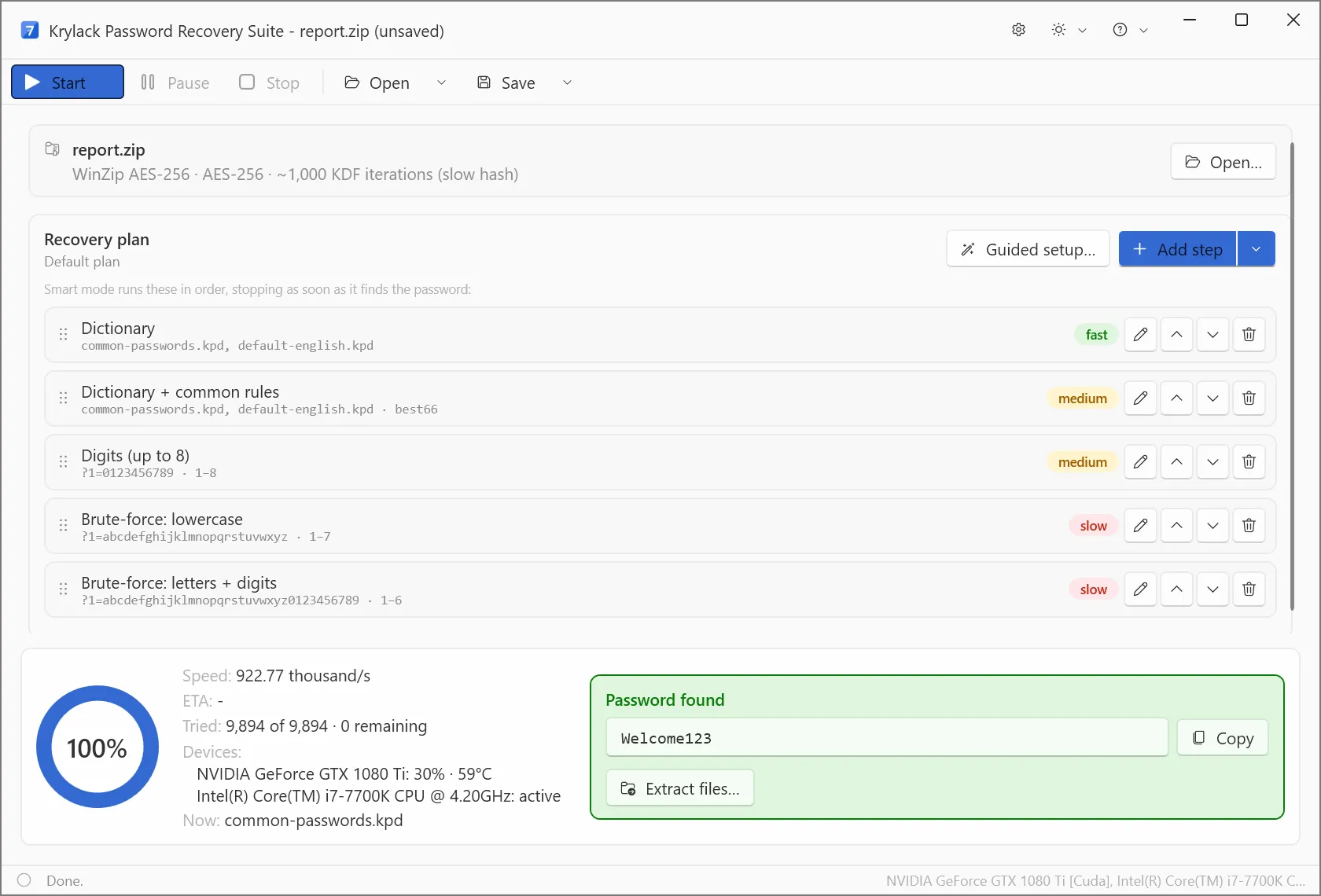
The Suite after finishing a WinZip AES-256 ZIP: the default recovery plan (dictionary, dictionary with rules, digits up to 8, two brute-force steps), about 923,000 passwords a second on a GTX 1080 Ti and an i7-7700K, and the found password with Copy and Extract files buttons.
Features
Every archive format, including the AES ones
Krylack Password Recovery Suite handles ZIP and ZIPX with both legacy ZipCrypto and WinZip AES (128 and 256-bit), RAR3 and RAR5 (including archives with encrypted file names), and 7-Zip's AES-256. It detects the format and encryption by itself, so you open the file and press Start. Once the password is found, Extract files unpacks the archive straight from the result panel.
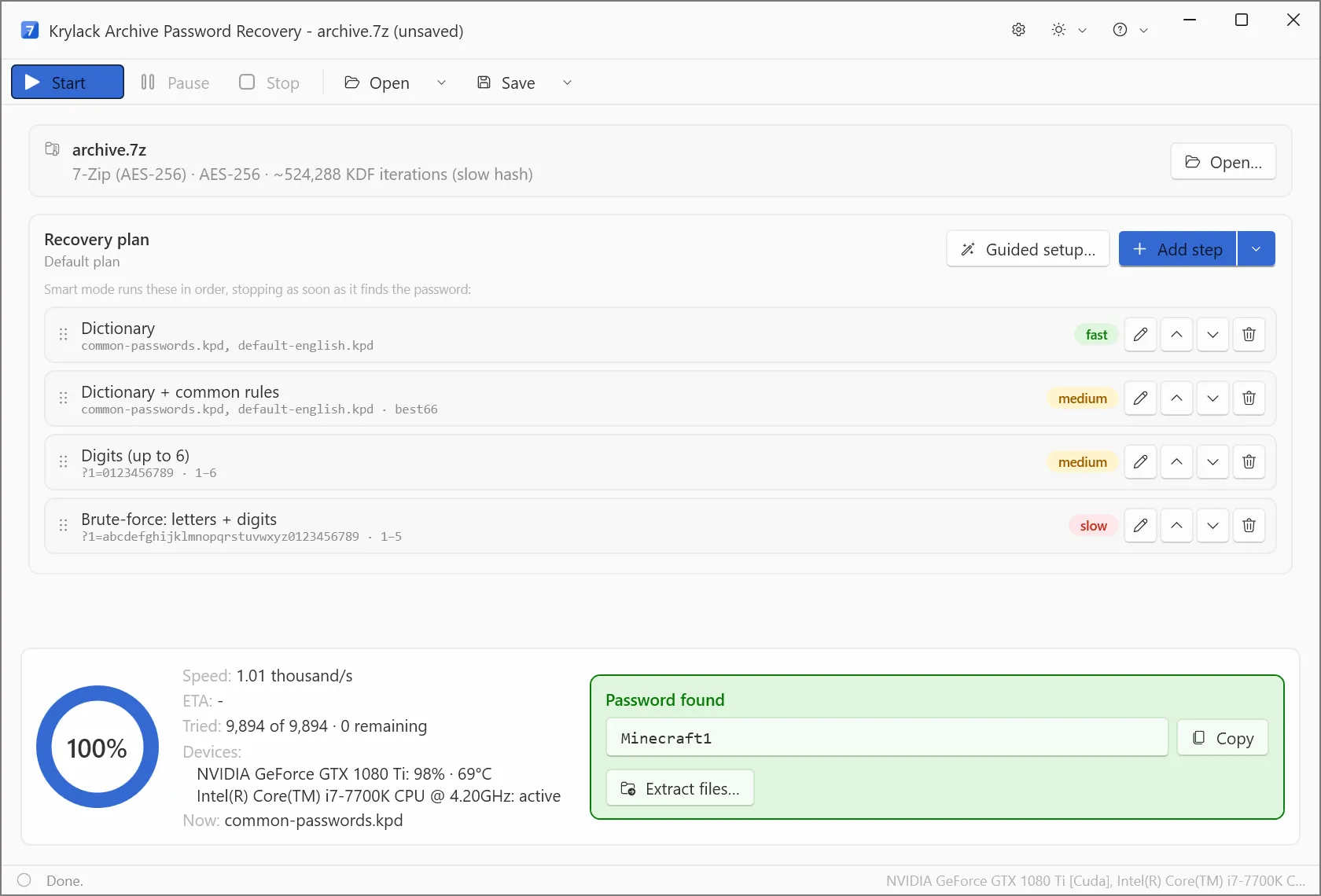
The same engine on a 7-Zip AES-256 archive (shown in the Archive edition's window): with 524,288 key-derivation rounds per guess, speed drops to about 1,010 passwords a second even with the GPU at 98%.
Word, Excel, PowerPoint and Access, from Office 97 to Microsoft 365
Krylack Password Recovery Suite recovers the password that opens an Office file, across every version. Office 97-2003 files (.doc, .xls, .ppt) use weak RC4 encryption and come back quickly. Office 2007 and 2010 use AES-128. Office 2013, 2016, 2019 and Microsoft 365 use "agile" AES-256 with about 100,000 hashing rounds per guess, which is where the GPU earns its keep. Old Access .mdb databases only obfuscate their password, so it's recovered almost instantly; modern .accdb files use the same agile AES-256 as recent Office.
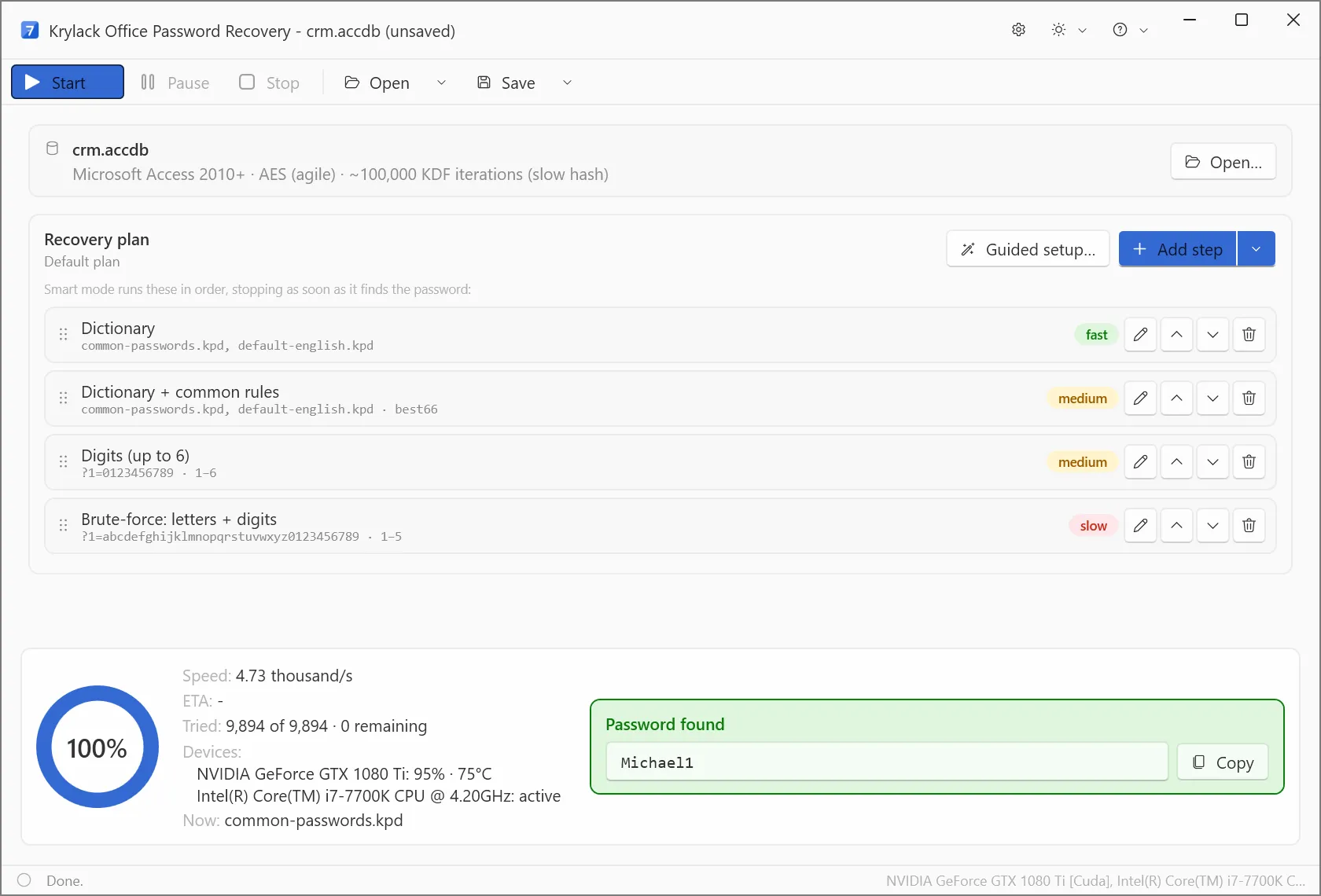
An Access 2010+ .accdb database (agile AES, about 100,000 rounds per guess) in the Office edition's window, running at about 4,730 passwords a second.
PDF: remove restrictions instantly, recover open passwords by search
Krylack Password Recovery Suite handles both kinds of PDF password. If your PDF opens but won't let you print, copy or edit, that's an owner (permissions) password, and the Suite removes it right away with no search. If the PDF won't open at all, that's a user (open) password, which it recovers by searching, from 40-bit RC4 up to 256-bit AES in PDF 2.0.
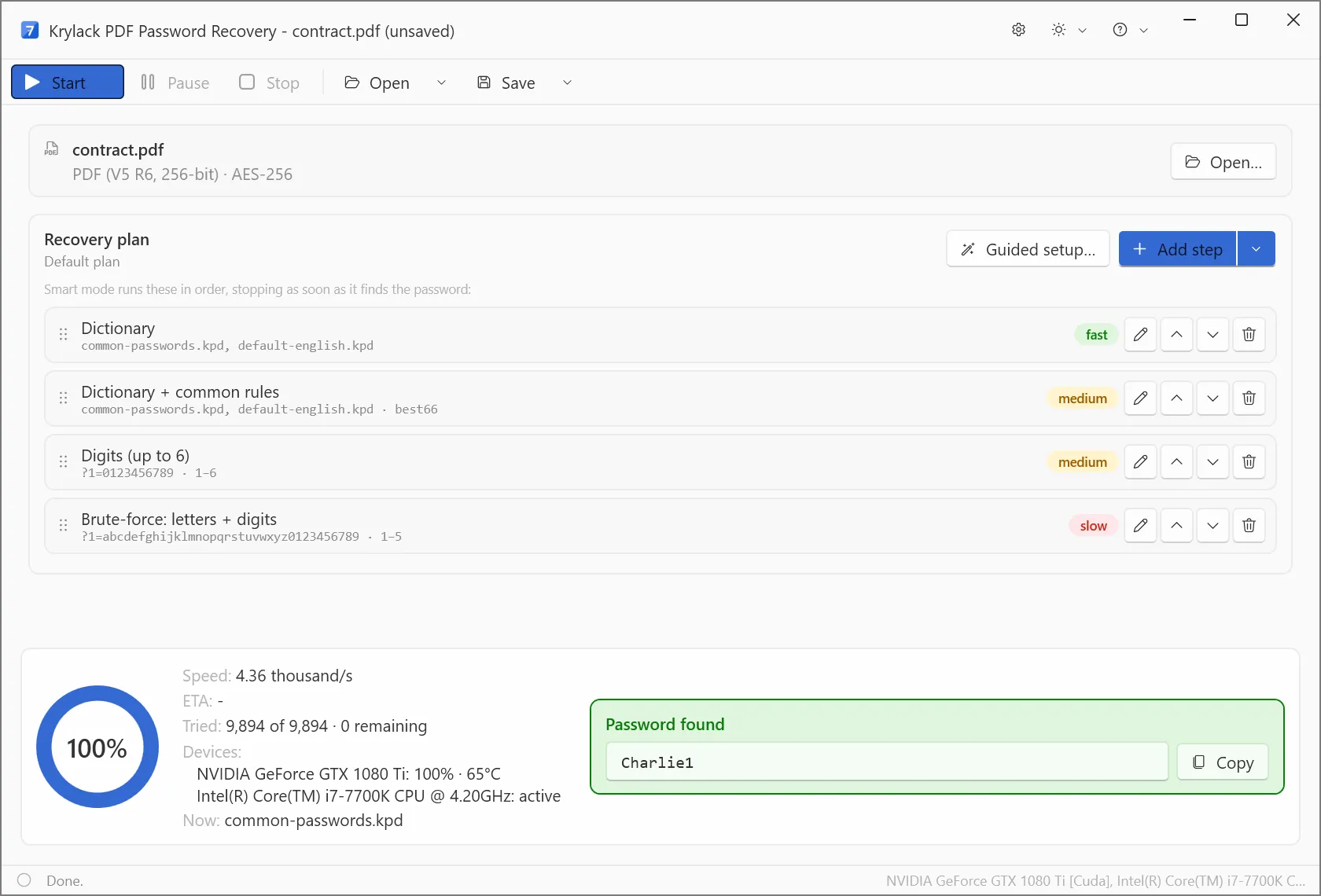
A PDF 2.0 file (revision 6, AES-256) in the PDF edition's window: the open password found at about 4,360 guesses a second.
A recovery plan that tries the likely passwords first
Krylack Password Recovery Suite doesn't just brute-force from "a" upward. Its default plan starts with dictionaries of common passwords and English words, then the same words with common rules for how people change them, then all-digit passwords, and only then brute-force. You can add, reorder or edit steps, use Guided setup, or write a mask for what you remember ("starts with a capital, ends in a year"). Smart mode stops at the first hit.
GPU acceleration, pause and resume
Krylack Password Recovery Suite runs on the CPU and a supported graphics card together, and shows each device's load and temperature while it works. A long run can be paused, saved, and resumed later, so you don't lose days of searching to a reboot.
Benefits
- One purchase for a mixed pile of files. Locked archives and locked documents rarely arrive one format at a time. With the Suite you don't need to guess which edition you'll need next year.
- You keep it. $39.95 once, with updates within the edition included, against tools in this category that charge yearly.
- It tells you what you're facing. The file card shows the cipher and key-derivation cost before you start, so you know at once if you're in for minutes or for a very long night.
- Nothing leaves your PC. Recovery runs locally and activation is offline, which matters when the locked file holds tax records or client data.
Real-World Uses
- The old backup archive. A 7-Zip or RAR backup from years ago, protected with a password that was "obvious" at the time. Feed the Smart mode the fragments you remember (a pet's name, a year) as a mask.
- The inherited spreadsheet. A former colleague's protected Excel workbook that the business still needs. Older .xls files usually fall quickly.
- The scanned statements that won't print. A PDF of your own documents that opens but blocks printing: the owner restriction comes off immediately.
- The family Access database. A genealogy or club membership .mdb from the 2000s whose password left with the person who set it up.
Who It's For, and Who Should Skip It
The Suite suits home users and small offices with several kinds of locked files, or anyone who doesn't know what the next locked file will be. It's best at the passwords people actually choose: short, a word with a number, a name and a year.
Skip it if:
- You only have one locked file type. A single edition costs $19.95, and the Archive or Office bundles $29.95.
- You're on a Mac or 32-bit Windows. It needs 64-bit Windows 10 or 11.
- The password was long and truly random (a password manager's 16 characters) on a modern AES file. No recovery tool can search that in a lifetime; that's the point of the encryption.
- You need to remove "restrict editing" or worksheet protection in Office. That's a different setting from the open password, and Krylack's Office tools focus on the open password.
- You need Windows login, browser or email passwords. This is a file tool only.
Usage Guide
- Install and launch. Download the installer (about 93 MB), run it, and start Krylack Password Recovery Suite. If your antivirus quarantines it, restore it and add an exception.
- Open the locked file. Click Open and pick the archive, document or PDF. The card at the top shows the format, cipher and key-derivation rounds.
- Check the recovery plan. The default plan works for most cases. Use Guided setup or Add step to put in a mask for what you remember, or your own word list, and drag the most promising step to the top.
- Press Start. Watch speed, ETA and device load at the bottom. Use Pause and Save to stop and resume a long run later.
- Use the password. When "Password found" appears, Copy it, or click Extract files to unpack an archive straight away.
Tips
- Write down everything you remember about the password before you start: its length, the kinds of characters, any words. A good mask turns years into minutes.
- Run it on a desktop with a decent NVIDIA card if you can. On the slow AES formats the vendor's own screenshots show a GPU-equipped PC managing only about 1,000 guesses a second on 7-Zip.
- Work on a copy of the file, not the original.
Where it falls short
- Modern encryption is slow by design. On 7-Zip, RAR5, WinZip AES, Office 2013+ and PDF 2.0, each guess costs hundreds of thousands of hashing rounds. The Suite searches common and patterned passwords well; a random 10-character password will stay locked.
- No guarantee. The license agreement says plainly that recovery depends on the password and isn't guaranteed, and there's no money-back guarantee. The 3-character trial is how you find out whether it works on your file type before paying.
- The trial can't prove it on your real file unless the password is 3 characters or fewer. Test with a copy you protect yourself.
- Office editing restrictions aren't its job. Restrict-editing and sheet protection are separate from the open password.
- A thin track record for this version. Independent reviews of the rebuilt 4.x line are hard to find so far (see below).
What Users Say
Krylack's rebuilt 4.x tools have no independent reviews yet that we could find. What exists is about the older KRyLack archive tools, and it's worth reading because it shows what the rebuild had to fix.
dotTech review of the old KRyLack Archive Password Recovery 3.45 (May 2013)
dotTech's staff tested the 2013 version and came away lukewarm: "Overall, KRyLack Archive Password Recovery is not a bad program. It isn't something exceptional, but it isn't too bad either." They liked that it was "Straightforward and easy to use — shows you password on-screen after it has finished cracking" and had "a built-in extractor".
Their complaints were specific: it "Supports cracking of password-protected ZIPs (ZipCrypto) but not ZIPs encrypted using AES-256", which they called "essentially a deal-breaker", it "appears to not make use of GPU while cracking", it had an "Ugly, outdated interface", and it "Comes bundled with crapware during installation (two, by my count)".
A buyer of the old KRyLack RAR Password Recovery (Free Download Manager)
The one user comment on Free Download Manager's page for the old RAR tool (rated 3.2 from 6 votes there) is harsh. User Alaunus wrote: "Don't go there, KryLack is a complete waste of money," adding "I use a fast gaming computer but KRyLack manages to plod through brute force cracking at only 30 passwords a second." The same buyer said a request to support for a speed fix went unanswered.
What has changed since
Each of those complaints is addressed on paper in version 4.x: WinZip AES and 7-Zip AES-256 are supported, the GPU is used (the vendor's screenshots show an NVIDIA GTX 1080 Ti at up to 100% load), the interface is new, and the installer we downloaded is a single signed file with no bundled offers (Krylack's site promises "No toolbars, no adware, no surprise offers in the installer"). Krylack now also says it replies to every message, usually within one business day. None of that has been confirmed by independent testers yet.
The themes: users of the old tools wanted AES support, GPU speed and an answer from support, and disliked bundled extras. The rebuild targets all of them. Until independent reviews of 4.x appear, the 3-character trial on a test file is the honest way to judge it.
Editions and Pricing
Every Krylack edition is a one-time purchase with free updates within that edition and a free 3-character trial. The prices below are from Krylack's pricing page; the Suite's $39.95 is also what we saw on the order page.
| Edition | Price | Formats |
|---|
| Password Recovery Suite | $39.95 | ZIP, RAR, 7-Zip, Word, Excel, PowerPoint, Access, PDF |
| Archive Password Recovery | $29.95 | ZIP, RAR, 7-Zip |
| Office Password Recovery | $29.95 | Word, Excel, PowerPoint, Access |
| ZIP, RAR, 7-Zip or PDF Password Recovery | $19.95 each | One format |
| Word, Excel, PowerPoint or Access Password Recovery | $19.95 each | One Office application |
The Suite pays off as soon as you need two of the bundles, or a bundle and the PDF edition: $39.95 against $59.90 or $49.90 bought separately.
FAQs
Is Krylack Password Recovery Suite a subscription?
No. Krylack Password Recovery Suite is a one-time $39.95 purchase with a perpetual license, and updates within the Suite edition are included.
Does Krylack Password Recovery Suite need a graphics card?
No. Krylack Password Recovery Suite runs on any 64-bit Windows 10 or 11 PC using the CPU. A supported graphics card is recommended because it makes the AES-based formats (7-Zip, RAR5, WinZip AES, Office 2013+, modern PDF) much faster.
Can I install Krylack Password Recovery Suite on more than one PC?
Krylack Password Recovery Suite's license is non-transferable and covers the edition and scope of your license key; the license agreement doesn't give a number of computers, so ask Krylack through its contact form before installing on a second machine.
Do I need an internet connection to activate Krylack Password Recovery Suite?
No. Krylack Password Recovery Suite activates offline: you paste the license key from your purchase email into the app, with no account. If you lose the key, Krylack resends it when you give your order details.
Is it legal to use a password recovery tool like Krylack?
Krylack Password Recovery Suite is licensed only for files you own or are authorized to open, such as your own archive or a company document you're responsible for. Using it on someone else's files without permission breaks the license and, in most countries, the law.
I already own an old KRyLack Archive or RAR Password Recovery. Is this the same program?
No. Krylack Password Recovery Suite 4.x is a rebuilt program with a new interface, AES and GPU support and Office and PDF formats that the old 3.x archive tools didn't have. Its license is separate from the old ones.
Why did my antivirus block the Krylack download?
Antivirus heuristics often flag password-recovery tools as "hacking tools" because of what they do, even when signed. The Krylack installer is code-signed and served from dl.krylack.com; Krylack advises restoring it from quarantine or contacting them to verify the file.
System Requirements
- Windows 10 or Windows 11, 64-bit
- A compatible graphics card recommended for faster recovery, not required
- About 93 MB for the installer; it's self-contained, with no extra runtimes to install
Conclusion
Krylack Password Recovery Suite is worth $39.95 if you have locked files in more than one format and the passwords were ones a person chose: it covers archives, Office and PDF in one modern, GPU-aware tool, for less than two of Krylack's bundles, and you own it outright. The main reason for caution is that this rebuilt version hasn't been tested independently yet and there's no money-back guarantee, while the old KRyLack tools drew real complaints about speed and support. So use the free trial on a copy of your file type first, and buy once you've seen it work. If you only have one format to open, buy that single edition instead.
Download Free TrialBuy Now