Short answer: if you know the password, you don't need to buy anything: open the PDF, type the password, and save or print a copy without it. If the PDF opens but printing or copying is blocked and you don't have that password, Krylack PDF Password Recovery ($19.95 once) lifts the limits on Windows, even on modern AES-256 files. If you forgot the password that opens the file, Krylack or Accent PDF Password Recovery ($40 first year) can search for it, but no tool will realistically find a long random password on AES-256. For folders of files with a known password, use XenArmor PDF Password Remover Pro ($24.95). On a Mac, Cisdem PDF Password Remover for Mac ($49.99) is the option here, for files that don't use AES. Do this only on PDFs you own or have the right to change.
At a glance
| Free way (Acrobat, Preview, print to PDF) | Krylack | Accent | XenArmor Basic | Cisdem for Mac |
|---|
| Price at checkout | Free, but Acrobat needs a subscription or trial | $19.95 one-time | $40.00 first year, then $12.00 a year | $24.95 one-time | $49.99 one-time |
| Runs on | Windows and Mac | 64-bit Windows 10, 11 | 64-bit Windows 10, 11 | Windows Vista to 11 | macOS 10.15 to 27 |
| Removes an open password you know | ✓ | ✗ Not needed, use the free way | ✗ Not needed, use the free way | ✓ Also whole folders | ✓ Up to 200 files |
| Lifts print, copy and edit limits without that password | ✗ | ✓ | ✓ | Built for known passwords, older PDFs may work | ✓ Not on AES files |
| Searches for a forgotten open password | ✗ | ✓ Dictionary, masks, brute force | ✓ Dictionary, masks, brute force | ✗ | ✓ Brute force only |
| Works on AES-256 PDFs | ✓ With the password | ✓ | ✓ | ✓ With the password | ✗ |
| Trial limit | None | Finds passwords up to 3 characters, no time limit | Full speed, shows 2 characters, 30-minute jobs | Passwords up to 8 characters | 14 days, half the pages (up to 3), watermarked |
How we picked
- We sorted the job into the three different situations a locked PDF can put you in, because a tool that handles one often can't handle another.
- We dropped tools that can't read modern files. A restriction remover limited to PDF 1.5 and RC4 can't touch anything saved with AES.
- We read each vendor's own statement of what its tool can't do, and each trial's limits.
- We read each order page for today's price and whether it renews.
- We turned the published search speeds into plain waiting times.
What we checked: prices and renewal terms on the order pages, the current versions and the trial links on November 10, 2026. The free-way steps come from Adobe's and Apple's own help pages. We compared features, prices and trials, and we didn't run a removal or a password search on a locked file, so search speeds are the vendors' figures.
First: which of the three locks do you have?
Most of the confusion around PDF passwords comes from there being two passwords of very different strength, and three situations that need different fixes. Find yours before you spend anything.
| What you see | What it is | What it takes |
|---|
| The PDF opens, but Print is greyed out or you can't copy text | Owner (permissions) password | Quick. The encryption key is inside the file, so no guessing is needed |
| The PDF asks for a password to open, and you know it | Open (user) password, known | Free. Open it and save a copy without the password |
| The PDF asks for a password to open, and you've lost it | Open (user) password, forgotten | A search for the password, which may fail on strong encryption |
To see the details, open the file in Acrobat Reader and choose File, then Properties, then the Security tab. It lists what is allowed and, under Show Details, the encryption level. Krylack and Accent also report the encryption as soon as you open the file in them.
Your files only
Everything here is for documents you own or have the right to change: your own old files, your company's records, statements issued to you. Adobe puts it plainly: "Only people with permission can remove restrictions." If someone else locked a PDF and you need it, ask them for an open copy. That's usually quicker than any software, and restrictions on a purchased or copyrighted document are there for a reason.
Try this free first: you know the password
If you can open the PDF, you can usually save a copy without the password at no cost. There are three routes, best first.
In Adobe Acrobat
- Open the PDF in Acrobat and type the password.
- Choose Tools, Protect, Encrypt, then Remove Security. In the newer Acrobat layout, look in the Protect a PDF tool under the security properties.
- For a Document Open password, click OK. For a permissions password, type it, click OK, and confirm with OK again.
- Save the file.
Adobe says removing protection needs an Acrobat subscription or free trial, and that free Acrobat Reader can only open a protected file, not take the password off. Because Acrobat changes the file's security and nothing else, this is the cleanest route if you have it.
In Preview on a Mac
- Open the PDF in Preview and type the password.
- Choose File, then Export, and give the copy a new name.
- Click Permissions and leave Require Password To Open Document unticked, then click Apply and Save.
If Preview asks for an owner password you don't have, this route is closed. Try printing to PDF instead.
Print to PDF, on anything
- Open the PDF in Chrome or another browser and type the password.
- Press Ctrl+P (Cmd+P on a Mac).
- Set the destination to Save as PDF, or pick Microsoft Print to PDF on Windows, and save under a new name.
Where the free way stops
Printing only works if the owner password allows printing. If Print is greyed out, this route is closed. A printed copy can also lose links, bookmarks and fillable form fields, so keep the original until you've compared them.
None of these help if you can't open the file at all. Free websites can strip a known password too, but the file goes to someone else's server, which is a poor idea for bank, tax, medical or legal PDFs. Every tool below runs on your own computer.
You forgot the open password: what to try, and the honest odds
Before you buy anything, look in your password manager and your old email, and ask whoever made the file. Bank, payroll and government PDFs usually use a pattern (a date of birth, part of an account number) explained in the message that came with them.
A forgotten open password isn't removed, it's searched for. The file is genuinely encrypted, so software has to try passwords until one fits. Success depends on the file's age and on how long and how random the password was. Files from Acrobat 5 to 8 can be searched quickly. Files saved for Acrobat 9 or later use AES-256, which is built to be slow.
| Password type | Older PDF (Acrobat 5 to 8) | Modern PDF (AES-256) |
|---|
| 4 digits | Instant | Under 1 second |
| 6 digits | Instant | About 36 seconds |
| 8 digits | About 22 seconds | About 1 hour |
| 6 lowercase letters | About 1 minute | About 3 hours |
| 8 lowercase letters | About 13 hours | About 86 days |
| 6 letters and digits, mixed case | About 3.4 hours | About 23 days |
| 8 letters and digits, mixed case | About 1.5 years | About 246 years |
Time to try every combination, by our arithmetic from Passcovery's published speeds for Accent 25.04 on a Ryzen 9 9950X: 4,620,728 passwords a second on older PDFs and 28,157 on AES-256. A mid-range Core i5-12400F does 8,376 a second on AES-256, about 3.4 times slower. A real search may finish earlier.
The table shows why anything you remember matters more than a faster PC. Passcovery's own example: a 7-character password of letters and digits is 3.5 trillion combinations, but if you remember it was four lowercase letters and three digits, that drops to 457 million, and almost four years of searching on AES-256 becomes four to five hours. If you remember nothing and the password was long and random, plan on not getting the file back.
Krylack PDF Password Recovery: the best value on Windows
Krylack PDF Password Recovery
$19.95 one-time at checkout | 64-bit Windows 10 and 11 | Best for restricted PDFs and forgotten passwords on a budget
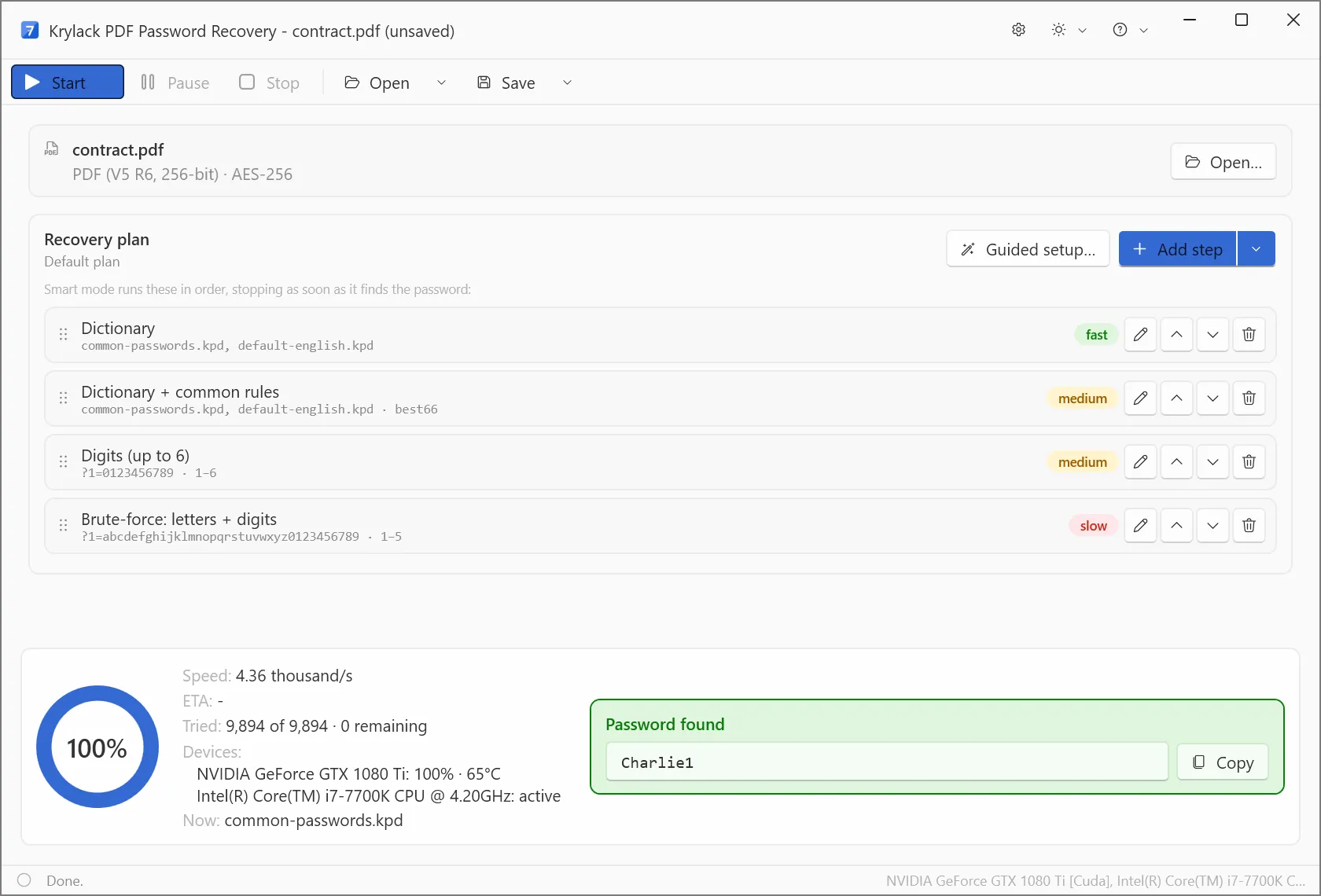
Krylack's own screenshot: contract.pdf detected as 256-bit AES, a four-step recovery plan, and the password found at 4.36 thousand guesses a second using a GTX 1080 Ti and a Core i7.
Krylack PDF Password Recovery does both of the jobs a free method can't. It removes owner restrictions from your own PDF directly, at any encryption level up to 256-bit AES in PDF 2.0, with no search. For an open password it runs a plan you can edit: dictionary, dictionary with rules, digits, then letters and digits, plus masks for anything you remember. Krylack says a supported graphics card speeds up the AES revisions. Version 4.3.3 is current, and it's the cheapest tool here by a clear margin.
Krylack finds a password rather than erasing it: once it's found, copy it and use the free steps above if you want a copy with no password. And at the 4,360 guesses a second in its own AES-256 screenshot, long waits apply here as well.
What we like
- One-time price with free updates within the edition
- Handles modern AES-256 and PDF 2.0
- Masks, dictionaries and a graphics card option
Watch out for
- The trial only proves passwords of up to 3 characters
- Windows only, 64-bit
- No independent reviews of the 4.x line, so the speed claims are Krylack's
What reviewers say
We found no independent review of Krylack's current version, so don't take anyone's word for its speed. Run the trial on your own file: it reports the encryption, which is what decides your odds.
Download Krylack TrialBuy Krylack PDF Password Recovery
Accent PDF Password Recovery: find out your odds before you pay
Accent PDF Password Recovery
$40.00 first year at checkout, then $12.00 a year | 64-bit Windows 10 and 11 | Best when the password matters and you remember part of it
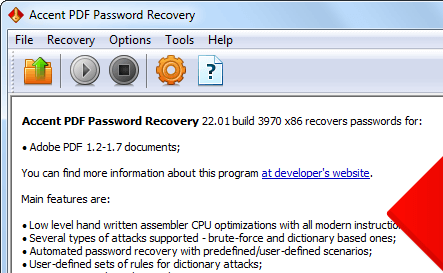
The recovery wizard on an Acrobat DC file: PDF /R6 with 256-bit AES, recovery speed "Very slow", maximum password length 127.
Accent PDF Password Recovery, from Passcovery, tells you where you stand before you pay. Its free demo runs at full speed on your own file, shows the encryption and gives an estimated time, which is useful even if you never buy it. It removes a permissions password in under a second on every PDF version, and its masks, mutated dictionaries and chained attacks are the most detailed here.
Passcovery says AES-256 is designed to resist graphics cards, so this edition searches on the CPU alone, while Krylack advertises graphics card help on AES. We can't say which is faster, because neither vendor publishes figures on matching hardware.
What we like
- Free demo at full speed, with a time estimate
- Every PDF version from 1.1 to 2.0
- Masks and rule-based dictionaries
Watch out for
- Renews automatically at $12.00 a year unless you switch it off
- Demo shows only the first 2 characters and stops at 30 minutes
- No refund when a password can't be found
- Home license is for personal use, Business is $60.00
What reviewers say
TechRadar's John Faulds rated the Passcovery family 3.5 out of 5 in January 2021: "Passcovery can recover passwords from a wider range of apps than the competition, but it's only a viable solution if your passwords aren't too long or complicated." We found no user review about this PDF tool on its own.
Download Accent DemoBuy Accent PDF Password Recovery
XenArmor PDF Password Remover Pro: for folders of files with a known password

Single File mode with the password typed in and a success line in the list. The title bar shows the Premium edition.
XenArmor PDF Password Remover Pro is the free way, automated. It isn't a password finder: the vendor says it removes only known passwords, though it may manage without one on some older PDFs. Give it the password and a folder, and the Basic edition processes up to 500 files in one run, offline, writing new copies and leaving the originals alone. It covers PDF 1.0 to 2.0 and both RC4 and AES.
What we like
- Whole folders in one run
- One-time price
- Works on AES files when you have the password
Watch out for
- No use for a forgotten password
- Basic takes one password per run, different passwords need Premium ($49.95)
- Trial is limited to passwords of up to 8 characters
- Antivirus programs may flag it, which XenArmor calls a false positive
What reviewers say
XenArmor's Trustpilot page showed 4.4 out of 5 from 314 reviews on November 6, 2026, covering the whole company. David D'Egidio, 5 stars, April 2026: "The PDF Password Removal Pro program made easier and quicker to remove the passwords from my pdf files." We found no complaint naming this product, and few reviews of it at all.
Download XenArmor TrialBuy XenArmor PDF Password Remover Pro
Cisdem PDF Password Remover for Mac: the Mac option, with one big limit

The search settings: minimum and maximum length and the character types to try.
Cisdem PDF Password Remover for Mac is the only tool in this guide that runs on macOS, and it's simple to use: drag in up to 200 PDFs, enter any open passwords you know, and click Remove. Version 5.4.0 came out on October 26, 2026. The limit is in Cisdem's own FAQ: "No, current version can't decrypt AES protected PDF files." Many modern PDFs use AES, so test your actual file in the trial. If yours is AES, you'd need Krylack or Accent on a Windows PC.
What we like
- Runs on current macOS, including Apple Silicon
- Batches of up to 200 files, originals untouched
- 30-day money-back guarantee
Watch out for
- Can't decrypt AES files
- Forgotten-password search is brute force only, with no dictionary
- Priciest tool here
- Searches run one file at a time
What reviewers say
iDownloadBlog's Ankur Thakur, on an older version: "PDF passwords up to 3 characters are unlocked in under a minute." And: "PDF passwords longer than 5 characters take more than a day to break".
MacUpdate shows 4.5 out of 5 from only 5 ratings. johncarync, 4 stars: "This tool doesn't instantly unlock your protected PDFs. It uses a brute-force attack to try all combinations".
Download Cisdem TrialBuy Cisdem PDF Password Remover for Mac
Prices side by side
Price for one PC or Mac at checkout (USD)
Krylack PDF Password Recovery (one-time)$19.95
XenArmor PDF Password Remover Pro Basic (one-time)$24.95
Accent PDF Password Recovery (first year, then $12.00 a year)$40.00
Cisdem PDF Password Remover for Mac (one-time)$49.99
Checkout prices checked on November 10, 2026.
Which should you choose?
| Your situation | Pick | Why |
|---|
| One file, and you know the password | Free way: Acrobat, Preview or print to PDF | It costs nothing |
| Print or copy is blocked, on Windows | Krylack PDF Password Recovery | Lifts the limits directly, on any encryption, for $19.95 |
| Forgot the open password, and you remember part of it | Krylack, or Accent if you want the estimate first | Masks shrink the search |
| Forgot the password, it's long and random, and the file is AES-256 | Stop and ask whoever issued the file | No tool will find it in useful time |
| Hundreds of statements with one known password | XenArmor PDF Password Remover Pro | Folder mode, one-time price |
| Older restricted PDFs on a Mac | Cisdem PDF Password Remover for Mac | The only macOS tool here, for non-AES files |
Who should skip these: skip all of them if you know the password and have only a file or two. Skip Krylack and Accent if you're on a Mac. Skip Accent if you dislike renewals. Skip XenArmor if you've lost the password. Skip Cisdem if your PDF uses AES.
What commonly goes wrong
- Buying a remover for the wrong lock. A tool that lifts printing limits does nothing for a file that won't open, and a known-password tool like XenArmor can't find a lost one.
- Assuming every password can be recovered. A long random password on AES-256 stays locked. Check the estimate before you pay, and note that Passcovery doesn't refund a password it couldn't find.
- Using the wrong clues. If the real password falls outside your length or character settings, the search ends empty after all that time.
- Forgetting the copy has no protection. Once the password is gone, anyone who gets the file can read it, so store it accordingly.
- Expecting server or certificate protection to come off. Adobe says files protected by server-based security policies, digital signatures or DRM can't be handled by Acrobat's tools, and Cisdem doesn't support certificate protection.
FAQs
How do I remove a password from a PDF for free?
You can remove a password you know for free by opening the PDF and saving a copy without it. Adobe Acrobat's Remove Security needs a subscription or free trial, Preview on a Mac can export a copy, and any browser can print to a new PDF if printing is allowed.
Can I remove a password from a PDF if I forgot it?
A forgotten open password has to be searched for, using software such as Krylack PDF Password Recovery or Accent PDF Password Recovery. A short or memorable password often comes back. A long random one on an AES-256 file is not realistically recoverable.
How do I open a password-protected PDF without the password?
You can't open a PDF that has an open password until that password is found. Krylack and Accent search for it on files you own. Otherwise ask whoever created the file for the password or an open copy.
Why can't I print or copy from my PDF?
A PDF that opens but blocks printing or copying has an owner, or permissions, password. Krylack PDF Password Recovery and Accent PDF Password Recovery remove it from your own file without a search, and Acrobat removes it if you know that password.
Is it legal to remove a password from a PDF?
Removing a password from your own PDF, or one you're authorized to change, is normally fine. Removing protection from someone else's document, or a copyrighted file you bought, may break the terms you received it under or the law where you live, so ask the owner.
Can Acrobat Reader remove a PDF password?
No. Adobe says Acrobat Reader can open a protected file but can't remove the protection. You need a paid Acrobat plan or trial, or you can print to a new PDF if printing is allowed.
Is there a PDF password remover for Mac?
Cisdem PDF Password Remover for Mac is the macOS tool in this guide, at $49.99, but Cisdem says it can't decrypt AES files. Preview can export a copy if you know the password.
Does removing a password change my original PDF?
XenArmor PDF Password Remover Pro and Cisdem PDF Password Remover for Mac both write a new copy and leave the original protected. Keep the original until you've checked the copy.
Conclusion
Work out which lock you have first. If you know the password, the free way is enough and you shouldn't pay for anything. If printing or copying is blocked, or you've lost a password you can partly remember, Krylack PDF Password Recovery is the one to buy on Windows: $19.95 once, it handles modern encryption, and it does both jobs. The honest limit is the same for every tool here: a long, random open password on AES-256 won't be found, so try the trial on your own file before you count on it.
Download Krylack TrialBuy Krylack PDF Password Recovery