XenArmor PDF Password Remover Pro: Stop Typing the Password on PDFs You Already Own
XenArmor PDF Password Remover Pro is a $24.95 Windows tool that saves a password-free copy of a PDF when you give it the password, one file or a whole folder at a time, entirely offline. It isn't a password cracker: it removes passwords you already know, apart from some older PDFs.
Your bank sends a statement each month, and each one opens only after you type your account number and date of birth. After a few years you have a folder of them, and searching or sending any one is a chore. This tool strips the password from your copies so they open like any other PDF.
Quick facts
- Version: 9.1 (2026 Edition), released June 7, 2026
- Developer: XenArmor Global Security Solutions
- Platforms: Windows Vista to Windows 11 and Windows Server 2008 to 2022, 32-bit and 64-bit. No Mac version
- Price: $24.95 at checkout for the Basic edition, 1 PC, one-time
- Trial: works only with passwords up to 8 characters, no command line
- Guarantee: 30 days, with the limits explained below
What we checked: trial installer, file version 9.1, 6.4 MB zip dated June 6, 2026, digitally signed by Xenarmor Global Security Solutions Private Limited with a valid signature; checkout price of $24.95 on the order page on November 6, 2026. We didn't install it or remove a password from a test file.
Before you buy
- You need to know the password. XenArmor's own note says the software removes only known PDF passwords. For a file that won't open and a password you've lost, it generally can't help.
- Only remove protection you're entitled to remove. It's fine for your own files. A password on someone else's document, or a paid report, is there for a reason.
- The trial stops at 8 characters. If your password is longer, the trial won't prove the tool works on your file, so test with a shorter one.
- Basic takes one password per run. A folder of files with different passwords needs Premium's multiple-password support.
- Refunds are limited. The 30-day guarantee doesn't cover change of mind, and XenArmor expects you to work with its support first.
- Your antivirus may object. XenArmor says password tools are often flagged as potentially unwanted programs and calls that a false positive. Check that the file came from xenarmor.com before you make any exception, and don't lower your protection for a tool you aren't sure about.
- Lifetime means the license, not the updates. The license never expires, but you get 1 year of minor updates, download access and priority support. Major new versions such as v2027 aren't included, and XenArmor sells those as upgrades.
Download Free Trial
Buy Now
Overview
XenArmor PDF Password Remover Pro has two modes. Single File mode takes one PDF, Folder mode takes every PDF in a folder, and both write a new copy with the suffix _free by default, so your original stays untouched. The status column tells you which files worked.
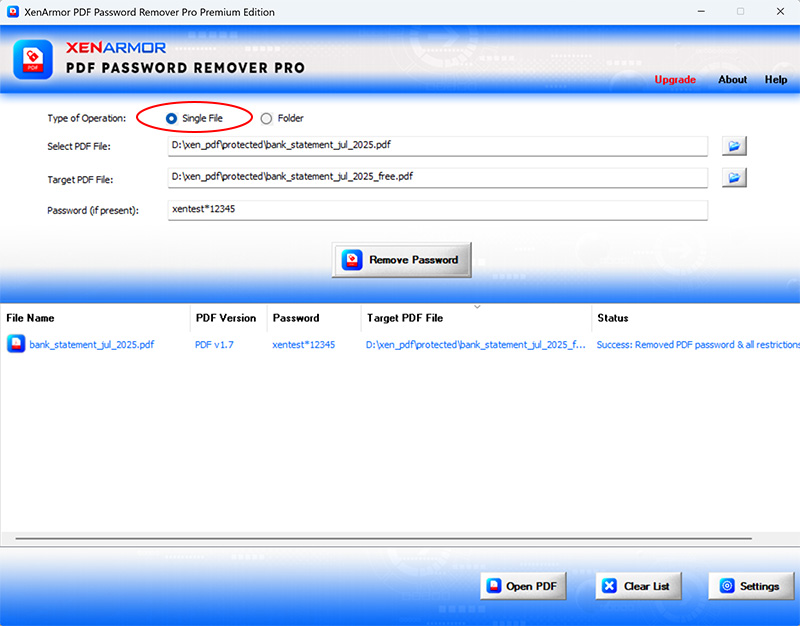
Single File mode, with the password entered and a success message in the list. This is the vendor's picture of the 2025 Premium edition.
Features
Password removal for good
PDF Password Remover Pro saves a copy that opens with no password prompt, so you can search, send or archive it. It handles PDF 1.0 to 2.0 and standard RC4 and AES encryption.
Copy, edit and print restrictions removed
PDF Password Remover Pro also clears the permission locks that stop you copying text, editing, printing or signing a PDF that otherwise opens normally.
Whole folders in one go
PDF Password Remover Pro's Basic edition processes up to 500 files from a folder in one run, and it skips files already marked with the suffix. That's the feature that saves real time on years of statements.
Offline by design
PDF Password Remover Pro does everything on your PC, and nothing is uploaded. For bank, legal or medical PDFs, that's the main reason to pick it over a free website.
Real-World Uses
- Bank and card statements: you clear a year of statements in one run so your accountant can open them.
- Payslips and tax forms: you make searchable copies for your own records.
- Insurance or school documents: you print a form whose printing was turned off.
- Your own old files: you remove a password you set yourself and no longer want.
Who It's For, and Who Should Skip It
It suits anyone with a pile of password-protected PDFs and a known password, especially if those files shouldn't go near an online service.
Skip it if you've lost the password: you need a recovery tool that tries passwords, and even those can fail on strong modern encryption. Skip it if you have one file that isn't sensitive, because several free options exist. Mac users need a different tool.
Usage Guide
- Download the trial from the button on this page and install it.
- Launch the program and choose Single File or Folder.
- Pick the source and the target location.
- Type the password and click Remove Password.
- Check the Status column, then open a result with Open PDF.
Where it falls short
- The unprotected copies are unprotected. That's the point, but a bank statement with no password is now readable by anyone who finds it. Keep the copies somewhere safe.
- It won't rescue a lost password. The Smart AutoRemove option tries for some older PDFs, but don't buy it for that.
- Few independent reviews. We found only a handful of user comments and no magazine test of this version.
What Users Say
XenArmor's Trustpilot page showed 4.4 out of 5 from 314 reviews on November 6, 2026, with 74% five-star and 11% one-star. The score covers the whole company, and many reviews don't name a product, so the quotes below are the ones that do or that clearly fit.
What reviewers say
"The PDF Password Removal Pro program made easier and quicker to remove the passwords from my pdf files" David D'Egidio, Trustpilot, 5 stars, April 2026, excerpt
"After testing similar products, I found your PDF Password Remover Pro to be the best one. Especially, portable version and ability to remove passwords of all PDFs in folder." Richard Helmer, South Africa, on XenArmor's site
We found no complaints that name this product, but with so few reviews that doesn't say much. The trial is a better guide than the score.
Comparisons
PDF Password Remover Pro vs free online PDF tools
Free websites remove a known password in seconds, but your file goes to someone else's server. PDF Password Remover Pro keeps it on your PC and handles whole folders, which is what you're paying $24.95 for.
PDF Password Remover Pro vs Adobe Acrobat
Acrobat's paid versions can remove a password you know, one file at a time, along with everything else Acrobat does. If you already pay for it, you may not need this. If you don't, a one-time $24.95 is far cheaper.
Editions and Pricing
| Edition | Price | PCs | Files per folder run | What it adds |
|---|
| Basic | $24.95 at checkout, one-time | 1 | 500 | Password and restriction removal, Wi-Fi Password Recovery Pro as a free gift |
| Premium | $49.95 on XenArmor's order page | 5 | 2,000 | Different passwords in one run, command line |
XenArmor's order page lists Basic at $29.95.
FAQs
Can XenArmor PDF Password Remover Pro open a PDF if I forgot the password?
Usually not. PDF Password Remover Pro is built to remove a password you know. XenArmor says it may work without the password on some older PDF versions, but that's the exception.
Does PDF Password Remover Pro change my original PDF?
No, by default PDF Password Remover Pro writes a new file with the suffix _free and leaves the original where it is. You can change the suffix in Settings.
Does PDF Password Remover Pro reduce quality?
XenArmor says PDF Password Remover Pro keeps the original quality and formatting, since it removes the protection and doesn't convert the document.
Can PDF Password Remover Pro run on a schedule?
Yes, but only in Premium and higher. PDF Password Remover Pro's command-line version works with scripts and Windows Task Scheduler.
Is it legal to use PDF Password Remover Pro?
PDF Password Remover Pro is generally fine on your own documents. Removing protection from someone else's copyrighted or confidential PDF is a different matter, so check that you have the right to do it.
Is the PDF Password Remover Pro license a subscription?
No. PDF Password Remover Pro uses a one-time lifetime license. You get a year of minor updates, and major new versions cost extra.
System Requirements
- Windows 11, 10, 8, 7 or Vista, or Windows Server 2008 to 2022, 32-bit or 64-bit
- 4 GB of RAM or more recommended
- 8 MB of disk space
Conclusion
XenArmor PDF Password Remover Pro is worth $24.95 if you have a folder of PDFs, a password you know, and a good reason to keep them off the internet. The reason to buy is offline batch processing. The reason not to is a forgotten password, which this tool wasn't made to solve. For a single non-sensitive file, a free tool will do.
Download Free Trial
Buy Now