XenArmor Browser Password Recovery Pro: Every Saved Website Login on Your PC, in One List
XenArmor Browser Password Recovery Pro is a $24.95 Windows tool that finds the website passwords saved in Chrome, Edge, Firefox, Opera, Brave and about 140 other browsers on your own PC and shows them in one list you can export. It's a one-time license for 1 PC, and it only reads passwords stored for the Windows user who runs it.
You know the moment: a site logs you out, the password lived in a browser you stopped using two laptops ago, and the reset email goes to an old address. If that browser profile is still on this PC, this tool pulls the login out of it with one click, along with every other one you saved.
Quick facts
- Version: 14.5 (2026 Edition), released November 18, 2026
- Developer: XenArmor Global Security Solutions
- Platforms: Windows Vista to Windows 11 and Windows Server 2008 to 2022, 32-bit and 64-bit. No Mac version
- Browsers: about 142, from Chrome, Edge, Firefox, Opera, Brave and Vivaldi to Arc, Zen, Yandex, Comet and Tor
- Price: $24.95 at checkout for the Basic edition, 1 PC, one-time payment
- Trial: shows only the first 2 characters of each password, no command line
- Guarantee: 30 days, with exceptions explained below
What we checked: Basic trial installer, file version 14.5, 7.4 MB zip, digitally signed by Xenarmor Global Security Solutions Private Limited with a valid signature and dated November 18, 2026; the edition comparison on XenArmor's order page; checkout price of $24.95 for the Basic edition on November 24, 2026. We didn't install it or recover passwords from a test PC.
Before you buy
- The Buy button orders the Basic edition, and Basic does one job. It recovers saved website passwords from all browser profiles and exports them. Autofill recovery, deleting saved passwords, Firefox master password support, custom profile folders and the command line are all Premium-only.
- Same PC, same Windows user. Chrome, Edge, Opera and other Chromium browsers encrypt passwords per user and per machine, so the tool can't read a profile copied from another PC or another account. XenArmor sells a separate External Drive edition for that.
- Use the trial first. It shows the first 2 characters of each password, which is enough to see whether your browser and logins are found. If the trial finds nothing, the paid version won't either.
- No refund after activation. XenArmor's 30-day guarantee excludes change of mind and, for password recovery tools, any refund after activation. A refund is possible when the software fails to recover passwords that exist (proof required).
- Your antivirus may flag it. Password recovery tools are commonly labelled potentially unwanted programs. XenArmor calls this a false positive and points to its EV code signing. Only make an exception for the file you downloaded from xenarmor.com.
- Lifetime license, 1 year of updates. The license never expires, but minor updates and priority support last 1 year. Major versions such as a 2027 edition are sold as upgrades.
Download Free Trial
Buy Now
Overview
XenArmor Browser Password Recovery Pro has one main button, Recover Passwords. It scans the default profile folders of every supported browser, including old and inactive profiles, and fills a table with the browser, website, username, password and the file each entry came from. Entries are color-coded by type, so email, social media, shopping, streaming and banking logins stand out. Click a column to sort, right-click to copy a field or open the site, and use Export to save the list.
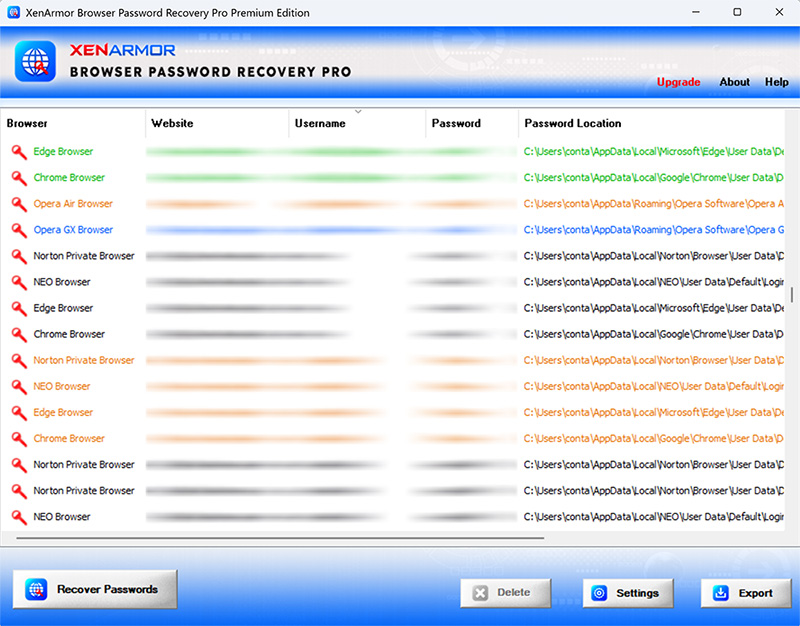
The results list after a scan, with logins from Edge, Chrome, Opera Air, Opera GX, Norton Private Browser and NEO Browser and the profile file each came from. Website, username and password are blurred by the vendor. The title bar shows the Premium edition.
Features
About 140 browsers in one scan
XenArmor Browser Password Recovery Pro reads the mainstream browsers and their beta, dev and canary builds, plus a long tail most tools ignore: Arc, Zen, Floorp, LibreWolf, Waterfox, Thorium, Comet AI, Genspark AI, Opera Air and GX, Yandex, 360 Secure, QQ, UC, Sogou and Tor. If you've tried several browsers over the years, that breadth is the reason to use it.
Current Chrome encryption covered
XenArmor Browser Password Recovery Pro keeps up with Chrome's changing password encryption. Version 11.0 (May 2025) added Chrome's newer "v20" encryption, version 12.0 (October 2025) handled the changes in Chrome 140, and version 14.5 (November 18, 2026) added recovery for Chrome 157 and later and the Chromium browsers built on it. A password viewer that isn't updated this often soon stops finding Chrome logins.
All profiles, not just the default one
XenArmor Browser Password Recovery Pro checks every profile of each Chromium browser, and for Firefox, SeaMonkey and Zen it reads the profiles of every Windows user on the PC. The "Password Location" column shows which profile file each login came from, which helps when two profiles hold different passwords for the same site.
Export to six formats
XenArmor Browser Password Recovery Pro saves the list as HTML, PDF, CSV, XML, JSON or SQLite, in every edition. CSV is the practical one: most password managers, including Bitwarden and 1Password, can import a CSV, so the tool doubles as a way to move years of browser logins into a proper manager.
Premium: autofill, deletion and master passwords
XenArmor Browser Password Recovery Pro's Premium edition adds a second mode, Form Autofill Secrets, which lists saved names, emails, addresses, card details and search history from about 130 browsers, with an ignore list to hide the noise. It can also delete chosen passwords and autofill entries, recover Firefox logins protected by a master (primary) password, and read profiles from a custom folder such as a portable browser.
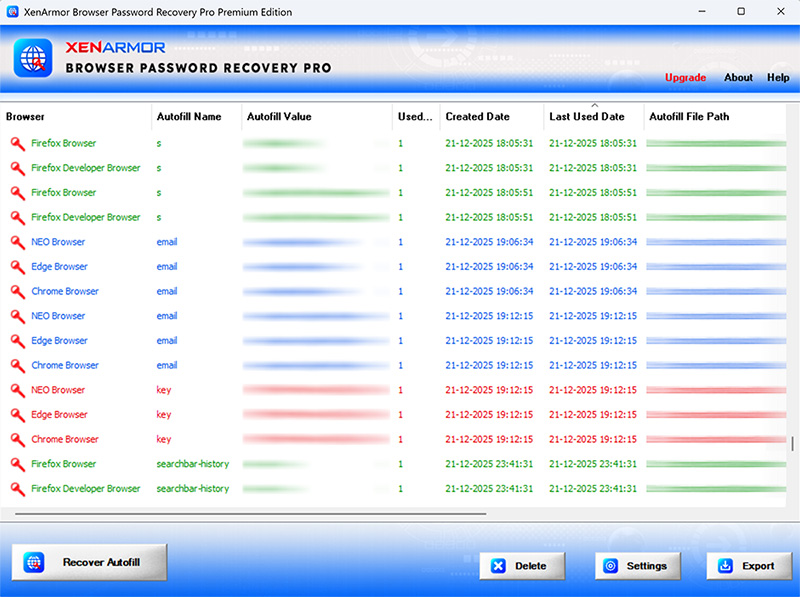
Autofill mode (Premium only): saved form entries from Firefox, Edge, Chrome and NEO Browser with their use count and dates, values blurred by the vendor.
Benefits
- No account resets. You get the existing password back instead of going through recovery emails and security questions for each site.
- A full inventory. Seeing every saved login at once shows how many sites share the same password, which is the first step to fixing it.
- Offline. Everything happens on your PC, and nothing is sent anywhere.
- One-time cost. $24.95 with no subscription, which is less than a year of most password managers.
Real-World Uses
- Leaving a browser: you're switching from Opera or Vivaldi to Firefox and want every login, including ones from an old profile, in one CSV.
- Before a PC goes out the door: you list what's saved on an old laptop before you wipe it, so nothing is lost.
- A forgotten forum or utility account: a site you use twice a year still has its login saved in a browser you no longer open.
- Helping a relative: on their PC, signed in as them, you recover the email password their browser remembered but they didn't.
Who It's For, and Who Should Skip It
It suits people who've used several browsers or profiles on one Windows PC and want all their saved logins in one place, either to recover one or to move them into a password manager.
Skip it if you only use one browser: Chrome, Edge and Firefox already show your saved passwords in their settings after you confirm your Windows or browser password, for free. Skip Basic if your Firefox uses a master password or you want to delete saved logins, since those need Premium. If you also need email client, Wi-Fi or app passwords, XenArmor's All-In-One Password Recovery Pro covers browsers plus about 300 other applications, at a higher price. And it can't help with a password that was never saved in a browser.
Usage Guide
- Download the trial with the button on this page, unzip it and run the installer. Run it as the same Windows user whose browser passwords you want.
- Launch XenArmor Browser Password Recovery Pro and click Recover Passwords.
- Sort by Browser or Website to find the login you need, or right-click an entry to copy it or open the site.
- Click Export and pick a format by file extension (.csv, .html, .json and so on).
- After buying, enter the license key on the activation screen. Delete exported files you don't need: they hold your passwords in plain text.
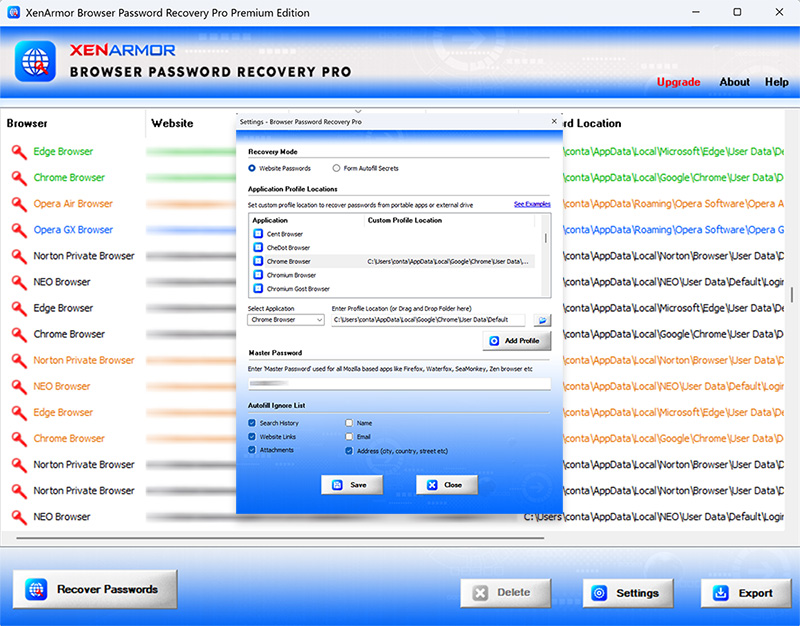
The Settings dialog: recovery mode (website passwords or autofill), custom profile locations, the Firefox master password field and the autofill ignore list. Everything below the recovery mode is a Premium feature.
Where it falls short
- Browser updates can break it. XenArmor itself warns that a browser release with a new encryption method may stop recovery until it ships an update, and Chrome has changed its scheme several times since 2024. Updates are free for only a year.
- Basic is thin for the money compared with Premium. Premium lists at twice the price on XenArmor's order page but adds five of the features most people expect, and it covers 5 PCs.
- The export is a security risk. A CSV of every password you own is exactly what malware looks for. Import it and delete it.
- Little independent testing. We found no recent magazine review of this product, only store listings and user comments.
What Users Say
XenArmor's Trustpilot page showed 4.4 out of 5 from 313 reviews on November 24, 2026: 74% five-star, 11% four-star, 3% three-star, 1% two-star and 11% one-star. The score covers all XenArmor products, and most reviews don't name one, so treat it as a rating of the company.
On Trustpilot
"XenArmor is one of the Best password recovery programs that you could obtain!" nes57, Trustpilot, 5 stars, April 2026
"It's so effective that you don't have to remember passwords anymore" gidi, Trustpilot, 5 stars, April 2026
"Useful for things forgotten. Easy to install and use" Pino, Trustpilot, 4 stars, April 2026
"CROSS SITE REFERENCING TO GOOGE EMAIL, THOUGH. TRIAL FOUND ONLY 2 PASSWORDS." cdavid colbert, Trustpilot, 3 stars, April 2026 (the review doesn't name the product)
On XenArmor's testimonials page
"I used Browser Password Pro and it is a very useful program. Best of all, it gets you out of trouble if you forget any password that is stored in the browser." Aaron Murakami, USA
"A friend suggested “BrowserPasswordRecovery” to me and, as if by magic, all the passwords used on my computer appeared, well 671!" David Morgan, United Kingdom
Vendor testimonials can't be checked, and some of XenArmor's quotes appear under different names on different pages of its site, so give them less weight than Trustpilot. The pattern across both: people who had the password saved got it back quickly, while the one critical review is a trial that found fewer passwords than expected. That's what the trial is for, so run it before you pay.
Comparisons
Browser Password Recovery Pro vs your browser's own password page
Chrome, Edge and Firefox each show their own saved passwords for free, one browser and one profile at a time. Browser Password Recovery Pro is worth paying for when the logins are spread over several browsers or old profiles, when the browser itself is gone but its profile folder isn't, or when you want them all in one export.
Browser Password Recovery Pro vs XenArmor All-In-One Password Recovery Pro
All-In-One Password Recovery Pro includes the same browser recovery and adds email clients, Wi-Fi, FTP, messengers, databases and Windows credentials, about 300 applications in all, for $79 at checkout for Basic. If browsers are all you need, this tool costs about a third as much.
Browser Password Recovery Pro vs XenArmor Email Password Recovery Pro
Email Password Recovery Pro costs the same $24.95 for Basic, reads mail clients such as Outlook and Thunderbird, and since version 12.0 can also list every saved browser login. Browser Password Recovery Pro is the better pick only if you want its Premium extras: autofill recovery and deleting saved passwords. If you need mail client passwords too, buy Email Password Recovery Pro instead.
Browser Password Recovery Pro vs free password viewers
Free utilities such as NirSoft's WebBrowserPassView do a similar job for the main browsers. What Browser Password Recovery Pro adds is the very long browser list, quick updates when Chrome changes its encryption, signed installers and support. If a free viewer works on your PC, you may not need to pay.
Editions and Pricing
| Edition | Price | PCs | What you get |
|---|
| Basic | $24.95 at checkout, one-time | 1 | Website passwords from all browser profiles, export to six formats. XenArmor advertises Wi-Fi Password Recovery Pro as a bonus for early orders |
| Premium | $49.95 list price on XenArmor's order page | 5 | Adds autofill recovery, deleting passwords and autofill, Firefox master password, custom profile locations, command line and scheduled runs |
XenArmor's order page lists Basic at $29.95. Its Black Friday sale was showing Basic at $20.96 and Premium at $32.47 on November 24, 2026. A portable Unlimited edition for technicians is also sold on XenArmor's site.
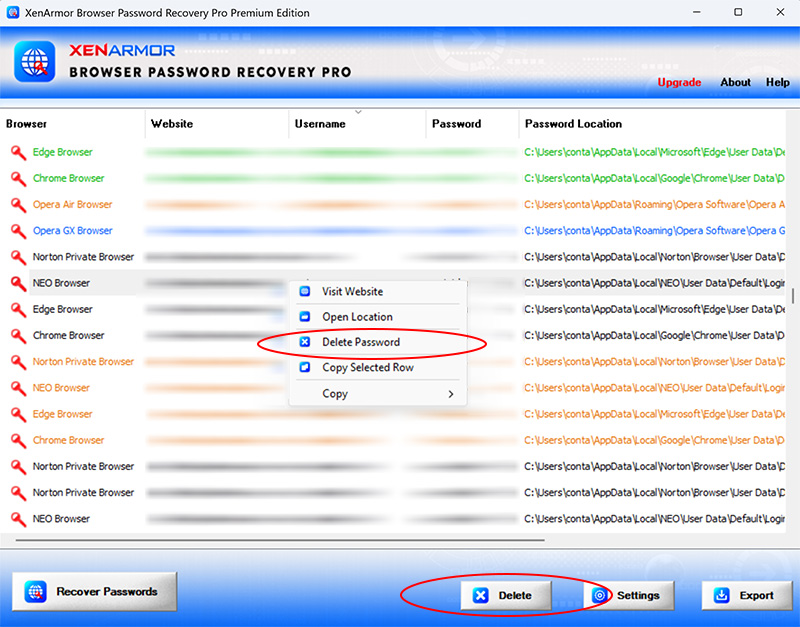
The right-click menu with Visit Website, Open Location, Delete Password and Copy. Deleting saved passwords is a Premium feature.
FAQs
Does XenArmor Browser Password Recovery Pro work with the latest Chrome?
Yes, as of version 14.5. XenArmor Browser Password Recovery Pro added recovery for Chrome 157 and later, and the Chromium browsers built on it, on November 18, 2026. Because Chrome changes its encryption from time to time, check with the trial on your own PC.
Can Browser Password Recovery Pro read passwords from an old hard drive?
Mostly not. Browser Password Recovery Pro can only decrypt Chrome, Edge and Opera passwords as the Windows user who saved them, on that PC. Firefox-type browsers can work from another folder in Premium. For old drives, XenArmor sells a separate External Drive Browser Password Recovery Pro.
Does Browser Password Recovery Pro need administrator rights?
No. Since version 13.0, Browser Password Recovery Pro runs for non-admin users too, which matters because it has to run as the user whose passwords you want.
Can I upgrade Browser Password Recovery Pro from Basic to Premium later?
Yes. XenArmor lets you upgrade Browser Password Recovery Pro to a higher edition at any time, though a discount running when you first bought may not apply to the upgrade.
Is Browser Password Recovery Pro legal to use?
Browser Password Recovery Pro is legal for your own passwords and for PCs you're authorized to work on. XenArmor's terms allow recovery of your own passwords, client recovery, IT auditing and forensics, and say unauthorized access ends the license. Using it on someone else's PC without permission is not acceptable.
Can I use Browser Password Recovery Pro for paid client work?
Not with Basic or Premium. XenArmor allows paid recovery services for clients only with the Unlimited edition of Browser Password Recovery Pro.
How fast is the license delivered?
Browser Password Recovery Pro licenses bought through the checkout on this page are delivered by email within minutes.
System Requirements
- Windows 11, 10, 8, 7 or Vista, or Windows Server 2008 to 2022, 32-bit or 64-bit
- 4 GB of RAM or more recommended
- 10 MB of disk space
Conclusion
XenArmor Browser Password Recovery Pro is worth $24.95 if your logins are scattered across several browsers or old profiles on one Windows PC and you want them back, or exported, in one go. The reason to buy is breadth: about 140 browsers and quick fixes when Chrome changes its encryption. The reason not to is that Basic only reads website passwords, and for a single browser the browser's own password page does the same for free. Run the trial, and if it lists your logins, the purchase is a safe one.
Download Free Trial
Buy Now