XenArmor WiFi Password Recovery Pro: See the Wi-Fi Passwords Your PC Already Knows
XenArmor WiFi Password Recovery Pro is a $19.95 Windows tool that lists every Wi-Fi network saved on your own PC with its password, and rates how secure each one is. It's for people who need a forgotten home or office Wi-Fi password and want more than Windows' one-network-at-a-time view.
A guest asks for the Wi-Fi password, or a new phone needs it, and the sticker on the router is long gone or the password was changed years ago. Your laptop connects without asking, so the password is on it somewhere. This tool shows it. It only reads networks your PC has already joined, so it can't get you onto a neighbor's network or anyone else's.
Quick facts
- Version: 12.0 (2026 Edition), released February 5, 2026
- Developer: XenArmor Global Security Solutions
- Platforms: Windows Vista to Windows 11 and Windows Server 2008 to 2022, 32-bit and 64-bit. No Mac version
- Price: $19.95 at checkout for the Basic edition, 1 PC, one-time
- Trial: 7 days, shows only the first 2 characters of each password
- Guarantee: 30 days, with the limits explained below
What we checked: trial installer, file version 12.0, 4.8 MB zip dated February 5, 2026, digitally signed by Xenarmor Global Security Solutions Private Limited with a valid signature; checkout price of $19.95 on the order page on November 6, 2026. We didn't install it or run a recovery.
Before you buy
- Windows may already do this for free. Windows 11's Wi-Fi settings can show the password of a saved network, and the command
netsh wlan show profile name="YourNetwork" key=clear works on Windows 10 and 11. Try those first if you need one password once.
- It's for networks you're allowed to use. It reads saved profiles only, and XenArmor limits the software to legitimate uses such as recovering your own passwords.
- Deleting saved networks isn't in Basic. The Delete button, connect and disconnect controls and the command line are in the Premium edition.
- Refunds are narrower than the 30-day guarantee sounds. XenArmor's policy excludes change of mind and says refunds on password and key recovery tools aren't possible after activation, even though it also lists a failed recovery, with proof, as a valid reason. Treat the purchase as final once you activate it.
- Your antivirus may object. XenArmor says password tools are often flagged as potentially unwanted programs and calls that a false positive. Check that the file came from xenarmor.com before you make any exception, and don't lower your protection for a tool you aren't sure about.
- Lifetime means the license, not the updates. The license never expires, but you get 1 year of minor updates, download access and priority support. Major new versions such as v2027 aren't included, and XenArmor sells those as upgrades.
Download Free Trial
Buy Now
Overview
XenArmor WiFi Password Recovery Pro scans the Wi-Fi profiles stored in Windows and shows them in a color-coded table: network name, signal, security type, the password as text and hex, and a plain-language security rating for each.
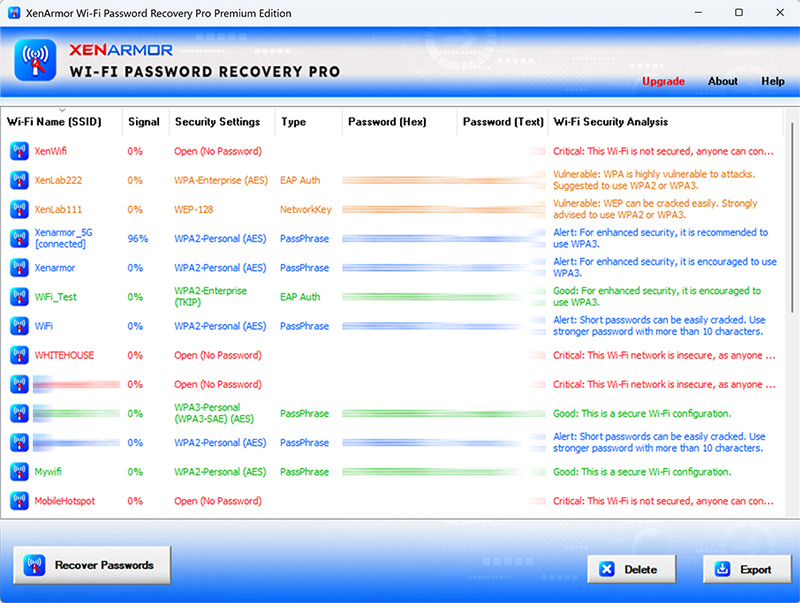
The main window with saved networks and their security ratings, passwords blurred by the vendor. The title bar shows the Premium edition.
Features
All saved networks at once
WiFi Password Recovery Pro lists every saved network in one click, for WEP, WPA, WPA2 and WPA3. You don't have to open each profile separately, which is the main thing it adds over Windows itself.
A security check of your networks
WiFi Password Recovery Pro flags weak setups in plain words: an open network anyone can join, old WEP encryption, or a password that's too short. On your own router, that's a useful nudge to change a setting.
Reports for your records
WiFi Password Recovery Pro exports to HTML, PDF, CSV, XML, JSON or SQLite. The HTML report opens with totals, such as how many networks fall into each security level, and then the full list.
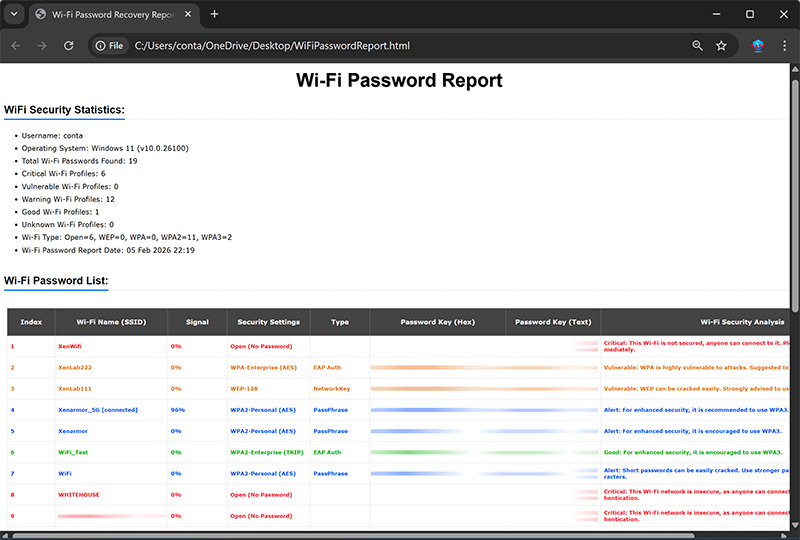
The exported report with its security statistics and network list, passwords blurred by the vendor.
Real-World Uses
- A new phone or TV: you read the home password from the laptop instead of resetting the router and reconnecting everything.
- A small office: you record the passwords of the networks you run before the person who set them up leaves.
- Moving PCs: you save the list of places you connect to, from the café you work in to your parents' house.
- A security tidy-up: you spot that your own guest network still uses WEP and fix it.
Who It's For, and Who Should Skip It
It suits someone with many saved networks who'd like them all in one report, with a security rating as a bonus.
Skip it if you need one password once: the free Windows methods above do that. Skip it if you're on a Mac or phone, since this is Windows only. And it's the wrong tool if your PC has never joined the network, because nothing's saved. In that case, check the router's label or admin page.
Usage Guide
- Download the trial from the button on this page and install it.
- Launch the program and click Recover Passwords.
- Find your network in the list, and right-click to copy its name or password.
- Click Export if you want a report, and store that file carefully.
Where it falls short
- It doesn't show nearby networks. One reviewer expected it to list what's around him. It shows only saved networks.
- Basic is read-only. You can view and export, but removing old networks takes Premium.
- Enterprise logins may not help. A work network that uses a personal sign-in (shown as EAP Auth) isn't the same as a shared Wi-Fi password.
What Users Say
XenArmor's Trustpilot page showed 4.4 out of 5 from 314 reviews on November 6, 2026, with 74% five-star and 11% one-star. The score covers the whole company, and many reviews don't name a product, so the quotes below are the ones that do or that clearly fit.
Praise
"The program "WiFi Password Recovery Pro" quickly recovered my WI-FI password. I was able to get going again." ROBERTJ DEGIDIO, Trustpilot, 5 stars, July 2026
"Tried this app on Machine and was shocked how easy it was to find all my networks password." JIM, Trustpilot, 5 stars, May 2026
"I forgot my Wi-Fi router password. Using your software (WiFi Password Pro) I got it back instantly. Thank you XenArmor." Patrick Bentley, Brazil, on XenArmor's site
Criticism
"This software cannot find and show all the available networks near me" Anjan Bose, Trustpilot, 3 stars, January 2025
This is the XenArmor product reviewers name most, and the reviews are the most consistent: it does the one job quickly. The main complaint comes from expecting a network scanner.
Comparisons
WiFi Password Recovery Pro vs Windows' built-in tools
Windows shows one network at a time, free. WiFi Password Recovery Pro shows them all at once, adds a security rating and exports a report. If you don't need those three things, you don't need to pay.
WiFi Password Recovery Pro vs free viewers
Free tools like NirSoft's WirelessKeyView also list saved passwords. What XenArmor adds is the security analysis, more export formats, PDF included, and a support team you can write to.
WiFi Password Recovery Pro vs XenArmor's other tools
XenArmor's $24.95 All-In-One Key Finder Pro and PDF Password Remover Pro both recover Wi-Fi passwords and include this tool as a free gift. If you could use either, the extra $5 is the better deal.
Editions and Pricing
| Edition | Price | PCs | What it adds |
|---|
| Basic | $19.95 at checkout, one-time | 1 | Password recovery, security analysis, all export formats |
| Premium | $49.95 on XenArmor's order page | 5 | Connect and disconnect, delete saved networks, command line |
XenArmor's order page lists Basic at $29.95.
FAQs
Can XenArmor WiFi Password Recovery Pro hack a neighbor's Wi-Fi?
No. WiFi Password Recovery Pro reads only the networks already saved on your PC. It doesn't attack or guess the password of any network, and using a network without permission is illegal in many countries.
Does WiFi Password Recovery Pro work with WPA3?
Yes, XenArmor WiFi Password Recovery Pro supports saved WPA3 networks, along with WEP, WPA and WPA2.
Can WiFi Password Recovery Pro show the password on my phone?
No, XenArmor WiFi Password Recovery Pro runs only on Windows PCs. It reads the networks saved on that PC, not your phone's.
Will I lose my saved networks if I use WiFi Password Recovery Pro?
No. WiFi Password Recovery Pro only reads your saved networks unless you delete one on purpose, and the Delete button is in Premium only.
Does WiFi Password Recovery Pro show my router's admin password?
No, XenArmor WiFi Password Recovery Pro shows the Wi-Fi network password. The router's own admin login is a separate password.
Is the WiFi Password Recovery Pro license a subscription?
No. WiFi Password Recovery Pro uses a one-time lifetime license. You get a year of minor updates, and major new versions cost extra.
System Requirements
- Windows 11, 10, 8, 7 or Vista, or Windows Server 2008 to 2022, 32-bit or 64-bit
- 4 GB of RAM or more recommended
- 15 MB of disk space
Conclusion
XenArmor WiFi Password Recovery Pro does a small job well, and reviewers back that up. It's worth $19.95 if you want all your saved networks in one report with a security check. The reason not to buy it is simple: Windows will show you a single password for free, so try that first.
Download Free Trial
Buy Now