XenArmor PDF Password Protector Pro: Lock a Folder of PDFs Before You Send Them
XenArmor PDF Password Protector Pro is a $24.95 Windows tool that adds a password and copy, edit and print restrictions to PDF files, one at a time or a whole folder in one run, with AES-256 encryption and nothing uploaded. It's a one-time license for 1 PC, aimed at people who send invoices, statements or reports as PDFs and want them locked.
Picture the end of the month: 60 invoices or payslips in a folder, each to be emailed to a different person, each needing a password. Doing that in a PDF editor means opening every file. Here you point the tool at the folder, type the password once and click Protect PDF.
Quick facts
- Version: 8.0 (2026 Edition), released June 6, 2026
- Developer: XenArmor Global Security Solutions
- Platforms: Windows Vista to Windows 11 and Windows Server 2008 to 2022, 32-bit and 64-bit. No Mac version
- Encryption: RC4, AES-128 or AES-256, for PDF versions 1.0 to 2.0
- Batch size: up to 500 files per folder run in Basic
- Price: $24.95 at checkout for the Basic edition, 1 PC, one-time payment
- Trial: passwords of up to 8 characters only, no command line
- Guarantee: 30 days, with exceptions explained below
What we checked: Basic trial installer, file version 8.0, 6.4 MB zip, digitally signed by Xenarmor Global Security Solutions Private Limited with a valid signature and dated June 6, 2026; the edition comparison on XenArmor's order page; checkout price of $24.95 for the Basic edition on November 24, 2026. We didn't install it or protect a test file.
Before you buy
- Use an open password, not just restrictions. A PDF that opens freely but blocks copying or printing is easy to strip, and XenArmor's own guide says so. Real protection comes from the open password.
- Keep the password somewhere safe. With AES-256 and a strong password, a forgotten open password generally means the file is gone, and no remover tool will help.
- The trial only takes short passwords. It accepts up to 8 characters, so test with a short one and use a longer password once you've bought it.
- The Buy button orders Basic. Basic does single files and folders of up to 500 PDFs. The command line and scheduled runs are Premium-only.
- Refunds are limited. XenArmor's 30-day guarantee doesn't cover change of mind, and it expects you to contact support before asking for a refund.
- Lifetime license, 1 year of updates. The license never expires, but minor updates and priority support last 1 year, and major versions are paid upgrades.
Download Free Trial
Buy Now
Overview
XenArmor PDF Password Protector Pro fits on one screen. Choose Single File or Folder, pick the source and target, type an open password, tick any of Prevent Copying, Prevent Modifying and Prevent Printing, set a permission password, and click Protect PDF. The list underneath shows each file's PDF version, the encryption used and whether it worked. Your originals stay untouched, because the tool writes protected copies with a suffix such as _protected.
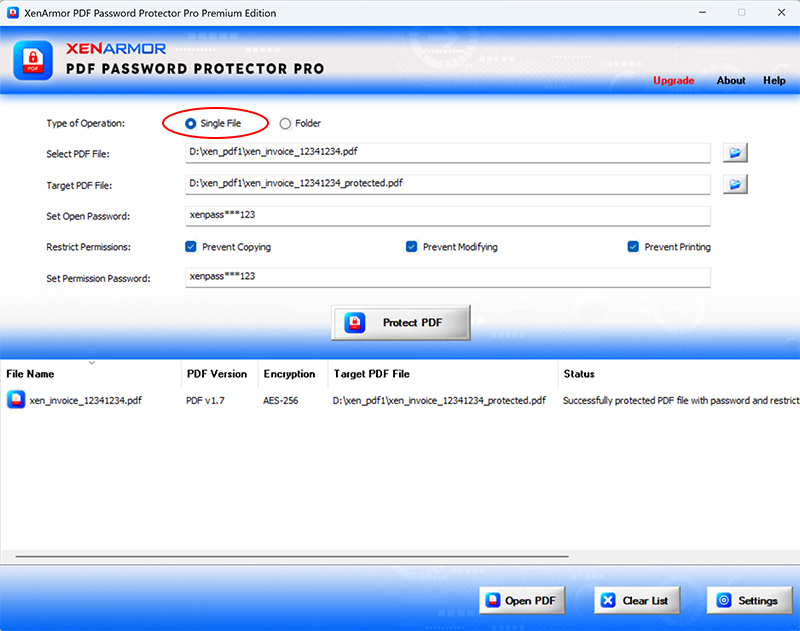
Single File mode: an invoice protected with an open password, all three restrictions and a permission password, with AES-256 shown in the result. This is the vendor's picture of the Premium edition.
Features
Two passwords, used the standard way
XenArmor PDF Password Protector Pro sets the two passwords every PDF reader understands. The open (user) password is needed to view the file. The permission (owner) password lifts the copy, edit and print restrictions. Give a client the open password only, and they can read but not change or print; keep the permission password for yourself. If you leave the permission password empty, the open password is used for both.
Whole folders in one run
XenArmor PDF Password Protector Pro's Folder mode protects every PDF in a folder with the same settings: up to 500 files in Basic and 2,000 in Premium, raised in version 8.0 from 200 and 1,000. It can skip files that already carry the suffix, so re-running on a folder doesn't double-process anything.
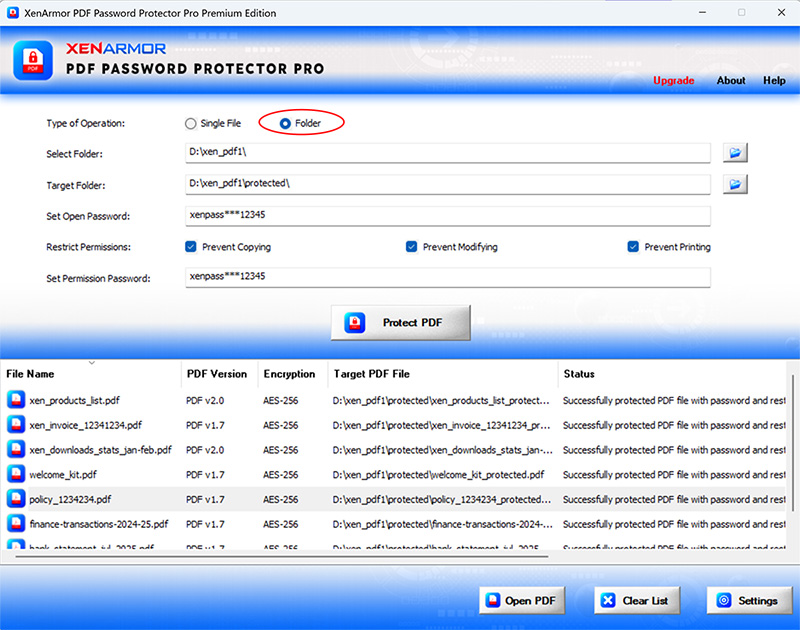
Folder mode: a product list, invoices, statements and a policy file protected into a "protected" subfolder, mixing PDF 1.7 and 2.0 files.
Your choice of encryption
XenArmor PDF Password Protector Pro offers RC4 and AES. AES-256 (readable in Adobe Reader 8 and later) is the right choice for nearly everyone. The older options only matter if a recipient uses very old PDF software.
Right-click protection
XenArmor PDF Password Protector Pro adds a Protect PDF entry to the File Explorer menu for PDF files, so a single file can be locked without opening the program. The option can be switched off in Settings.
Local processing
XenArmor PDF Password Protector Pro never uploads a file. For payroll, medical or legal PDFs, that's the main reason to use it rather than a free website that does the same job on its own server.
Benefits
- Minutes instead of an afternoon. One password, one click, a whole folder done.
- Safer email attachments. A protected PDF sent to the wrong address is unreadable without the password you share separately.
- No subscription. $24.95 once, against a monthly fee for full PDF editors.
- Nothing leaves your PC. No account, no cloud, no third-party copy of your documents.
Real-World Uses
- Payslips: a small business locks each month's payslips before emailing them to staff.
- Client reports: an accountant protects a folder of year-end statements with a password agreed with the client.
- Price lists and drafts: a supplier lets customers read a price list but blocks copying and printing.
- Personal records: you lock scanned ID documents and tax returns before putting them in a cloud folder.
Who It's For, and Who Should Skip It
It suits small offices and freelancers who regularly send batches of sensitive PDFs from Windows and want them locked without uploading them anywhere.
Skip it if you protect one PDF now and then: Microsoft Word can encrypt a PDF when you save a document as PDF, and Adobe Acrobat's paid versions add passwords too. Skip it if every file needs a different password, since Folder mode uses one password per run unless you script it with Premium's command line. Mac users need another tool. And if what you want is to remove passwords from PDFs you receive, that's XenArmor's PDF Password Remover Pro, a separate product.
Usage Guide
- Download the trial with the button on this page, unzip it and run the installer.
- Open Settings, check that the encryption is 256-bit AES and set the suffix for protected copies.
- Choose Single File or Folder and pick the source and target.
- Type the open password, tick the restrictions you want and set a permission password.
- Click Protect PDF, check the Status column, and open a result with Open PDF to confirm it asks for the password.
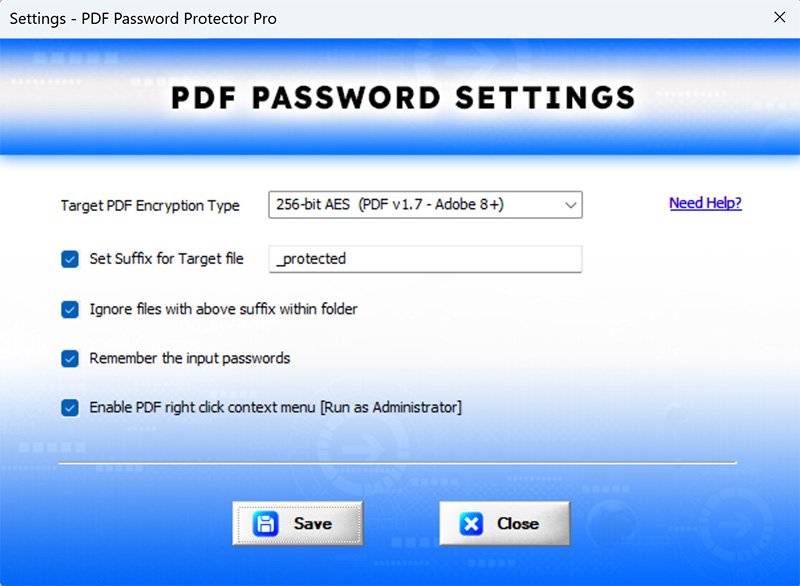
Settings: 256-bit AES encryption, the _protected suffix, skipping already-protected files, remembering passwords and the right-click menu.
Where it falls short
- It remembers your passwords by default. The "Remember the input passwords" setting stores them, encoded, in the program's settings file. On a shared PC, untick it.
- One password per folder run. Giving every client a different password means one run per client in the window, or Premium's command line.
- Restrictions are a courtesy. Copy and print locks stop casual users only, and many PDF tools ignore or remove them.
- Thin public feedback. We found only a vendor testimonial and no independent review of this product.
What Users Say
XenArmor's Trustpilot page showed 4.4 out of 5 from 313 reviews on November 24, 2026, with 74% five-star and 11% one-star ratings. The rating covers all XenArmor products, and none of the visible reviews named PDF Password Protector Pro; the PDF reviews there were about the company's password remover.
On XenArmor's testimonials page
"We have to regularly send confidential PDF files to our customers. PDF Password Protector Pro turned out to be great choice. Now we can easily and automatically password protect PDF files using command-line version." Patrick Bentley, Brazil
That's one vendor-published quote, and it describes the Premium command line, not Basic. With so little feedback, the 8-character trial is your best test: protect a few of your own files and open them in the PDF reader your recipients use.
Comparisons
PDF Password Protector Pro vs Microsoft Word's PDF encryption
Word can encrypt a PDF with a password when it saves a document as PDF, for free, but only for documents you create in Word and one at a time, with no print or copy restrictions to choose. PDF Password Protector Pro works on PDFs you already have, from any source, in batches.
PDF Password Protector Pro vs Adobe Acrobat
Acrobat's paid versions set the same passwords and permissions and do far more besides, on a subscription. If you already pay for Acrobat, you don't need this. If protecting PDFs is the only job, a one-time $24.95 is the cheaper route.
PDF Password Protector Pro vs free online tools
Free websites add a password in seconds, but you upload the very file you're trying to keep private. PDF Password Protector Pro keeps it on your PC and handles hundreds of files at once.
Editions and Pricing
| Edition | Price | PCs | Files per folder run | What it adds |
|---|
| Basic | $24.95 at checkout, one-time | 1 | 500 | Passwords and restrictions. XenArmor advertises Wi-Fi Password Recovery Pro as a bonus for early orders |
| Premium | $49.95 list price on XenArmor's order page | 5 | 2,000 | Command line and scheduled tasks |
| Unlimited | $197 list price on XenArmor's order page | Unlimited | Unlimited | Portable from USB, commercial use for clients |
XenArmor's order page lists Basic at $29.95. Its Black Friday sale was showing Basic at $20.96, Premium at $32.47 and Unlimited at $118.20 on November 24, 2026.
FAQs
Will a PDF protected by XenArmor PDF Password Protector Pro open on a phone or Mac?
Yes. XenArmor PDF Password Protector Pro uses the standard PDF password scheme, so any reader that supports AES-256 (Adobe Reader 8 and later, and current browsers and phone apps) asks for the password and opens the file. Only the protecting program is Windows-only.
Does PDF Password Protector Pro change my original files?
No. PDF Password Protector Pro writes protected copies to the target file or folder you choose, adding a suffix such as _protected, and leaves the originals as they were.
Can PDF Password Protector Pro give each file a different password?
Not in one Folder run. PDF Password Protector Pro applies one open password and one permission password per run. Different passwords per file need separate runs, or a script around the command line in Premium.
How do I remove a password I added with PDF Password Protector Pro?
Open the file with the password in any PDF editor and save it without protection, or use XenArmor's separate PDF Password Remover Pro, which removes passwords you know in bulk. PDF Password Protector Pro itself only adds protection.
Is the PDF Password Protector Pro license a subscription?
No. PDF Password Protector Pro uses a one-time lifetime license with 1 year of minor updates and priority support. Major new versions are sold as upgrades.
Can I use PDF Password Protector Pro on more than one PC?
Basic covers 1 PC. PDF Password Protector Pro's Premium edition covers 5 PCs, and the Unlimited edition runs portably on any number of PCs.
System Requirements
- Windows 11, 10, 8, 7 or Vista, or Windows Server 2008 to 2022, 32-bit or 64-bit
- 4 GB of RAM or more recommended
- 8 MB of disk space
Conclusion
XenArmor PDF Password Protector Pro is worth $24.95 if you regularly send batches of sensitive PDFs from Windows and want them locked with AES-256 without uploading them anywhere. The reason to buy is folder-wide protection in one click. The reason not to is occasional use: for one file now and then, Word or a PDF editor you already own does the job. Turn off "Remember the input passwords" on a shared PC, and keep your open passwords safe.
Download Free Trial
Buy Now