XenArmor All-In-One Password Recovery Pro: Get Back the Passwords Saved on Your Own PC
XenArmor All-In-One Password Recovery Pro is a Windows tool that finds passwords you've already saved in browsers, email clients, messengers, FTP clients and other apps on your own computer. It costs $79 for the Basic edition (1 PC, 240+ apps, lifetime license) and $197 for Premium (5 PCs, 330+ apps).
You know the moment: a site you haven't visited in two years asks you to log in, the reset email goes to an address you no longer use, and Chrome has been filling in that password for you all along. This tool puts everything your PC remembers into one list, so you can copy the old login out instead of starting over. It reads what's stored on the machine. It can't guess or crack an online account's password that was never saved there.
Quick facts
- Version: 14.5 (2026 Edition), released August 14, 2026
- Developer: XenArmor Global Security Solutions
- Platforms: Windows Vista to Windows 11 and Windows Server 2008 to 2022, 32-bit and 64-bit. No Mac version
- Price: $79 at checkout for Basic, $197 for Premium, both one-time
- Trial: 7 days, shows only the first 2 characters of each password
- Guarantee: 30 days, with the limits explained below
What we checked: Basic trial installer, file version 14.5, 8.3 MB zip dated August 14, 2026, digitally signed by Xenarmor Global Security Solutions Private Limited with a valid signature; checkout prices of $79 for Basic and $197 for Premium on the order page on November 6, 2026. We didn't install it or run a recovery.
Before you buy
- Use it on your own PC and accounts. XenArmor limits the software to legitimate uses such as recovering your own passwords, and says unauthorized access can end your license. Reading someone else's saved passwords without permission isn't what it's for, and it may be illegal where you live.
- Run the trial first. The first 2 characters are enough to see whether it finds the logins you need. If it doesn't list them in the trial, buying won't change that. It only finds what's stored on that PC.
- Refunds are narrower than the 30-day guarantee sounds. XenArmor's policy excludes change of mind and says refunds on password and key recovery tools aren't possible after activation, even though it also lists a failed recovery, with proof, as a valid reason. Treat the purchase as final once you activate it.
- Your antivirus may object. XenArmor says password tools are often flagged as potentially unwanted programs and calls that a false positive. Check that the file came from xenarmor.com before you make any exception, and don't lower your protection for a tool you aren't sure about.
- Lifetime means the license, not the updates. The license never expires, but you get 1 year of minor updates, download access and priority support. Major new versions such as v2027 aren't included, and XenArmor sells those as upgrades.
Download Free Trial
Buy Now
Overview
XenArmor All-In-One Password Recovery Pro comes from a company that has been making Windows password tools for 19 years, by its own count. You click Recover Passwords, it checks the default storage location of each supported app, and it fills a table with the app, the site or server, the username, the password and the file or registry location it came from.
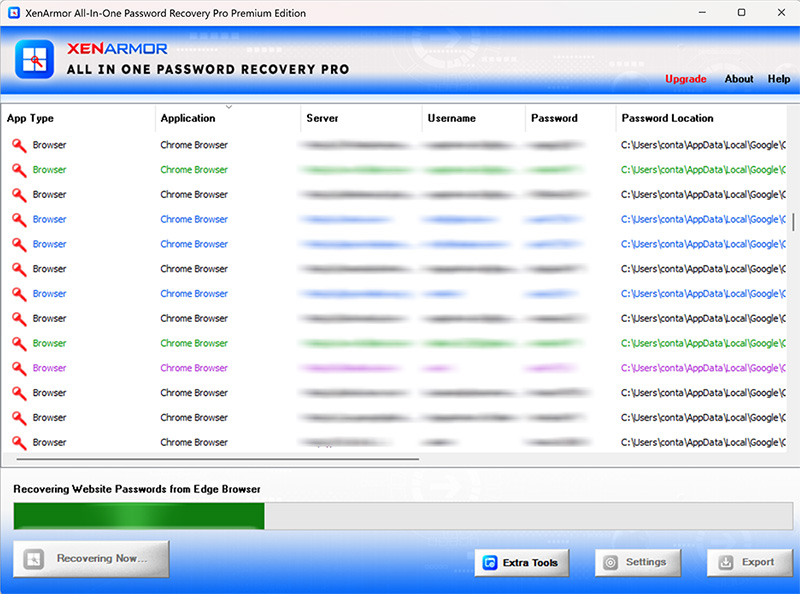
All-In-One Password Recovery Pro during a scan, with recovered browser logins blurred by the vendor. The title bar shows the Premium edition.
Features
One list for your saved logins
All-In-One Password Recovery Pro checks browsers such as Chrome, Edge, Firefox, Opera, Brave and Vivaldi, plus email clients like Outlook, Thunderbird, Mailbird and eM Client, messengers like Pidgin and FTP clients like FileZilla and WinSCP. The Basic edition covers 240+ apps. Saved Wi-Fi passwords and Windows Credential Manager entries are included too.
Passwords hidden behind asterisks
All-In-One Password Recovery Pro also covers the dots in a login box. When a program shows a filled-in password as ***** and you've forgotten what it is, this feature reveals it.
Reports you can keep
All-In-One Password Recovery Pro exports results to HTML, PDF, CSV, XML, JSON or SQLite. The list is color-coded by type, so finance sites, social networks and shopping sites stand out. Version 14.0 added the PDF export.
Premium: more apps and harder cases
All-In-One Password Recovery Pro Premium raises coverage to 330+ apps by adding download managers, database tools and Windows Vault. It also scans the registry for stored passwords, handles Firefox and Thunderbird profiles with a master password you enter, and reads portable apps or profiles in non-default folders.
Real-World Uses
- Moving to a new PC: you export your logins before the old machine goes, so nothing is lost with it.
- Setting up a password manager: you pull every saved login into one place, then sort out which ones to keep.
- An old mail account: your email client has logged in by itself for ten years and you need that password on your phone.
- A site you built long ago: your FTP client still has the login your web host's email can't send you.
Who It's For, and Who Should Skip It
It suits a home or small-office Windows user who has years of logins spread across several programs and wants them back without a string of resets.
Skip it if your passwords are all in one browser. Chrome, Edge and Firefox already show saved passwords in their own settings for free. Skip it if you already use a password manager. Mac users should skip it too, since there's no Mac version. And if you've forgotten the Windows login itself, you need a boot-disk reset tool instead.
Usage Guide
- Download the trial from the button on this page and run the installer.
- Launch the program. Run it from the Windows account that saved the passwords.
- Click Recover Passwords and wait for the scan to finish.
- Click a column header to sort, or right-click a row to copy a field.
- Click Export to save a report, and keep that file somewhere safe.
Where it falls short
- Results vary from one PC to the next. Several buyers on Trustpilot found far fewer passwords than they expected, as you'll see below. The vendor says a new app version with different encryption, or a custom profile location, can cause misses.
- Installs don't always go smoothly. Some reviewers report install or license activation failures, one of them on Windows 11.
- Basic is the cut-down version. The custom location setting, master password support and registry scan are Premium only, so a portable browser or a Firefox profile with a master password needs the $197 edition.
- An export is a list of your passwords. The report shows them in full. Delete it when you're done, and don't leave it in a synced folder.
What Users Say
XenArmor's Trustpilot page showed 4.4 out of 5 from 314 reviews on November 6, 2026, with 74% five-star and 11% one-star. The score covers the whole company, and many reviews don't name a product, so the quotes below are the ones that do or that clearly fit.
Praise
"Useful for things forgotten. Easy to install and use" Pino, Trustpilot, 4 stars, April 2026
"XenArmor is my go to software when I need to find a solution to a lost key, password and so on." Ken B, Trustpilot, 5 stars, October 2026
"Got my website password instantly which I had forgotten as it was not visited regularly. Perfect software by XenArmor." Takashi Yoshida, Japan, on XenArmor's site
"I have a habit of forgetting passwords for sites. Your software is absolutely brilliant and fast. I'm very impressed!" Ian Booth, Germany, on XenArmor's site
Criticism
"Did not install properly on Windows 11. Did not pick up any passwords from Brave, and only a few from Chrome." Pam Garrett, Trustpilot, 1 star, January 2026
"Only shows WiFi and FTP passwords, no applications at all. No better that NirSoft Wireless KeyView which is freeware." donnascherer, Trustpilot, 3 stars, January 2026
"It found all my wifi passwords but that's about it." mink, Trustpilot, 2 stars, January 2026
"NICE INTERFACE. CROSS SITE REFERENCING TO GOOGE EMAIL, THOUGH. TRIAL FOUND ONLY 2 PASSWORDS." cdavid colbert, Trustpilot, 3 stars, April 2026
"just installed AllinOne recovery password pro , 2025 version and work not, can not recovery my password" Salvatore Giaimo, Trustpilot, 1 star, October 2025
The pattern is split. Happy users had a specific forgotten password and got it back quickly. Unhappy ones expected every password they own and got a short list. We found no independent lab test or magazine review of the current version, so treat your own trial scan as the real evidence.
Comparisons
All-In-One Password Recovery Pro vs your browser's password page
Your browser's settings show its own saved passwords free of charge. All-In-One Password Recovery Pro earns its price only when the login lives outside the browser, in an email client, FTP client or messenger, or when you want everything in a single export.
All-In-One Password Recovery Pro vs free single-purpose tools
Free tools such as NirSoft's utilities each read one kind of password. XenArmor's pitch is one program, one report and support if an app is missed. If you need only one password from one program, try a free tool first.
Editions and Pricing
| Edition | Price at checkout | PCs | Apps | What it adds |
|---|
| Basic | $79, one-time | 1 | 240+ | Browsers, email, messengers, FTP, Wi-Fi, Credential Manager, asterisk fields |
| Premium | $197, one-time | 5 | 330+ | Download managers, databases, Windows Vault, registry scan, master password, custom locations, command line |
XenArmor's own order page lists these at $97 and $247 before discounts. Buying a 1-PC Basic and later wanting Premium is allowed, but today's discount may not apply then.
Buy Basic ($79)
Buy Premium, 5 PCs ($197)
FAQs
Is XenArmor All-In-One Password Recovery Pro legal to use?
XenArmor All-In-One Password Recovery Pro is legal when you use it on your own passwords or with the owner's permission. XenArmor's terms prohibit unauthorized access and say it can cost you your license.
Can XenArmor All-In-One Password Recovery Pro hack a Facebook or Gmail account?
No. All-In-One Password Recovery Pro only reads logins already saved on the PC it runs on, so it can't get into an account from outside. If the password was never saved on that machine, use the site's own account recovery.
Does All-In-One Password Recovery Pro work on Windows 11?
XenArmor lists Windows 11 as supported, along with 10, 8, 7 and Vista. At least one Trustpilot reviewer had an install problem on Windows 11, which is another reason to try the trial first.
Is the Basic edition enough for one home PC?
The All-In-One Password Recovery Pro Basic edition is enough if your logins are in common browsers, email clients, messengers and FTP clients. Choose Premium if you need database tools, download managers, a Firefox master password or portable apps.
Will I pay again for the next version of All-In-One Password Recovery Pro?
You can keep using your version for life, but moving to a major new release such as v2027 costs extra. Minor updates are free for the first year.
Can I use All-In-One Password Recovery Pro to recover passwords for clients?
Not with Basic or Premium. XenArmor allows paid service to clients only on its Unlimited edition, which costs $1,297 on its order page.
What if I lose my All-In-One Password Recovery Pro license key?
XenArmor resends All-In-One Password Recovery Pro license keys and downloads during your first year under its download warranty. Contact its support with your order details.
System Requirements
- Windows 11, 10, 8, 7 or Vista, or Windows Server 2008 to 2022, 32-bit or 64-bit
- 4 GB of RAM or more recommended
- 8 MB of disk space
Conclusion
XenArmor All-In-One Password Recovery Pro is worth $79 if the trial lists a login you need and that login isn't simply sitting in your browser's settings. The reason to buy is one scan across dozens of programs instead of a day of password resets. The reason not to is the uneven results some buyers report, combined with a refund policy that closes once you activate. Run the trial, look at what it finds, and let that decide.
Download Free Trial
Buy Now