XenArmor Email Password Recovery Pro: Get Back the Mail Password Your PC Remembers
XenArmor Email Password Recovery Pro is a $24.95 Windows tool that finds the email account passwords saved by Outlook, Thunderbird, eM Client, Mailbird and about 20 other mail clients, plus around 140 browsers and a few messengers, on your own PC. It's a one-time license for 1 PC, and it only works on passwords that were actually saved on that computer.
The usual story: your mail client has checked your inbox every day for years, you set up a new phone, and nobody remembers the password typed in years ago. The provider's reset process wants a recovery number you no longer have. If the old PC still sends and receives mail, the password is stored on it, and this tool reads it back.
Quick facts
- Version: 12.5 (2026 Edition), released November 19, 2026
- Developer: XenArmor Global Security Solutions
- Platforms: Windows Vista to Windows 11 and Windows Server 2008 to 2022, 32-bit and 64-bit. No Mac version
- Sources: mail clients (Outlook 2003 to 2024, Thunderbird, BetterBird, eM Client, Mailbird, The Bat!, Foxmail, Postbox and more), about 140 browsers, and Pidgin, Paltalk, Miranda IM, Google Talk and Windows Live Messenger
- Price: $24.95 at checkout for the Basic edition, 1 PC, one-time payment
- Trial: shows only the first 2 characters of each password, no command line
- Guarantee: 30 days, with exceptions explained below
What we checked: Basic trial installer, file version 12.5, 8.6 MB zip, digitally signed by Xenarmor Global Security Solutions Private Limited with a valid signature and dated November 19, 2026; the edition comparison on XenArmor's order page; checkout price of $24.95 for the Basic edition on November 24, 2026. We didn't install it or recover a password from a test mail account.
Before you buy
- Only saved passwords can come back. Many Gmail, Outlook.com and Microsoft 365 accounts now sign in through a browser window and keep a sign-in token rather than a password, so there may be no password on the PC to find. The trial will tell you.
- The Buy button orders the Basic edition. Basic reads mail clients, browsers and messengers. Accounts kept in Windows Vault or Credential Manager (the Windows Mail app, Outlook Exchange accounts, your Microsoft account) need Premium, which includes XenArmor's Vault tool. So do Thunderbird or Firefox master passwords, custom profile folders and the command line.
- Same PC, same Windows user. Outlook, Chrome, Edge and Opera encrypt passwords per user and machine, so a profile copied from another computer usually can't be read. XenArmor sells an External Drive edition for that.
- No refund after activation. XenArmor's 30-day guarantee excludes change of mind and, for password recovery tools, refunds after activation. It does refund when the software can't recover a password that's stored on the PC (proof required).
- Your antivirus may flag it. Password recovery tools are routinely labelled potentially unwanted programs, and XenArmor calls this a false positive. Only allow the file you downloaded from xenarmor.com.
- 1 year of updates. The license is lifetime, but minor updates and priority support last 1 year, and major versions are paid upgrades.
Download Free Trial
Buy Now
Overview
XenArmor Email Password Recovery Pro scans the profile folders and registry keys where mail clients keep their account settings and lists each account it finds: the application, the mail server, the account type (POP3, IMAP or SMTP), the username, the password, and the exact file or registry key it came from. Email entries are shown in blue, so they stand out when you also scan browsers. One click on Recover Passwords does the whole scan.
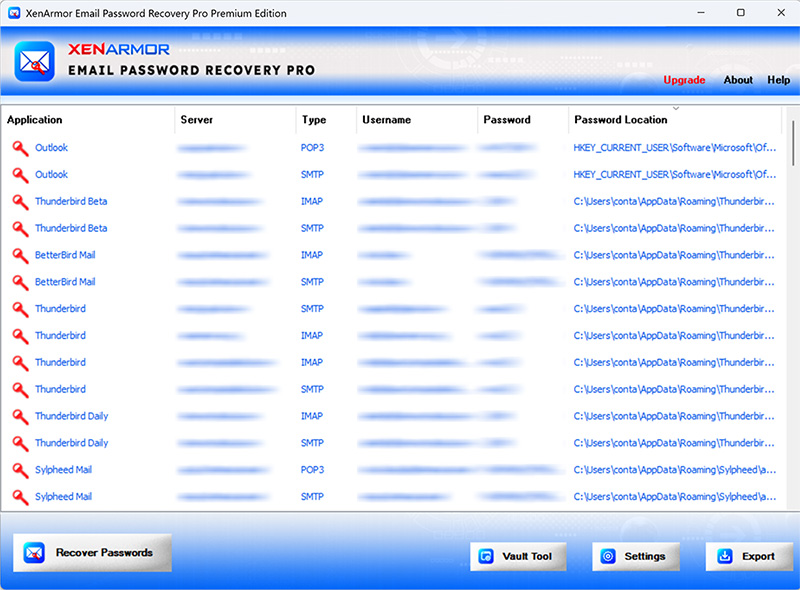
Recovered accounts from Outlook (read from the registry), Thunderbird, Thunderbird Beta and Daily, BetterBird and Sylpheed, with POP3, IMAP and SMTP entries. Servers, usernames and passwords are blurred by the vendor. The title bar shows the Premium edition, which adds the Vault Tool button.
Features
Desktop mail clients, old and new
XenArmor Email Password Recovery Pro reads Outlook from 2003 to 2024, Thunderbird (release, Beta, Daily and ESR), BetterBird, eM Client, Mailbird, The Bat!, Foxmail, Postbox, Claws Mail, Sylpheed, Becky, Poco Mail, IncrediMail, Opera Mail, Windows Live Mail and the old Windows Mail. Several of those are long discontinued, which is exactly when their passwords get lost.
Webmail logins saved in browsers
XenArmor Email Password Recovery Pro also checks about 140 browsers for saved webmail logins and recognizes about 130 providers, including Gmail, Outlook.com, Yahoo Mail, iCloud Mail, AOL, Proton Mail, Zoho, Yandex, Mail.ru and QQ Mail. Since version 12.0 a setting lets it list every saved browser password instead of only the email ones.
Server details, not just the password
XenArmor Email Password Recovery Pro shows the incoming and outgoing server and account type next to each password. If you're moving an old POP3 account to a new mail app, you get every setting you need from one row, and the export keeps them together.
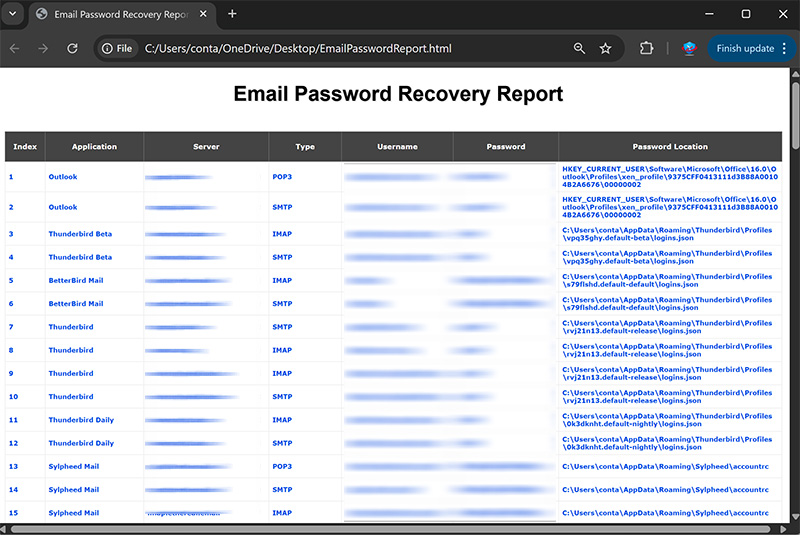
The exported HTML report opened in a browser, with the profile file or registry key for each account in the last column.
Export to six formats
XenArmor Email Password Recovery Pro saves results as HTML, PDF, CSV, XML, JSON or SQLite in every edition, so you can keep a record before you retire an old PC.
Premium: Windows Vault, master passwords and scripts
XenArmor Email Password Recovery Pro's Premium edition adds Windows Vault Password Pro for accounts stored in Credential Manager, such as the Windows Mail app, Outlook Exchange and your Microsoft account. It also reads Thunderbird and Firefox profiles protected by a master password, scans custom profile folders and runs from the command line or Task Scheduler.
Benefits
- Skip the provider's reset maze. If the password is saved locally, you have it in seconds, without recovery codes or support tickets.
- Move to a new mail app cleanly. Server names and passwords for every account come out together.
- Works offline. Nothing leaves your PC.
- Pay once. $24.95 with no subscription.
Real-World Uses
- New phone, old account: your desktop Thunderbird still collects mail from an ISP address, and you need its password to add the account to your phone.
- A small office's old PC: before replacing the front-desk computer, you record the POP3 and SMTP details of the shared mailbox in Outlook.
- A retired mail client: you're leaving IncrediMail or Windows Live Mail and want the passwords before uninstalling it.
- A parent's laptop: signed in as them, you find the email password their mail program has remembered for a decade.
Who It's For, and Who Should Skip It
It suits people with desktop mail clients and POP3 or IMAP accounts, especially older ISP, hosting or work addresses where the password was typed once and forgotten.
Skip it if your mail lives in Gmail or Outlook.com in the browser and you're signed in with a modern sign-in: the provider's own recovery is the route, and there may be no password to find. Skip Basic if you use the Windows Mail app or an Exchange account, since those need Premium. If you also want Wi-Fi, FTP or app passwords, XenArmor's All-In-One Password Recovery Pro covers about 300 applications at a higher price.
Usage Guide
- Download the trial with the button on this page, unzip it and run the installer as the Windows user whose mail you want.
- Launch XenArmor Email Password Recovery Pro. In Settings, tick email clients, messengers and browsers, and choose whether browsers should return all passwords or only email ones.
- Click Recover Passwords and sort by Application or Server to find the account.
- Right-click to copy a field, or click Export to save a report.
- After buying, enter your license key on the activation screen. Delete any exported report once you've used it.
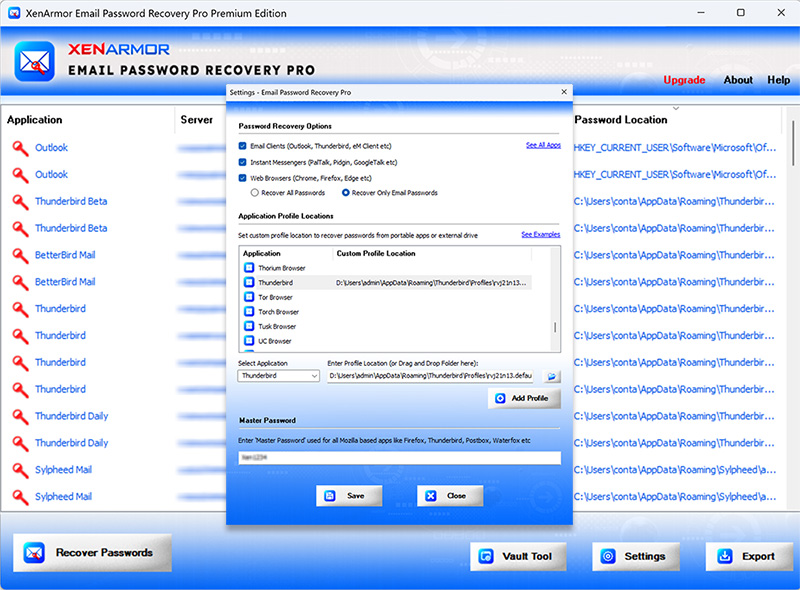
The Settings dialog: which sources to scan, the all-or-email-only option for browsers, custom profile locations and the master password field. Custom locations and the master password are Premium features.
Where it falls short
- Modern sign-ins leave nothing to recover. The tool is strongest with classic POP3, IMAP and SMTP accounts. Accounts added with a browser sign-in often store no password, and the new Outlook for Windows isn't on XenArmor's client list.
- Basic leaves out common Microsoft accounts. Windows Mail app and Exchange accounts sit in Windows Vault, which only Premium reads.
- Updates matter. Mail clients and browsers change how they store passwords, and XenArmor says recovery can stop working until it updates. Free updates last 1 year.
- Little independent testing. We found no recent independent review of this product, only store listings and user comments.
What Users Say
XenArmor's Trustpilot page showed 4.4 out of 5 from 313 reviews on November 24, 2026: 74% five-star, 11% four-star, 3% three-star, 1% two-star and 11% one-star. The rating covers all XenArmor products, and none of the visible reviews named Email Password Recovery Pro.
On Trustpilot
"XenArmor is one of the Best password recovery programs that you could obtain!" nes57, Trustpilot, 5 stars, April 2026
"Useful for things forgotten. Easy to install and use" Pino, Trustpilot, 4 stars, April 2026
"CROSS SITE REFERENCING TO GOOGE EMAIL, THOUGH. TRIAL FOUND ONLY 2 PASSWORDS." cdavid colbert, Trustpilot, 3 stars, April 2026 (the review doesn't name the product)
On XenArmor's testimonials page
"I had forgotten my Outlook password. Finally I downloaded your software and it recovered the password in seconds. Thank you!!!" Dinesh Rao, India
"I received the right version and I’m so excited to have my old email back. Thank you so much for providing such good software." Jacob Baxter, Australia
Vendor testimonials can't be verified, and some of XenArmor's quotes appear under different names on different pages of its site, so weigh them lightly. The consistent message from users is that recovery is quick when a password is saved, and the one critical review describes a trial that found fewer passwords than hoped. The trial shows the first 2 characters of every password it finds, so you'll know before paying whether your account is there.
Comparisons
Email Password Recovery Pro vs XenArmor Browser Password Recovery Pro
Both cost $24.95 at checkout for Basic. Email Password Recovery Pro covers mail clients and messengers and can also list every saved browser login. Browser Password Recovery Pro covers browsers only, but its Premium edition adds autofill recovery and deleting saved passwords. If you want mail client passwords at all, this is the one to buy.
Email Password Recovery Pro vs XenArmor All-In-One Password Recovery Pro
All-In-One Password Recovery Pro includes everything here plus Wi-Fi, FTP, database, Windows and other app passwords, about 300 applications, for $79 at checkout for Basic. Buy All-In-One only if you need those other types.
Email Password Recovery Pro vs free mail password viewers
Free utilities such as NirSoft's Mail PassView also read saved passwords from older mail clients. Email Password Recovery Pro adds current clients like BetterBird and eM Client, the browser coverage, signed installers and support. If a free viewer finds your account, use it.
Editions and Pricing
| Edition | Price | PCs | What you get |
|---|
| Basic | $24.95 at checkout, one-time | 1 | Mail clients, browsers and messengers (about 170 apps), export to six formats. XenArmor advertises Wi-Fi Password Recovery Pro as a bonus for early orders |
| Premium | $49.95 list price on XenArmor's order page | 5 | Adds Windows Vault and Credential Manager accounts, master password support, custom locations, command line, Windows Vault Password Pro |
| Unlimited | $497 list price on XenArmor's order page | Unlimited | Portable from USB, commercial use for client work |
XenArmor's order page lists Basic at $29.95. Its Black Friday sale was showing Basic at $20.96, Premium at $32.47 and Unlimited at $298.20 on November 24, 2026.
FAQs
Can XenArmor Email Password Recovery Pro recover my Gmail password?
Only if it's saved on your PC. XenArmor Email Password Recovery Pro finds a Gmail password stored in a browser or in a mail client set up with a password. It can't reach Google's servers, and an account added through Google's own sign-in window usually stores no password at all.
Does Email Password Recovery Pro work with new Outlook for Windows?
Email Password Recovery Pro reads classic Outlook from 2003 to 2024, whose account passwords sit in the registry. The new Outlook app isn't on XenArmor's list of supported clients, and Exchange accounts are read from Windows Vault, which needs Premium. Test with the trial first.
Can Email Password Recovery Pro read Thunderbird with a master password?
Yes, in Premium. You type the master (primary) password into Email Password Recovery Pro's Settings before scanning. Basic can't decrypt a protected Thunderbird or Firefox profile.
Does Email Password Recovery Pro need administrator rights?
No. Since version 12.0, Email Password Recovery Pro installs and runs for non-admin users, which matters because it should run as the user who owns the mail profile.
Is Email Password Recovery Pro legal to use?
Email Password Recovery Pro is legal for your own accounts and for computers you're authorized to work on. XenArmor's terms limit it to legitimate uses such as recovering your own passwords, IT administration and forensics, and say unauthorized access may end the license.
Can I upgrade Email Password Recovery Pro from Basic to Premium later?
Yes. XenArmor lets you upgrade Email Password Recovery Pro to a higher edition at any time, but a discount from your first purchase may not carry over.
System Requirements
- Windows 11, 10, 8, 7 or Vista, or Windows Server 2008 to 2022, 32-bit or 64-bit
- 4 GB of RAM or more recommended
- 21 MB of disk space
Conclusion
XenArmor Email Password Recovery Pro is worth $24.95 when a desktop mail client on your PC still knows a password you don't, especially for older POP3 and IMAP accounts. The reason to buy is the wide client list with the server details alongside each password. The reason not to is that modern Gmail, Outlook.com and Microsoft 365 sign-ins often leave no password to find, and the Windows Mail app needs Premium. Run the trial: if your account shows up, the purchase is safe.
Download Free Trial
Buy Now