Cisdem PDF Password Remover for Mac: Open and Edit Your Locked PDFs Again
Cisdem PDF Password Remover for Mac is a $49.99 one-time-purchase app that strips owner and open passwords from PDFs, and it can search for an open password you have forgotten. It suits people who have old statements, forms or contracts of their own that they can no longer open, print or copy from.
Two very different jobs hide behind the name. Removing a print or copy restriction takes seconds. Finding a forgotten open password is a brute-force search that can take days, and for a long password it may never finish.
Quick facts
- Version: 5.4.0, released October 26, 2026
- Developer: Cisdem
- Platform: macOS 10.15 Catalina through macOS 27 Golden Gate, Intel and Apple Silicon. A separate Windows version exists.
- Handles: owner (permissions) passwords and user (open) passwords, PDF versions 1.0 to 1.7
- Batch: up to 200 files at a time
- Price: $49.99 one-time for one Mac at checkout
- Trial: 14 days. Exports half of a PDF, up to 3 pages, with a watermark.
- Guarantee: 30-day money back
- What we checked: installer size 27.6 MB from the vendor's download link, dated October 26, 2026, release notes, FAQ and tech specs on the vendor's site, order page price $49.99 for the one-time license on November 6, 2026. We did not time a password search ourselves.
Download Free TrialBuy Now
Before you buy
Cisdem's FAQ says the current version can't decrypt AES-protected PDFs, and certificate protection isn't supported either. Many modern PDFs use AES, so add your file to the trial and test it before paying. Use this tool only on PDFs you own or are authorized to change. If a file came from someone else, asking them for an unlocked copy is usually faster.
Overview
Cisdem PDF Password Remover is a small single-window app. Drag in your PDFs and it sorts them for you: a file with an open password shows a red lock, a file with only owner restrictions doesn't, and an unprotected PDF can't be added at all. Click Remove and it writes unprotected copies to your output folder, leaving the originals as they were. Version 5.4 added native Apple Silicon support and fixed blank pages, broken hyperlinks and valid passwords being rejected on certain files.
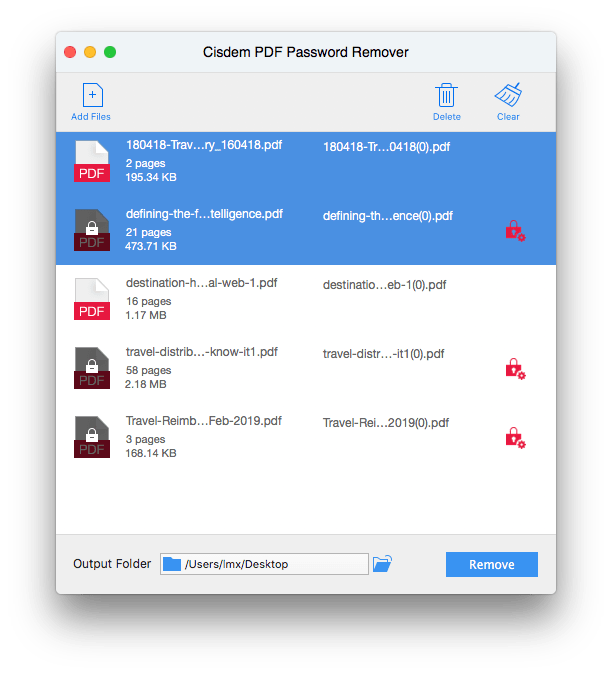
A batch of PDFs. Red locks mark the files that need an open password.
Features
Remove owner passwords without knowing them
Cisdem PDF Password Remover clears the restrictions on printing, editing and copying directly, whether or not you know the owner password. This is the app's fast, dependable job, and it works in batches.
Remove open passwords you know
Cisdem PDF Password Remover asks once for the open password, then saves a copy that opens without one. Apply to All helps if a batch shares a password, which saves typing it into each statement.
Search for a forgotten open password
Cisdem PDF Password Remover runs a brute-force search when you click Forgot. You give it clues: minimum and maximum length, lowercase, uppercase, numbers, spaces, symbols and any other characters. Every clue you add cuts the time, and a panel shows the time left and the speed. Files needing this search go one at a time, not in a batch.

The decryption settings. The narrower your clues, the shorter the search.
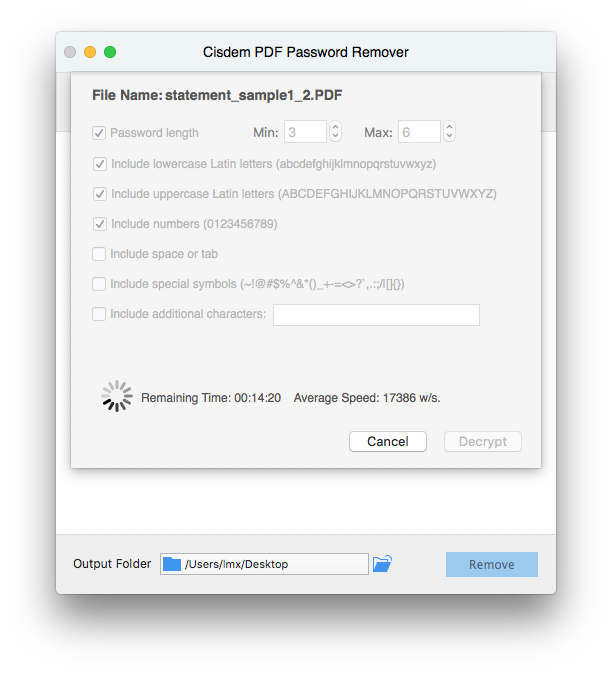
A search in progress, showing 14 minutes left at 17,386 words per second.
What that speed means for you
At the 17,386 words per second in Cisdem's own screenshot, a 6-character password of letters and numbers has about 57 billion combinations, which works out to roughly 38 days for the whole range by our arithmetic. Your Mac may be faster or slower, and the search can get lucky early. Knowing it was digits only drops that to under two minutes. So the clues matter more than anything else here.
Benefits
- You regain the ability to print, copy and edit your own documents in seconds when only owner restrictions are in the way.
- The file stays offline on your Mac instead of being uploaded to a web unlocker, which matters for bank and tax PDFs.
- Originals stay untouched, so a failed run costs you nothing.
- Each search shows its remaining time, so you can decide early whether to wait.
Real-World Uses
- You copy a table from a report whose author disabled copying, for your own company's use.
- An accountant clears the known password from a folder of client statements for archiving.
- You find an old tax PDF and remember that the password was a 4-digit number.
- An office prints a form that has printing disabled and that it is entitled to use.
Who It's For, and Who Should Skip It
Cisdem PDF Password Remover suits Mac users who often handle restricted or password-protected PDFs of their own, especially in batches.
Skip it if you know the password and have a single file: macOS Preview can open it and export a copy without the password, for free. Skip it too if your file uses AES, if you have no idea of the password's length, or if you can't show that the document is yours to change.
Usage Guide
- Download the DMG, drag the app to Applications and open it.
- Click Add Files or drag in your PDFs. Files with an open password show a lock.
- Click a lock and enter the password. If you have forgotten it, click Forgot?, set your clues and click Decrypt.
- Choose the output folder and click Remove to save unlocked copies.
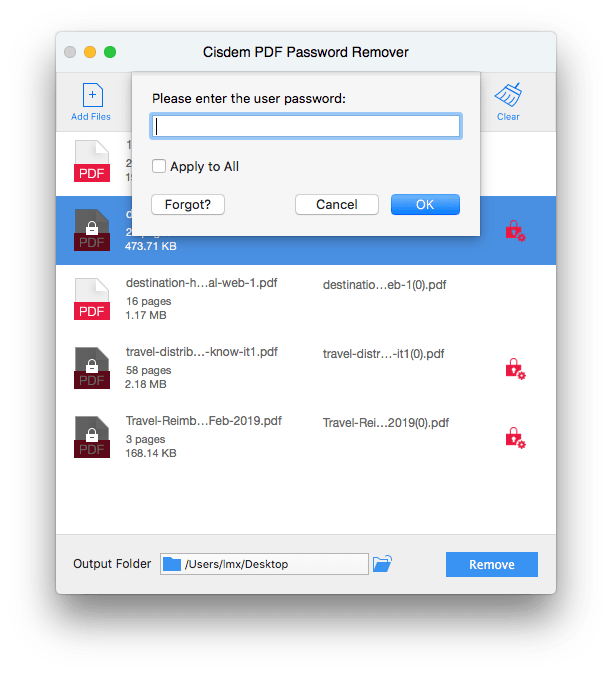
The password prompt, with Apply to All and the Forgot? button that starts a search.
Where it falls short
Long passwords are the obvious limit. iDownloadBlog's write-up reports up to 3 characters in under a minute, 4 characters in about an hour and more than 5 characters taking over a day. A search with the wrong settings simply ends without a result. If the true password falls outside your clues, you must start again. The Tech Hacker also points out that the app removes the password without showing it to you, so you can't reuse it on other copies. There is no dictionary-style attack among the options Cisdem lists, so a common word gets no shortcut.
What Users Say
MacUpdate: 4.5 out of 5 from 5 ratings
A small sample, with most comments from older versions.
- "At work, I often deal with PDF files, many of which have passwords, and I always forgot the password for each file." Traci E. Hess, June 4, 2025, version 5.2.0, 5 stars
- "This tool doesn't instantly unlock your protected PDFs. It uses a brute-force attack to try all combinations" johncarync, May 18, 2016, version 3.0.0, 4 stars
- "Finally, I no longer have to spend time on typing, I can just copy the important information needed" m-anderson-m, October 8, 2014, version 2.0, 4 stars
Independent reviews
These are reviews of older versions, but the search method hasn't changed in principle.
- "PDF passwords up to 3 characters are unlocked in under a minute." and "PDF passwords longer than 5 characters take more than a day to break" Ankur Thakur, iDownloadBlog, who also warns "don't be surprised if the app returns an error after running for hours" if the right options weren't selected
- "Cisdem PDF Password Remover 3 for Mac is nothing less than a perfect PDF password decryption software for your Mac" Muhammed Swalih, The Tech Hacker, 8.2 out of 10, who adds that "it will not display the recovered password"
Trustpilot: 4.9 out of 5 from 304 reviews of Cisdem
These cover all Cisdem products and mostly praise support.
- "I had a problem with my licence, and they solved it in under 5 minutes." Simon, August 27, 2026
The pattern: owner-password removal gets easy praise, while open-password searches get realistic warnings about time. Few reviews cover the current version, so test your own file with the trial.
Comparisons
PDF Password Remover vs. macOS Preview
Preview is free and fine for one file when you know the password: open it and export a copy without encryption. Cisdem PDF Password Remover earns its price with batches, with owner restrictions you can't get past in Preview, and with forgotten-password searches.
PDF Password Remover vs. web unlockers
Web tools can be quick, but they mean uploading your PDF to someone else's server. Cisdem PDF Password Remover works locally, which is the better choice for financial or legal documents.
Editions and Pricing
| Plan | Price | License term | Devices |
|---|
| One-Year Subscription | $29.99 | One year | 1 Mac |
| One-Time Purchase | $49.99 | Lifetime | 1 Mac |
| One-Time Purchase | $69.99 | Lifetime | 2 Macs |
| One-Time Purchase | $124.99 | Lifetime | 5 Macs |
| Business License | $64.99 | One-time | 1 Mac |
Prices are from Cisdem's buy page. The Buy Now button here is for the one-time 1-Mac license. The $99.99 bundle adds PDF Converter OCR and PDF Compressor.
FAQs
What is the difference between an owner password and a user password?
A user password stops a PDF from opening. An owner password lets it open but restricts printing, copying and editing. Cisdem PDF Password Remover removes the second kind directly, and needs the password or a search for the first.
How long does Cisdem PDF Password Remover take to find a forgotten password?
Cisdem says the time depends on the settings and your Mac, and a long password with many character types can take days. The app shows a time estimate once the search runs.
Why did the Cisdem PDF Password Remover search fail?
The real password was probably longer than your maximum, or it used characters you didn't tick. Widen the settings and restart.
Does Cisdem PDF Password Remover change my original PDF?
No. Cisdem PDF Password Remover saves a new unprotected copy, and the original stays password-protected.
Do I need Adobe Reader to use Cisdem PDF Password Remover?
No. Cisdem PDF Password Remover doesn't need Adobe Reader installed.
Is it legal to remove a PDF password?
It depends on your rights to the document and on local law. Removing a password from your own file is normally fine. Don't use Cisdem PDF Password Remover to get around someone else's protection.
Does the Mac license of Cisdem PDF Password Remover cover Windows?
No. The plan here covers one Mac, and the Windows version has its own buy page.
System Requirements
- macOS 10.15 Catalina, 11 Big Sur, 12 Monterey, 13 Ventura, 14 Sonoma, 15 Sequoia, 26 Tahoe or 27 Golden Gate
- Intel or Apple Silicon processor
- 512 MB RAM or more
- 50 MB free space or more for installation
Conclusion
Cisdem PDF Password Remover for Mac is worth buying if you regularly deal with restricted PDFs of your own, because owner-password removal in batches is quick and local. The forgotten-password search is a useful extra when you remember roughly what the password looked like.
The main reason not to buy it is a single file with a long, unknown password or AES protection: the odds are poor. Test the file in the trial first. The one-year plan at $29.99 is enough for a one-off job.
Download Free TrialBuy Now